카드 분류
그룹화, 분류, 정보 구조 설계 작업을 위해 Potato에서 드래그 앤 드롭 카드 분류 인터페이스를 구축합니다. 닫힌 분류와 열린 분류 모드를 지원합니다.
카드 분류 어노테이션 스키마는 항목을 카테고리로 그룹화하는 드래그 앤 드롭 인터페이스를 제공합니다. 이 스키마는 정보 구조 연구, 콘텐츠 분류, 그리고 어노테이터가 항목을 의미 있는 그룹으로 정리해야 하는 모든 작업에 적합합니다.
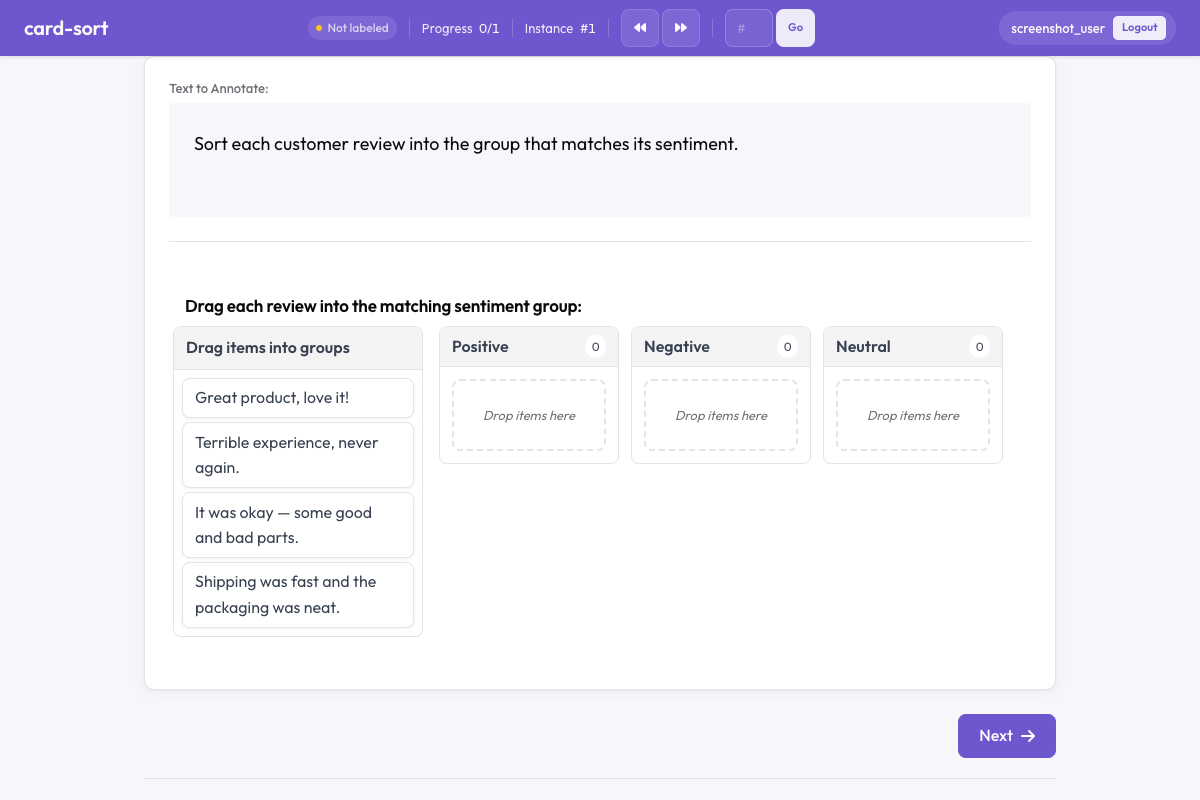 Potato의 카드 분류
개요
카드 분류 스키마는 두 가지 모드를 지원합니다.
- 닫힌 분류 - 어노테이터가 카드를 미리 정의된 그룹으로 끌어다 놓습니다
- 열린 분류 - 어노테이터가 직접 그룹을 만들고 이름을 붙입니다
카드는 어노테이터가 그룹 컨테이너에 끌어다 놓아 배치하는 드래그 가능한 요소로, 작업을 직관적이고 흥미롭게 만듭니다.
빠른 시작
yaml
annotation_schemes:
  - annotation_type: card_sort
    name: content_grouping
    description: Drag each card into the most appropriate group.
    mode: closed
    groups:
      - Positive
      - Negative
      - Neutral
구성 옵션
| 필드 | 타입 | 기본값 | 설명 |
|---|---|---|---|
annotation_type | string | 필수 | "card_sort"이어야 합니다 |
name | string | 필수 | 이 스키마의 고유 식별자 |
description | string | 필수 | 어노테이터에게 표시되는 지침 |
mode | string | 필수 | "closed"(미리 정의된 그룹) 또는 "open"(어노테이터가 만든 그룹) |
groups | array | 필수 (closed) | 닫힌 분류 모드용 그룹 이름 목록 |
items_field | string | "items" | 카드 항목 목록을 담은 데이터 JSON의 필드 |
allow_empty_groups | boolean | true | 제출 시 그룹이 비어 있어도 되는지 여부 |
allow_multiple | boolean | false | 카드를 여러 그룹에 배치할 수 있는지 여부 |
예시
감정 분류 (닫힌)
yaml
annotation_schemes:
  - annotation_type: card_sort
    name: sentiment_sort
    description: Sort each comment into the appropriate sentiment category.
    mode: closed
    groups:
      - Positive
      - Negative
      - Mixed
      - Off-topic
    allow_empty_groups: true
샘플 데이터:
json
{
  "id": "batch_001",
  "items": [
    "Great product, love it!",
    "Terrible experience, never again.",
    "It was okay, some good and bad parts.",
    "Anyone know the weather today?"
  ]
}
정보 구조 설계를 위한 열린 카드 분류
yaml
annotation_schemes:
  - annotation_type: card_sort
    name: ia_sort
    description: >
      Group these menu items into categories that make sense to you.
      Name each group with a descriptive label.
    mode: open
    items_field: "menu_items"
    allow_empty_groups: false
다중 라벨 그룹화
yaml
annotation_schemes:
  - annotation_type: card_sort
    name: theme_sort
    description: >
      Sort each statement into relevant themes.
      A statement can belong to multiple themes.
    mode: closed
    groups:
      - Economy
      - Healthcare
      - Education
      - Environment
      - Security
    allow_multiple: true
출력 형식
json
{
  "content_grouping": {
    "groups": {
      "Positive": ["Great product, love it!"],
      "Negative": ["Terrible experience, never again."],
      "Mixed": ["It was okay, some good and bad parts."],
      "Off-topic": ["Anyone know the weather today?"]
    }
  }
}
열린 분류에서는 그룹 이름이 어노테이터가 정의한 문자열입니다.
모범 사례
- 일관된 결과를 위해 닫힌 분류를 사용하세요 - 미리 정의된 그룹은 어노테이터 간 비교 가능한 어노테이션을 보장합니다
- 탐색적 연구에는 열린 분류를 사용하세요 - 사람들이 항목을 자연스럽게 어떻게 그룹화하는지 알아내고 싶을 때 유용합니다
- 카드 텍스트를 짧게 유지하세요 - 카드에 긴 텍스트가 있으면 드래그가 어색해지므로 간결한 라벨이나 발췌문을 사용하세요
- 카드 수를 제한하세요 - 작업당 15~30개의 카드가 이상적이며, 40개를 넘으면 지루해집니다
- 명확한 그룹 라벨을 제공하세요 - 닫힌 분류에서는 혼동을 줄이기 위해 모호하지 않은 그룹 이름을 사용하세요
더 읽어보기
- Radio 및 Multiselect - 표준 라벨 선택
- Best-Worst Scaling - 비교 어노테이션
- 생산성 기능 - 키보드 단축키와 효율성
구현 세부 사항은 원본 문서를 참조하세요.