스팬 주석
Potato에서 개체명 인식을 위해 텍스트 스팬을 강조 표시하고 레이블을 지정합니다. 레이블별 색상, 키보드 단축키, 툴팁, 불연속 스팬을 지원합니다.
스팬 주석을 사용하면 주석자가 텍스트의 일부를 선택하고 레이블을 지정할 수 있으며, Potato에서는 개체명 인식(NER), 품사 태깅, 텍스트 강조 표시 작업을 이 방식으로 구성합니다. 레이블은 단순 문자열로 쓰거나, 자체 color, key_value, tooltip을 가진 객체로 씁니다. Potato는 이 세 가지를 각 레이블의 속성으로 읽기 때문에, 스키마 수준의 colors, key_values, tooltips 맵은 스팬 스키마에서 아무 효과가 없습니다.
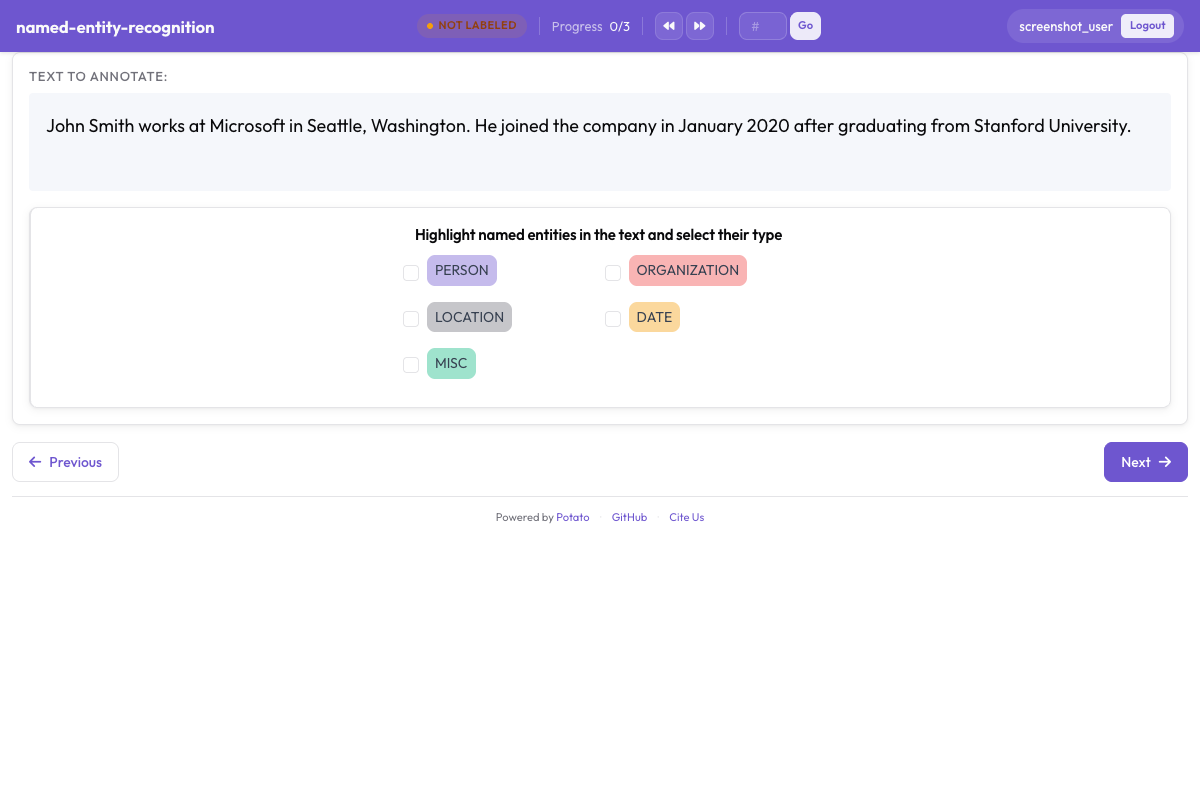 Potato에서 색상으로 구분된 개체 레이블이 있는 스팬 주석
기본 구성
annotation_schemes:
  - annotation_type: span
    name: entities
    description: "Highlight named entities in the text"
    labels:
      - PERSON
      - ORGANIZATION
- LOCATIONdescription은 모든 스키마에서 필수이며, 레이블 버튼 위에 주석자가 읽는 지시문으로 표시됩니다. 따라서 스키마 이름을 반복하기보다 레이블 지정에서 내려야 할 판단을 적어야 합니다. 단순 문자열로 쓴 레이블은 나열된 순서대로 Potato 팔레트에서 색상을 받습니다.
구성 옵션
개체 레이블
레이블 집합은 스팬 작업에서 가장 중요한 설계 결정입니다. 재현율, 일치도, 그리고 이후의 모든 측정이 이 집합을 기준으로 정의되기 때문입니다. 주석자가 스팬마다 지침을 확인하지 않고도 기억할 수 있을 만큼 작게 유지하십시오. 실제로는 대부분의 NER 작업에서 4~8개 유형을 뜻합니다. 위 스키마에 레이블을 추가합니다.
labels:
  - PERSON
  - ORGANIZATION
  - LOCATION
  - DATE
  - EVENT
색상
Potato는 목록 순서대로 각 레이블에 팔레트 색상을 할당하므로, 색상을 직접 적을 가치가 있는 경우는 특정 조합이 중요할 때뿐입니다. 예를 들어 같은 문장에 자주 함께 나타나고 한눈에 혼동되어서는 안 되는 두 유형이 그렇습니다. 색상은 레이블에 속합니다.
annotation_schemes:
  - annotation_type: span
    name: entities
    description: "Highlight named entities in the text"
    labels:
      - name: PERSON
        color: "#3b82f6"
      - name: ORGANIZATION
        color: "#10b981"
      - name: LOCATION
        color: "#f59e0b"
      - DATE
값은 16진수(#3b82f6) 또는 rgb(255, 0, 0)입니다. 위의 DATE처럼 단순 문자열로 남겨 둔 레이블은 팔레트의 다음 색상을 받으므로, 스키마는 색상이 필요한 레이블에만 색상을 지정하고 나머지는 그대로 둘 수 있습니다.
여러 스키마의 색상은 ui.label_colors 아래에서 스키마 이름, 그다음 레이블을 키로 하여 한곳에서 설정할 수도 있습니다.
ui:
  label_colors:
    entities:
      PERSON: "#3b82f6"
      ORGANIZATION: "#10b981"
스키마 자체에 쓴 colors: 맵은 Potato가 읽는 키가 아닙니다. 이 맵이 있는 스키마는 그 블록이 없는 것처럼 팔레트 색상으로 렌더링됩니다.
키보드 단축키
레이블이 세 개 이상인 스팬 작업이라면 단축키를 활성화할 가치가 있습니다. 스팬마다 마우스를 버튼으로 옮기는 주석자는 두 손을 텍스트에 둔 주석자에 비해 속도가 훨씬 느리기 때문입니다. sequential_key_binding: true를 설정하면 레이블이 나열된 순서대로 키를 받습니다.
- annotation_type: span
  name: entities
  description: "Highlight named entities in the text"
  labels:
    - PERSON
    - ORGANIZATION
    - LOCATION
    - DATE
  sequential_key_binding: true
한 작업의 페이지에 스키마가 여러 개 있으면 Potato는 각 스키마에 별도의 풀에서 키를 할당합니다. 숫자 행을 먼저 쓰고, 그다음 윗줄 문자 행, 그다음 홈 행을 쓰므로 서로 다른 스키마의 단축키가 충돌하지 않습니다.
레이블을 목록 내 위치가 아니라 특정 키에 고정하려면 해당 레이블에 key_value를 지정하십시오. 할당기는 자동으로 키를 배정하기 전에 명시적인 key_value를 먼저 적용합니다. 또한 기억하기 쉬운 키는 나중에 레이블 목록의 순서를 바꾸어도 유지되지만, 위치 기반 키는 그렇지 않습니다.
- annotation_type: span
  name: entities
  description: "Highlight named entities in the text"
  labels:
    - name: PERSON
      key_value: "p"
    - name: ORGANIZATION
      key_value: "o"
    - LOCATION
  sequential_key_binding: true
스키마 수준의 key_values: 맵은 읽히지 않으며, sequential_key_binding의 값으로 쓴 매핑도 마찬가지입니다. Potato는 이 키를 플래그로만 취급합니다.
툴팁
레이블의 경계 사례는 툴팁에 두는 것이 알맞습니다. 그러면 주석자가 작업을 벗어나지 않고도 무엇이 ORGANIZATION에 해당하는지 확인할 수 있습니다. 툴팁은 각 레이블의 속성입니다.
- annotation_type: span
  name: entities
  description: "Highlight named entities in the text"
  labels:
    - name: PERSON
      tooltip: "Names of people, characters, or personas"
    - name: ORGANIZATION
      tooltip: "Companies, agencies, institutions"
    - name: LOCATION
tooltip_file: "config/tooltips/location.html"tooltip은 일반 텍스트를 받고 tooltip_file은 HTML 파일 경로를 받습니다. 안내에 예시, 굵은 글씨, 목록이 필요하다면 후자가 더 나은 선택입니다. 스키마 수준의 tooltips: 맵은 hierarchical_multiselect만 읽으며 스팬 스키마에서는 아무 효과가 없습니다.
겹치는 스팬
겹침 허용
스팬은 겹칠 수 있으며, 이 동작을 켜는 설정은 따로 없습니다. 텍스트의 같은 부분이 동시에 두 레이블을 가질 때 겹침이 필요합니다. 예를 들어 "Dr. Smith"는 PERSON이면서 ROLE입니다. 버전 2.9.0부터는 기존 스팬의 끝에서 시작하거나 기존 스팬의 시작에서 끝나는 선택도 허용되므로 부분적으로 겹치는 스팬을 만들 수 있습니다. 이전 버전은 이러한 선택을 거부했습니다.
겹침 비활성화(기본값)
스팬 스키마에는 겹침을 금지하는 키가 없으므로, 스팬이 절대 겹치면 안 되는 작업은 이를 주석 지침에 명시해야 합니다. 이 구분이 주석자가 아니라 내보내기에서 중요하다면, 두 개의 스팬 스키마로 레이블 집합을 분리할 수 있습니다. 각 스키마는 자기 이름 아래에 스팬을 저장하기 때문입니다.
annotation_schemes:
  - annotation_type: span
    name: entities
    description: "Label named entities"
    labels:
      - PERSON
      - ORGANIZATION

  - annotation_type: span
    name: roles
    description: "Label professional roles"
    labels:
      - ROLE
스팬 선택 모드
Potato는 모든 스팬을 항목 텍스트 내의 문자 오프셋으로 저장하며, 선택을 단어 단위와 문자 단위 사이에서 전환하는 구성 키는 없습니다. 아래 두 모드는 주석자가 할 수 있는 동작을 설명한 것이며, 켜는 설정이 아닙니다.
단어 단위 선택
실제 NER 작업은 대부분 단어 전체를 드래그하는 방식으로 이루어지며, 결과는 선택한 첫 문자와 마지막 문자의 오프셋으로 저장됩니다. 구성에는 단어 경계를 강제하는 요소가 없습니다. 따라서 데이터에서 단어 전체 스팬이 중요하다면 그 요구 사항을 지침에 적고, 인터페이스가 부분 단어를 거부하리라 기대하지 말고 내보낸 결과에서 확인하십시오.
문자 단위 선택
단어의 일부를 선택하는 것은 언제나 가능하며 별도 구성이 필요 없습니다. 형태론 작업과 하위 토큰 작업이 이 기능에 의존합니다. Potato는 렌더링 전에 연속된 공백과 탭을 하나로 합쳐, 저장하는 오프셋이 브라우저가 측정한 값과 일치하도록 합니다. 텍스트에 의미 있는 들여쓰기가 있다면 이 점이 중요합니다. 가로 방향 공백을 정확히 보존해야 할 때는 instance_display를 선언하십시오.
사전 주석된 스팬
모델 출력으로 작업을 미리 채우면 레이블 지정이 수정 작업으로 바뀝니다. 모델이 이미 코퍼스 대부분에서 정확하다면 이쪽이 더 빠른 워크플로입니다. Potato는 각 항목의 필드에서 초기 주석을 읽으며, 그 필드 이름은 pre_annotation.field로 지정합니다.
pre_annotation:
  enabled: true
  field: "predictions"
  allow_modification: true
  show_confidence: true
  highlight_low_confidence: 0.7
작업을 검토가 아닌 수정으로 만드는 것은 allow_modification: true입니다. 이 설정이 없으면 주석자가 모델의 제안을 변경할 수 없습니다. highlight_low_confidence: 0.7은 모델이 가장 확신하지 못한 항목을 표시하여, 틀렸을 가능성이 가장 높은 스팬에 주의가 가도록 합니다.
이 필드에는 스키마 이름마다 하나의 항목이 들어가며, 스팬 스키마는 오프셋 목록을 받습니다.
{
  "id": "item_002",
  "text": "Apple announced new iPhone in California.",
  "predictions": {
    "entities": [
      {"start": 0, "end": 5, "label": "ORG", "confidence": 0.85},
      {"start": 27, "end": 37, "label": "LOC", "confidence": 0.91}
    ]
  }
}
사전 주석은 출발점일 뿐 주석이 아닙니다. 따라서 아무도 열지 않은 항목은 예측이 첨부된 상태로 들어왔더라도 빈 상태로 내보내집니다.
일반적인 NER 구성
표준 NER(4가지 유형)
4가지 유형 집합은 CoNLL-2003 관례를 따르며, 결과를 발표된 NER 수치와 비교할 수 있어야 할 때 알맞은 선택입니다.
- annotation_type: span
  name: ner
  description: "Label named entities"
  labels:
    - PER    # Person
    - ORG    # Organization
    - LOC    # Location
    - MISC   # Miscellaneous
  sequential_key_binding: true
확장 NER(OntoNotes 스타일)
18가지 유형은 더 세밀한 구분을 제공하지만 일치도 면에서 실제 비용이 따릅니다. NORP, ORG, GPE 사이의 경계에서 주석자 간 의견이 가장 많이 갈리기 때문입니다. 후속 작업에 이러한 구분이 필요할 때 확장 집합을 사용하고, 더 긴 교육 기간을 예상하십시오.
- annotation_type: span
  name: ner_extended
  description: "Label named entities using the OntoNotes type set"
  labels:
    - PERSON
    - NORP        # Nationalities, religious/political groups
    - FAC         # Facilities
    - ORG
    - GPE         # Geopolitical entities
    - LOC
    - PRODUCT
    - EVENT
    - WORK_OF_ART
    - LAW
    - LANGUAGE
    - DATE
    - TIME
    - PERCENT
    - MONEY
    - QUANTITY
    - ORDINAL
    - CARDINAL
생물의학 NER
생물의학 스팬은 길고 중첩되는 경우가 많으므로, 유형마다 실제 예시를 담은 툴팁이 일반 도메인 작업보다 여기서 더 큰 효과를 냅니다.
- annotation_type: span
  name: bio_ner
  description: "Label biomedical entities"
  labels:
    - GENE
    - PROTEIN
    - DISEASE
    - DRUG
    - SPECIES
소셜 미디어 NER
소셜 미디어 텍스트에는 뉴스 기사용 집합에 자리가 없는 개체 유형이 나타납니다. CREATIVE_WORK와 GROUP은 자체 레이블이 없을 때 ORG로 잘못 분류되는 경우가 가장 많은 두 유형입니다.
- annotation_type: span
  name: social_ner
  description: "Label named entities in social media text"
  labels:
    - PERSON
    - ORGANIZATION
    - LOCATION
    - PRODUCT
    - CREATIVE_WORK
    - GROUP
속성이 있는 스팬
스팬 스키마 옆에 두는 두 번째 스키마는 항목 전체에 대한 판단을 수집합니다. Potato는 둘을 따로 저장하므로, 라디오 응답은 개별 스팬이 아니라 문서 전체에 적용됩니다.
annotation_schemes:
  - annotation_type: span
    name: entities
    description: "Highlight named entities"
    labels:
      - PERSON
      - ORGANIZATION

  - annotation_type: radio
    name: entity_type
    description: "What type of entity is this?"
    labels:
      - Named
      - Nominal
      - Pronominal
여러 스팬 스키마
같은 텍스트의 서로 다른 측면을 주석 처리할 때는 두 개의 스팬 스키마를 사용합니다. 그러면 주석자가 하나로 합친 레이블 집합을 기억할 필요가 없습니다. 각 스키마는 자체 버튼 행, 자체 키 풀, 내보내기에서 자체 필드를 갖습니다.
annotation_schemes:
  # Named entities
  - annotation_type: span
    name: entities
    description: "Label named entities"
    labels:
      - PERSON
      - ORGANIZATION
      - LOCATION

  # Sentiment expressions
  - annotation_type: span
    name: sentiment_spans
    description: "Highlight sentiment expressions"
    labels:
      - POSITIVE
      - NEGATIVE
다중 필드 스팬 주석
v2.1.0에서 추가됨
스팬 주석은 target_field 옵션을 통해 다중 필드 데이터에서 특정 텍스트 필드를 대상으로 지정할 수 있습니다. 항목에 원문 문서와 요약이 함께 있고 스팬이 그중 하나에 속할 때 이 옵션이 필요합니다.
구성
각 스키마가 주석 대상 필드의 이름을 지정하므로, 두 레이블 집합이 올바른 텍스트에 연결된 상태로 유지됩니다.
annotation_schemes:
  - annotation_type: span
    name: source_entities
    description: "Label entities in the source text"
    target_field: source_text
    labels:
      - PERSON
      - ORGANIZATION

  - annotation_type: span
    name: summary_entities
    description: "Label entities in the summary"
    target_field: summary
    labels:
      - PERSON
      - ORGANIZATION
다중 필드 데이터 형식
데이터에는 별도의 텍스트 필드가 포함되어야 합니다.
{
  "id": "doc1",
  "source_text": "John Smith works at Microsoft in Seattle.",
  "summary": "Smith is employed by Microsoft."
}
출력 형식
target_field를 사용하면 주석이 필드별로 키가 지정됩니다.
{
  "id": "doc1",
  "source_entities": {
    "source_text": [
      {"start": 0, "end": 10, "text": "John Smith", "label": "PERSON"},
      {"start": 20, "end": 29, "text": "Microsoft", "label": "ORGANIZATION"}
    ]
  },
  "summary_entities": {
    "summary": [
      {"start": 0, "end": 5, "text": "Smith", "label": "PERSON"},
      {"start": 22, "end": 31, "text": "Microsoft", "label": "ORGANIZATION"}
    ]
  }
}
완전히 동작하는 예제는 Potato 저장소의 project-hub/simple_examples/simple-multi-span/을 참조하십시오.
표시 옵션
스팬에 레이블 표시
Potato는 기본적으로 강조 표시된 각 스팬 안에 레이블을 표시합니다. 짧은 스팬이 많은 밀집된 문서에서는 레이블 텍스트가 문장을 비좁게 만드는데, show_span_labels: false를 쓰면 강조 색상이 레이블을 계속 나타내면서 텍스트를 읽기 쉽게 유지할 수 있습니다.
- annotation_type: span
  name: entities
  description: "Highlight named entities in the text"
  labels:
    - PERSON
    - ORGANIZATION
  show_span_labels: false
밑줄 스타일
스팬 스키마에는 강조 스타일을 지정하는 키가 없으며, 스팬은 항상 색상 배경으로 렌더링됩니다. 밑줄과 괄호 표시는 visual_display.highlight_mode를 통한 상호참조 유형의 옵션이므로, 둘 중 하나가 필요한 작업은 상호참조 체인을 사용해야 합니다.
출력 형식
스팬 주석은 문자 오프셋과 함께 저장됩니다.
{
  "id": "doc1",
  "entities": [
    {
      "start": 0,
      "end": 10,
      "text": "John Smith",
      "label": "PERSON"
    },
    {
      "start": 20,
      "end": 29,
      "text": "Microsoft",
      "label": "ORGANIZATION"
    }
  ]
}
전체 예제: NER 작업
item_properties는 Potato가 항목 ID와 텍스트로 읽는 필드의 이름을 지정하며, 이것이 없는 구성은 시작되지 않습니다. 다섯 개의 개체 유형은 sequential_key_binding을 통해 숫자 행에서 키를 받고, 마지막 라디오 스키마는 난이도 판단을 기록합니다. 이 판단은 나중에 일치도가 어디에서 떨어졌는지 설명할 때 유용합니다.
annotation_task_name: "Named Entity Recognition"

data_files:
  - data/documents.json

item_properties:
  id_key: id
  text_key: text

annotation_schemes:
  - annotation_type: span
    name: entities
    description: "Highlight and label all named entities"
    labels:
      - PERSON
      - ORGANIZATION
      - LOCATION
      - DATE
      - MONEY
    sequential_key_binding: true
    allow_discontinuous: false

  - annotation_type: radio
    name: difficulty
    description: "How difficult was this document to annotate?"
    labels:
      - Easy
      - Medium
      - Hard

output_annotation_dir: annotation_output
export_annotation_format: jsonl
불연속 스팬
v2.2.0에서 추가됨
allow_discontinuous: true를 설정하면 주석자가 인접하지 않은 여러 텍스트 구간을 선택해 하나의 스팬으로 기록할 수 있으며, 분할 선행사와 불연속 구성 성분에 이 기능이 필요합니다. 불연속성은 겹침과는 다른 개념이며, 이 키는 두 스팬이 같은 문자를 덮을 수 있는지 여부에 영향을 주지 않습니다.
- annotation_type: span
  name: entities
  description: "Highlight named entities in the text"
  labels:
    - PERSON
    - ORGANIZATION
  allow_discontinuous: true
이 옵션을 켜면 주석자는 Windows와 Linux에서는 Ctrl, Mac에서는 Cmd를 누른 채 추가 텍스트를 선택해 현재 스팬에 더합니다. 출력에는 세그먼트마다 시작/끝 쌍이 하나씩 포함됩니다.
개체 연결 통합
v2.2.0에서 추가됨
스팬 스키마에 entity_linking 블록을 추가하면 스팬 주석을 외부 지식 베이스(Wikidata, UMLS 또는 사용자 지정 REST API)에 연결할 수 있습니다. 두 개체가 같은 표면형을 공유해 레이블만으로는 구분할 수 없을 때, 스팬마다 연결 단계를 추가할 가치가 있습니다.
- annotation_type: span
  name: entities
  description: "Highlight and link named entities"
  labels:
    - PERSON
    - ORGANIZATION
    - LOCATION
  entity_linking:
    enabled: true
    knowledge_bases:
      - name: wikidata
        type: wikidata
        language: en
    auto_search: true
    required: false
auto_search: true는 스팬이 생성되자마자 검색을 실행하므로, 대부분의 스팬을 연결하는 작업에서 클릭을 한 번 줄여 줍니다. required: true는 연결이 없는 스팬의 저장을 거부하므로, 데이터의 모든 개체가 지식 베이스에 있을 것으로 예상되는 경우가 아니라면 꺼 두십시오. 개체 연결이 활성화되면 각 스팬의 컨트롤 바에 링크 아이콘이 나타나고, 이를 클릭하면 검색 모달이 열립니다. 자세한 내용은 개체 연결 문서를 참조하십시오.
모범 사례
- 색상이 필요한 레이블에만 색상을 지정하고 나머지는 팔레트에 맡깁니다
- 경계 사례는
tooltip또는tooltip_file에 두되, 스키마 설명이 아니라 레이블마다 하나씩 둡니다 - 레이블이 세 개 이상인 스키마에서는
sequential_key_binding을 켜고, 기억하기 쉬운 키가 도움이 되는 곳에는key_value를 추가합니다 - 스키마가 겹침 정책을 강제하지 않으므로 겹침 정책은 지침에서 정합니다
- 수정 워크플로에서는
pre_annotation으로 미리 채우고,allow_modification: true를 유지합니다 - 레이블 집합을 작게 유지하고, 관련 없는 측면은 별도의 스팬 스키마로 나눕니다
더 읽어보기
- 개체 연결 - 스팬을 지식 베이스에 연결
- 상호참조 체인 - 상호참조 언급 그룹화
- 이벤트 주석 - 스팬 인수가 있는 n항 이벤트 구조
- 스팬 연결 - 스팬 간 관계 생성
- 인스턴스 표시 - 스팬 대상이 있는 다중 필드 콘텐츠 표시
- UI 구성 - 스팬 색상 사용자 지정
- 생산성 기능 - 키보드 단축키
구현 세부 사항은 원본 문서를 참조하십시오.