설정 기초
Potato의 YAML 설정 형식을 배웁니다 — 작업 설정, 데이터 파일 경로, 주석 스킴, 출력 형식, 사용자 관리의 핵심 사항.
Potato는 YAML 설정 파일을 사용하여 주석 작업을 정의합니다. 이 가이드에서는 필수 설정 옵션을 다룹니다.
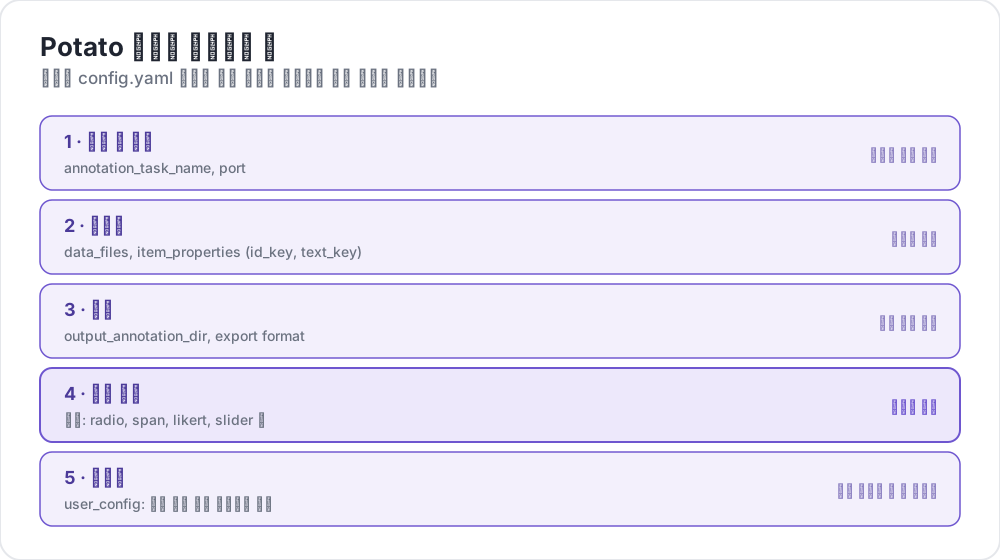 Potato 설정에 들어가는 것
설정 파일 구조
기본적인 Potato 설정은 다음 주요 섹션으로 구성됩니다:
yaml
# Task settings
annotation_task_name: "My Annotation Task"
port: 8000

# Data configuration
data_files:
  - data.json

item_properties:
  id_key: id
  text_key: text

# Output settings
output_annotation_dir: "annotation_output/"
export_annotation_format: "jsonl"

# Annotation schemes
annotation_schemes:
  - annotation_type: radio
    name: my_annotation
    description: "Pick the label that fits this item"
    labels:
      - Label 1
      - Label 2

# User settings
user_config:
  allow_all_users: true
필수 설정
작업 및 서버 설정
yaml
annotation_task_name: "My Task"  # Display name for your task
port: 8000                       # Port to run the server on
데이터 설정
yaml
data_files:
  - data.json           # Path to your data file(s)
  - more_data.json      # You can specify multiple files

item_properties:
  id_key: id            # Field containing unique ID
  text_key: text        # Field containing text to annotate
지원되는 데이터 형식:
- JSON (
.json) - JSON Lines (
.jsonl) - CSV (
.csv) - TSV (
.tsv)
출력 설정
yaml
output_annotation_dir: "annotation_output/"   # Directory for annotation files
export_annotation_format: "jsonl"             # Formats: jsonl, csv, tsv, parquet, and the other registered exporters
주석 스킴
하나 이상의 주석 스킴을 정의합니다:
yaml
annotation_schemes:
  - annotation_type: radio      # Type of annotation
    name: sentiment             # Internal name
    description: "Select the sentiment"  # Instructions
    labels:                     # Options for annotators
      - Positive
      - Negative
      - Neutral
사용 가능한 주석 유형
| 유형 | 설명 |
|---|---|
radio | 단일 선택 |
multiselect | 다중 선택 |
likert | 척도 기반 평가 |
text | 자유 텍스트 입력 |
number | 숫자 입력 |
span | 텍스트 구간 강조 |
slider | 연속 범위 선택 |
multirate | 여러 항목 평가 |
select | 드롭다운 단일 선택 |
pairwise | 쌍별 비교 |
best_worst | 베스트-워스트 척도 |
soft_label | 소프트 레이블 분포 |
confidence | 신뢰도를 포함한 주석 |
constant_sum | 고정 합계 배분 |
range_slider | 범위 슬라이더 선택 |
semantic_differential | 의미 차이 척도 |
hierarchical_multiselect | 계층적 다중 레벨 선택 |
card_sort | 카드 분류 |
rubric_eval | 루브릭 기반 평가 |
extractive_qa | 추출형 질의응답 |
error_span | 오류 구간 강조 |
triage | 분류 선별 |
coreference | 상호 참조 주석 |
span_link | 구간 연결 |
entity_linking | 엔터티 연결 |
사용자 설정
모든 사용자 허용
yaml
user_config:
  allow_all_users: true
특정 사용자로 제한
yaml
user_config:
  allow_all_users: false
  users:
    - user1@example.com
    - user2@example.com
작업 디렉터리
task_dir 설정은 상대 경로의 루트 디렉터리를 정의합니다:
yaml
task_dir: ./my-task/
data_files:
  - data/input.json    # Resolves to ./my-task/data/input.json
전체 예시
다음은 감정 분석 작업을 위한 완전한 설정입니다:
yaml
# config.yaml
annotation_task_name: "Sentiment Analysis"
port: 8000
task_dir: ./

# Data
data_files:
  - data/tweets.json

item_properties:
  id_key: id
  text_key: text

# Output
output_annotation_dir: "annotation_output/"
export_annotation_format: "jsonl"

# Annotation
annotation_schemes:
  - annotation_type: radio
    name: sentiment
    description: "What is the sentiment expressed in this tweet?"
    labels:
      - name: Positive
        key_value: "1"
      - name: Negative
        key_value: "2"
      - name: Neutral
        key_value: "3"
    sequential_key_binding: true

# Users
user_config:
  allow_all_users: true

# Assignment
per_annotator_quota:
  default: 100
num_annotators_per_item: 2