쌍대 비교
Potato에서 나란히 비교를 구성하여 선호 학습, A/B 테스트, 출력 품질 평가를 무작위 제시 순서로 수행합니다.
쌍대 비교를 사용하면 어노테이터가 두 항목을 나란히 비교하고 선호도를 표시할 수 있습니다. 두 가지 모드를 지원합니다.
- 이진 모드(기본값): 선호하는 타일(A 또는 B)을 클릭하며, 무승부 버튼은 선택 사항입니다
- 스케일 모드: 슬라이더를 사용하여 한 선택지가 다른 선택지보다 얼마나 더 선호되는지 평가합니다
일반적인 사용 사례로는 모델 출력 비교, RLHF를 위한 선호 학습, 번역이나 요약의 품질 비교, A/B 테스트가 있습니다.
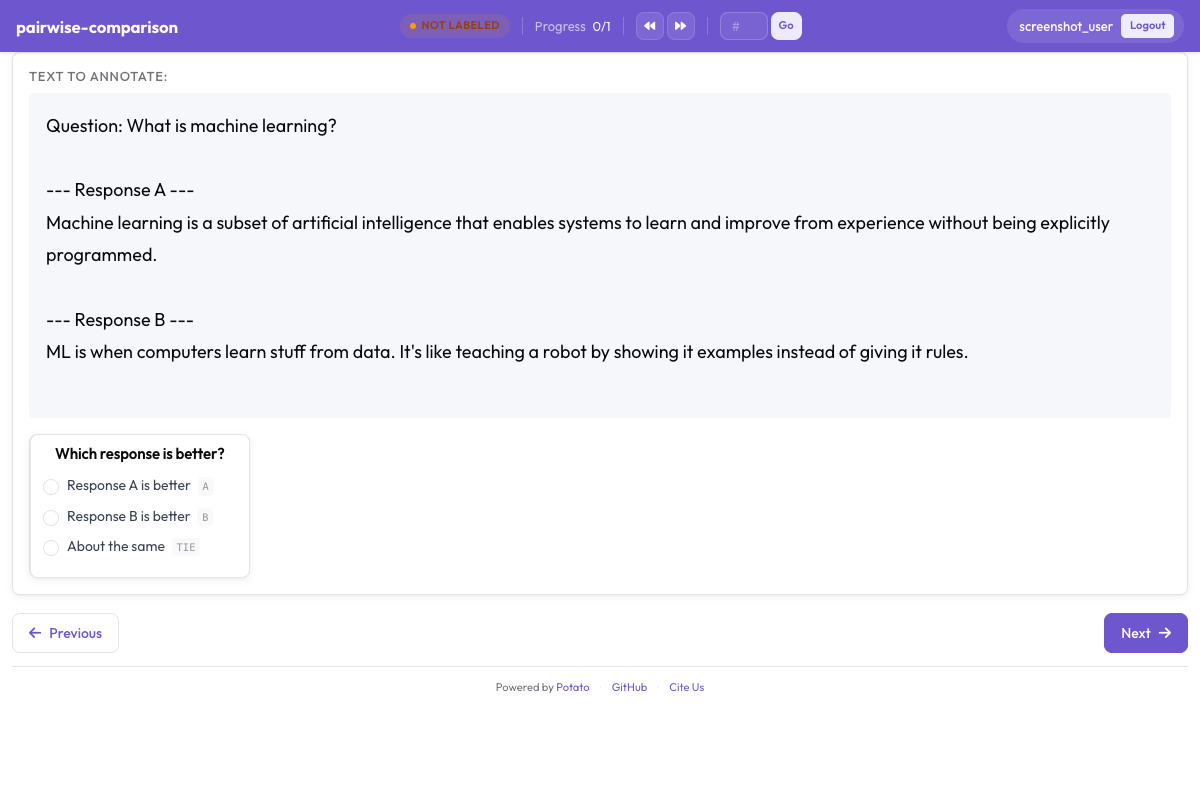 Potato에서 선호 어노테이션을 위한 나란히 쌍대 비교
이진 모드
이진 모드는 클릭할 수 있는 두 개의 타일을 표시합니다. 어노테이터는 선호하는 선택지를 클릭합니다.
yaml
annotation_schemes:
  - annotation_type: pairwise
    name: preference
    description: "Which response is better?"
    mode: binary

    # Data source - key in instance data containing items to compare
    items_key: "responses"

    # Display options
    show_labels: true
    labels:
      - "Response A"
      - "Response B"

    # Tie option
    allow_tie: true
    tie_label: "No preference"

    # Keyboard shortcuts
    sequential_key_binding: true

    # Validation
    label_requirement:
      required: true
스케일 모드
스케일 모드는 두 항목 사이에 슬라이더를 표시하여 어노테이터가 선호 정도를 표시할 수 있게 합니다.
yaml
annotation_schemes:
  - annotation_type: pairwise
    name: preference_scale
    description: "Rate how much better A is than B"
    mode: scale

    items_key: "responses"

    labels:
      - "Response A"
      - "Response B"

    # Scale configuration
    scale:
      min: -3           # Negative = prefer left item (A)
      max: 3            # Positive = prefer right item (B)
      step: 1
      default: 0

      # Endpoint labels
      labels:
        min: "A is much better"
        max: "B is much better"
        center: "Equal"

    label_requirement:
      required: true
데이터 형식
스키마는 비교할 항목 목록이 담긴 인스턴스 데이터를 기대합니다.
json
{"id": "1", "responses": ["Response A text", "Response B text"]}
{"id": "2", "responses": ["First option here", "Second option here"]}
items_key 구성은 비교할 항목이 담긴 필드를 지정합니다. 해당 필드에는 항목이 최소 2개 이상 들어 있는 목록이 있어야 합니다.
키보드 단축키
sequential_key_binding: true인 이진 모드에서는 다음과 같습니다.
| 키 | 동작 |
|---|---|
1 | 선택지 A 선택 |
2 | 선택지 B 선택 |
0 | 무승부/선호 없음 선택(allow_tie: true인 경우) |
스케일 모드는 슬라이더 상호작용을 사용합니다.
출력 형식
이진 모드
json
{
  "preference": {
    "selection": "A"
  }
}
무승부일 경우:
json
{
  "preference": {
    "selection": "tie"
  }
}
스케일 모드
음수 값은 A에 대한 선호를, 양수 값은 B에 대한 선호를, 0은 동등함을 나타냅니다.
json
{
  "preference_scale": {
    "scale_value": "-2"
  }
}
예시
기본 이진 비교
yaml
annotation_schemes:
  - annotation_type: pairwise
    name: quality
    description: "Which text is higher quality?"
    labels: ["Text A", "Text B"]
    allow_tie: true
다측면 비교
여러 차원에서 비교합니다.
yaml
annotation_schemes:
  - annotation_type: pairwise
    name: fluency
    description: "Which response is more fluent?"
    labels: ["Response A", "Response B"]

  - annotation_type: pairwise
    name: relevance
    description: "Which response is more relevant?"
    labels: ["Response A", "Response B"]

  - annotation_type: pairwise
    name: overall
    description: "Which response is better overall?"
    labels: ["Response A", "Response B"]
    allow_tie: true
사용자 지정 범위가 있는 선호 스케일
yaml
annotation_schemes:
  - annotation_type: pairwise
    name: sentiment_comparison
    description: "Compare the sentiment of these two statements"
    mode: scale
    labels: ["Statement A", "Statement B"]
    scale:
      min: -5
      max: 5
      step: 1
      labels:
        min: "A is much more positive"
        max: "B is much more positive"
        center: "Equal sentiment"
RLHF 선호 수집
yaml
annotation_schemes:
  - annotation_type: pairwise
    name: overall
    description: "Overall, which response is better?"
    labels: ["Response A", "Response B"]
    allow_tie: true
    sequential_key_binding: true

  - annotation_type: multiselect
    name: criteria
    description: "What factors influenced your decision?"
    labels:
      - Accuracy
      - Helpfulness
      - Clarity
      - Safety
      - Completeness

  - annotation_type: text
    name: notes
    description: "Additional notes (optional)"
    rows: 4
    label_requirement:
      required: false
스타일링
쌍대 어노테이션은 테마 시스템의 CSS 변수를 사용합니다. 타일을 커스터마이즈하려면 사용자 지정 CSS를 추가하세요.
css
/* Make tiles taller */
.pairwise-tile {
  min-height: 200px;
}

/* Change selected tile highlight */
.pairwise-tile.selected {
  border-color: #10b981;
  background-color: rgba(16, 185, 129, 0.1);
}
모범 사례
- 명확하고 구별되는 레이블을 사용하세요 - 어노테이터가 선택지를 즉시 이해할 수 있어야 합니다
- 무승부 옵션을 신중하게 고려하세요 - 때로는 선택을 강제하는 것이 적절합니다
- 키보드 단축키를 사용하세요 - 어노테이션 속도를 크게 높여 줍니다
- 근거 필드를 추가하세요 - 판단 근거를 파악하는 데 도움이 되고 데이터 품질을 높여 줍니다
- 데이터로 테스트하세요 - 콘텐츠 길이에 맞게 표시가 잘 되는지 확인하세요
더 읽어보기
구현 세부 사항은 원본 문서를 참조하세요.