범위 슬라이더
Potato에서 듀얼 핸들 범위 슬라이더 어노테이션을 구성하여 사용자 정의 가능한 경계, 스텝 크기, 양 끝 레이블로 수치 범위를 선택합니다.
범위 슬라이더 어노테이션 스키마는 어노테이터가 단일 지점이 아니라 값의 범위를 선택할 수 있도록 두 개의 핸들이 달린 슬라이더를 제공합니다. 연령 범위, 시간대, 신뢰 구간 추정처럼 답이 구간이나 간격인 작업에 유용합니다.
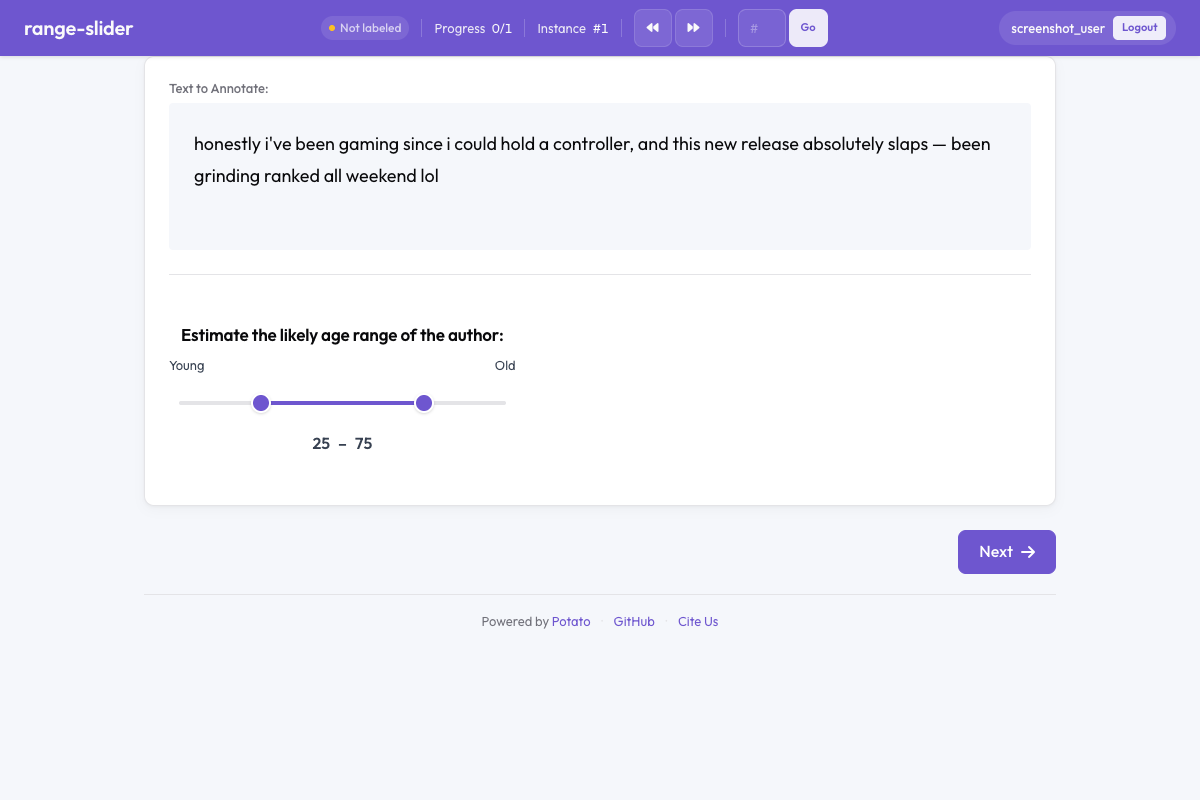 Potato의 범위 슬라이더
개요
단일 값을 입력받는 일반 슬라이더와 달리, 범위 슬라이더에는 범위의 하한과 상한을 나타내는 두 개의 드래그 가능한 핸들이 있습니다. 어노테이터는 어느 핸들이든 드래그하여 구간을 정의합니다. 정밀한 입력을 위해 현재 값이 슬라이더 옆에 표시됩니다.
빠른 시작
yaml
annotation_schemes:
  - annotation_type: range_slider
    name: age_range
    description: Estimate the age range of the author.
    min_value: 0
    max_value: 100
    step: 1
    left_label: "Young"
    right_label: "Old"
구성 옵션
| 필드 | 타입 | 기본값 | 설명 |
|---|---|---|---|
annotation_type | string | 필수 | "range_slider"여야 합니다 |
name | string | 필수 | 이 스키마의 고유 식별자 |
description | string | 필수 | 어노테이터에게 표시되는 안내문 |
min_value | number | 0 | 슬라이더 척도의 최솟값 |
max_value | number | 100 | 슬라이더 척도의 최댓값 |
step | number | 1 | 선택 가능한 값 사이의 증분 |
left_label | string | — | 슬라이더 왼쪽(최솟값) 끝에 표시되는 레이블 |
right_label | string | — | 슬라이더 오른쪽(최댓값) 끝에 표시되는 레이블 |
show_values | boolean | true | 현재 선택된 하한 및 상한 값을 표시합니다 |
default_low | number | — | 하한 핸들의 기본 위치 |
default_high | number | — | 상한 핸들의 기본 위치 |
label_requirement.required | boolean | false | 다음으로 넘어가기 전에 어노테이션을 반드시 완료해야 하는지 여부 |
예시
연령 범위 추정
yaml
annotation_schemes:
  - annotation_type: range_slider
    name: age_estimate
    description: What age range do you think the author falls in?
    min_value: 13
    max_value: 90
    step: 1
    left_label: "Younger"
    right_label: "Older"
신뢰 구간
yaml
annotation_schemes:
  - annotation_type: range_slider
    name: confidence_interval
    description: Select the range within which you believe the true value falls.
    min_value: 0
    max_value: 100
    step: 5
    left_label: "0%"
    right_label: "100%"
    show_values: true
시간대
yaml
annotation_schemes:
  - annotation_type: range_slider
    name: time_window
    description: When during the day is this activity most likely? (hours)
    min_value: 0
    max_value: 24
    step: 0.5
    left_label: "Midnight"
    right_label: "Midnight"
온도 쾌적 범위
yaml
annotation_schemes:
  - annotation_type: range_slider
    name: comfort_range
    description: What temperature range (°F) do you find comfortable?
    min_value: 40
    max_value: 110
    step: 1
    left_label: "Cold"
    right_label: "Hot"
    show_values: true
출력 형식
json
{
  "age_estimate": {
    "labels": {
      "low": 28,
      "high": 42
    }
  }
}
출력에는 항상 구성된 min_value부터 max_value 범위 내의 low 값과 high 값이 포함됩니다.
모범 사례
- 의미 있는 기본값을 설정하세요 -
default_low와default_high를 사용하여 모든 어노테이터가 양 극단에 고정되지 않도록 하세요 - 적절한 스텝 크기를 선택하세요 - 정밀한 작업에는 세밀한 스텝(0.1), 대략적인 추정에는 큰 스텝(5, 10)을 사용하세요
- 양 끝 레이블을 추가하세요 -
left_label과right_label은 단순한 숫자를 넘어 의미적 맥락을 제공합니다 - show_values를 켜 두세요 - 숫자 표시는 어노테이터가 정밀하게 선택하는 데 도움이 됩니다
- 진짜 범위 작업에 사용하세요 - 단일 값만 필요하다면 일반 슬라이더를 사용하세요
더 읽어보기
구현 세부 사항은 원본 문서를 참고하세요.