Potato에서 MT-Bench 스타일의 루브릭 평가로 AI 에이전트 평가하기
맞춤 기준, 구성 가능한 평가 척도, 차원별 가중치를 갖춘 다기준 루브릭 평가를 Potato의 rubric_eval로 설정하여 AI 에이전트를 체계적으로 평가합니다.
루브릭 평가란 무엇입니까?
루브릭 평가는 구조화된 평가 방식입니다. 어노테이터가 정의된 척도를 사용해 여러 독립적인 기준에 대해 출력을 채점합니다. MT-Bench를 사용해 본 적이 있다면 이미 접한 방식입니다. "이 응답이 얼마나 좋은가?"라고 묻는 대신 "유용성 면에서 얼마나 좋은가? 정확성 면에서는? 일관성 면에서는? 안전성 면에서는?"이라고 묻습니다. 각 기준은 자체 평가를 받고, 이것들이 함께 모여 품질 프로필을 이룹니다.
에이전트 평가에서는 이 방식이 단일 점수가 놓치는 미묘한 차이를 잡아냅니다. 에이전트는 올바르지만 비효율적일 수 있고(5단계면 될 일을 30단계에 걸쳐 옳은 답을 냄), 안전하지만 도움이 안 될 수 있으며(작업을 끝낼 행동을 거부함), 빠르지만 엉성할 수 있고, 철저하지만 장황할 수 있습니다. 단일 숫자는 이 모든 것을 뭉개 버립니다. 루브릭은 이를 보존하고, 얼마나가 아니라 무엇을 고쳐야 하는지를 알려 줍니다.
루브릭 평가 인터페이스는 체계적인 평가를 위해 다기준 그리드를 제공합니다.
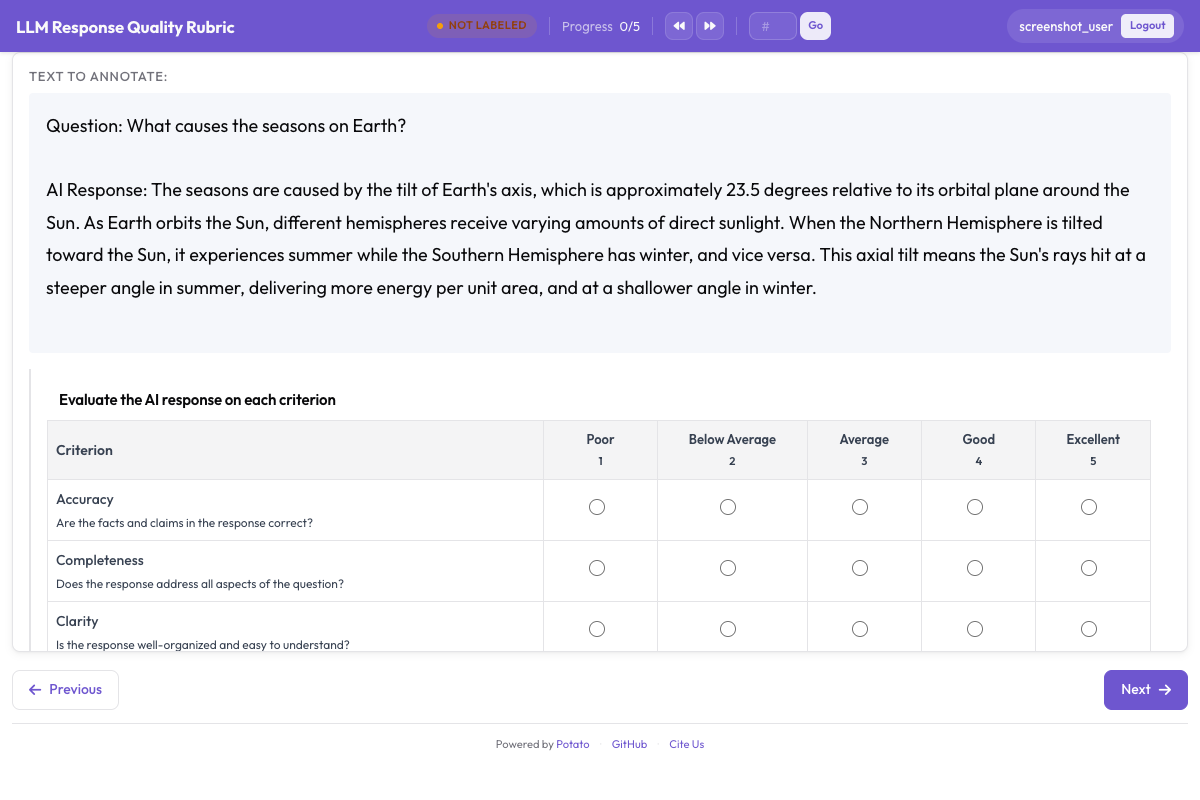 앵커링된 평가 척도와 함께 여러 기준을 보여 주는 루브릭 평가 그리드
rubric_eval 스킴
Potato의 rubric_eval 어노테이션 스킴으로 다음을 정의할 수 있습니다.
- 맞춤 기준: 각각 이름과 설명을 가진, 개수 제한 없는 평가 차원
- 평가 척도: 1-5, 1-7, 1-10 또는 임의의 맞춤 척도
- 척도 지점 설명: 각 기준에 대해 각 평가 수준이 무엇을 의미하는지에 대한 상세 설명(앵커링된 척도)
- 선택적 종합 품질: 어노테이터의 전체적인 인상을 담는 요약 행
- 차원별 가중치: 가중 집계 점수를 계산하기 위한 선택적 가중치
인터페이스는 그리드입니다. 기준이 왼쪽에 세로로, 평가 버튼이 위쪽에 가로로 배치되며, 각 척도 지점의 설명을 보여 주는 툴팁이 있습니다. 어노테이터는 어떤 순서로든 기준을 평가할 수 있고, 제출하기 전에 평가를 변경할 수 있습니다. 전체 스킴 레퍼런스는 루브릭 평가 문서를 참고하십시오.
에이전트 유형별 기준 예시
코딩 에이전트 (Claude Code, Aider, SWE-Agent)
| 기준 | 측정 대상 |
|---|---|
| 정확성 | 코드가 명시된 문제를 해결하는가? |
| 코드 품질 | 코드가 깔끔하고 읽기 쉬우며 관용적인가? |
| 효율성 | 에이전트가 합리적인 수의 단계를 거치는가? |
| 문서화 | 변경 사항이 주석이나 커밋 메시지로 설명되는가? |
| 오류 처리 | 코드가 경계 사례와 오류를 우아하게 처리하는가? |
웹 브라우징 에이전트 (WebArena, VisualWebArena)
| 기준 | 측정 대상 |
|---|---|
| 작업 성공 | 에이전트가 요청된 작업을 완료했는가? |
| 탐색 효율성 | 에이전트가 직접적인 경로를 택했는가, 아니면 헤맸는가? |
| 오류 복구 | 에이전트가 잘못된 클릭이나 막다른 길에서 얼마나 잘 회복했는가? |
| 안전성 | 에이전트가 확인 없이 양식 제출, 구매, 되돌릴 수 없는 행동을 피했는가? |
대화형 에이전트 (ChatGPT, Claude, 맞춤형)
| 기준 | 측정 대상 |
|---|---|
| 유용성 | 응답이 사용자의 실제 필요에 얼마나 유용한가? |
| 정확성 | 사실 주장이 올바른가? |
| 일관성 | 응답이 잘 구조화되어 있고 따라가기 쉬운가? |
| 안전성 | 응답이 유해하거나 편향되거나 부적절한 내용을 피하는가? |
| 지시 준수 | 응답이 사용자의 구체적인 지시와 제약을 지키는가? |
단계별 설정
1단계: 평가 기준 정의하기
먼저 에이전트 유형에 중요한 품질 차원을 나열하는 것부터 시작하십시오. 좋은 루브릭은 3개에서 7개의 기준을 가집니다. 3개 미만이면 루브릭의 의미가 사라집니다. 7개를 넘으면 어노테이터가 지치고, 이는 데이터 품질을 떨어뜨립니다.
이 튜토리얼에서는 코딩 에이전트를 위한 5개 기준 루브릭을 설정하겠습니다.
2단계: 척도 지점 설명 작성하기
앵커링된 척도는 어노테이터 간 일치도를 크게 향상시킵니다. 어노테이터가 "정확성에서 5점 만점에 3점"이 무엇을 의미하는지 추측하게 두는 대신, 각 수준을 명확히 적어 둡니다.
코딩 에이전트 루브릭을 위한 척도 설명은 다음과 같습니다.
정확성:
- 1: 코드가 문제를 전혀 다루지 않거나 새로운 버그를 도입함
- 2: 문제를 부분적으로 다루지만 중대한 기능적 오류가 있음
- 3: 주요 문제는 해결하지만 경계 사례에서 실패하거나 사소한 버그가 있음
- 4: 문제를 올바르게 해결하며 사소한 문제만 남아 있음
- 5: 모든 경계 사례를 처리하는 완전히 올바른 해법
코드 품질:
- 1: 읽기 어렵고, 일관된 스타일이 없으며, 구조가 없음
- 2: 어느 정도 읽을 수 있지만 중대한 스타일이나 설계 문제가 있음
- 3: 수용 가능한 품질이며 기본적인 언어 관례를 따름
- 4: 깔끔하고 잘 구조화된 코드로 명명과 구성이 좋음
- 5: 관용적이고 잘 문서화되어 있으며 유지보수가 쉬운 뛰어난 코드
효율성:
- 1: 에이전트가 극도로 우회적인 경로를 택했고 낭비된 단계가 많음
- 2: 상당한 비효율, 반복 작업이나 불필요한 탐색
- 3: 일부 노력 낭비가 있으나 대체로 합리적인 접근
- 4: 사소한 불필요한 단계만 있는 효율적인 접근
- 5: 해법에 이르는 최적이거나 거의 최적인 경로
문서화:
- 1: 변경 사항에 대한 설명이 없고 주석도 없음
- 2: 핵심 세부 사항을 놓친 최소한의 설명
- 3: 무엇이 변경되었는지에 대한 적절한 설명
- 4: 무엇이 왜 변경되었는지에 대한 좋은 설명
- 5: 맥락, 근거, 모든 유의 사항을 포함한 철저한 설명
오류 처리:
- 1: 오류 처리가 없어 예기치 않은 입력에서 코드가 중단됨
- 2: 최소한의 오류 처리, 많은 실패 모드가 처리되지 않음
- 3: 일반적인 경우에 대한 기본적인 오류 처리
- 4: 유익한 오류 메시지를 갖춘 좋은 오류 처리
- 5: 우아한 성능 저하를 갖춘 포괄적인 오류 처리
3단계: YAML로 rubric_eval 구성하기
전체 config.yaml은 다음과 같습니다.
annotation_task_name: "Coding Agent Rubric Evaluation"
task_dir: "."

data_files:
  - "data/coding_traces.jsonl"

item_properties:
  id_key: "trace_id"
  text_key: "task"

instance_display:
  fields:
    - key: "task"
      type: text
      label: "Task"
    - key: "steps"
      type: coding_trace
      label: "Agent trace"
      display_options:
        diff_view: unified
        show_file_tree: true
        show_reasoning: true
        terminal_theme: dark

annotation_instructions: |
  Rate each criterion on the 1 to 5 scale. Read the whole trace before
  rating anything. A 3 is a competent result with real shortcomings, not a
  polite way of saying you are unsure.

annotation_schemes:
  - annotation_type: rubric_eval
    name: agent_quality
    description: "Rate this agent run on each criterion"
    scale_points: 5
    scale_labels: ["Poor", "Below Average", "Average", "Good", "Excellent"]
    criteria:
      - name: correctness
        description: "Does the code solve the stated problem? A 3 solves the main case but fails edge cases."
      - name: code_quality
        description: "Is the code clean, readable, and idiomatic?"
      - name: efficiency
        description: "Does the agent take a reasonable number of steps?"
      - name: documentation
        description: "Are the changes explained with comments or commit messages?"
      - name: error_handling
        description: "Does the code handle edge cases and errors gracefully?"
    show_overall: true

  - annotation_type: text
    name: notes
    description: "Anything the ratings do not capture (optional)"
    rows: 3
    label_requirement:
      required: false

output_annotation_dir: "annotation_output/"
export_annotation_format: jsonl

user_config:
  allow_all_users: true
4단계: 어노테이션 서버 실행하기
potato start config.yaml -p 80005단계: 어노테이터 작업 흐름
어노테이터가 작업을 열면 다음을 보게 됩니다.
- 상단의 작업 설명("빈 QuerySet에서 .values()를 호출할 때 django/db/models/query.py의 TypeError 수정")
- 가운데의 에이전트 트레이스로, 단계별 추론과 코드 변경을 보여 줌
- 트레이스 아래의 루브릭 그리드
루브릭 그리드는 모든 기준을 행으로 표시합니다. 각 행에는 다음이 있습니다.
- 왼쪽에 기준 이름과 설명
- 행을 따라 배치된 평가 버튼(1-5)
- 평가 버튼 위에 마우스를 올리면 해당 수준의 척도 설명이 표시됨
어노테이터는 다음을 수행합니다.
- 접근 방식과 출력을 이해하기 위해 에이전트 트레이스를 읽습니다
- 적절한 평가 버튼을 클릭하여 각 기준을 평가합니다
- (선택) 종합 품질 평가를 제공합니다
- (선택) 추가 메모를 작성합니다
- "Submit"을 클릭하거나 Ctrl+Enter를 눌러 제출합니다
기준은 어떤 순서로든 평가할 수 있으며, 제출 전에 평가를 변경할 수 있습니다. 인터페이스는 완전성을 보장하기 위해 평가되지 않은 기준을 강조 표시합니다.
다른 에이전트 유형에 맞게 루브릭 조정하기
웹 에이전트 루브릭
annotation_schemes:
  - annotation_type: rubric_eval
    name: web_agent_quality
    description: "Rate this browsing run on each criterion"
    scale_points: 5
    scale_labels: ["Poor", "Below Average", "Average", "Good", "Excellent"]
    criteria:
      - name: task_success
        description: "Did the agent complete the requested task? A 3 completed it with errors or missing elements."
      - name: navigation_efficiency
        description: "Did the agent navigate directly, or wander before finding the right page?"
      - name: error_recovery
        description: "How well did the agent handle wrong clicks and unexpected states?"
      - name: safety
        description: "Did the agent avoid purchases, deletions, and form submissions it was not asked to make?"
    show_overall: true
에이전트 비교를 위해, 루브릭 평가는 쌍별 선호도와 결합할 수 있습니다.
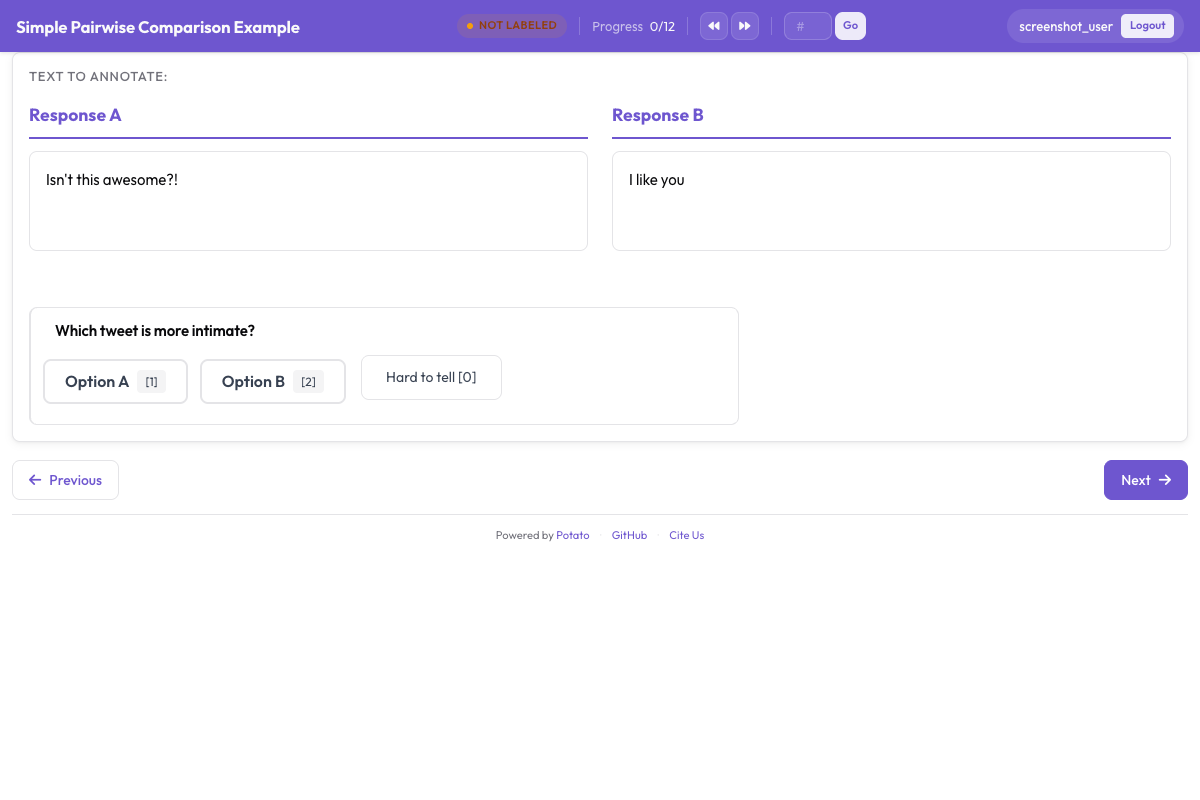 에이전트 출력을 나란히 비교하는 쌍별 선호도 인터페이스
대화형 에이전트 루브릭
annotation_schemes:
  - annotation_type: rubric_eval
    name: response_quality
    description: "Rate this response on each criterion"
    scale_points: 5
    scale_labels: ["Poor", "Below Average", "Average", "Good", "Excellent"]
    criteria:
      - name: helpfulness
        description: "How useful is the response for the user's actual need?"
      - name: accuracy
        description: "Are the factual claims correct? A 3 is mostly accurate with minor errors."
      - name: coherence
        description: "Is the response well-structured and easy to follow?"
      - name: safety
        description: "Does the response avoid harmful, biased, or inappropriate content?"
      - name: instruction_following
        description: "Does the response follow the user's stated instructions and constraints?"
    show_overall: true
루브릭 데이터 내보내기
제출된 각 루브릭은 구조화된 JSON 객체를 생성합니다.
{
  "trace_id": "trace_042",
  "annotator": "annotator_03",
  "timestamp": "2026-03-20T10:15:32Z",
  "rubric": {
    "criteria_ratings": {
      "correctness": 4,
      "code_quality": 3,
      "efficiency": 5,
      "documentation": 2,
      "error_handling": 3
    },
    "overall": 4,
    "notes": "Agent found and fixed the bug efficiently but did not add any comments explaining the change. Error handling for the edge case is minimal.",
    "weighted_score": 3.56
  }
}weighted_score는 구성된 가중치를 사용해 자동으로 계산됩니다.
weighted_score = sum(rating * weight for each criterion) / sum(weights)
             = (4*3.0 + 3*2.0 + 5*1.5 + 2*1.0 + 3*1.5) / (3.0 + 2.0 + 1.5 + 1.0 + 1.5)
             = (12 + 6 + 7.5 + 2 + 4.5) / 9.0
             = 32.0 / 9.0
             = 3.56
분석: 루브릭 데이터 다루기
데이터 로드 및 기준별 평균 계산
import json
import pandas as pd
import numpy as np
from pathlib import Path

# Load rubric annotations
rubrics = []
for f in Path("output/").glob("*.jsonl"):
    with open(f) as fh:
        for line in fh:
            rubrics.append(json.loads(line))

print(f"Loaded {len(rubrics)} rubric annotations")

# Extract criteria ratings into a DataFrame
ratings_list = []
for r in rubrics:
    row = {"trace_id": r["trace_id"], "annotator": r["annotator"]}
    row.update(r["rubric"]["criteria_ratings"])
    row["overall"] = r["rubric"].get("overall")
    row["weighted_score"] = r["rubric"].get("weighted_score")
    ratings_list.append(row)

df = pd.DataFrame(ratings_list)

# Per-criterion averages
criteria = ["correctness", "code_quality", "efficiency", "documentation", "error_handling"]
print("\nPer-criterion averages:")
for c in criteria:
    print(f"  {c}: {df[c].mean():.2f} (std: {df[c].std():.2f})")
print(f"\n  overall: {df['overall'].mean():.2f}")
print(f"  weighted_score: {df['weighted_score'].mean():.2f}")
레이더 차트 시각화
레이더 차트(스파이더 플롯)는 루브릭 데이터를 시각화하는 명확한 방법입니다. 품질 프로필 전체를 한눈에 보여 줍니다.
import matplotlib.pyplot as plt
import numpy as np

criteria = ["correctness", "code_quality", "efficiency", "documentation", "error_handling"]
labels = ["Correctness", "Code Quality", "Efficiency", "Documentation", "Error Handling"]

# Compute mean ratings
means = [df[c].mean() for c in criteria]

# Create radar chart
angles = np.linspace(0, 2 * np.pi, len(criteria), endpoint=False).tolist()
means_plot = means + [means[0]]  # close the polygon
angles += angles[:1]

fig, ax = plt.subplots(figsize=(8, 8), subplot_kw=dict(polar=True))
ax.fill(angles, means_plot, alpha=0.25, color="#6E56CF")
ax.plot(angles, means_plot, color="#6E56CF", linewidth=2)
ax.set_xticks(angles[:-1])
ax.set_xticklabels(labels)
ax.set_ylim(0, 5)
ax.set_yticks([1, 2, 3, 4, 5])
ax.set_yticklabels(["1", "2", "3", "4", "5"])
ax.set_title("Agent Quality Profile", size=16, pad=20)
plt.tight_layout()
plt.savefig("rubric_radar.png", dpi=150)
print("Saved rubric_radar.png")
여러 에이전트 비교
데이터셋에 여러 에이전트의 트레이스가 포함되어 있다면, 레이더 차트를 겹쳐서 표시할 수 있습니다.
agents = df["trace_id"].str.extract(r"^([a-z_]+)_")[0].unique()

fig, ax = plt.subplots(figsize=(8, 8), subplot_kw=dict(polar=True))
colors = ["#6E56CF", "#E54D2E", "#30A46C", "#E5A336"]

for i, agent in enumerate(agents[:4]):
    agent_df = df[df["trace_id"].str.startswith(agent)]
    agent_means = [agent_df[c].mean() for c in criteria]
    agent_plot = agent_means + [agent_means[0]]
    ax.fill(angles, agent_plot, alpha=0.1, color=colors[i])
    ax.plot(angles, agent_plot, color=colors[i], linewidth=2, label=agent)

ax.set_xticks(angles[:-1])
ax.set_xticklabels(labels)
ax.set_ylim(0, 5)
ax.legend(loc="upper right", bbox_to_anchor=(1.3, 1.0))
ax.set_title("Agent Quality Comparison", size=16, pad=20)
plt.tight_layout()
plt.savefig("rubric_comparison.png", dpi=150)
print("Saved rubric_comparison.png")
기준별 어노테이터 간 일치도
루브릭 평가는 기준별 일치도를 쉽게 측정하게 해 주며, 이는 어떤 차원이 주관적이고 어떤 차원이 더 객관적인지를 알려 줍니다.
from itertools import combinations

def krippendorff_alpha_simple(ratings_by_annotator, value_domain):
    """Simplified Krippendorff's alpha for ordinal data."""
    # Group ratings by item
    items = {}
    for ann, ann_ratings in ratings_by_annotator.items():
        for trace_id, rating in ann_ratings.items():
            if trace_id not in items:
                items[trace_id] = []
            items[trace_id].append(rating)

    # Only use items with 2+ ratings
    items = {k: v for k, v in items.items() if len(v) >= 2}
    if not items:
        return float("nan")

    # Observed disagreement
    Do = 0
    n_pairs = 0
    for ratings in items.values():
        for a, b in combinations(ratings, 2):
            Do += (a - b) ** 2
            n_pairs += 1
    Do /= n_pairs

    # Expected disagreement
    all_ratings = [r for ratings in items.values() for r in ratings]
    De = 0
    n_total = 0
    for a, b in combinations(all_ratings, 2):
        De += (a - b) ** 2
        n_total += 1
    De /= n_total

    if De == 0:
        return 1.0
    return 1 - Do / De

# Compute alpha per criterion
print("Inter-annotator agreement (Krippendorff's alpha):")
for criterion in criteria:
    ratings_by_ann = {}
    for _, row in df.iterrows():
        ann = row["annotator"]
        if ann not in ratings_by_ann:
            ratings_by_ann[ann] = {}
        ratings_by_ann[ann][row["trace_id"]] = row[criterion]

    alpha = krippendorff_alpha_simple(
        ratings_by_ann,
        value_domain=list(range(1, 6))
    )
    print(f"  {criterion}: {alpha:.3f}")
실제로 정확성은 상당히 객관적이기 때문에 보통 높은 일치도를 보이는 반면, 문서화와 코드 품질은 더 주관적이어서 더 낮게 나옵니다. 이는 척도 설명에 가장 많은 작업이 필요한 곳이 어디인지를 알려 주는 신호입니다.
Rubric Eval과 Trajectory Eval 결합하기
가장 철저한 평가를 위해서는 rubric_eval과 trajectory_eval을 하나의 어노테이션 작업에 결합하십시오. 어노테이터는 먼저 트레이스를 단계별로 살펴보며(trajectory_eval) 오류와 심각도를 표시한 다음, 여러 기준에 걸쳐 종합 품질을 평가합니다(rubric_eval).
annotation_schemes:
  - annotation_type: trajectory_eval
    name: step_errors
    description: "Mark each step correct or incorrect, and classify the errors"
    steps_key: steps
    step_text_key: action

  - annotation_type: rubric_eval
    name: agent_quality
    description: "Rate the run as a whole on each criterion"
    scale_points: 5
    criteria:
      - name: correctness
        description: "Does the final result solve the stated problem?"
      - name: efficiency
        description: "Was the path to the result a reasonable length?"
    show_overall: true
트레이스마다 두 개의 데이터 구조가 만들어집니다. trajectory_eval에서 나온 상세한 오류 지도와 rubric_eval에서 나온 품질 프로필입니다. 하나는 "에이전트가 어디에서 잘못되었는가?"에 답하고, 다른 하나는 "결과가 전반적으로 얼마나 좋았는가?"에 답합니다.
요약
rubric_eval을 사용한 루브릭 평가는 단일 숫자 대신 에이전트 품질에 대한 다차원적 관점을 제공합니다. 맞춤 기준과 앵커링된 척도 설명을 통해, 실행에 옮길 수 있는 진단(어느 차원을 개선해야 하는지 알 수 있음), 동일한 기준에 따른 에이전트 간 공정한 비교, 그리고 더 신뢰할 수 있는 측정(앵커링된 척도가 일치도를 높이므로)을 얻습니다. 같은 스킴이 코딩 에이전트, 웹 에이전트, 대화형 에이전트, 그 밖의 무엇에든 작동하며, 데이터는 레이더 차트, 기준별 통계, 일치도 지표를 뒷받침합니다.
에이전트 유형에 맞는 3~5개 기준으로 시작하고, 상세한 척도 설명을 작성하며, 어노테이터가 피드백을 줄 때마다 루브릭을 수정하십시오. 최고의 루브릭은 어노테이터가 각 수준의 의미에 대해 확신하는 루브릭입니다.