고정 합계
Potato에서 숫자 입력 또는 슬라이더를 사용해 카테고리 전반에 고정 예산 포인트를 배분하는 고정 합계 어노테이션을 구성합니다.
고정 합계 어노테이션 스키마는 어노테이터가 여러 카테고리에 정해진 수의 포인트를 분배할 수 있게 해 줍니다. 연결된 슬라이더를 사용하는 소프트 레이블과 달리, 고정 합계는 직접 숫자 입력과 슬라이더를 모두 지원하며, 어노테이터가 고정된 예산 안에서 명시적인 절충 결정을 내려야 하는 작업을 위해 설계되었습니다.
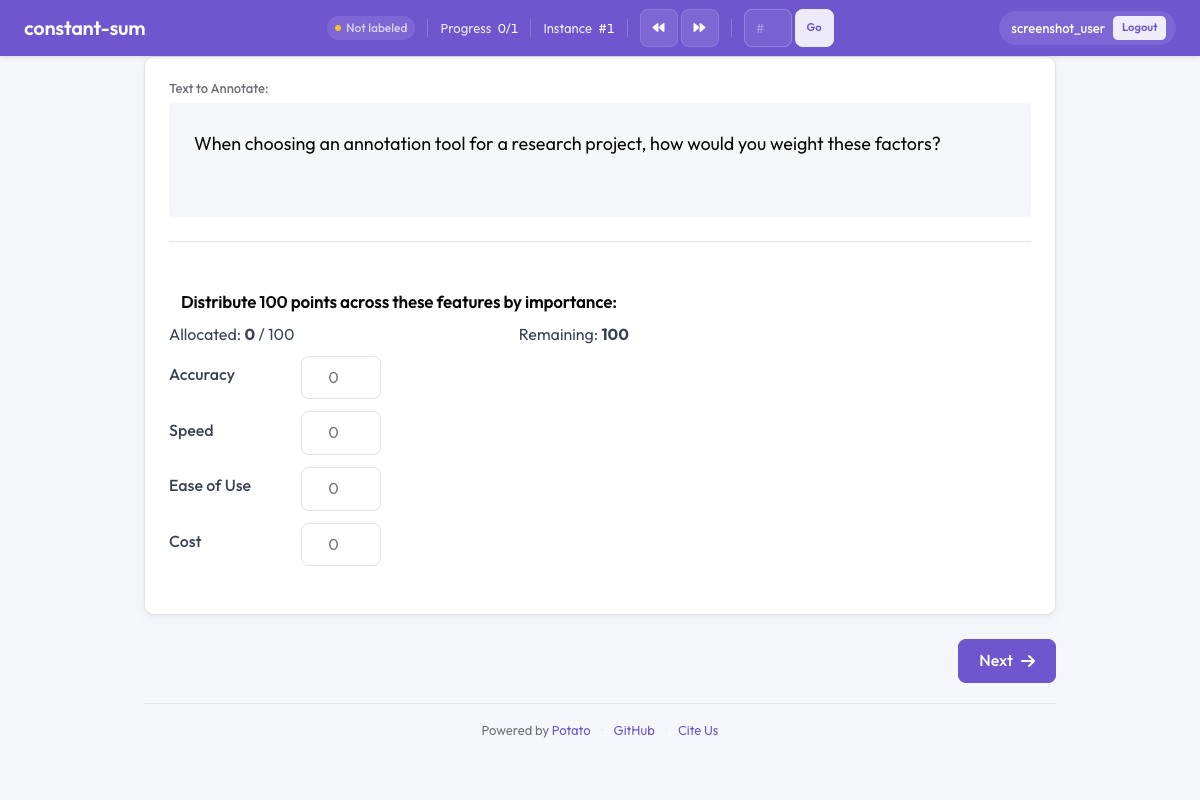 Potato의 고정 합계
개요
고정 합계 작업은 설문 연구와 선호도 도출에서 흔히 사용됩니다. 어노테이터에게는 정해진 포인트 풀(예: 100)이 주어지며, 상대적 중요도, 선호도 또는 비율을 표현하기 위해 항목 전반에 이를 배분해야 합니다. 인터페이스는 배분이 항상 구성된 총합과 같아지도록 강제합니다.
빠른 시작
yaml
annotation_schemes:
  - annotation_type: constant_sum
    name: feature_importance
    description: Distribute 100 points across features based on their importance.
    labels: ["Accuracy", "Speed", "Ease of Use", "Cost"]
    total_points: 100
구성 옵션
| 필드 | 유형 | 기본값 | 설명 |
|---|---|---|---|
annotation_type | string | 필수 | "constant_sum"이어야 합니다 |
name | string | 필수 | 이 스키마의 고유 식별자 |
description | string | 필수 | 어노테이터에게 표시되는 안내문 |
labels | array | 필수 | 포인트를 배분할 항목 목록(최소 2개) |
total_points | integer | 100 | 배분이 합산되어야 하는 고정 총합 |
min_per_item | integer | 0 | 각 항목이 받아야 하는 최소 포인트 |
input_type | string | "number" | 입력 방식: 텍스트 필드에는 "number", 슬라이더 컨트롤에는 "slider" |
label_requirement.required | boolean | false | 다음으로 넘어가기 전에 어노테이션을 완료해야 하는지 여부 |
예시
기능 우선순위 지정
yaml
annotation_schemes:
  - annotation_type: constant_sum
    name: feature_priority
    description: Allocate 100 points to indicate which features matter most to you.
    labels: ["Performance", "Reliability", "Usability", "Security"]
    total_points: 100
    input_type: number
예산 배분
yaml
annotation_schemes:
  - annotation_type: constant_sum
    name: budget_allocation
    description: How would you distribute a $1000 budget across these areas?
    labels: ["Marketing", "Engineering", "Design", "Research"]
    total_points: 1000
    input_type: slider
    min_per_item: 50
시간 분배
yaml
annotation_schemes:
  - annotation_type: constant_sum
    name: time_spent
    description: Distribute 24 points (hours) across daily activities.
    labels: ["Work", "Sleep", "Exercise", "Leisure", "Commute", "Other"]
    total_points: 24
    min_per_item: 0
슬라이더를 사용한 간단한 비교
yaml
annotation_schemes:
  - annotation_type: constant_sum
    name: text_comparison
    description: Distribute 10 points between the two texts based on quality.
    labels: ["Text A", "Text B"]
    total_points: 10
    input_type: slider
출력 형식
json
{
  "feature_importance": {
    "labels": {
      "Accuracy": 40,
      "Speed": 25,
      "Ease of Use": 20,
      "Cost": 15
    }
  }
}
값은 항상 구성된 total_points로 합산됩니다.
모범 사례
- 직관적인 총합을 선택하세요 - 100은 백분율에 적합하며, 더 작은 총합(10, 20)은 빠른 작업에 더 쉽습니다
- 정밀도를 위해 숫자 입력을 사용하세요 - 정확한 값이 중요할 때는 숫자 필드가 슬라이더보다 더 정확합니다
- 속도를 위해 슬라이더를 사용하세요 - 슬라이더 입력은 대략적인 배분에 더 빠릅니다
- 항목 수를 제한하세요 - 항목이 7~8개를 넘으면 포인트 배분이 인지적으로 부담스러워집니다
- 최소 배분을 고려하세요 - 모든 카테고리가 최소한 일부 포인트를 받아야 할 때
min_per_item을 사용하세요 - 명확한 맥락을 제공하세요 - 포인트가 무엇을 나타내는지(중요도, 시간, 금액 등) 설명하세요
더 읽어보기
구현 세부 사항은 원본 문서를 참조하세요.