AIエージェントを並べて比較する:バイナリ・スケール・多次元の3モード
Potatoでペアワイズのエージェント比較を設定する方法を解説します。バイナリ選好、連続スケール、根拠の記入を必須にした次元ごとの多基準判定という3つのモードを扱います。
エージェント評価にペアワイズ比較を使う理由
コーディングエージェントのトレースを1〜10で採点してくださいと頼むと、ノイズの多いデータが返ってきます。尺度の当て方が人によって違うからです。あるアノテーターの7は、別のアノテーターの5です。ペアワイズ比較はこれを回避します。トレースを単独で採点させる代わりに、2件を並べて見せて、どちらが良いかを答えてもらいます。この直接対決の判断は下しやすく、人をまたいでも安定していて、しかもDirect Preference Optimization(DPO)やReinforcement Learning from Human Feedback(RLHF)がまさに必要とする形をしています。
言語モデルのアラインメント用に報酬モデルを訓練するときと同じやり方で、コーディングエージェントにもそのまま持ち込めます。エージェントのトラジェクトリのペアについて人間の選好を集め、それで報酬モデルを訓練し、そのモデルでエージェントの訓練を導いたり、推論時にN個の候補から最良のものを選んだりします。
Potatoにはペアワイズ比較のモードが3つあり、それぞれ評価のニーズとデータ予算の違いに対応します。
インターフェースは2件のトレースを左右に並べます。
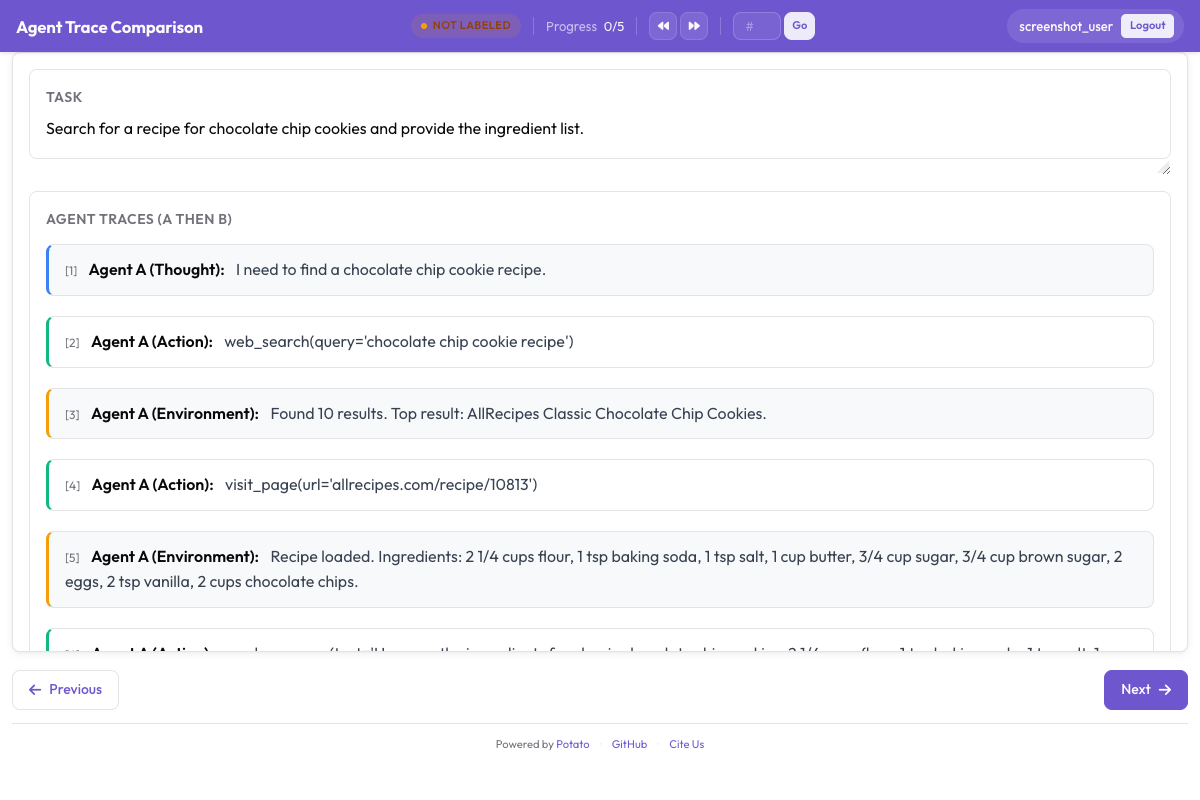 Annotators compare two agent traces and select which approach was better
モード1:バイナリ選好
最も単純で速いモードです。アノテーターは並んだ2件のトレースを見て、良いほうをクリックします。どちらも同程度に良い(あるいは同程度に悪い)場合に備えて、引き分けボタンを任意で用意できます。
バイナリモードが向く場面
短期間に大量の選好データが必要なときはバイナリモードです。基本的な報酬モデルの訓練、エージェントの勝率の算出、Eloのリーダーボード作りに向いています。難点はニュアンスが落ちることです。どちらのトレースが勝ったかは分かっても、どれくらいの差で、どの点で勝ったのかは分かりません。
設定
annotation_task_name: "Agent Comparison - Binary"
task_dir: "."
port: 8000

data_files:
  - "data/paired_traces.jsonl"

item_properties:
  id_key: "id"
  text_key: "task"

instance_display:
  fields:
    - key: "task"
      type: text
      label: "Task"

annotation_schemes:
  - annotation_type: pairwise
    name: preference
    description: "Which agent produced a better solution?"
    mode: binary
    items_key: "responses"
    show_labels: true
    labels:
      - "Agent A"
      - "Agent B"
    allow_tie: true
    tie_label: "Tie (equally good or equally bad)"
    randomize_order: true
    sequential_key_binding: true
    label_requirement:
      required: true

  - annotation_type: radio
    name: confidence
    description: "How confident are you in this judgment?"
    labels:
      - "Very confident"
      - "Somewhat confident"
      - "Not confident"

output_annotation_dir: "annotation_output/"
export_annotation_format: jsonl

user_config:
  allow_all_users: true
アノテーションの流れ
アノテーターの画面は左右に分割されます。左側にはトレースAが、CodingTraceDisplayの機能をすべて使って描画されます。差分、ターミナルブロック、ファイル読み取り、思考です。右側には同じタスクに対するトレースBが表示されます。両側は独立してスクロールします。
タスクの説明は両方のトレースの上に置かれるので、2つのエージェントが何をしようとしていたのかが分かります。
その下に3つのボタンが並びます。「Agent A is better」「Agent B is better」「Tie」です。randomize_order を有効にしておくと、どちらのエージェントがAでどちらがBになるかがインスタンスごとにシャッフルされるので、アノテーターが左側あるいは右側を選ぶ癖に陥ることを防げます。
より細かい評価をしたい場合、インターフェースは複数の次元にも対応します。
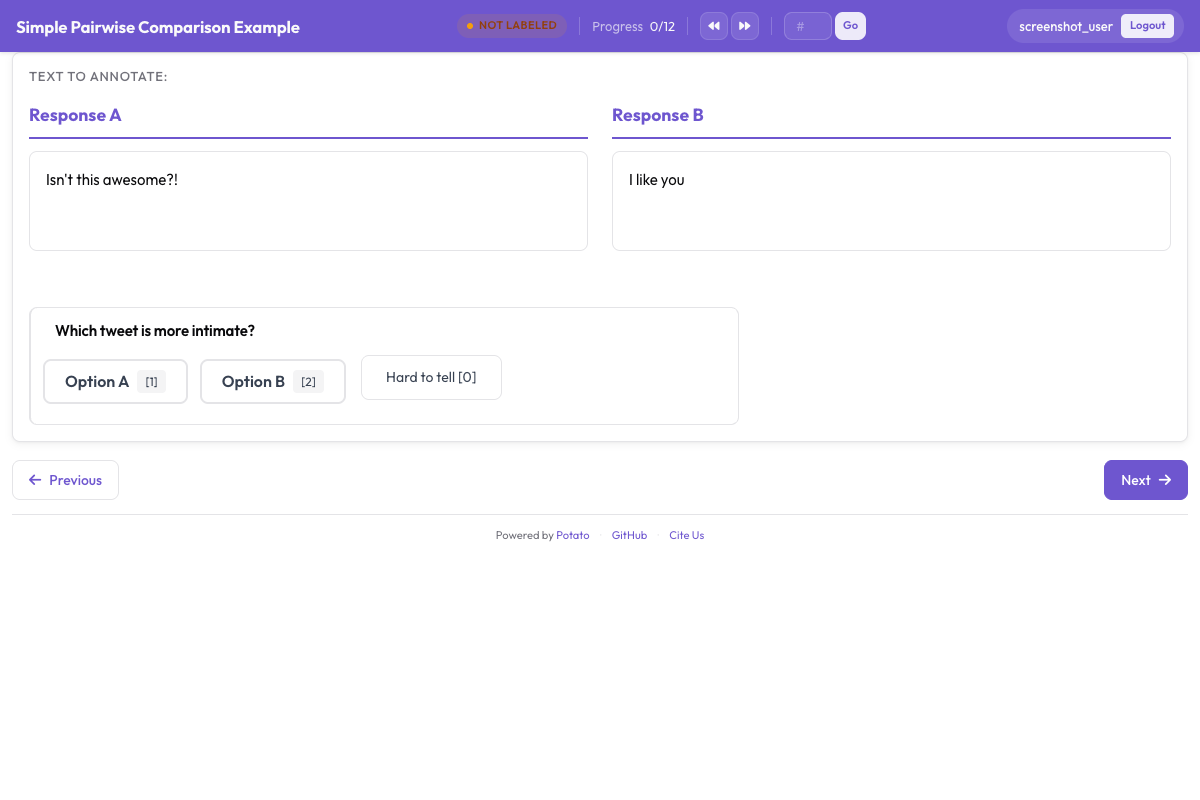 Binary preference, continuous scale, and multi-dimension modes are available
モード2:連続スケール
スケールモードでは、どちらが勝ったかだけでなく、どれくらい良いのかをアノテーターが答えられます。クリック1回の代わりに、左端の「Aのほうが大幅に良い」から右端の「Bのほうが大幅に良い」まで、中央に「同等」を置いたスライダーを動かします。
スケールモードが向く場面
選好の向きだけでなく強さが問題になるときに使います。スライダーが端に寄っていれば品質差がはっきりしていることを、中央付近であれば両者が接戦だったことを意味します。DPOなどのパイプラインでは、この強さで事例に重みを付け、判断のはっきりした例をより重く扱えます。
設定
annotation_schemes:
  - annotation_type: pairwise
    name: preference_scale
    description: "Which agent produced a better solution, and by how much?"
    mode: scale
    items_key: "responses"
    labels:
      - "Agent A"
      - "Agent B"
    scale:
      min: -3
      max: 3
      step: 1
      default: 0
      labels:
        min: "A is much better"
        max: "B is much better"
        center: "Equal"
    label_requirement:
      required: true
5段階尺度を使う
アノテーションを速くしたく、粒度は多少粗くてよい場合は、5段階に落とします。
annotation_schemes:
  - annotation_type: pairwise
    name: multi_dim_comparison
    description: "Compare the two solutions along each dimension"
    mode: multi_dimension
    items_key: "responses"
    labels:
      - "Agent A"
      - "Agent B"
    dimensions:
      - name: correctness
        description: "Which solution actually fixes the stated problem?"
        allow_tie: true
      - name: efficiency
        description: "Which takes fewer unnecessary steps, file reads, or redundant edits?"
        allow_tie: true
      - name: code_quality
        description: "Which is more readable, better named, and closer to existing patterns?"
        allow_tie: true
      - name: communication
        description: "Which explains its reasoning more clearly and identifies the root cause?"
        allow_tie: true
      - name: robustness
        description: "Which handles edge cases and verifies its changes?"
        allow_tie: true
    justification:
      required: true
      reason_categories:
        - "More correct"
        - "More efficient"
        - "Better written"
        - "Better explained"
      min_rationale_chars: 20
      rationale_placeholder: "Which agent was better here, and why?"
モード3:多次元比較
最も詳細なモードです。全体としての選好をひとつ答える代わりに、アノテーターは独立した複数の次元それぞれについて2件のトレースを判定します。次元ごとにA/B/引き分けを選び、そのすべてに文章での根拠が必要です。
多次元モードが向く場面
どちらのエージェントが勝ったかだけでなく、なぜ勝ったかを知りたいときに使います。あるトレースはコードは正しいが効率がひどく、別のトレースは効率的だがエッジケースを踏み抜いている、といったことがあります。ここから得られる次元ごとのデータは、次元別の報酬モデルの訓練にも、エージェントを作っている人たちへ詳しいフィードバックを返すのにも使えます。
設定
attention_checks:
  enabled: true
  items_file: "data/attention_checks.json"
  frequency: 20
  min_response_time: 10.0
  failure_handling:
    warn_threshold: 2
    block_threshold: 5
ペアになったトレースデータを用意する
3つのモードはいずれも、ペアになったトレースを入力として受け取ります。JSONLファイルの各行に、同じタスクに取り組んだ2件のトレースが入ります。
データ形式
{
  "id": "pair_001",
  "task_description": "Fix the IndexError in process_batch() when the input list is empty",
  "repo": "myorg/myproject",
  "trace_a": {
    "agent": "claude_code",
    "model": "claude-sonnet-4-20250514",
    "structured_turns": [
      {
        "step_idx": 0,
        "type": "file_read",
        "path": "src/batch.py",
        "content": "def process_batch(items):\n    result = items[0]\n    ...",
        "start_line": 10,
        "end_line": 25
      },
      {
        "step_idx": 1,
        "type": "file_edit",
        "path": "src/batch.py",
        "diff": "--- a/src/batch.py\n+++ b/src/batch.py\n@@ -10,3 +10,5 @@\n def process_batch(items):\n+    if not items:\n+        return []\n     result = items[0]\n"
      },
      {
        "step_idx": 2,
        "type": "bash_command",
        "command": "python -m pytest tests/test_batch.py -v",
        "output": "PASSED",
        "exit_code": 0
      }
    ]
  },
  "trace_b": {
    "agent": "swe_agent",
    "model": "gpt-4o",
    "structured_turns": [
      {
        "step_idx": 0,
        "type": "bash_command",
        "command": "find . -name '*.py' | xargs grep 'process_batch'",
        "output": "src/batch.py:def process_batch(items):\ntests/test_batch.py:    process_batch([])",
        "exit_code": 0
      },
      {
        "step_idx": 1,
        "type": "file_read",
        "path": "src/batch.py",
        "content": "def process_batch(items):\n    result = items[0]\n    ...",
        "start_line": 1,
        "end_line": 50
      },
      {
        "step_idx": 2,
        "type": "file_edit",
        "path": "src/batch.py",
        "diff": "--- a/src/batch.py\n+++ b/src/batch.py\n@@ -10,3 +10,6 @@\n def process_batch(items):\n+    if items is None or len(items) == 0:\n+        logger.warning('Empty input to process_batch')\n+        return []\n     result = items[0]\n"
      },
      {
        "step_idx": 3,
        "type": "bash_command",
        "command": "python -m pytest tests/ -v",
        "output": "PASSED (12 tests)",
        "exit_code": 0
      }
    ]
  }
}
個々のトレースからペアを作る
同じタスクに取り組んだ個別のトレースが手元にある場合は、ペア作成ユーティリティが組み立ててくれます。
# Generate all possible pairs for each task
potato pair-traces \
  --input ./data/individual_traces.jsonl \
  --output ./data/paired_traces.jsonl \
  --pair_by "task_id" \
  --strategy "all_pairs"

# Or sample a fixed number of pairs per task
potato pair-traces \
  --input ./data/individual_traces.jsonl \
  --output ./data/paired_traces.jsonl \
  --pair_by "task_id" \
  --strategy "sample" \
  --pairs_per_task 3
比較データのエクスポート
DPO/RLHF用の選好ペア
ペアワイズ比較の主なエクスポート形式は、DPOやRLHFの訓練に使う選好ペアです。
potato export \
  --format dpo_preferences \
  --project ./output/ \
  --output ./training_data/preferences.jsonl
バイナリモードでは、出力は単純です。
{
  "prompt": "Fix the IndexError in process_batch() when the input list is empty",
  "chosen": {"agent": "claude_code", "trace_id": "trace_a_001", "steps": [...]},
  "rejected": {"agent": "swe_agent", "trace_id": "trace_b_001", "steps": [...]},
  "annotator": "judge1",
  "confidence": "high"
}
スケールモードでは、選好の強さが加わります。
{
  "prompt": "Fix the IndexError in process_batch()",
  "chosen": {"agent": "claude_code", "trace_id": "trace_a_001"},
  "rejected": {"agent": "swe_agent", "trace_id": "trace_b_001"},
  "preference_strength": 0.83,
  "scale_value": 2,
  "justification": "Agent A found and fixed the bug in fewer steps with cleaner code"
}
多次元モードでは、次元ごとの選好が含まれます。
{
  "prompt": "Fix the IndexError in process_batch()",
  "chosen": {"agent": "claude_code", "trace_id": "trace_a_001"},
  "rejected": {"agent": "swe_agent", "trace_id": "trace_b_001"},
  "overall_preference": "A",
  "dimensions": {
    "correctness": {"preference": "Tie", "justification": "Both correctly fix the bug"},
    "efficiency": {"preference": "A", "justification": "A solves it in 3 steps vs 4"},
    "code_quality": {"preference": "B", "justification": "B adds logging and handles None"},
    "communication": {"preference": "A", "justification": "A's reasoning is more focused"},
    "robustness": {"preference": "B", "justification": "B runs full test suite, not just one file"}
  },
  "weighted_score_a": 0.55,
  "weighted_score_b": 0.45
}
分析:勝率、Eloレーティング、次元ごとの内訳
勝率の計算
import json
from collections import defaultdict

with open("training_data/preferences.jsonl") as f:
    prefs = [json.loads(line) for line in f]

wins = defaultdict(lambda: {"wins": 0, "losses": 0, "ties": 0})

for pref in prefs:
    agent_chosen = pref["chosen"]["agent"]
    agent_rejected = pref["rejected"]["agent"]

    if agent_chosen == agent_rejected:
        continue  # Skip self-comparisons

    if pref.get("overall_preference") == "Tie":
        wins[agent_chosen]["ties"] += 1
        wins[agent_rejected]["ties"] += 1
    else:
        wins[agent_chosen]["wins"] += 1
        wins[agent_rejected]["losses"] += 1

print("Agent Win Rates:")
print("-" * 55)
for agent, record in sorted(wins.items()):
    total = record["wins"] + record["losses"] + record["ties"]
    win_rate = (record["wins"] + 0.5 * record["ties"]) / total * 100
    print(f"  {agent:<20} {win_rate:5.1f}%  "
          f"(W:{record['wins']} L:{record['losses']} T:{record['ties']})")
Eloレーティングの計算
import json
import math
from collections import defaultdict

def compute_elo(preferences, k=32, initial_rating=1500):
    """Compute Elo ratings from pairwise preferences."""
    ratings = defaultdict(lambda: initial_rating)

    for pref in preferences:
        agent_a = pref["chosen"]["agent"]
        agent_b = pref["rejected"]["agent"]

        ra = ratings[agent_a]
        rb = ratings[agent_b]

        # Expected scores
        ea = 1.0 / (1.0 + math.pow(10, (rb - ra) / 400))
        eb = 1.0 / (1.0 + math.pow(10, (ra - rb) / 400))

        overall = pref.get("overall_preference", "A")
        if overall == "Tie":
            sa, sb = 0.5, 0.5
        else:
            # "chosen" is the winner
            sa, sb = 1.0, 0.0

        ratings[agent_a] = ra + k * (sa - ea)
        ratings[agent_b] = rb + k * (sb - eb)

    return dict(ratings)

with open("training_data/preferences.jsonl") as f:
    prefs = [json.loads(line) for line in f]

ratings = compute_elo(prefs)

print("Elo Ratings:")
print("-" * 35)
for agent, rating in sorted(ratings.items(), key=lambda x: -x[1]):
    print(f"  {agent:<20} {rating:.0f}")
次元ごとの内訳
多次元比較では、各エージェントがどの次元で強いかを見ます。
import json
from collections import defaultdict

with open("training_data/preferences.jsonl") as f:
    prefs = [json.loads(line) for line in f]

# Only process multi-dimension annotations
multi_dim = [p for p in prefs if "dimensions" in p]

dim_wins = defaultdict(lambda: defaultdict(lambda: {"A": 0, "B": 0, "Tie": 0}))

for pref in multi_dim:
    agent_a = pref["chosen"]["agent"]
    agent_b = pref["rejected"]["agent"]
    pair_key = f"{agent_a} vs {agent_b}"

    for dim_name, dim_data in pref["dimensions"].items():
        dim_wins[dim_name][pair_key][dim_data["preference"]] += 1

print("Per-Dimension Win Rates:")
print("=" * 60)
for dim_name, matchups in sorted(dim_wins.items()):
    print(f"\n  {dim_name.upper()}")
    print(f"  {'-' * 50}")
    for pair, counts in matchups.items():
        total = counts["A"] + counts["B"] + counts["Tie"]
        a_rate = (counts["A"] + 0.5 * counts["Tie"]) / total * 100
        print(f"    {pair}: A={a_rate:.0f}% B={100-a_rate:.0f}%  "
              f"(A:{counts['A']} B:{counts['B']} Tie:{counts['Tie']})")
実際に効くこと
モードの選び方
バイナリモードが正解になるのは、選好を数千件すばやく集めたいとき、汎用の報酬モデルがほしいとき、リーダーボードの順位を出したいときです。1件あたりおよそ1〜2分を見込んでください。
スケールモードが効いてくるのは、選好の強さを訓練パイプラインに流し込む場合です。マージンで重み付けするDPOは、強い選好(スライダーが端)と弱い選好(スライダーが中央付近)の差を見ています。1件あたり2〜3分を見込んでください。
多次元モードが手間に見合うのは、エージェントの強みと弱みがどこにあるかを知りたいとき、次元別の報酬モデルを訓練しているとき、エージェントの開発者に詳しいレポートを返す必要があるときです。1件あたり4〜6分を見込んでください。
必要な比較件数
勝率を安定させるには、エージェントのペアごとに最低100件の比較を集めてください。5個以上のエージェントにまたがるEloレーティングでは、合計200〜300件で順位が落ち着きます。DPO用の報酬モデルなら、易しいタスクと難しいタスクの両方にまたがる選好ペアを1,000件以上集めることを目標にしてください。
順序をランダム化する
randomize_order: true は常に設定してください。左側や最初のタブに出たトレースを選びやすいという位置バイアスは、人間評価の研究で十分に記録されています。ランダム化と attention_checks.type: "duplicate_reversed" のチェックを併用すると、同じ側をクリックし続けているだけの人を検出できます。
引き分けの扱い
バイナリモードでは引き分けを許可しつつ、その比率を見ておいてください。30%を超えるようなら、エージェント同士が近すぎて二択では判定できていない可能性が高く、スケールモードか多次元モードに移るべきです。スケールモードでは引き分けは単に中央の点です。多次元モードでは、個々の次元での引き分けは想定内であり、それ自体が情報になります。
エージェントの正体を隠す
はっきりした理由がない限り show_agent_identity: false のままにしてください。どちらのエージェントが出したトレースかをアノテーターが知っていると、もともと強いと思っているほうを選びがちになります。
モードを組み合わせる
しっかり評価したい場合は、まず大きなペアのプールに対してバイナリモードを回して全体の順位を出し、その後で層化した小さめのサブセットに多次元モードをかけて診断的な詳細を取ります。バイナリの比較は報酬モデルの訓練に回り、多次元の比較はエージェント改善の焦点を教えてくれます。
これらのモードの設定リファレンスはソースドキュメントを参照してください。エージェント評価を端から端まで見通したい場合は、エージェント評価ガイドから始めるのがよいでしょう。