AIエージェントの評価:エージェントトレースの人間アノテーション
PotatoでAIエージェント出力の人間評価をセットアップする方法。トレースのインポートから、トレースレベルとステップごとのスキーマ設計を経て、エクスポートした結果の分析までを扱います。
エージェントトレースを python -m potato.trace_converter で変換し、agent_trace 表示フィールドでレンダリングし、トレースレベルの判定とステップごとの trajectory_eval 判定を併せて収集します。実行がどのステップで誤ったかを特定するのは、ステップごとの判定のほうです。
成功率からわかるのはエージェントがタスクを完了する頻度であり、失敗がなぜ起きたかは何もわかりません。成功率が同じ62%の2つのエージェントでも、失敗の理由はまったく異なることがあります。一方は誤ったツールを選び、もう一方は質の悪い検索結果に対して正しく推論している、といった具合で、修正方法もそれぞれ異なります。ステップレベルの人間評価ならこの2つを区別できます。アノテーターが、どのステップが壊れたか、そしてどのような壊れ方だったかを記録するからです。
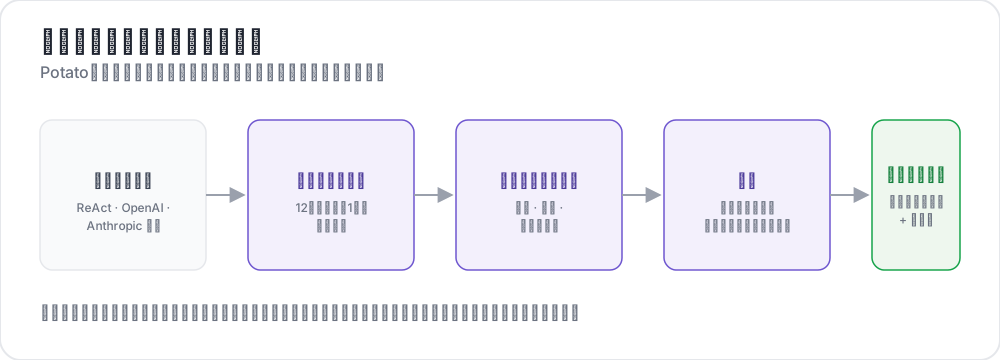 生のトレースから構造化された判定へ
このガイドでは、Webを検索して質問に答えるReActスタイルのエージェントを対象にパイプラインを構築します。設定はPotato 2.9.1で確認済みです。
pip install --upgrade potato-annotationステップ1:トレースを変換する
Potatoには15個のトレースコンバーターが登録されており、CLIで説明付きの一覧を表示できます。
python -m potato.trace_converter --list-formats一覧に含まれるのは react、openai、anthropic、langchain、langfuse、multi_agent、mcp、otel、atif、webarena、web_agent、swebench、swe_agent_trajectory、claude_code、aider です。LangSmithのラン出力は langchain を、CrewAI、AutoGen、LangGraphのログは multi_agent を通します。
react コンバーターは、各ステップが thought、action、observation キーを持つトレースを読み込みます。
{
  "id": "trace_001",
  "task": "What is the capital of Australia and what is its population?",
  "steps": [
    {"thought": "I need the capital of Australia and then its population.",
     "action": "search('capital of Australia')",
     "observation": "Canberra is the capital city of Australia."},
    {"thought": "Now I need Canberra's population.",
     "action": "search('Canberra population 2025')",
     "observation": "Canberra has a population of approximately 467,000 as of 2025."},
    {"thought": "I have both pieces of information.",
     "action": "finish('Canberra, approximately 467,000')"}
  ],
  "metadata": {"agent": "GPT-4", "tokens": 2340}
}
ファイルの変換はコマンド1つで済みます。
python -m potato.trace_converter \
  --input raw_traces.json \
  --input-format react \
--output data/traces.jsonlどのコンバーターが合うかわからない場合は、--input-format の代わりに --auto-detect を渡すと、レジストリがフィールドのシグネチャからコンバーターを選びます。フォーマットがわかったら明示的に指定してください。検出は最初に一致したコンバーターを採用し、複数のフォーマットが同じフィールドを持つことがあるためです。
どのコンバーターも同じ正規形式で出力します。1つの設定が複数のフレームワークで使えるのはこのためです。各行には id、task_description、conversation が含まれ、conversation は speaker と text を持つターンのリストです。agent_name、metadata_table、screenshots を持っているコンバーターは、それらも出力します。
{
  "id": "trace_001",
  "task_description": "What is the capital of Australia and what is its population?",
  "agent_name": "GPT-4",
  "metadata_table": [{"Property": "Steps", "Value": "3"},
                     {"Property": "tokens", "Value": "2340"}],
  "conversation": [
    {"speaker": "Agent (Thought)", "text": "I need the capital of Australia and then its population."},
    {"speaker": "Agent (Action)", "text": "search('capital of Australia')"},
    {"speaker": "Environment", "text": "Canberra is the capital city of Australia."}
  ]
}
ステップ2:トレースを表示する
agent_trace 表示は各ターンをステップの種類ごとに色分けしたカードとしてレンダリングするので、アノテーターはJSONの塊ではなく実行の流れを読むことになります。
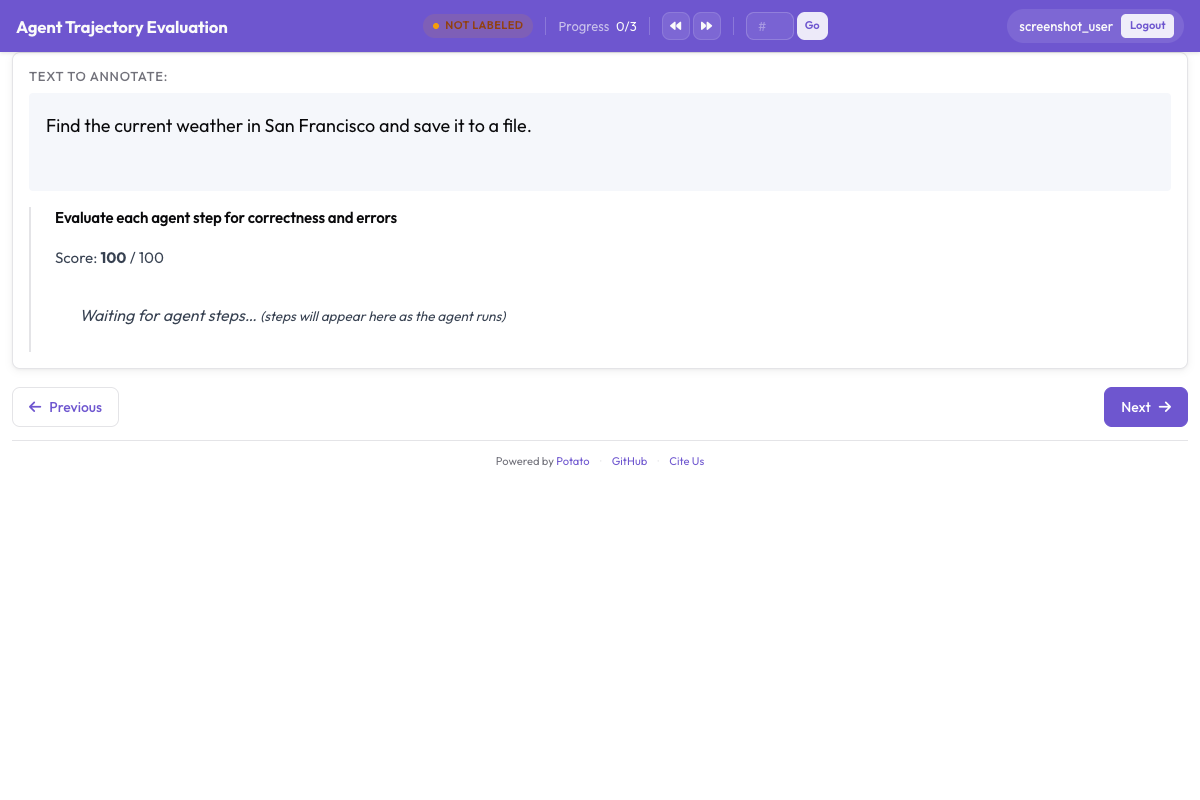
instance_display は、ページに何をどの順序で表示するかを決めます。タスク説明を最上部に置くのは、エージェントが何を求められたかを知らなければどのステップも意味をなさないからです。メタデータの表はその下に、コンパクトなスプレッドシートフィールドとして置きます。
instance_display:
  layout:
    direction: vertical
    gap: 16px

  fields:
    - key: task_description
      type: text
      label: "Task"

    - key: metadata_table
      type: spreadsheet
      label: "Trace Info"
      display_options:
        compact: true
        max_height: 120

    - key: conversation
      type: agent_trace
      label: "Agent Trace"
      span_target: true
      display_options:
        show_step_numbers: true
        show_summary: true
        collapse_observations: true
        step_type_colors:
          thought: "#e8f4fd"
          action: "#fff3e0"
          observation: "#e8f5e9"
オブザベーションを折りたたんでおくと、長い検索結果がトレースの残りを画面の外へ押し出すことがなくなります。完全な検索結果を十数件含むトレースはほとんどがスクロールになり、アノテーターは実行のどこを見ているのか見失ってしまいます。同じフィールドに span_target: true を設定すると、スパンスキーマでターン内のハルシネーションによる主張の正確な語句をマークできます。これはステップ全体を誤りとマークするより細かい記録になります。
ステップ3:トレースレベルの判定
トレース全体は3つの質問でカバーします。タスクの成功は最も重要な数値です。回答の正確性は、まずいやり方でたどり着いた正解と不正解とを区別します。効率は、どちらも成功した2つのエージェントを見分けるものです。
annotation_schemes:
  - annotation_type: radio
    name: task_success
    description: "Did the agent complete the task?"
    labels:
      - name: "Success"
        tooltip: "Fully completed correctly"
      - name: "Partial success"
        tooltip: "Completed with errors or omissions"
      - name: "Failure"
        tooltip: "Not completed"
    label_requirement:
      required: true
    sequential_key_binding: true

  - annotation_type: radio
    name: answer_correctness
    description: "Is the agent's final answer factually correct?"
    labels:
      - name: "Correct"
      - name: "Partially correct"
      - name: "Incorrect"
      - name: "Cannot determine"
    label_requirement:
      required: true

  - annotation_type: likert
    name: efficiency
    description: "Did the agent reach the answer without wasted steps?"
    size: 5
    min_label: "Many unnecessary steps"
    max_label: "No wasted steps"

  - annotation_type: text
    name: evaluator_notes
    description: "Anything the ratings above do not capture"
    multiline: true
    rows: 3
「Cannot determine」には置くだけの理由があります。これがないと、回答を確認する手段のないアノテーターは推測するか不正解とマークするしかなく、どちらを選んでも最も重視する数値にノイズが入ります。
ステップ4:ステップごとの判定
trajectory_eval は各ステップを専用のコントロール付きのカードとしてレンダリングし、正確性のラベル、エラー分類、重大度を3つではなく1つのスキーマにまとめて持ちます。steps_key にはステップを保持するフィールド(変換済みトレースでは conversation)を、step_text_key には各ステップ内で表示すべきキーを指定します。
annotation_schemes:
  - annotation_type: trajectory_eval
    name: step_evaluation
    description: "Mark each step and classify anything that went wrong"
    steps_key: conversation
    step_text_key: text
    correctness_options:
      - correct
      - partially_correct
      - incorrect
      - unnecessary
    error_types:
      - name: reasoning
        subtypes:
          - logical_error
          - factual_error
          - planning_error
      - name: execution
        subtypes:
          - wrong_tool
          - wrong_args
          - api_error
      - name: termination
        subtypes:
          - premature_stop
          - redundant_step
    severities:
      - name: minor
        weight: -1
      - name: major
        weight: -5
      - name: critical
        weight: -10
    show_score: true
    max_score: 100
重大度の重みは、マークされたステップのリストをトレースごとに比較可能な1つの数値に変換します。デフォルトはそのまま受け入れるより変更する価値があります。重みは、そのタスクにとって重大なエラーが軽微なエラーよりどれだけ悪いかを表すもので、安全性の評価では検索タスクよりもこの比率がはるかに大きくなります。
unnecessary を incorrect と分けておくことも、意図的に決めるべきもう1つの判断です。無駄なステップはトークンと時間を消費しますが、エラーは持ち込みません。この2つをまとめてしまうと、迷走するエージェントと誤っているエージェントの違いが見えなくなります。
ステップ5:完全な設定
ここまでの内容を1つのファイルにまとめると次のようになります。
annotation_task_name: "ReAct Agent Evaluation"
task_dir: "."
output_annotation_dir: "output/"

data_files:
  - "data/traces.jsonl"

item_properties:
  id_key: id
  text_key: task_description

instance_display:
  layout:
    direction: vertical
    gap: 16px
  fields:
    - key: task_description
      type: text
      label: "Task"
    - key: metadata_table
      type: spreadsheet
      label: "Trace Info"
      display_options:
        compact: true
        max_height: 120
    - key: conversation
      type: agent_trace
      label: "Agent Trace"
      span_target: true
      display_options:
        show_step_numbers: true
        show_summary: true
        collapse_observations: true

annotation_schemes:
  - annotation_type: radio
    name: task_success
    description: "Did the agent complete the task?"
    labels:
      - name: "Success"
      - name: "Partial success"
      - name: "Failure"
    label_requirement:
      required: true
    sequential_key_binding: true

  - annotation_type: radio
    name: answer_correctness
    description: "Is the agent's final answer factually correct?"
    labels:
      - name: "Correct"
      - name: "Partially correct"
      - name: "Incorrect"
      - name: "Cannot determine"
    label_requirement:
      required: true

  - annotation_type: likert
    name: efficiency
    description: "Did the agent reach the answer without wasted steps?"
    size: 5
    min_label: "Many unnecessary steps"
    max_label: "No wasted steps"

  - annotation_type: text
    name: evaluator_notes
    description: "Anything the ratings above do not capture"
    multiline: true
    rows: 3

  - annotation_type: trajectory_eval
    name: step_evaluation
    description: "Mark each step and classify anything that went wrong"
    steps_key: conversation
    step_text_key: text
    correctness_options: [correct, partially_correct, incorrect, unnecessary]
    error_types:
      - name: reasoning
        subtypes: [logical_error, factual_error, planning_error]
      - name: execution
        subtypes: [wrong_tool, wrong_args, api_error]
      - name: termination
        subtypes: [premature_stop, redundant_step]
    severities:
      - name: minor
        weight: -1
      - name: major
        weight: -5
      - name: critical
        weight: -10
    show_score: true
    max_score: 100

export_annotation_format: jsonlサーバーを起動し、http://localhost:8000 を開きます。
potato start config.yaml -p 8000アノテーションセッションの様子
ページにはタスク、トレース情報の表、ステップカードが表示されます。ステップごとのコントロールは各カードに付き、トレースレベルのスキーマはトレースの下に表示されます。アノテーターが作業する順序は、見た目以上に重要です。先にステップを評価してからトレースを評価すると、全体の判定は実行が実際に何をしたかに基づいたものになります。一方、先に成功を評価すると、その後のステップの判定すべてがその印象に引きずられがちです。
アノテーター向けの指示には、3つの習慣を書いておく価値があります。要約行を信用せず、折りたたまれたオブザベーションを展開すること。検索結果の読み違いは、筋が通って見える誤答の最もよくある原因です。データセットに正解がある場合は、タスクの成功を評価する前に最終回答を正解と照合すること。後のステップを見て前のステップがすでに誤っていたとわかったら、ステップタイムラインを使ってそのステップに戻ること。
ステップ6:エクスポートと分析
JSONLエクスポーターは annotations.jsonl を出力し、インスタンスとアノテーターの組ごとに1レコードを書き込みます。
python -m potato.export --config config.yaml --format jsonl --output ./export/各レコードには instance_id、user_id、labels、spans、links が含まれ、スキーマの回答は labels の下にスキーマ名をキーとして格納されます。
import json
import pandas as pd

records = [json.loads(line) for line in open("export/annotations.jsonl")]

df = pd.DataFrame([
    {"trace": r["instance_id"], "annotator": r["user_id"], **r["labels"]}
    for r in records
])

print(df["task_success"].value_counts())
数百件を超えるトレースを扱う場合は、代わりにParquetにエクスポートし、ファイルをそのままクエリします。Parquetエクスポートは instance_id、user_id、そしてアノテーションスキーマごとに1列を持つ annotations.parquet を出力するので、スキーマ名は値ではなく列になります。
python -m potato.export --config config.yaml --format parquet --output ./export/import duckdb
print(duckdb.sql("""
SELECT task_success, COUNT(*) AS n
FROM 'export/annotations.parquet'
GROUP BY task_success
ORDER BY n DESC
"""))最初に読むべきはステップレベルの判定です。トレース全体でエラーのサブタイプを数えると、エージェントに体系的な失敗が1つあるのか、無関係な失敗が長く続いているのかがわかります。的を絞った修正に値するのは前者だけです。
ステップ7:アノテーターの追加と資格認定フェーズ
エージェント評価は主観的な要素が大きいため、トレースごとに1つの評価しかないのは誤差範囲のない測定と同じです。トレースごとに3人のアノテーターを割り当てれば一致度の数値が得られ、ランダム割り当てにすれば、重複がたまたまファイルの先頭にあるトレースに集中するのを防げます。
num_annotators_per_item: 3
assignment_strategy: random
資格認定フェーズは、エラー分類を理解していないアノテーターが丸一日それを一貫性なく適用してしまう前に見つけ出します。トレーニングブロックは、合格するまで正解がわかっているトレースで練習させます。
training:
  enabled: true
  data_file: "data/training_traces.jsonl"
  passing_criteria:
    min_correct: 4
  allow_retry: true
  failure_action: "repeat_training"
その他のエージェントフレームワーク
表示とスキーマはフレームワークが変わっても同じで、変わるのはコンバーターだけです。OpenAI Chat Completionsのトレースと、tool_use ブロックを含むAnthropicのメッセージにはそれぞれ専用のコンバーターがあり、CrewAI、AutoGen、LangGraphのマルチエージェントログは1つのコンバーターを共有します。
python -m potato.trace_converter --input runs.json --input-format openai --output data/traces.jsonl
python -m potato.trace_converter --input runs.json --input-format anthropic --output data/traces.jsonl
python -m potato.trace_converter --input runs.json --input-format multi_agent --output data/traces.jsonlコーディングエージェントには別の表示が必要です。JSON文字列として読むdiffはレビューのしようがないからです。coding_trace 表示はunified diffをファイルツリー付きでレンダリングし、長いターミナル出力を折りたたみます。
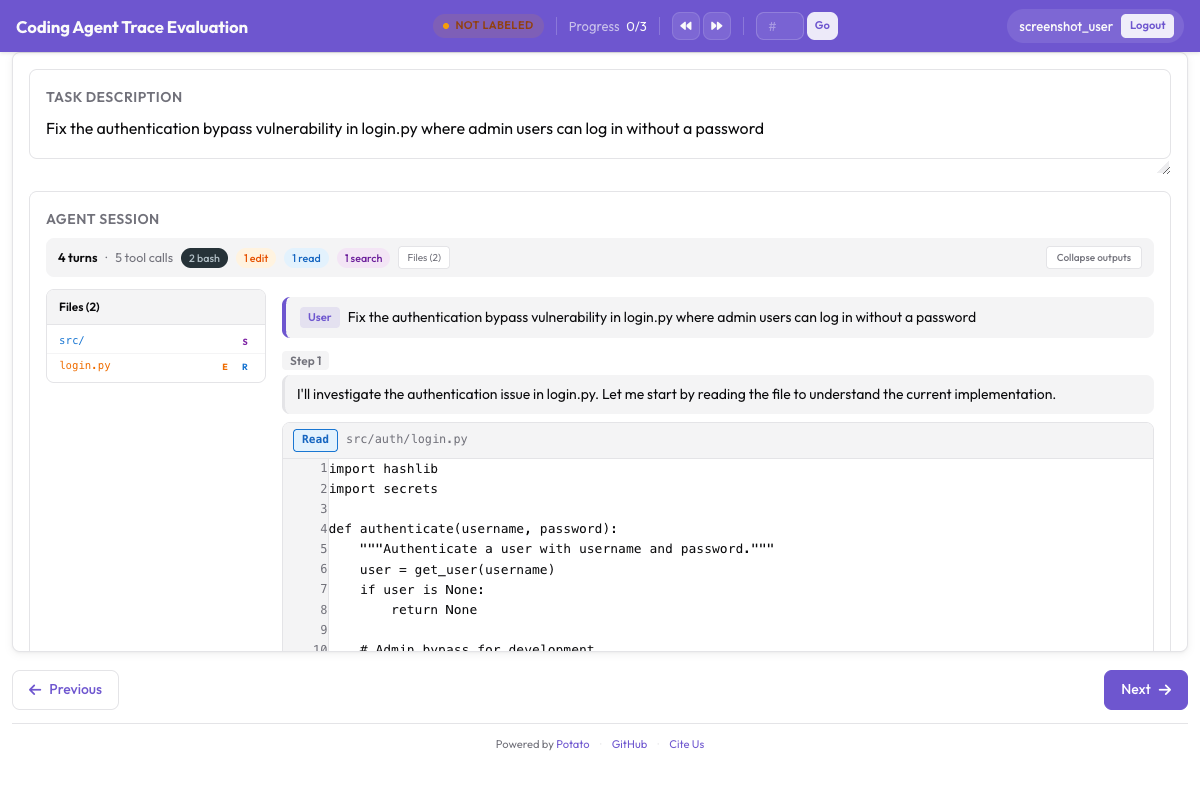
instance_display:
  fields:
    - key: structured_turns
      type: coding_trace
      label: "Agent Session"
      display_options:
        show_file_tree: true
        diff_view: unified
        collapse_long_outputs: true
        max_output_lines: 50
Webブラウジングエージェントには、スクリーンショット、アクションのオーバーレイ、それらを移動するためのフィルムストリップが必要です。
instance_display:
  fields:
    - key: steps
      type: web_agent_trace
      label: "Agent Browsing Trace"
      display_options:
        show_overlays: true
        show_filmstrip: true
        show_thought: true
screenshot_max_width: 900オーバーレイの形式と新しいトレースを記録する作成モードについては、Webブラウジングエージェントのアノテーションで説明しています。
これらすべての実装の詳細は、エージェント評価ガイドとエージェントトレースのドキュメントを参照してください。初めて評価をセットアップする場合は、トレースを10件変換し、上の設定を実行して、ガイドラインを書く前に自分でアノテーションしてみてください。必要になるエラー分類は、たいてい事前に書いたであろうものとは違うからです。
参考資料
- エージェント型アノテーションのドキュメント
- Webブラウジングエージェントのアノテーション
- Solo Mode(エージェント型アノテーションを人間とLLMの協調評価と組み合わせる場合)
- Best-Worst Scaling(エージェントの出力を比較によってランク付けする場合)
- Parquetエクスポート(大規模な分析向け)