多模态智能体评估
评估在文本之外采取行动的智能体:computer-use 与 GUI 智能体、语音助手、视频与文档智能体。Potato 为带点击定位的 GUI 轨迹、全双工语音时间线、带实时 IoU 的视频时间定位、语音转录错误标记、交错式多模态推理以及表格网格结构提供专门构建的 schema。
智能体越来越多地在文本之外的模态中行动:它们驱动 GUI、观看视频、进行语音对话。每种模态都需要一个纯文本控件无法提供的审查界面,比如一张带智能体点击位置的截图、一条双轨语音时间线、一个带黄金区间的视频拖动条。 Potato 为这些轨迹提供专门构建的标注 schema,与它现有的图像、音频和视频视图并列。
每个 schema 在渲染时都从轨迹中推导出其步骤、回合或片段,并且每个都在 examples/agent-traces/ 下附带一个可运行的示例。
GUI/computer-use 轨迹(gui_trajectory)
逐步评估一个 computer-use、GUI 或 OS 智能体(OSWorld,NeurIPS 2024;ScreenSpot-Pro;AndroidWorld)。每一步展示智能体所看到的截图和它所采取的动作;标注者对动作做出裁定(正确/错误元素/错误动作/幻觉)。当某一步带有点击坐标时,截图上的一个定位标记会显示该点击是否落在了正确的元素上。
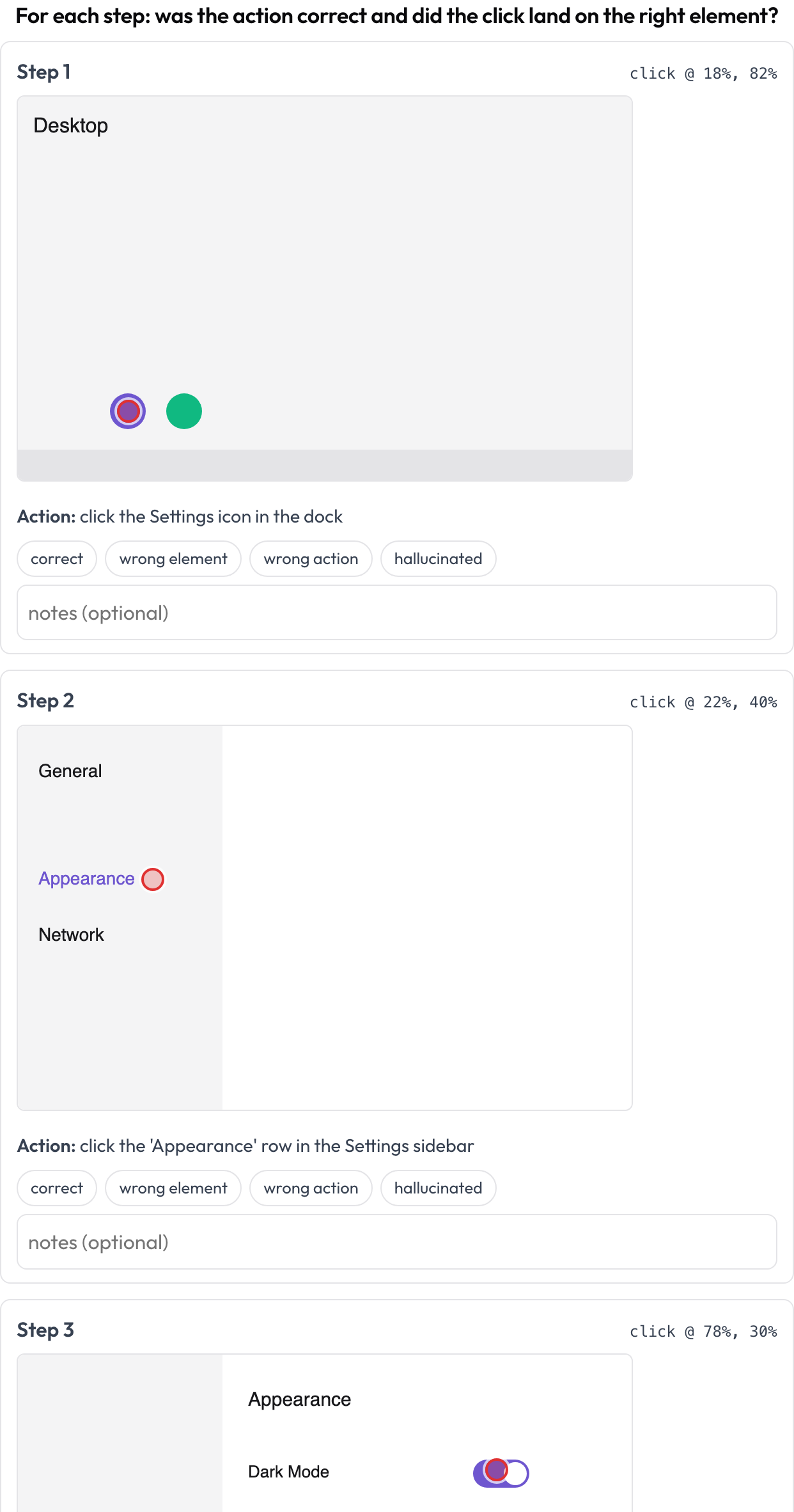 Review each computer-use step: action correctness plus click-grounding on the screenshot
annotation_schemes:
  - annotation_type: gui_trajectory
    name: gui_review
    description: "For each step: was the action correct and did the click land right?"
    steps_key: steps
    screenshot_key: screenshot   # field on each step holding an image URL / data-URI
    action_key: action           # field holding the action text
    coord_space: normalized      # normalized (0..1) | pixels — for the x/y grounding marker
    verdict_options: [correct, wrong_element, wrong_action, hallucinated]
每一步可提供 screenshot、action,以及可选的 x/y(或嵌套的 click: {x, y})。存储为一个 {index, step, verdict, notes} 列表。
语音/全双工交互(voice_interaction)
对一段语音的人↔智能体对话标注其轮流发言和打断(barge-in)处理(Full-Duplex-Bench,2025)。一条双轨时间线(用户泳道加智能体泳道)按起止时间放置每个回合,并高亮重叠区域,即两位说话者同时说话之处。标注者对每个重叠进行分类(智能体应当回应/应当继续/附和/不确定)并对整体轮流发言进行评分;提供时,源音频会内联播放。
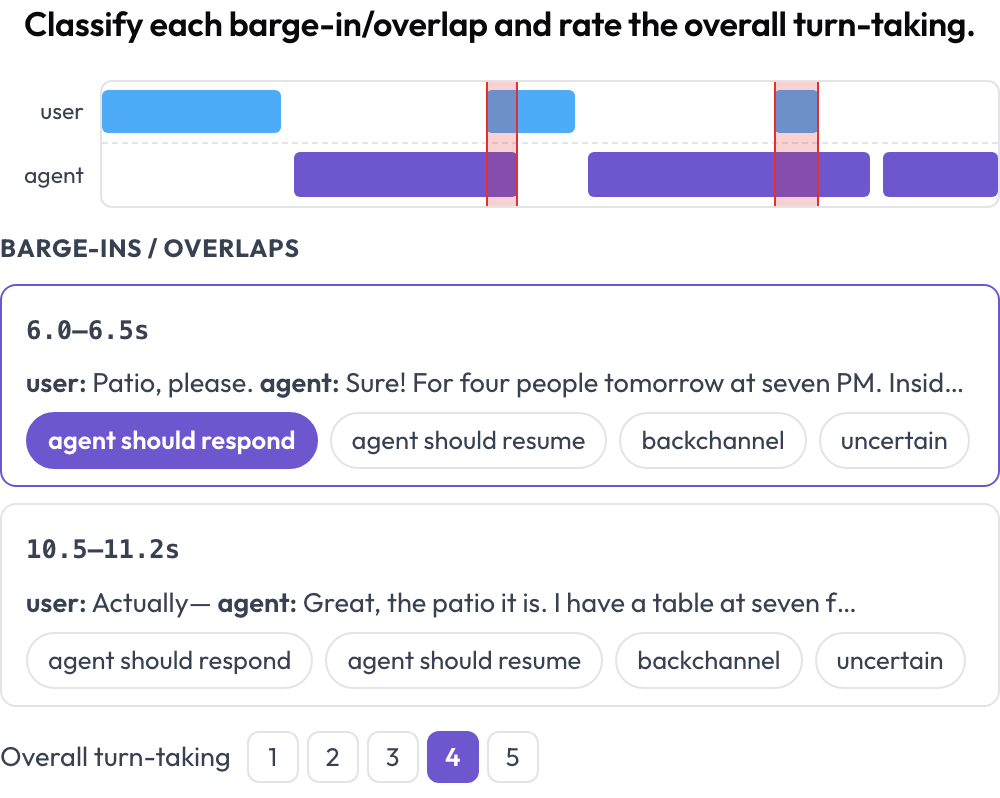 A dual-track voice timeline with barge-in detection and turn-taking scoring
annotation_schemes:
  - annotation_type: voice_interaction
    name: turn_taking
    description: "Classify each barge-in/overlap and rate the overall turn-taking."
    turns_key: turns           # list of {speaker, start, end, text} (seconds)
    speaker_key: speaker
    user_speakers: [user, human, caller]   # everything else is treated as the agent
    overlap_labels: [agent_should_respond, agent_should_resume, backchannel, uncertain]
    rating_scale: 5
    # audio_key: audio         # optional per-instance audio URL to enable the player
不同说话者回合之间的重叠在渲染时计算得出。存储为 {"overlaps": {idx: label}, "rating": int}。
视频时间定位(temporal_grounding)
在视频中标出事件时间区间以进行时间定位评估(TimeScope,2025;ET-Bench)。对于每个事件提示,标注者设定黄金 [start, end],方式是捕获播放头位置或输入秒数。当数据带有模型预测的区间时,一个实时 IoU 和一条两条棒的迷你时间线(预测 vs. 黄金)会随你调整而更新。这是为"预测 vs. 黄金"的定位评分专门构建的,区别于通用的片段标注。
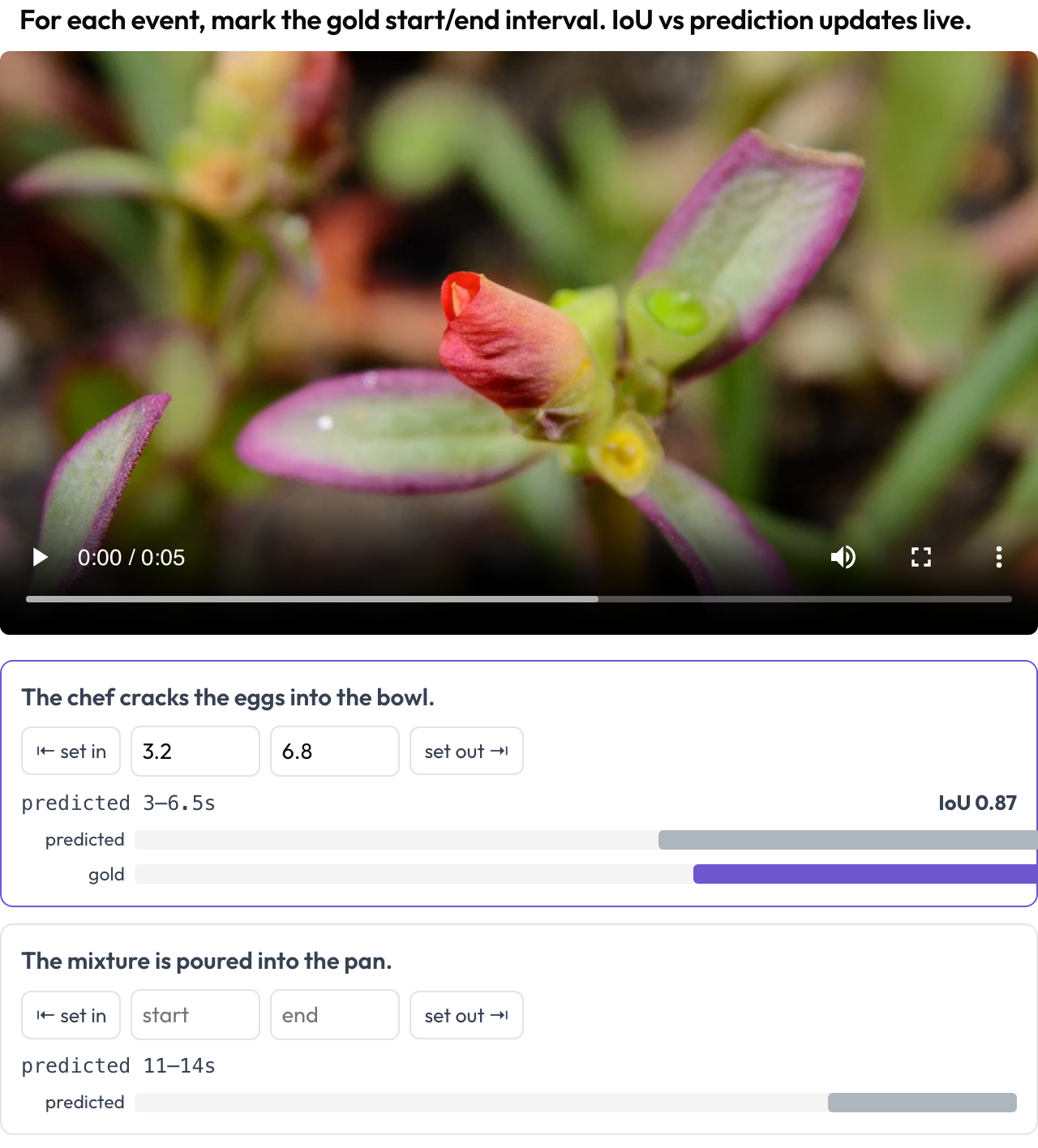 Mark gold event intervals on video with a live IoU vs. the model's prediction
annotation_schemes:
  - annotation_type: temporal_grounding
    name: grounding
    description: "Mark the gold start/end interval for each event. IoU vs prediction updates live."
    video_key: video           # per-instance video URL
    events_key: events         # list of {prompt, predicted: {start, end}} (predicted optional)
    # duration: 120            # optional fixed timeline scale (else inferred from the video)
存储为 {"events": {idx: {start, end}}}。
对齐转录的语音错误(speech_transcript)
对一段时间对齐的语音转录逐片段标注 ASR/TTS 与语音质量错误(Speak & Improve,2025)。每个片段 {start, end, text, speaker?} 是一张显示其时间戳和文本的卡片;标注者标记错误(ASR 错误/TTS 瑕疵/发音错误/不流畅)并可输入修正后的转录。这是对 voice_interaction 中轮流发言视图的片段级补充。
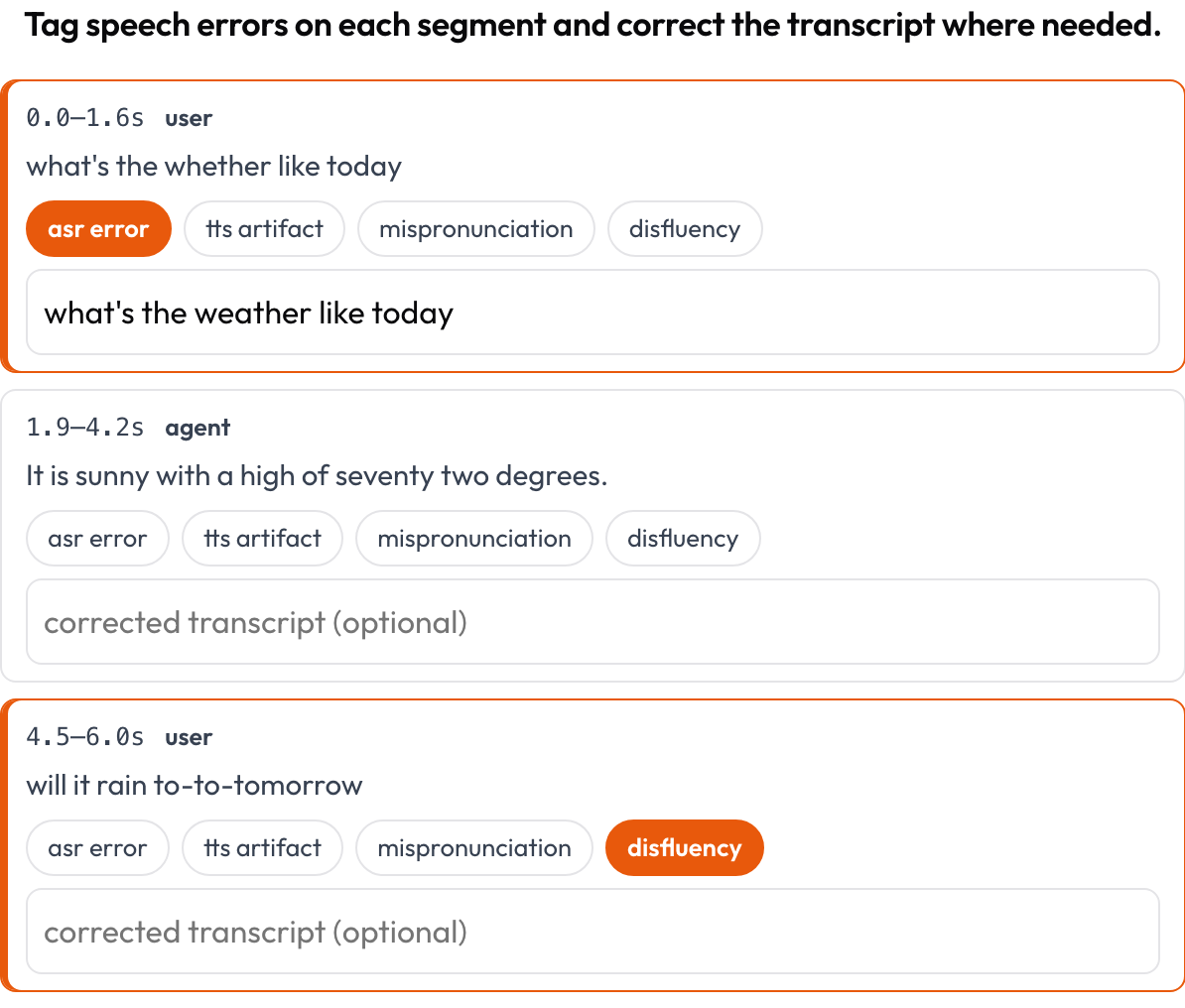 Tag ASR/TTS/pronunciation errors per segment and correct the transcript inline
annotation_schemes:
  - annotation_type: speech_transcript
    name: speech_errors
    description: "Tag speech errors on each segment and correct the transcript where needed."
    segments_key: segments       # list of {start, end, text, speaker?}
    error_types: [asr_error, tts_artifact, mispronunciation, disfluency]
    allow_correction: true
    # audio_key: audio           # optional per-item audio URL to enable the player
存储为一个 {index, start, end, errors, correction} 列表。
交错式多模态推理(multimodal_reasoning)
逐步对一段交错的文本 ↔ 图像 ↔ 工具 ↔ 动作推理轨迹进行评分(Multimodal RewardBench 2,2025;Zebra-CoT)。每一步是一个有类型的块,按其类型内联渲染;标注者评判每一步的连贯性,即推理是否从图像和先前步骤中推导而来,还是视觉内容是幻觉?
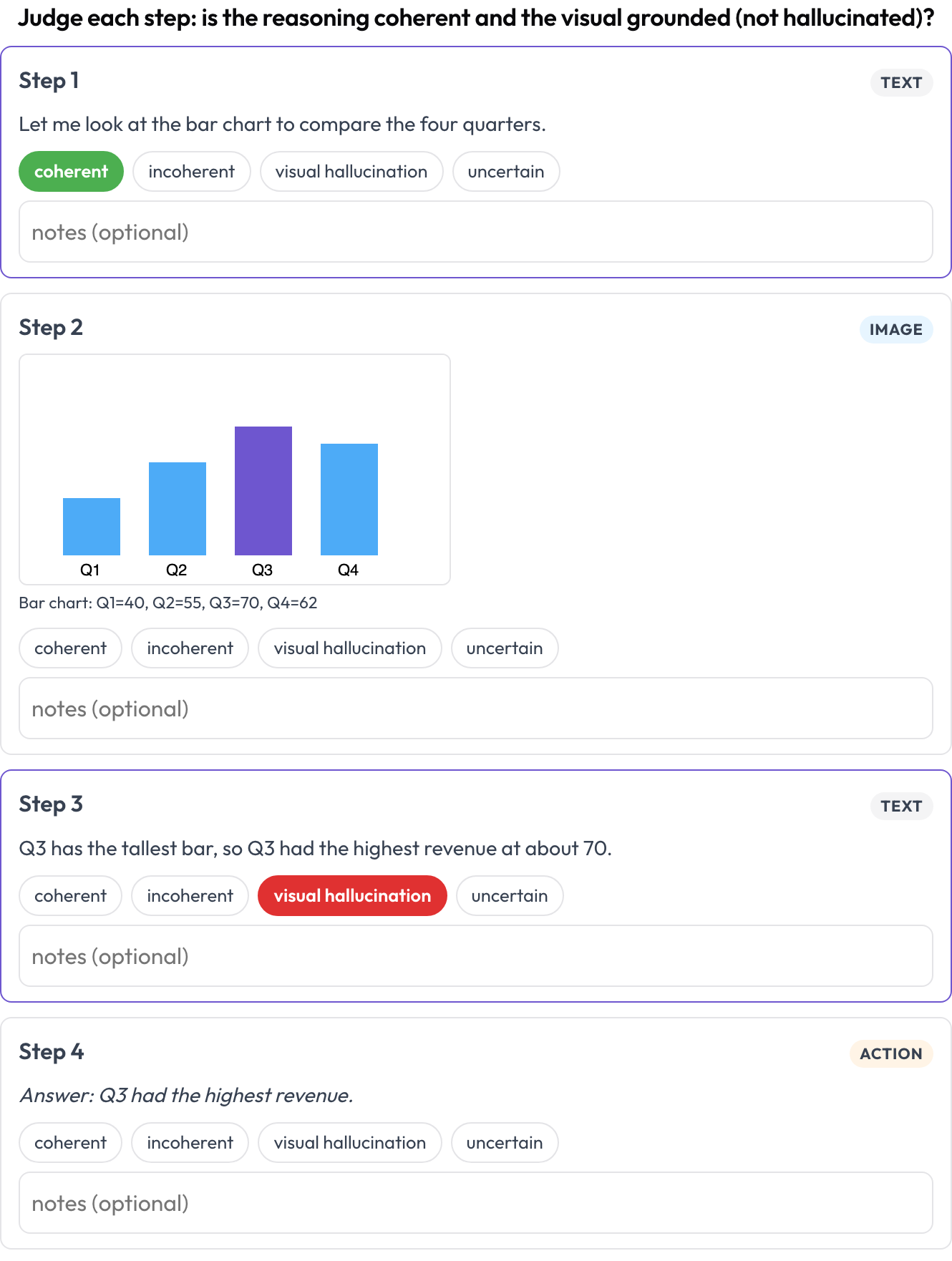 Rate each step of a text-image-tool reasoning trace for coherence and visual hallucination
annotation_schemes:
  - annotation_type: multimodal_reasoning
    name: reasoning_review
    description: "Judge each step: coherent reasoning and grounded visuals?"
    steps_key: steps
    type_key: type     # each step's 'type': text | image | tool | action (inferred if absent)
    verdict_options: [coherent, incoherent, visual_hallucination, uncertain]
每一步可携带 text/content、image/image_url(+caption),或 tool/args。存储为一个 {index, step, type, verdict, notes} 列表。
表格网格结构(table_grid)
标注一张表格图像的单元格结构,这是普通边界框无法捕捉的文档专属部分(OmniDocBench,CVPR 2025;RealHiTBench)。标注者设定网格尺寸并点击单元格以标记其角色(数据/列表头/行表头/空)。逐页的区域框已由对每一页运行图像标注所覆盖,因此该 schema 聚焦于那些框无法表达的结构。
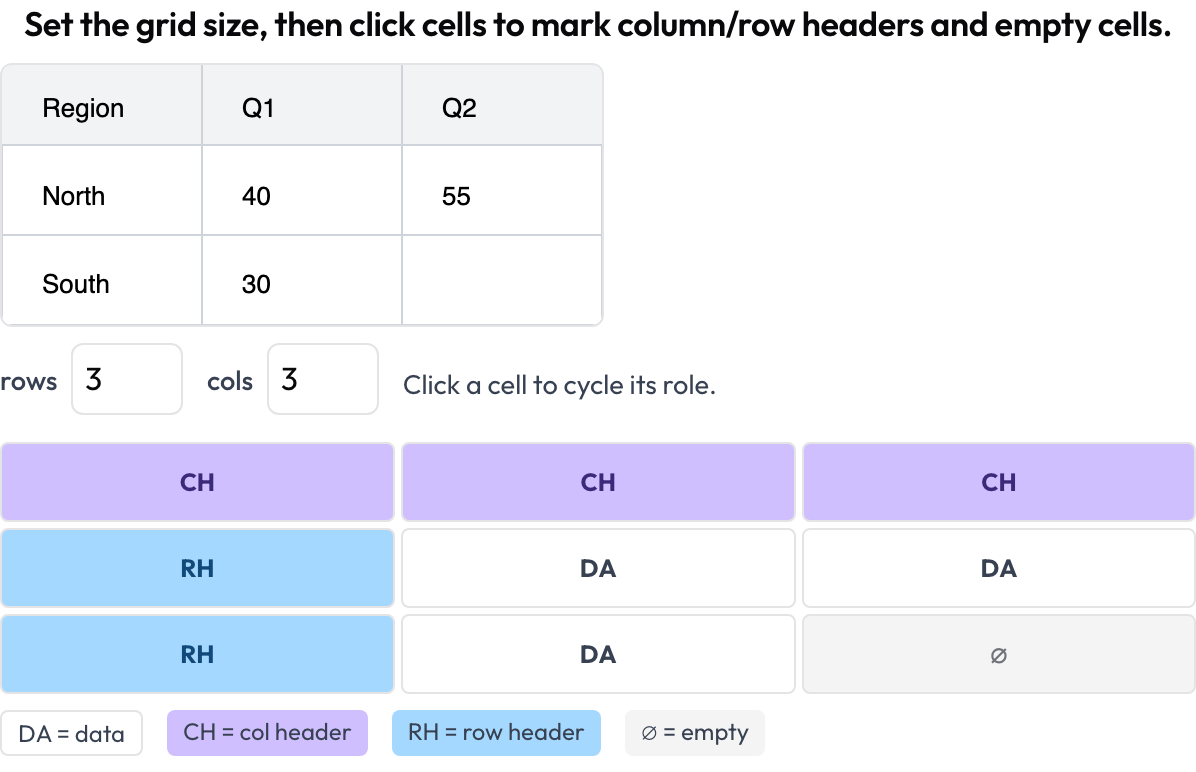 Annotate document-table cell structure: column and row headers, data, and empty cells
annotation_schemes:
  - annotation_type: table_grid
    name: structure
    description: "Set the grid size, then click cells to mark headers and empty cells."
    image_key: image           # per-instance table image URL / data-URI
    rows_key: rows             # optional initial dims from the data
    cols_key: cols
    roles: [data, col_header, row_header, empty]   # click cycles through these
存储为 {rows, cols, cells: {"r,c": role}},只保留非 data 的单元格。
相关内容
- 多智能体团队评估 — 交互图、交接与团队评分卡
- 网页智能体评估 — 截图与动作型网页智能体
- 如何评估 AI 智能体 — 智能体评估的各个层级
- 智能体标注 — 轨迹视图配置与数据接入
如需实现细节,请参阅源文档。