实例显示
配置 instance_display 块,控制 Potato 任务中文本、图像、音频和视频内容在标注控件旁的显示方式。
v2.1.0 新增
实例显示把向标注者展示什么内容和收集什么标注分开,因此任意组合的内容类型(图像、视频、音频、文本)都可以和任意标注方案(单选按钮、复选框、片段等)并列出现。
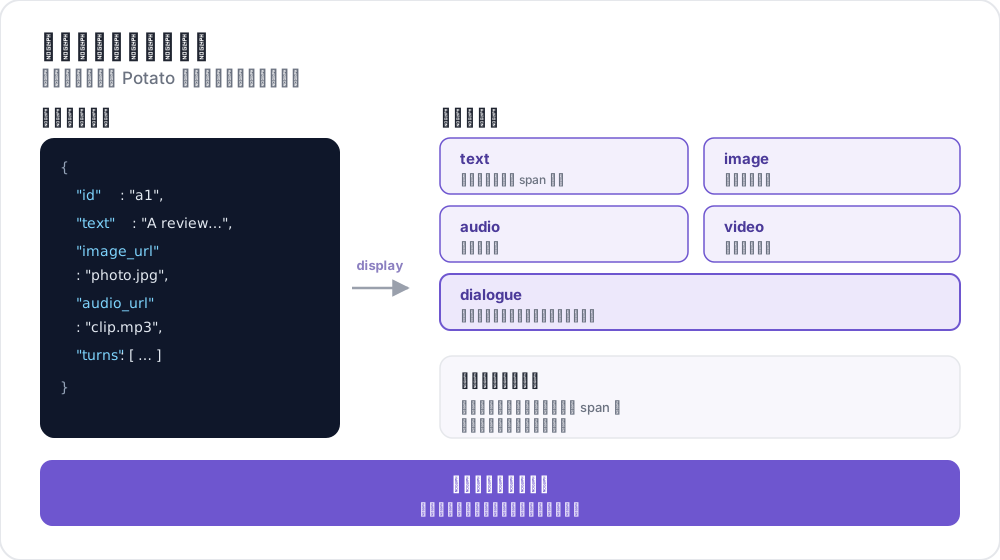 实例显示如何映射字段
为什么使用实例显示?
要显示一张图像并用单选按钮对它分类,把图像写在 instance_display 下,把问题写在 annotation_schemes 下。image_annotation 方案的用途是在图像上绘制,而不是显示图像;早先那种加一个 min_annotations: 0 的方案来凑合的写法,等于声明了一个本来就没打算让人做的绘制任务。
下面就是那种已弃用的凑合写法:
annotation_schemes:
  - annotation_type: image_annotation
    name: image_display
    description: "Unused, present only to display the image"
    min_annotations: 0
    tools: [bbox]
    labels: [unused]
  - annotation_type: radio
    name: category
    description: "What category is this?"
    labels: [A, B, C]
把图像声明为内容之后,方案列表就只用来描述真正要问的问题:
instance_display:
  fields:
    - key: image_url
      type: image

annotation_schemes:
  - annotation_type: radio
    name: category
    description: "What category is this?"
    labels: [A, B, C]
基本配置
在 YAML 配置中加入 instance_display 部分:
instance_display:
  fields:
    - key: "image_url"           # Field name in your data JSON
      type: "image"              # Content type
      label: "Image to classify" # Optional header
      display_options:
        max_width: 600
        zoomable: true

  layout:
    direction: "vertical"        # vertical or horizontal
    gap: "20px"
每个字段指定数据文件中的一个键,以及 Potato 渲染它所用的显示类型。显示类型不认识的选项名会报配置错误,而不是被悄悄忽略,错误信息会给出最接近的真实选项名。
支持的显示类型
Potato 提供 27 种显示类型。“片段目标”一列说明该类型能否通过下文介绍的 span_target 标志承载片段标注。
| 类型 | 描述 | 片段目标 |
|---|---|---|
text | 纯文本内容 | 是 |
html | 经过清理的 HTML 内容 | 否 |
image | 带缩放的图像显示 | 否 |
video | 视频播放器 | 否 |
audio | 音频播放器 | 否 |
audio_dialogue | 与音频同步的分说话人文字稿,可逐轮播放 | 是 |
gallery | 可滚动的图像画廊,带说明文字 | 否 |
depth_map | 深度图,带远近窗口、色彩映射和米数读数 | 否 |
dialogue | 对话轮次 | 是 |
conversation_tree | 对话树,分支节点可折叠 | 否 |
multi_agent_discussion | 多智能体讨论,带智能体图例和筛选 | 是 |
interactive_chat | 交互式智能体对话,附交互结束后的轨迹 | 是 |
pairwise | 并排比较 | 否 |
code | 语法高亮的源代码 | 是 |
spreadsheet | 表格数据(Excel/CSV),按行或按单元格标注 | 否 |
document | 富文档(Word、Markdown、HTML) | 是 |
pdf | 带页面控件的 PDF 文档 | 否 |
agent_trace | 智能体轨迹,显示为纵向的步骤卡片 | 否 |
coding_trace | 编程智能体轨迹,带差异、终端块和文件树 | 是 |
eval_trace | 一条轨迹分三栏显示:推理、函数调用、最终答案 | 是 |
cot_trace | 长思维链轨迹,带固定的进度导轨 | 否 |
web_agent_trace | 网页智能体轨迹,带截图和点击叠加层 | 否 |
live_agent | 实时 AI 智能体查看器,带实时截图 | 否 |
live_coding_agent | 实时编程智能体查看器,带实时流式输出 | 否 |
image_region | 大图中的一个矩形区域(如一行文字),在浏览器中裁剪显示(数字人文) | 否 |
protein_structure | 在 3Dmol.js 或 Mol* 中显示蛋白质结构(mmCIF、BinaryCIF、PDB),可选择残基(蛋白质结构) | 否 |
genome_locus | 在 igv.js 中显示基因组位点,含参考序列、reads、变异和注释轨道(基因组位点) | 否 |
spreadsheet 和 pdf 标为“否”,是因为它们不接受 span_target 标志。两者仍各有自己的标注锚定方式:电子表格按行或按单元格标注,PDF 通过 PDF.js 的文本层标注。
每种显示类型都支持的选项
有三个选项属于 Potato 包在每个字段外面的可调整大小的容器,而不属于某一个渲染器,所以它们对每种显示类型都有效:
| 选项 | 默认值 | 描述 |
|---|---|---|
resizable | true | 把字段包在一个标注者可以拖动调整大小的容器里 |
max_height | 500 | 字段在内部开始滚动之前可以长到多高 |
min_height | 100 | 字段最矮可以被拖到多高 |
长度可以写数字,也可以写 CSS 长度,400、"400px" 和 "50vh" 都可以,只写数字表示像素。字段很短时适合设 resizable: false,因为给一行标签配一个拖拽手柄看起来像是出了错。
显示类型选项
文本显示
- key: "text"
  type: "text"
  label: "Document"
  display_options:
    collapsible: false           # Make content collapsible
    collapsed_by_default: false  # Start collapsed (needs collapsible)
    max_height: 400              # Max height in pixels before scrolling
    preserve_whitespace: true    # Preserve line breaks and spacing
collapsed_by_default 让篇幅很长的案卷先收起来,等标注者需要时再展开,而不是每一条都把问题挤到页面下方。
图像显示
- key: "image_url"
  type: "image"
  label: "Image"
  display_options:
    max_width: 800            # Max width (number or CSS string)
    max_height: 600           # Max height
    zoomable: true            # Enable zoom controls
    alt_text: "Description"   # Alt text for accessibility
    object_fit: "contain"     # CSS object-fit property
视频显示
- key: "video_url"
  type: "video"
  label: "Video"
  display_options:
    max_width: 800
    max_height: 450
    controls: true            # Show video controls
    autoplay: false           # Auto-play on load
    loop: false               # Loop playback
    muted: false              # Start muted
音频显示
- key: "audio_url"
  type: "audio"
  label: "Audio"
  display_options:
    controls: true            # Show audio controls
    autoplay: false
    loop: false
    show_waveform: false      # Show waveform visualization
对话显示
- key: "conversation"
  type: "dialogue"
  label: "Conversation"
  display_options:
    alternating_shading: true    # Alternate background colors
    speaker_extraction: true     # Extract "Speaker:" from text
    show_turn_numbers: false     # Show turn numbers
max_height: 600 # Cap the height and scroll inside it否则长对话会把标注表单挤出页面底部,max_height 会让容器内部滚动,而不是把内容裁掉。
对话的数据格式(JSONL 文件中的每一行):
{"id": "conv_001", "conversation": ["Speaker A: Hello there!", "Speaker B: Hi, how are you?"]}或者使用结构化数据:
{"id": "conv_001", "conversation": [{"speaker": "Alice", "text": "Hello there!"}, {"speaker": "Bob", "text": "Hi, how are you?"}]}成对显示
- key: "comparison"
  type: "pairwise"
  label: "Compare Options"
  display_options:
    cell_width: "auto"          # "auto" splits the row evenly
    show_labels: true           # Show A/B labels
    labels: ["Option A", "Option B"]
    vertical_on_mobile: true    # Stack vertically on mobile
布局选项
控制多个字段的排列方式:
instance_display:
  layout:
    direction: horizontal  # horizontal or vertical
    gap: 24px              # Space between fields
当两个字段需要标注者互相对照时,例如原文和它的摘要,适合用水平方向。按顺序阅读的材料则适合上下堆叠。
片段标注支持
有九种显示类型可以作为片段标注的目标:text、dialogue、audio_dialogue、code、document、coding_trace、eval_trace、interactive_chat 和 multi_agent_discussion。把一个字段标记为片段目标:
instance_display:
  fields:
    - key: "document"
      type: "text"
      span_target: true  # Enable span annotation on this field

annotation_schemes:
  - annotation_type: span
    name: entities
    description: "Highlight named entities"
    labels: [PERSON, LOCATION, ORG]
在不支持的类型上设置 span_target 会报配置错误,错误信息会列出支持的类型。
多片段目标
可以有多个支持片段标注的文本字段:
instance_display:
  fields:
    - key: "source_text"
      type: "text"
      label: "Source Document"
      span_target: true

    - key: "summary"
      type: "text"
      label: "Summary"
      span_target: true

annotation_schemes:
  - annotation_type: span
    name: factual_errors
    description: "Mark claims in the summary that the source does not support"
    labels: [contradiction, unsupported, fabrication]
使用多个片段目标时,标注会连同所属字段一起存储:
{
  "factual_errors": {
    "source_text": [],
    "summary": [
      {"start": 45, "end": 67, "label": "unsupported"}
    ]
  }
}
偏移量按字段分别记录,因此摘要里的片段不会和原文中同一字符位置的片段混淆。
将标注方案链接到显示字段
对于媒体标注方案(image_annotation、video_annotation、audio_annotation),用 source_field 把它们链接到显示字段:
instance_display:
  fields:
    - key: "image_url"
      type: "image"

annotation_schemes:
  - annotation_type: image_annotation
    name: objects
    description: "Draw a box around each object"
    source_field: "image_url"  # Links to display field
    tools: [bbox]
labels: [person, car]当一个条目带有多张图像,或者方案应该画在它默认会找到的那个字段以外的字段上时,才需要指明字段。只有一个图像字段时,image_annotation 会自己找到它。
逐轮次对话评分
为单个对话轮次添加内联评分控件:
instance_display:
  fields:
    - key: conversation
      type: dialogue
      label: "Conversation"
      display_options:
        show_turn_numbers: true
        per_turn_ratings:
          speakers: ["Agent"]          # Only show ratings for these speakers
          schema_name: "turn_quality"  # Name for the stored annotation data
          scheme:
            type: likert
            size: 5
            labels: ["Poor", "Excellent"]
把 speakers 限制在一方,可以让评分只落在被评估的那些轮次上;当另一方是固定的用户脚本时,这正是你要的效果。评分圆圈内联显示在每个匹配轮次的下方,填充到选中的值,并以轮次索引为键存为一个 JSON 对象:
{
  "turn_quality": "{\"0\": 4, \"2\": 5, \"4\": 3}"
}
示例:图像分类
annotation_task_name: "Image Classification"

data_files:
  - data/images.json

item_properties:
  id_key: id
  text_key: image_url

task_dir: .
output_annotation_dir: annotation_output

instance_display:
  fields:
    - key: image_url
      type: image
      label: "Image to Classify"
      display_options:
        max_width: 600
        zoomable: true

    - key: context
      type: text
      label: "Additional Context"
      display_options:
        collapsible: true

annotation_schemes:
  - annotation_type: radio
    name: category
    description: "What category best describes this image?"
    labels:
      - nature
      - urban
      - people
      - objects

user_config:
  allow_all_users: true
context 字段设为可折叠,是因为它属于辅助材料。默认收起可以让图像和问题出现在同一屏上。
示例数据文件(data/images.json),JSONL 格式:
{"id": "img_001", "image_url": "https://example.com/image1.jpg", "context": "Taken in summer 2023"}
{"id": "img_002", "image_url": "https://example.com/image2.jpg", "context": "Winter landscape"}
示例:多模态标注
视频与可做片段标注的文字稿并排显示:
annotation_task_name: "Video Analysis"

data_files:
  - data/videos.json

item_properties:
  id_key: id
  text_key: transcript

task_dir: .
output_annotation_dir: annotation_output

instance_display:
  layout:
    direction: horizontal
    gap: 24px

  fields:
    - key: video_url
      type: video
      label: "Video"
      display_options:
        max_width: "45%"

    - key: transcript
      type: text
      label: "Transcript"
      span_target: true

annotation_schemes:
  - annotation_type: radio
    name: sentiment
    description: "What is the overall sentiment of this clip?"
    labels: [positive, neutral, negative]

  - annotation_type: span
    name: highlights
    description: "Highlight the passages that support your rating"
    labels:
      - key_point
      - question
      - supporting_evidence
水平布局把视频放在文字稿旁边,标注者标记一段文字时不必滚动离开它所描述的画面。
向后兼容性
- 没有
instance_display的现有配置继续照常工作 item_properties中的text_key仍作为后备使用- 通过标注方案进行的旧版媒体检测仍然有效
- 使用旧的仅显示模式时,日志中会出现弃用警告
从仅显示模式迁移
如果你之前只是用标注方案来显示内容:
之前(已弃用):
annotation_schemes:
  - annotation_type: image_annotation
    name: image_display
    description: "Unused, present only to display the image"
    min_annotations: 0
    tools: [bbox]
    labels: [unused]
之后(推荐):
instance_display:
  fields:
    - key: image_url
      type: image
延伸阅读
有关实现细节,请参阅源文档。