片段标注
在 Potato 中高亮并标记文本片段,用于命名实体识别,支持逐标签颜色、键盘快捷键、工具提示和不连续片段。
片段标注让标注者选中并标记文本的一部分,Potato 中的命名实体识别(NER)、词性标注和文本高亮任务都是这样搭建的。标签既可以写成纯字符串,也可以写成一个对象,自带 color、key_value 和 tooltip。Potato 把这三项读作每个标签的属性,所以写在方案层级的 colors、key_values 或 tooltips 映射对片段方案不起作用。
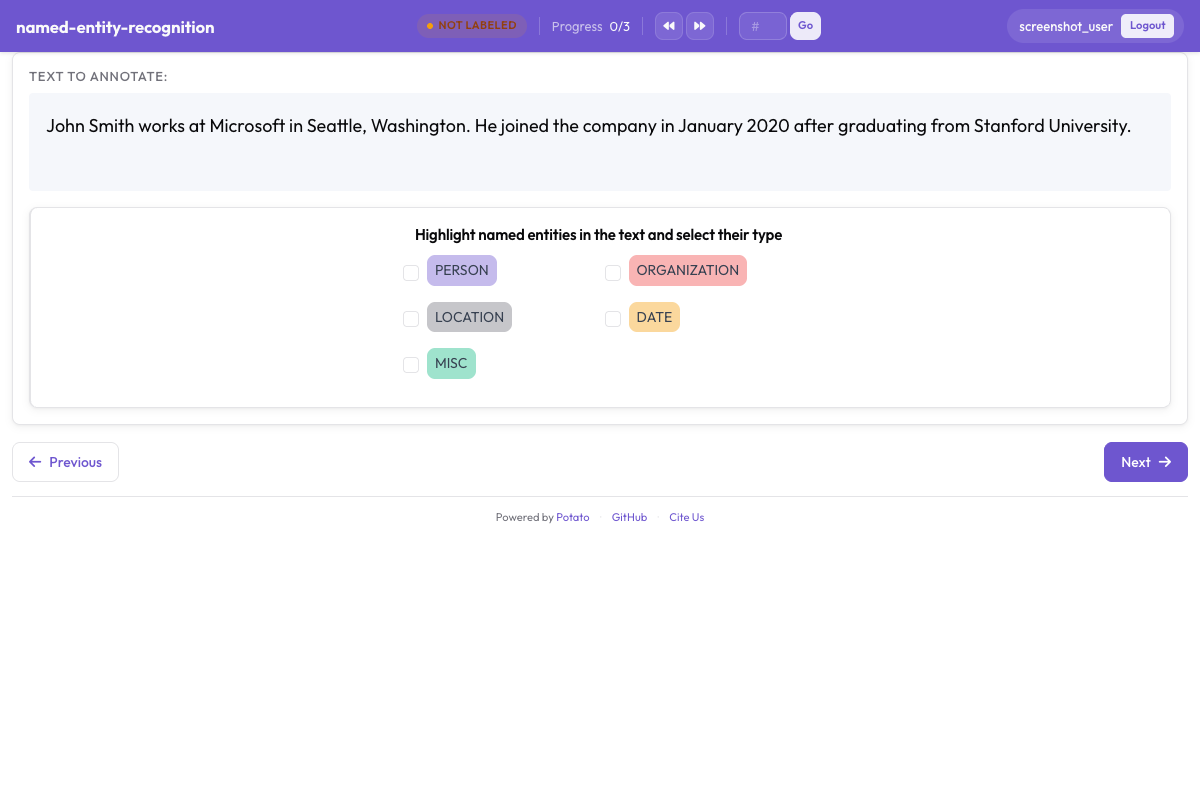 Potato 中按颜色区分实体标签的片段标注
基本配置
annotation_schemes:
  - annotation_type: span
    name: entities
    description: "Highlight named entities in the text"
    labels:
      - PERSON
      - ORGANIZATION
      - LOCATION
每个方案都必须有 description,它显示在标签按钮上方,是标注者读到的提示语,因此应当说明要做的标注判断,而不是重复方案名称。写成纯字符串的标签按列出的顺序从 Potato 调色板取色。
配置选项
实体标签
标签集是片段任务最主要的设计决定,因为召回率、一致性以及之后的每一项测量都是相对它定义的。标签数量要少到标注者不必每标一个片段就去翻指南,对多数 NER 工作来说实际上是四到八个类型。把标签加进上面的方案:
labels:
  - PERSON
  - ORGANIZATION
  - LOCATION
  - DATE
  - EVENT
颜色
Potato 按列表顺序给每个标签分配一种调色板颜色,所以只有在某组搭配确实要紧时才值得把颜色写出来,比如两个经常出现在同一句话里、不该一眼看混的类型。颜色属于标签:
annotation_schemes:
  - annotation_type: span
    name: entities
    description: "Highlight named entities in the text"
    labels:
      - name: PERSON
        color: "#3b82f6"
      - name: ORGANIZATION
        color: "#10b981"
      - name: LOCATION
        color: "#f59e0b"
- DATE取值是十六进制(#3b82f6)或 rgb(255, 0, 0)。像上面的 DATE 那样仍写成纯字符串的标签会沿用下一个调色板颜色,所以一个方案可以只为需要的标签指定颜色,其余不管。
多个方案的颜色也可以集中在一处设置,写在 ui.label_colors 下,先按方案名再按标签名作键:
ui:
  label_colors:
    entities:
      PERSON: "#3b82f6"
      ORGANIZATION: "#10b981"
写在方案自身上的 colors: 映射不是 Potato 会读的键。带这个块的方案照样用调色板颜色渲染,就像这个块不存在一样。
键盘快捷键
只要片段任务的标签多于两个,就值得启用快捷键,因为每标一个片段都要把鼠标移到按钮上的标注者,速度只有双手不离文本者的一小部分。设置 sequential_key_binding: true 会按标签列出的顺序给它们分配按键:
- annotation_type: span
  name: entities
  description: "Highlight named entities in the text"
  labels:
    - PERSON
    - ORGANIZATION
    - LOCATION
    - DATE
  sequential_key_binding: true
当一个任务在同一页面上有多个方案时,Potato 会从互不相同的按键池里给每个方案分配按键,先用数字行,再用字母上排,然后是中排,所以不同方案的快捷键不会冲突。
若要把某个标签固定到特定按键、而不是随它在列表中的位置变动,就给这个标签写一个 key_value。分配器会先满足显式的 key_value,再自动分配其余按键;助记性的按键在之后重排标签列表时仍然有效,按位置分配的则不然:
- annotation_type: span
  name: entities
  description: "Highlight named entities in the text"
  labels:
    - name: PERSON
      key_value: "p"
    - name: ORGANIZATION
      key_value: "o"
    - LOCATION
  sequential_key_binding: true
方案层级的 key_values: 映射不会被读取,把映射写成 sequential_key_binding 的值也一样,Potato 只把它当作一个开关。
工具提示
标签的边界情况应当写进工具提示,这样标注者不必离开任务就能查到什么算 ORGANIZATION。工具提示是每个标签的属性:
- annotation_type: span
  name: entities
  description: "Highlight named entities in the text"
  labels:
    - name: PERSON
      tooltip: "Names of people, characters, or personas"
    - name: ORGANIZATION
      tooltip: "Companies, agencies, institutions"
    - name: LOCATION
      tooltip_file: "config/tooltips/location.html"
tooltip 接受纯文本,tooltip_file 接受一个 HTML 文件路径;当说明需要举例、加粗或列表时,后者更合适。方案层级的 tooltips: 映射只有 hierarchical_multiselect 会读,在片段方案上毫无作用。
重叠片段
允许重叠
片段本来就允许重叠,没有开关可以打开这个行为。当一段文本同时带两个标签时你要的正是重叠,比如 "Dr. Smith" 既是 PERSON 又是 ROLE。从 2.9.0 版起,起点落在已有片段末尾、或终点落在已有片段起点的选区也会被接受,因此可以创建部分重叠的片段;更早的版本会拒绝这种选区。
禁止重叠(默认)
片段模式没有任何键能禁止重叠,所以片段绝不该重叠的任务只能在标注指南里写明。如果这个区分只对导出结果要紧、对标注者并不要紧,那么用两个片段方案把标签集分开即可,因为每个方案都以自己的名字存储其片段:
annotation_schemes:
  - annotation_type: span
    name: entities
    description: "Label named entities"
    labels:
      - PERSON
      - ORGANIZATION

  - annotation_type: span
    name: roles
    description: "Label professional roles"
    labels:
      - ROLE
片段选择模式
Potato 把每个片段都存成相对条目文本的字符偏移量,没有配置键能在词级和字符级之间切换选择粒度。下面两种模式描述的是标注者能做什么,不是你要打开的设置。
词级选择
拖选整词是多数 NER 工作的实际样子,结果存成所选首字符和末字符的偏移量。配置中没有任何东西强制词边界,所以如果整词片段对你的数据很重要,就把这个要求写进指南,并在导出结果中核对,而不要指望界面会拒绝半个词。
字符级选择
选中一个词的一部分随时可用,不需要任何配置,形态学和子词级任务靠的就是这一点。Potato 在渲染前会把连续的空格和制表符折叠起来,好让它存储的偏移量与浏览器测得的一致,而当你的文本带有表意的缩进时这就要紧了。若水平空白必须原样保留,请声明 instance_display。
预标注片段
用模型输出给任务打底,会把标注变成校正;只要模型在语料的大部分上已经正确,这就是更快的工作流。Potato 从每个条目的一个字段读取种子标注,字段名由 pre_annotation.field 指定:
pre_annotation:
  enabled: true
  field: "predictions"
  allow_modification: true
  show_confidence: true
  highlight_low_confidence: 0.7
allow_modification: true 才使任务成为校正而非审阅,因为没有它标注者无法改动模型的提议。highlight_low_confidence: 0.7 标出模型最没把握的条目,好让注意力落在最可能出错的片段上。
该字段为每个方案名各存一项,片段方案取的是一组偏移量:
{
  "id": "item_002",
  "text": "Apple announced new iPhone in California.",
  "predictions": {
    "entities": [
      {"start": 0, "end": 5, "label": "ORG", "confidence": 0.85},
      {"start": 27, "end": 37, "label": "LOC", "confidence": 0.91}
    ]
  }
}
预标注只是起点,不算标注,所以没人打开过的条目即使带着预测进来,导出时也是空的。
常见 NER 配置
标准 NER(4 种类型)
这四类沿用 CoNLL-2003 的惯例,当你的结果必须能与已发表的 NER 数字比较时,选它是对的:
- annotation_type: span
  name: ner
  description: "Label named entities"
  labels:
    - PER    # Person
    - ORG    # Organization
    - LOC    # Location
    - MISC   # Miscellaneous
  sequential_key_binding: true
扩展 NER(OntoNotes 风格)
十八种类型带来更细的区分,代价是一致性实打实地下降,因为 NORP、ORG 和 GPE 之间的界线正是标注者分歧最大的地方。当下游工作确实需要这些区分时再用扩展集,并为更长的培训留出预算:
- annotation_type: span
  name: ner_extended
  description: "Label named entities using the OntoNotes type set"
  labels:
    - PERSON
    - NORP        # Nationalities, religious/political groups
    - FAC         # Facilities
    - ORG
    - GPE         # Geopolitical entities
    - LOC
    - PRODUCT
    - EVENT
    - WORK_OF_ART
    - LAW
    - LANGUAGE
    - DATE
    - TIME
    - PERCENT
    - MONEY
    - QUANTITY
    - ORDINAL
    - CARDINAL
生物医学 NER
生物医学片段既长又常常嵌套,所以在这里为每个类型写一条带实例的工具提示,比在通用领域任务上更划算:
- annotation_type: span
  name: bio_ner
  description: "Label biomedical entities"
  labels:
    - GENE
    - PROTEIN
    - DISEASE
    - DRUG
    - SPECIES
社交媒体 NER
社交媒体文本带来了新闻语料标签集没有位置安放的实体类型,其中 CREATIVE_WORK 和 GROUP 这两类如果没有自己的标签,最常被错归为 ORG:
- annotation_type: span
  name: social_ner
  description: "Label named entities in social media text"
  labels:
    - PERSON
    - ORGANIZATION
    - LOCATION
    - PRODUCT
    - CREATIVE_WORK
    - GROUP
带属性的片段
在片段方案旁边再放一个方案,用来收集对整个条目的判断。Potato 把两者分开存储,所以单选的答案属于整篇文档,而不属于其中任何一个片段:
annotation_schemes:
  - annotation_type: span
    name: entities
    description: "Highlight named entities"
    labels:
      - PERSON
      - ORGANIZATION

  - annotation_type: radio
    name: entity_type
    description: "What type of entity is this?"
    labels:
      - Named
      - Nominal
      - Pronominal
多个片段方案
要标注同一段文本的不同方面而又不逼标注者记住一个合并的标签集,办法就是用两个片段方案。每个方案都有自己的一排按钮、自己的按键池,以及导出结果里自己的字段:
annotation_schemes:
  # Named entities
  - annotation_type: span
    name: entities
    description: "Label named entities"
    labels:
      - PERSON
      - ORGANIZATION
      - LOCATION

  # Sentiment expressions
  - annotation_type: span
    name: sentiment_spans
    description: "Highlight sentiment expressions"
    labels:
      - POSITIVE
      - NEGATIVE
多字段片段标注
v2.1.0 新增
通过 target_field 选项,片段标注可以指向多字段数据中的某个特定文本字段;当一个条目同时包含原文和摘要、而某个片段属于其中之一时,你需要的就是它。
配置
每个方案指明自己标注的字段,好让两个标签集各自附着在正确的文本上:
annotation_schemes:
  - annotation_type: span
    name: source_entities
    description: "Label entities in the source text"
    target_field: source_text
    labels:
      - PERSON
      - ORGANIZATION

  - annotation_type: span
    name: summary_entities
    description: "Label entities in the summary"
    target_field: summary
    labels:
      - PERSON
      - ORGANIZATION
多字段数据格式
你的数据应当包含这些分开的文本字段:
{
  "id": "doc1",
  "source_text": "John Smith works at Microsoft in Seattle.",
  "summary": "Smith is employed by Microsoft."
}
输出格式
使用 target_field 时,标注按字段作键:
{
  "id": "doc1",
  "source_entities": {
    "source_text": [
      {"start": 0, "end": 10, "text": "John Smith", "label": "PERSON"},
      {"start": 20, "end": 29, "text": "Microsoft", "label": "ORGANIZATION"}
    ]
  },
  "summary_entities": {
    "summary": [
      {"start": 0, "end": 5, "text": "Smith", "label": "PERSON"},
      {"start": 22, "end": 31, "text": "Microsoft", "label": "ORGANIZATION"}
    ]
  }
}
完整的可运行示例见 Potato 仓库中的 project-hub/simple_examples/simple-multi-span/。
显示选项
在片段内显示标签
Potato 默认把标签名印在每个高亮片段里。在短片段密集的文档上,标签文字会挤占句子,而 show_span_labels: false 能让文本保持可读,同时高亮颜色仍然表示标签:
- annotation_type: span
  name: entities
  description: "Highlight named entities in the text"
  labels:
    - PERSON
    - ORGANIZATION
  show_span_labels: false
下划线样式
片段模式没有控制高亮样式的键,片段一律渲染成带色背景。下划线和方括号渲染是共指类型的选项,通过 visual_display.highlight_mode 设置,所以需要其中任何一种的任务应当改用共指链。
输出格式
片段标注以字符偏移量保存:
{
  "id": "doc1",
  "entities": [
    {
      "start": 0,
      "end": 10,
      "text": "John Smith",
      "label": "PERSON"
    },
    {
      "start": 20,
      "end": 29,
      "text": "Microsoft",
      "label": "ORGANIZATION"
    }
  ]
}
完整示例:NER 任务
item_properties 指明 Potato 从哪些字段读取条目 id 和文本,缺了它配置无法启动。五个实体类型通过 sequential_key_binding 拿到数字行的按键,末尾的单选方案记录一个难度判断,之后解释一致性为何下降时会用得上:
annotation_task_name: "Named Entity Recognition"

data_files:
  - data/documents.json

item_properties:
  id_key: id
  text_key: text

annotation_schemes:
  - annotation_type: span
    name: entities
    description: "Highlight and label all named entities"
    labels:
      - PERSON
      - ORGANIZATION
      - LOCATION
      - DATE
      - MONEY
    sequential_key_binding: true
    allow_discontinuous: false

  - annotation_type: radio
    name: difficulty
    description: "How difficult was this document to annotate?"
    labels:
      - Easy
      - Medium
      - Hard

output_annotation_dir: annotation_output
export_annotation_format: jsonl
不连续片段
v2.2.0 新增
allow_discontinuous: true 让标注者选中多段不相邻的文本并把它们记作一个片段,分裂先行词和不连续成分需要的正是这个。不连续和重叠是两回事,这个键不影响两个片段能否覆盖同一批字符:
- annotation_type: span
  name: entities
  description: "Highlight named entities in the text"
  labels:
    - PERSON
    - ORGANIZATION
  allow_discontinuous: true
打开这个选项后,标注者在 Windows 和 Linux 上按住 Ctrl、在 Mac 上按住 Cmd,再选中更多文本,就能把它加进当前片段。输出为每一段各带一对起止偏移量。
实体链接集成
v2.2.0 新增
在片段方案里加一个 entity_linking 块,就能把片段标注链接到外部知识库(Wikidata、UMLS 或自定义 REST API)。当两个实体的表层形式相同、光靠标签分不开时,每个片段多花这一步是值得的:
- annotation_type: span
  name: entities
  description: "Highlight and link named entities"
  labels:
    - PERSON
    - ORGANIZATION
    - LOCATION
  entity_linking:
    enabled: true
    knowledge_bases:
      - name: wikidata
        type: wikidata
        language: en
    auto_search: true
    required: false
auto_search: true 在片段一创建就发起检索,在多数片段都要链接的任务上能省一次点击。required: true 会拒绝保存没有链接的片段,所以除非你数据里的每个实体都预期在知识库中,否则不要打开。启用实体链接后,每个片段的控制条上会出现一个链接图标,点击它会打开检索弹窗。完整说明见实体链接文档。
最佳实践
- 只给需要的标签写颜色,其余交给调色板
- 把边界情况放进
tooltip或tooltip_file,一个标签一条,而不是塞进方案描述 - 为标签多于两个的方案打开
sequential_key_binding,并在助记按键有帮助的地方加上key_value - 在指南里定下重叠策略,因为模式本身并不强制任何一种
- 用
pre_annotation打底做校正流程,并保持allow_modification: true - 让标签集保持精简,把互不相关的方面拆成各自的片段方案
延伸阅读
- 实体链接 - 把片段链接到知识库
- 共指链 - 归并共指提及
- 事件标注 - 带片段论元的多元事件结构
- 片段链接 - 在片段之间建立关系
- 条目显示 - 带片段目标的多字段内容显示
- 界面配置 - 自定义片段颜色
- 效率功能 - 键盘快捷键
实现细节见源文档。