标注方案
用 YAML 定义标注方案,涵盖单选、多选、片段、李克特、滑块、文本等 76 种类型。配置标签、问题和必填项。
标注方案定义标注者要完成的标注任务。Potato 支持 76 种标注类型,可以组合出复杂的标注任务。
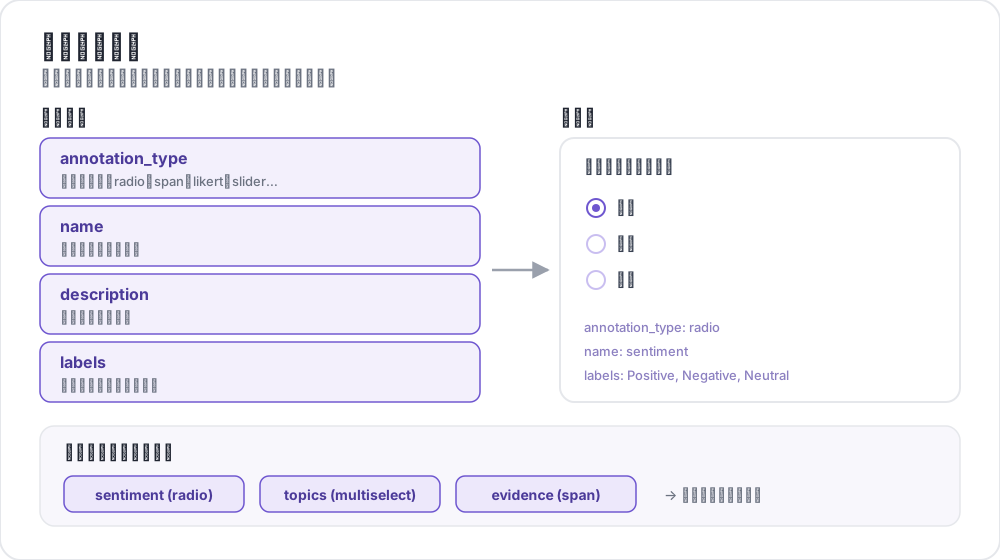 标注方案剖析
基本结构
每个方案都定义在 annotation_schemes 数组里:
annotation_schemes:
  - annotation_type: radio
    name: sentiment
    description: "What is the sentiment?"
    labels:
      - Positive
      - Negative
      - Neutral
必填字段
每个方案都带这三个字段。各个类型还会在此之上追加自己的必填字段,下文介绍每种类型时会一并列出。
| 字段 | 说明 |
|---|---|
annotation_type | 标注类型(radio、multiselect、likert、span、text、number、slider、multirate、select、pairwise、bws、soft_label、confidence、constant_sum、range_slider、semantic_differential、hierarchical_multiselect、card_sort、rubric_eval、extractive_qa、error_span、triage、coreference、span_link 等) |
name | 内部标识符(不含空格,用于输出) |
description | 展示给标注者的说明 |
支持的标注类型
1. 单选(Radio)
从列表中恰好选一项:
- annotation_type: radio
  name: sentiment
  description: "What is the sentiment of this text?"
  labels:
    - Positive
    - Negative
    - Neutral

  # Assigns keys 1, 2, 3... in the order the labels are listed
  sequential_key_binding: true

  # Horizontal layout instead of vertical
  horizontal: true
顺序绑定把数字 1-9 映射到前九个标签,所以重排标签列表会重新分配按键。若想要一种不随重排变动的绑定,请给每个标签各自指定按键(见键盘快捷键)。
2. 李克特量表(Likert)
带端点标签的评分量表:
- annotation_type: likert
  name: agreement
  description: "How much do you agree with this statement?"
  size: 5  # Number of scale points
  min_label: "Strongly Disagree"
  max_label: "Strongly Agree"

  # Show the numeric value of the selected point
  displaying_score: true
size 和两端的端点标签都是必填。五个刻度给标注者一个中立的中点;偶数刻度则强迫他们选边。
3. 多选(Multiselect)
从列表中选多项:
- annotation_type: multiselect
  name: topics
  description: "Select all relevant topics"
  labels:
    - Politics
    - Technology
    - Sports
    - Entertainment
    - Science

  # Require at least one box before the annotator can move on
  label_requirement:
    required: true

  # Allow free text response
  has_free_response: true
has_free_response 会加上一个"其他"文本框;在标签集还在修订期间值得打开,因为它收上来的条目正好点出你漏掉了哪些类别。
4. 片段标注(Span)
高亮并标记文本片段:
- annotation_type: span
  name: entities
  description: "Highlight named entities in the text"
  labels:
    - PERSON
    - ORGANIZATION
    - LOCATION
    - DATE

  # Show the label name on each highlighted span
  show_span_labels: true

  # Ctrl/Cmd+click to add non-contiguous ranges to one annotation
  allow_discontinuous: false

  # Keyboard shortcuts for labels
  sequential_key_binding: true
allow_discontinuous 管的是由分散区间组成的片段,比如分裂先行词,而不是彼此重叠的片段。除非你要标的现象确实跨越间隔,否则别打开它,因为 Ctrl/Cmd 点击这个动作很容易误触发。
5. 滑块(Slider)
连续数值区间:
- annotation_type: slider
  name: confidence
  description: "How confident are you in your answer? (0 = not at all, 100 = completely)"
  min_value: 0
  max_value: 100
  starting_value: 50
  step: 1

  # Shows min_value and max_value at the ends of the track
show_labels: truemin_value、max_value 和 starting_value 三个都是必填。起始值是每位标注者动手之前滑块所在的位置,取中点可以避免把他们锚定到任何一端。滑块不接受 labels 列表。一旦添加,题目会切换为单选(radio)布局,滑块也随之消失,因此量表两端的说明文字请写在 description 中。
6. 文本输入(Text)
自由文本作答:
- annotation_type: text
  name: explanation
  description: "Explain your reasoning"

  # Multi-line input
  rows: 4

  # Require a minimum length and show a running count
  min_chars: 20
  show_char_count: true

  # Placeholder text
  placeholder: "Enter your explanation here..."

  # Disable paste (for transcription tasks)
  allow_paste: false
allow_paste: false 对转写和自由回忆类任务很要紧,因为在这类任务里粘贴来的答案是从原文抄的,不是标注者产出的。
7. 数字输入(Number)
带约束的数值输入:
- annotation_type: number
  name: count
  description: "How many entities are mentioned?"
  min: 0
  max: 100
  step: 1
8. 矩阵评分(Multirate)
用同一套量表给多个条目评分:
- annotation_type: multirate
  name: quality_aspects
  description: "Rate each aspect of the response"

  # Rows: the items being rated
  options:
    - Accuracy
    - Fluency
    - Relevance

  # Columns: the shared rating scale
  labels:
    - Poor
    - Fair
    - Good
    - Very Good
    - Excellent

  # Randomize row order per annotator
  option_randomization: true

  # Layout options
  arrangement: "vertical"
  display_config:
    num_columns: 2
options 和 labels 都是必填,因为矩阵需要行和列。把行的顺序随机化,可以把顺序效应摊到各个条目上,而不是全压在恰好排在最前面的那一项上。
通用选项
键盘快捷键
用键盘绑定加快标注:
# Automatic sequential binding: digits 1, 2, 3... in label order
sequential_key_binding: true
若想要一种在标签列表变动时不会跟着移动的绑定,就把标签写成对象,各自给一个 key_value:
labels:
  - name: Positive
    key_value: "1"
  - name: Negative
    key_value: "2"
  - name: Neutral
    key_value: "3"
工具提示
给单个标签提供悬停提示。工具提示附着在标签上,不在方案上,因此配置在 labels 里面:
labels:
  - name: Positive
    tooltip: "Expresses happiness, approval, or satisfaction"
  - name: Negative
    tooltip: "Expresses sadness, anger, or disappointment"
  - name: Neutral
    tooltip: "No clear emotional content"
若说明需要排版,就把 tooltip_file 指向一个 HTML 文件:
labels:
  - name: Economic
    tooltip_file: "config/tooltips/economic.html"
标签颜色
用于视觉区分的自定义颜色,在 ui 下为整个项目统一定义:
ui:
  label_colors:
    entities:
      PERSON: "#3b82f6"
      LOCATION: "#10b981"
      ORGANIZATION: "#f59e0b"
颜色先按方案名作键,再按标签名。颜色也可以连同工具提示一起写在单个标签上:
labels:
  - name: positive
    color: "#22C55E"
    tooltip: "Positive sentiment"
必填项
把某个方案设为提交前必填:
- annotation_type: radio
  name: sentiment
  description: "What is the sentiment?"
  label_requirement:
    required: true
  labels:
    - Positive
    - Negative
若要求的是某个特定选项而不是随便作答,就用 required_label 点名,它接受单个标签或一组标签。
多个方案
在一个条目上组合多种标注类型:
annotation_schemes:
  # Primary classification
  - annotation_type: radio
    name: sentiment
    description: "Overall sentiment"
    labels:
      - Positive
      - Negative
      - Neutral
    label_requirement:
      required: true
    sequential_key_binding: true

  # Confidence rating
  - annotation_type: likert
    name: confidence
    description: "How confident are you?"
    size: 5
    min_label: "Guessing"
    max_label: "Certain"

  # Topic tags
  - annotation_type: multiselect
    name: topics
    description: "Select all relevant topics"
    labels:
      - Politics
      - Technology
      - Sports
      - Entertainment
    has_free_response: true

  # Notes
  - annotation_type: text
    name: notes
    description: "Any additional observations"
    rows: 4
    label_requirement:
      required: false
这里只有情感标签是必填的。把置信度评分和备注设为可选,能把必填集合收缩到研究真正依赖的那一个字段上,标注者就不会被一个不承担分析重量的框卡住。
高级功能
成对比较(Pairwise)
比较两个条目。两个条目来自实例本身,由 items_key 指定:
- annotation_type: pairwise
  name: preference
  description: "Which response is better?"
  mode: binary
  items_key: "responses"   # Field holding a list of 2+ items

  # Labels for the two sides
  show_labels: true
  labels:
    - "Response A"
    - "Response B"

  # Tie option (opt-in)
  allow_tie: true
  tie_label: "No preference"
这一对由数据文件提供,所以每一行都带一个至少两项的列表:
{"id": "1", "responses": ["First response text", "Second response text"]}当确实等价的配对很常见时,加一个平局按钮是值得的,因为没有它标注者只能随意断定高下,而这些噪声会以分歧的形式冒出来。
最优最差量表(Best-Worst Scaling)
从一个元组中挑出最优和最差来给条目排序。元组由顶层的 bws_config 块构造,而不是由方案构造;没有它的 bws 方案会在一个空条目列表上渲染出一道问题:
bws_config:
  tuple_size: 4              # Items per tuple
  min_item_appearances: 8    # Minimum appearances per item across tuples
  seed: 42
  scoring:
    method: counting         # counting | bradley_terry | plackett_luce

annotation_schemes:
  - annotation_type: bws
    name: ranking
    description: "Sentiment Intensity"
    best_description: "Which sentence expresses the MOST positive sentiment?"
    worst_description: "Which sentence expresses the LEAST positive sentiment?"
    tuple_size: 4
    sequential_key_binding: true
数据文件的每一行就是一个条目,Potato 从这个池子里抽取元组。调高 min_item_appearances 会让每个条目的分数更稳,代价是比较次数更多。
下拉选择(Select)
省空间的单项选择:
- annotation_type: select
  name: category
  description: "Select a category"
  labels:
    - Category A
    - Category B
    - Category C
    - Category D
    - Category E

  # Vary the option order between annotators
  randomize_order: true
下拉框在展开之前会藏起选项,因此适合标签集很长、用单选按钮会把正文挤出屏幕的情形。对于短标签集,单选按钮更快,因为它只要一次点击而不是两次。
数据格式参考
输入
标注方案配合你自己的数据格式工作:
{
  "id": "doc_1",
  "text": "This is the text to annotate."
}
输出
标注以方案名作键保存:
{
  "id": "doc_1",
  "annotations": {
    "sentiment": "Positive",
    "confidence": 4,
    "topics": ["Technology", "Science"],
    "entities": [
      {"start": 0, "end": 4, "label": "ORGANIZATION", "text": "This"}
    ],
    "notes": "Clear positive sentiment about technology."
  }
}
最佳实践
1. 清晰的标签
使用无歧义、互相区分的标签:
下面这些标签在同一个维度上标出了不同的点:
labels:
  - Strongly Positive
  - Somewhat Positive
  - Neutral
  - Somewhat Negative
  - Strongly Negative
下面这些则不然。两个标注者不会在 "OK"、"Fine" 和 "Acceptable" 之间划出同一条线,随之而来的分歧说的是标签集本身,而不是数据:
labels:
  - Good
  - OK
  - Fine
  - Acceptable
2. 有用的工具提示
为含义微妙的标签加上工具提示:
labels:
  - name: Sarcasm
    tooltip: "The text says the opposite of what it means"
  - name: Irony
    tooltip: "A mismatch between expectation and reality"
3. 键盘快捷键
为高吞吐量的任务启用快捷键:
sequential_key_binding: true4. 合理的顺序
让标签顺序保持一致:
- 最常见的排在前面
- 按字母顺序
- 按强度(由低到高)
5. 限制选项数量
选项太多会拖慢标注:
- 单选:2-7 个选项
- 多选:5-15 个选项
- 李克特:5-7 个刻度
6. 先自己试标
部署给标注者之前先自己标几个例子,用来发现:
- 有歧义的标签
- 缺失的类别
- 说不清楚的说明