区间滑块
在 Potato 中配置双滑块区间标注,选取一段数值范围,上下界、步长和端点标签都可自定义。
区间滑块标注方案提供一个双滑块控件,让标注者选择一段数值范围而不是单个值。当答案本身是一个区间时它很合适,比如估计年龄段、时间窗口或置信区间。
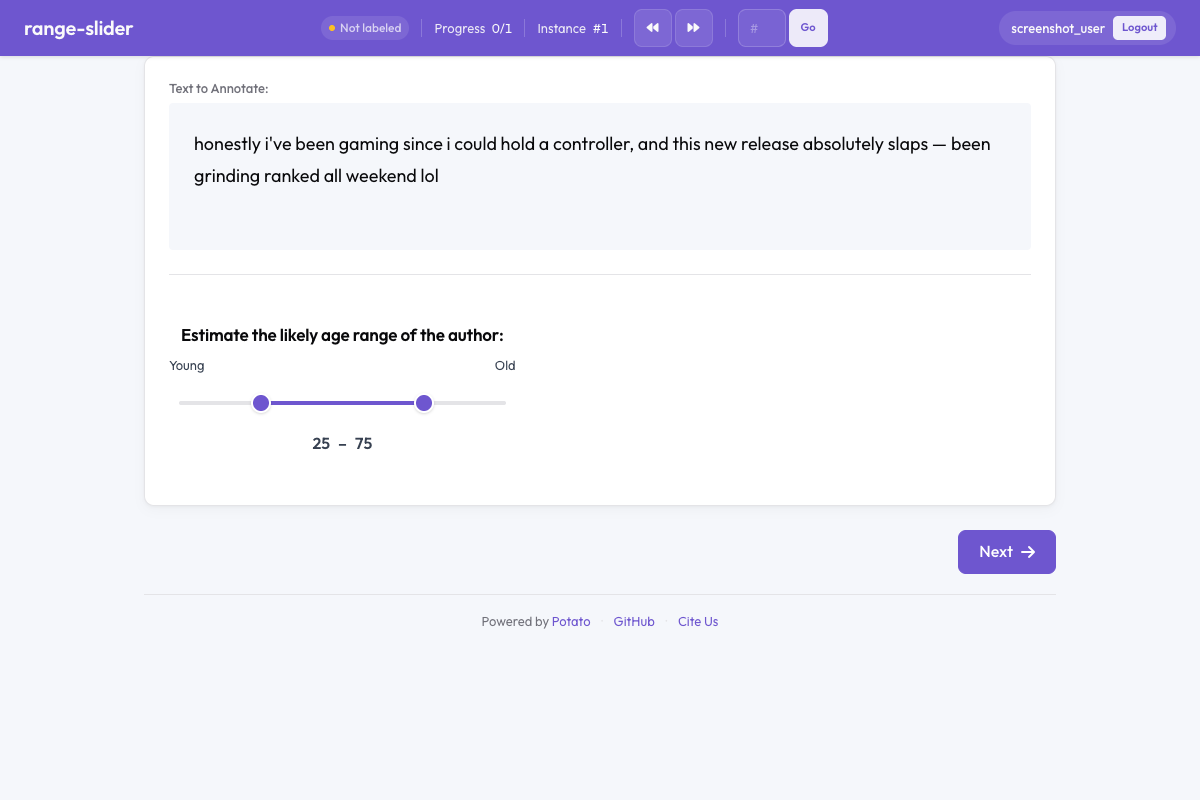 Range slider in Potato
概览
普通滑块只能记录一个值,区间滑块则有两个可拖动的滑块,分别代表区间的下界和上界。标注者拖动任意一个滑块来确定区间。当前数值会显示在滑块旁边,方便精确调整。
快速开始
yaml
annotation_schemes:
  - annotation_type: range_slider
    name: age_range
    description: Estimate the age range of the author.
    min_value: 0
    max_value: 100
    step: 1
    left_label: "Young"
    right_label: "Old"
配置项
| 字段 | 类型 | 默认值 | 说明 |
|---|---|---|---|
annotation_type | string | 必填 | 必须为 "range_slider" |
name | string | 必填 | 本方案的唯一标识符 |
description | string | 必填 | 展示给标注者的说明文字 |
min_value | number | 0 | 滑块量表的最小值 |
max_value | number | 100 | 滑块量表的最大值 |
step | number | 1 | 可选取数值之间的步长 |
left_label | string | — | 显示在滑块左端(最小值)的标签 |
right_label | string | — | 显示在滑块右端(最大值)的标签 |
show_values | boolean | true | 是否显示当前选中的下界和上界数值 |
default_low | number | — | 下界滑块的默认位置 |
default_high | number | — | 上界滑块的默认位置 |
label_requirement.required | boolean | false | 是否必须完成本项标注才能继续 |
示例
年龄段估计
yaml
annotation_schemes:
  - annotation_type: range_slider
    name: age_estimate
    description: What age range do you think the author falls in?
    min_value: 13
    max_value: 90
    step: 1
    left_label: "Younger"
    right_label: "Older"
置信区间
yaml
annotation_schemes:
  - annotation_type: range_slider
    name: confidence_interval
    description: Select the range within which you believe the true value falls.
    min_value: 0
    max_value: 100
    step: 5
    left_label: "0%"
    right_label: "100%"
    show_values: true
时间窗口
yaml
annotation_schemes:
  - annotation_type: range_slider
    name: time_window
    description: When during the day is this activity most likely? (hours)
    min_value: 0
    max_value: 24
    step: 0.5
    left_label: "Midnight"
    right_label: "Midnight"
舒适温度区间
yaml
annotation_schemes:
  - annotation_type: range_slider
    name: comfort_range
    description: What temperature range (°F) do you find comfortable?
    min_value: 40
    max_value: 110
    step: 1
    left_label: "Cold"
    right_label: "Hot"
    show_values: true
输出格式
json
{
  "age_estimate": {
    "labels": {
      "range_low": 28,
      "range_high": 42
    }
  }
}
输出里总会有 low 和 high 两个值,都落在配置的 min_value 到 max_value 范围内。
实践建议
- 设好默认值 —— 用
default_low和default_high避免所有标注者都从两端极值开始 - 选合适的步长 —— 精细任务用小步长(0.1),粗略估计用大步长(5、10)
- 加上端点标签 ——
left_label和right_label能给纯数字补上语义背景 - 保持 show_values 打开 —— 数值读数能帮标注者选得更准
- 确实需要区间时才用 —— 如果只需要一个值,用普通的滑块
延伸阅读
有关实现详情,请参阅源文档。