单选与多选
在 Potato 中配置单选按钮做单选标注、复选框做多标签标注,并设置键盘快捷键、工具提示、颜色和必答要求。
单选按钮和多选复选框是分类任务中最常用的标注类型。两者都需要同样的三个必填字段 annotation_type、name 和 description,再加上它们提供的 labels。
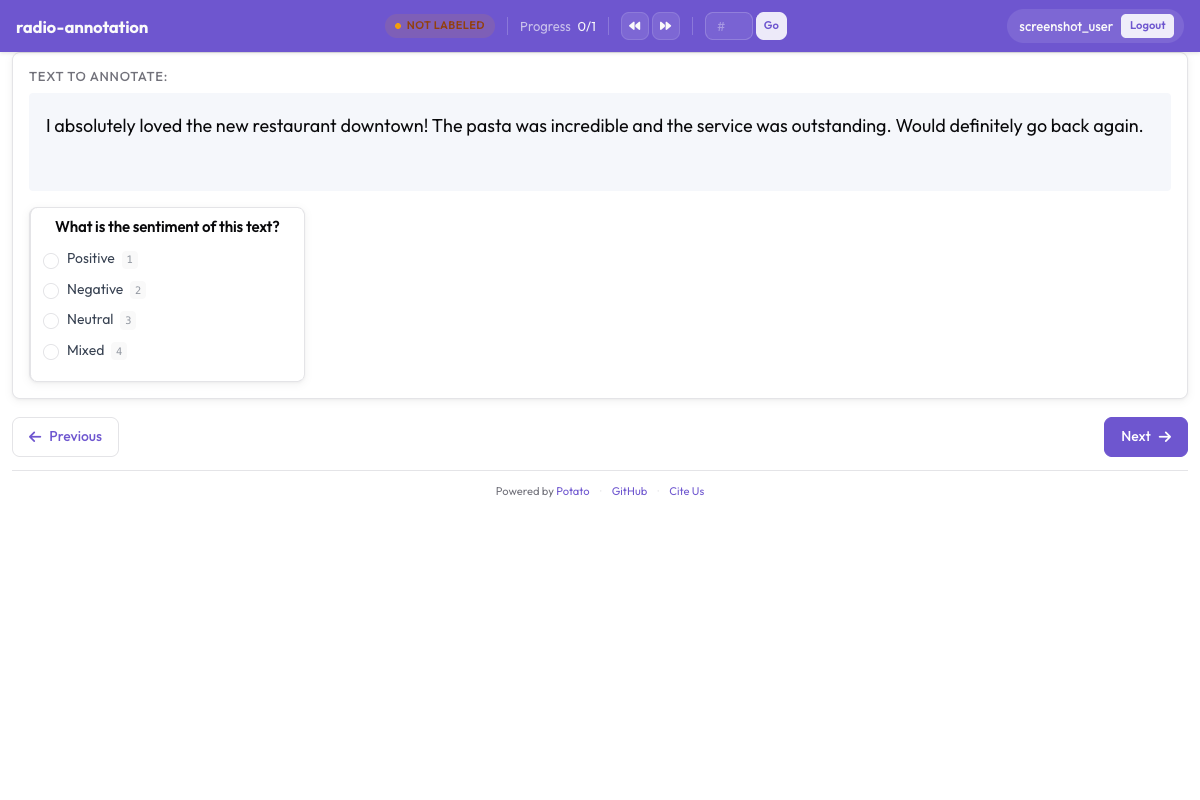 Potato 中用于类别标注的单选按钮和复选框
单选按钮
当标注者应当恰好选择一个选项时,使用单选按钮。
基本配置
annotation_schemes:
  - annotation_type: radio
    name: sentiment
    description: "Select the sentiment of this text"
    labels:
      - Positive
      - Negative
      - Neutral
键盘快捷键
sequential_key_binding 是一个开关,不是映射表。把它设为 true 会按标签列出的顺序依次分配数字 1、2、3 等:
annotation_schemes:
  - annotation_type: radio
    name: sentiment
    description: "Select the sentiment"
    labels:
      - Positive
      - Negative
      - Neutral
    sequential_key_binding: true
因为按键跟随列表顺序,重新排列标签就会重新分配按键。要把某个按键固定在某个标签上,使它不受排序影响,就把标签写成对象,并各给一个 key_value:
annotation_schemes:
  - annotation_type: radio
    name: sentiment
    description: "Select the sentiment"
    labels:
      - name: Positive
        key_value: "p"
      - name: Negative
        key_value: "n"
      - name: Neutral
        key_value: "u"
工具提示
工具提示属于标签而不是方案,所以写在 labels 里面。边界情况就该放在这里,标注者不用离开任务就能查看:
annotation_schemes:
  - annotation_type: radio
    name: sentiment
    description: "Select the sentiment"
    labels:
      - name: Positive
        tooltip: "Expresses satisfaction, praise, or approval"
      - name: Negative
        tooltip: "Expresses dissatisfaction, criticism, or complaint"
      - name: Neutral
        tooltip: "Factual or mixed, with no clear evaluation"
如果说明需要举例或排版,就改用 tooltip_file 指向一个 HTML 文件:
    labels:
      - name: Positive
        tooltip_file: "config/tooltips/positive.html"
多选
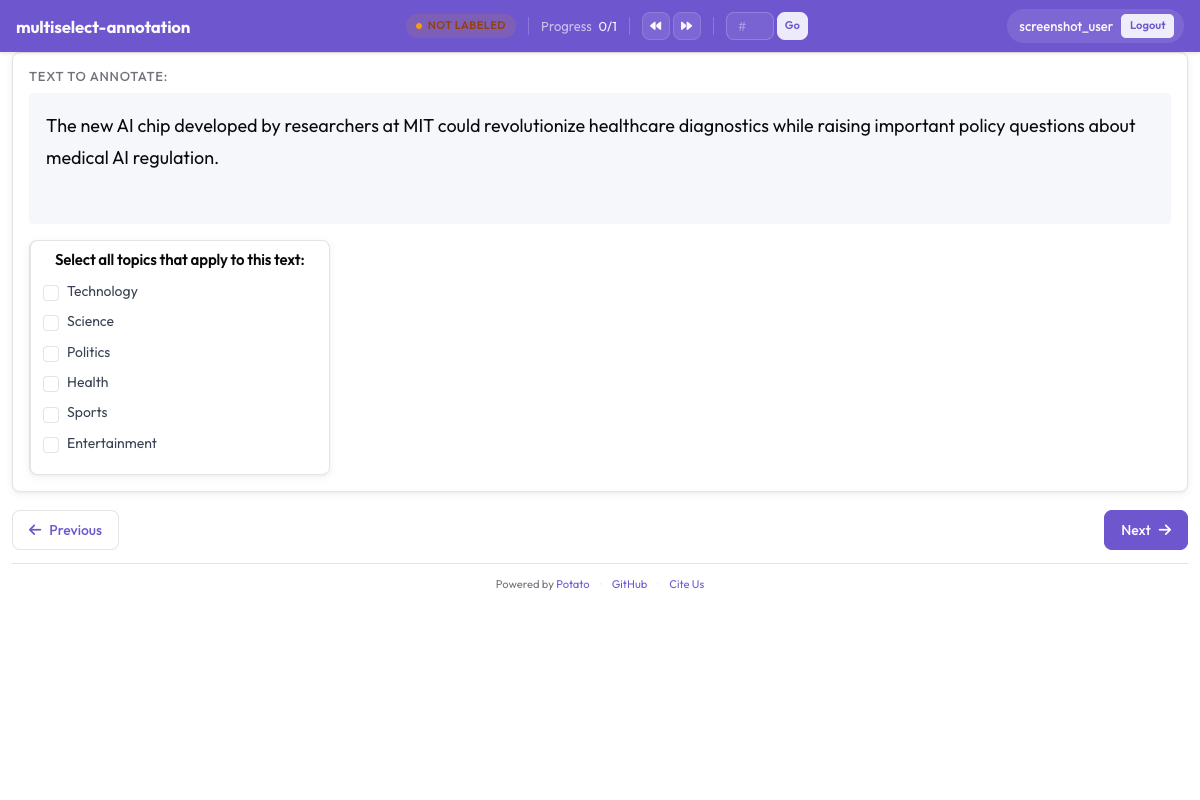 复选框让标注者一次选中所有适用的标签
当标注者可以选择多个选项时,使用多选。
基本配置
annotation_schemes:
  - annotation_type: multiselect
    name: topics
    description: "Select all topics that apply"
    labels:
      - Politics
      - Sports
      - Technology
      - Entertainment
      - Science
要求作答
没有哪个键可以设置复选框的最少或最多勾选数量。能要求的是标注者必须作答:
annotation_schemes:
  - annotation_type: multiselect
    name: topics
    description: "Select all topics that apply"
    labels:
      - Politics
      - Sports
      - Technology
    label_requirement:
      required: true
如果数量确实重要,就写在 description 里,并在导出的数据中检查。你想要三个而方案默默接受了六个,这种情况在分析阶段发现,好过让标注者去猜。
自由文本回答
has_free_response 会加上一个“其他”输入框。标签集还在修订时值得开启,因为标注者填进去的内容会指出你缺少的类别:
annotation_schemes:
  - annotation_type: multiselect
    name: topics
    description: "Select all topics that apply"
    labels:
      - Politics
      - Sports
      - Technology
    has_free_response: true
显示选项
水平布局
horizontal: true 把选项横向排成一行,而不是纵向排在页面上,适合评分这类很短的标签集:
annotation_schemes:
  - annotation_type: radio
    name: rating
    description: "Rate this item from 1 to 5"
    labels:
      - "1"
      - "2"
      - "3"
      - "4"
      - "5"
    horizontal: true
标签颜色
颜色可以写在标签上:
annotation_schemes:
  - annotation_type: radio
    name: sentiment
    description: "Select the sentiment"
    labels:
      - name: Positive
        color: "#22C55E"
      - name: Negative
        color: "#EF4444"
      - name: Neutral
        color: "#9CA3AF"
也可以为整个项目集中设置,先按方案名再按标签名作为键:
ui:
  label_colors:
    sentiment:
      Positive: "#22C55E"
      Negative: "#EF4444"
      Neutral: "#9CA3AF"
两处都设置时以 ui.label_colors 为准。完整的取值顺序见 UI 配置。
改变选项顺序
randomize_order 会在不同标注者之间打乱选项顺序,把顺序效应分摊到整个标签集上,而不是集中在碰巧排在最前面的那个选项上:
annotation_schemes:
  - annotation_type: radio
    name: preference
    description: "Which option do you prefer?"
    labels:
      - Option A
      - Option B
      - Option C
    randomize_order: true
有序量表不要开启,因为那里的顺序本身就带有含义。
最佳实践
- 标签要短 - 每一条条目上都要读一遍
- 打开键盘快捷键 - 完全不用碰鼠标的标注者速度要快得多
- 把边界情况写进工具提示 - 标注者真正会弄错的区分,应该放在他们看得到的地方
- 限制选项数量 - 单选列表超过七项左右,每一次判断都会变慢
- 按逻辑排序 - 最常见的放前面,或者按强度排,并在开始收集数据后保持不变