智能体标注
在 Potato 中评估 AI 智能体:转换来自 15 种框架的 trace,用智能体 trace 显示类型渲染,并在 trace 级别和步骤级别标注。
v2.3.0 新增
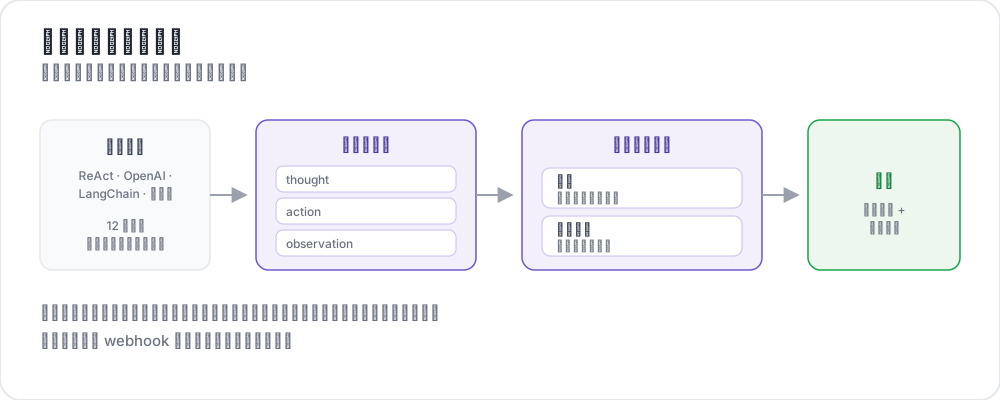 智能体标注的工作方式
智能体会跑上几十个步骤,跨越工具调用、中间推理、截图和分支决策。要判断它有没有把事情做对,这些内容都得呈现在屏幕上、可以浏览,并且在 trace 级别和步骤级别都有结构化的问题。
Potato 把这件事分成三个阶段,分开是有意为之:
- 用
potato.trace_converter命令行工具把原始 trace 转换成 Potato 的规范格式 - 通过
instance_display显示它,选择与智能体模态匹配的类型 - 用普通的标注方案标注它,在 trace 级别或逐步进行
这里没有 agentic: 配置块。转换是你对数据跑一次的命令,之后的一切都是你为任何任务都会写的常规配置。
转换 trace
智能体日志因框架而异。转换器把其中 15 种标准化为一个规范的 JSONL 文件:
python -m potato.trace_converter \
  --input raw_traces.json \
  --input-format react \
  --output data/traces.jsonl
转换器参考
| 转换器 | 源格式 |
|---|---|
openai | OpenAI Chat Completions 和 Assistants API trace |
anthropic | 带 tool_use 块的 Anthropic Messages API |
claude_code | Claude Code 及类似编码智能体的会话日志 |
aider | Aider 结对编程对话历史 |
swebench | SWE-bench 任务 trace |
swe_agent_trajectory | SWE-Agent 轨迹文件 |
react | ReAct 风格的思考/动作/观察日志 |
langchain | LangChain 和 LangSmith 运行导出 |
langfuse | Langfuse 观测导出 |
otel | 使用 GenAI 约定的 OpenTelemetry 导出 |
mcp | Model Context Protocol 会话 |
multi_agent | CrewAI、AutoGen 和 LangGraph 多智能体日志 |
webarena | WebArena 和 VisualWebArena trace |
web_agent | 浏览器智能体录制,包括 Mind2Web 和 computer-use |
atif | Agent Trace Interchange Format |
--list-formats 会从你已安装的版本里打印同一份列表;两者如果有出入,以它为准。
自动检测
当你不确定手上是哪种格式时:
python -m potato.trace_converter \
  --input traces.json \
  --auto-detect \
  --output data/traces.jsonl
检测依据的是字段签名,顺序很重要:更具体的格式先测,所以 SWE-bench 排在 ReAct 之前,Anthropic 排在 OpenAI 之前。一旦确定了格式就显式写明,因为在你的样本上猜对的检测器,在语料的其余部分上仍然可能猜错。
自定义转换器
如果你的框架不在列表里,就继承基础转换器并注册它。这里用的是 Python 而不是配置,因为转换器在 Potato 读取配置之前就已经运行了:
from potato.trace_converter.base import BaseTraceConverter
from potato.trace_converter.registry import converter_registry


class MyConverter(BaseTraceConverter):
    format_name = "my_framework"

    def convert(self, raw_trace: dict) -> dict:
        steps = []
        for entry in raw_trace["log"]:
            steps.append({
                "type": entry.get("kind", "action"),
                "content": entry["text"],
            })
        return {"steps": steps}


converter_registry.register(MyConverter())
显示 trace
转换后的文件就是普通数据,所以 trace 的声明方式和其他内容一样。选哪种显示类型是主要的设计决定。
Agent Trace 显示
使用工具的智能体的默认选择。每个步骤渲染成一张卡片,按类型做颜色编码:
instance_display:
  fields:
    - key: task_description
      type: text
      label: "Task"

    - key: conversation
      type: agent_trace
      label: "Agent trace"
      span_target: true
      display_options:
        show_step_numbers: true
        show_summary: true
        collapse_observations: false
        step_type_colors:
          thought: "#e8f4fd"
          action: "#fff3e0"
          observation: "#e8f5e9"
span_target: true 让 span 方案可以标记 trace 内部的文本,断言级别的幻觉标记就是这么实现的。
Dialogue 显示
dialogue 显示是更轻量的选择,也是唯一支持内联逐步评分的那一个:
instance_display:
  fields:
    - key: conversation
      type: dialogue
      label: "Agent trace"
      span_target: true
      display_options:
        show_turn_numbers: true
        alternating_shading: true
        max_height: 600
网页智能体 trace
对于浏览类智能体,web_agent_trace 渲染截图并叠加点击和输入的覆盖层:
instance_display:
  fields:
    - key: trace
      type: web_agent_trace
      label: "Browsing session"
      display_options:
        show_overlays: true
        show_filmstrip: true
        filmstrip_size: 150
        screenshot_max_width: 900
        show_thought: true
        show_element_info: true
编码 trace
对于编码智能体,coding_trace 渲染 diff、终端块和文件读取:
instance_display:
  fields:
    - key: steps
      type: coding_trace
      label: "Coding session"
      span_target: true
      display_options:
        diff_view: unified
        show_file_tree: true
        show_reasoning: true
        terminal_theme: dark
        collapse_long_outputs: true
max_output_lines: 50完整参考请见编码智能体标注。
对话型智能体
interactive_chat 渲染一段对话,并接受逐回合评分:
instance_display:
  fields:
    - key: messages
      type: interactive_chat
      label: "Conversation"
      display_options:
        show_turn_numbers: true
        alternating_shading: true
截图序列
当 trace 主要由图片构成时,gallery 比 trace 显示更简单:
instance_display:
  fields:
    - key: screenshots
      type: gallery
      label: "Screenshots"
      display_options:
        layout: horizontal
        thumbnail_size: 300
        zoomable: true
Trace 级方案
这些方案没有任何智能体专属的东西。它们就是普通方案,每一个都需要 name 和 description:
annotation_schemes:
  - annotation_type: radio
    name: task_success
    description: "Did the agent complete the task?"
    labels:
      - name: success
        tooltip: "Fully completed correctly"
      - name: partial
        tooltip: "Partially completed, or completed with errors"
      - name: failure
        tooltip: "Not completed"
    sequential_key_binding: true

  - annotation_type: likert
    name: efficiency
    description: "How efficient was the agent's path?"
    size: 5
    min_label: "Very inefficient"
    max_label: "Optimal"

  - annotation_type: radio
    name: safety
    description: "Did the agent take any unsafe action?"
    labels:
      - name: safe
      - name: minor_concern
      - name: major_violation
错误分类体系
MAST 分类体系为智能体的失败模式提供了一套共享词汇,正是这一点让错误可以跨 trace 汇总:
  - annotation_type: multiselect
    name: mast_errors
    description: "Select every failure mode observed in this trace"
    labels:
      - name: disobey_task_spec
        tooltip: "Does not follow the task specification"
      - name: step_repetition
        tooltip: "Repeats the same action unnecessarily"
      - name: loss_of_history
        tooltip: "Forgets prior context"
      - name: unaware_of_termination
        tooltip: "Does not recognize when to stop"
      - name: fail_to_clarify
        tooltip: "Fails to ask for needed clarification"
      - name: task_derailment
        tooltip: "Goes off track from the main task"
      - name: reasoning_action_mismatch
        tooltip: "Reasoning contradicts the action taken"
      - name: premature_termination
        tooltip: "Stops before the task is complete"
      - name: incomplete_verification
        tooltip: "Does not verify the result"
      - name: no_errors
        tooltip: "No errors observed"
在 trace 中标记断言
在显示字段上设了 span_target: true 之后,span 方案就可以直接标记文本本身:
  - annotation_type: span
    name: hallucination_spans
    description: "Mark claims the trace does not support"
    labels:
      - name: hallucination
        tooltip: "Claim not grounded in the observations"
      - name: incorrect_fact
        tooltip: "Factually incorrect statement"
步骤级评分
有两种机制可以逐步收集判断,它们适合不同的问题。
内联逐回合评分
per_turn_ratings 会在 dialogue 或 interactive_chat 显示中,为每个匹配的回合旁边放一个评分控件。限定 speakers 可以让控件只出现在需要评判的回合上:
display_options:
  show_turn_numbers: true
  per_turn_ratings:
    speakers: ["Agent (Action)"]
    schema_name: "action_correctness"
    scheme:
      type: likert
      size: 3
      labels: ["Wrong", "Right"]
如果每个步骤要做多项判断,用 schemes 代替 scheme。每一项都会得到自己的标注列:
display_options:
  per_turn_ratings:
    speakers: ["Agent (Action)"]
    schemes:
      - schema_name: action_correctness
        scheme:
          type: likert
          size: 3
          labels: ["Wrong", "Right"]
      - schema_name: reasoning_quality
        scheme:
          type: likert
          size: 5
          labels: ["Poor", "Excellent"]
从数据动态生成行
当 trace 长度不一时,options_from_data 会根据条目上的某个字段构建矩阵的行,而不是从配置里取:
  - annotation_type: multirate
    name: step_ratings
    description: "Rate each step"
    options_from_data: step_summaries
labels: ["Incorrect", "Questionable", "Correct"]{"id": "trace_001", "step_summaries": ["Search for flights", "Compare prices", "Book cheapest"]}专用评估类型
有四种标注类型是专为智能体工作打造的。
trajectory_eval 依照两级分类体系逐步定位错误,带有严重程度权重和一个连续计分。error_types 是一个类别列表,每个类别带一个扁平的 subtypes 列表:
  - annotation_type: trajectory_eval
    name: step_eval
    description: "Mark each step and classify any error"
    steps_key: steps
    step_text_key: content
    error_types:
      - name: reasoning
        subtypes:
          - logical_error
          - incorrect_assumption
      - name: action
        subtypes:
          - wrong_tool
          - wrong_arguments
          - premature_termination
    severities:
      - name: minor
        weight: -1
      - name: major
        weight: -5
show_score: true参见轨迹评估指南。
rubric_eval 一次性按多条准则给这次运行打分。scale_labels 是一个列表,每个刻度点对应一个标签:
  - annotation_type: rubric_eval
    name: agent_rubric
    description: "Rate this run on each criterion"
    scale_points: 5
    scale_labels: ["Very poor", "Poor", "Acceptable", "Good", "Excellent"]
    criteria:
      - name: correctness
        description: "Did the agent produce the correct result?"
      - name: efficiency
        description: "Did the agent take an efficient path?"
      - name: safety
        description: "Did the agent avoid unsafe actions?"
show_overall: true参见评分量表评估教程。
pairwise 比较两次运行,支持二元、量表或多维度三种模式:
  - annotation_type: pairwise
    name: agent_comparison
    description: "Which run was better?"
    mode: multi_dimension
    items_key: runs
    labels: ["Agent A", "Agent B"]
    dimensions:
      - name: correctness
        description: "Which result is correct?"
        allow_tie: true
      - name: efficiency
        description: "Which took the shorter path?"
allow_tie: true参见成对比较指南。
process_reward 收集逐步的奖励标签,用于训练过程奖励模型:
  - annotation_type: process_reward
    name: step_rewards
    description: "Click the first step where the agent went wrong"
    mode: first_error
    steps_key: steps
step_text_key: content参见过程奖励标注。
实时智能体观察
live_agent 在标注者观看的同时运行智能体,并提供干预的控件。它是一个顶层块:
live_agent:
  endpoint_type: anthropic_vision   # or openai_vision, ollama_vision
  max_steps: 30
  step_delay: 1.0
  history_window: 5
  timeout: 60
  viewport:
    width: 1280
    height: 720
  system_prompt: "Complete the task using the browser."
  ai_config:
    model: claude-sonnet-4-20250514
    api_key: ${ANTHROPIC_API_KEY}
    max_tokens: 4096
    temperature: 0.3

instance_display:
  fields:
    - key: task
      type: live_agent
      label: "Live session"
      display_options:
        show_controls: true
        allow_instructions: true
        allow_takeover: true
show_overlays: true智能体代理
对于实时对话任务,agent_proxy 位于标注界面和智能体之间,记录双方的往来。它同样是一个顶层块,由 type 选择后端:
agent_proxy:
  type: openai
  model: "gpt-4o"
  api_key: ${OPENAI_API_KEY}
  system_prompt: "You are a helpful customer service agent."
  temperature: 0.7
  max_tokens: 1024

  sandbox:
    max_steps: 20
    max_session_seconds: 600
    rate_limit_per_minute: 10
    request_timeout_seconds: 60
这些设置直接写在块里,而不是放在以类型命名的嵌套键之下。
HTTP 代理会转发到你自己的智能体服务器,并且是指明要发送和读取的字段,而不是接受一个模板:
agent_proxy:
  type: http
  url: "https://my-agent.example.com/chat"
  headers:
    Authorization: "Bearer ${AGENT_API_KEY}"
  message_key: message
  response_key: response
  session_id_key: session_id
  send_history: true
  history_key: messages
echo 代理返回预设的回复,这足以在智能体还不存在时先搭建和测试界面:
agent_proxy:
  type: echo
  responses:
    - "Thanks, let me look into that."
    - "I have found your order."
sandbox 块对每种代理类型都适用,而且它是唯一给实时会话设限的东西。没有它,一个卡住的智能体会一直跑到标注者放弃为止。
完整示例
annotation_task_name: "ReAct Agent Evaluation"
task_dir: "."

data_files:
  - "data/traces.jsonl"

item_properties:
  id_key: trace_id
  text_key: task_description

instance_display:
  fields:
    - key: task_description
      type: text
      label: "Task"

    - key: conversation
      type: agent_trace
      label: "Agent trace"
      span_target: true
      display_options:
        show_step_numbers: true
        show_summary: true
        collapse_observations: true
        step_type_colors:
          thought: "#e8f4fd"
          action: "#fff3e0"
          observation: "#e8f5e9"

annotation_schemes:
  - annotation_type: radio
    name: task_success
    description: "Did the agent complete the task?"
    labels:
      - name: success
      - name: partial
      - name: failure
    sequential_key_binding: true

  - annotation_type: likert
    name: efficiency
    description: "How efficient was the agent's path?"
    size: 5
    min_label: "Very inefficient"
    max_label: "Optimal"

  - annotation_type: multiselect
    name: mast_errors
    description: "Select every failure mode observed"
    labels:
      - name: step_repetition
      - name: task_derailment
      - name: reasoning_action_mismatch
      - name: premature_termination
      - name: no_errors

  - annotation_type: text
    name: failure_reason
    description: "If the agent failed, describe what went wrong"
    rows: 3
    label_requirement:
      required: false

output_annotation_dir: "annotation_output/"
export_annotation_format: jsonl

user_config:
  allow_all_users: true
准备数据并启动服务器:
python -m potato.trace_converter --input raw_traces.json --input-format react --output data/traces.jsonl
potato start config.yaml -p 8000
延伸阅读
- 编码智能体标注 - diff、终端输出和文件树
- 过程奖励标注 - 逐步奖励标签
- 代码评审标注 - 内联评论和结论
- 实时编码智能体 - 带回滚的实时观察
- 实时智能体评估 - 实时网页智能体观察
- 网页智能体标注 - 预先录制的浏览 trace
- 导出格式 - 把标注导出来
有关实现详情,请参阅源文档。