文本与数字输入
用于标注的自由文本和数字输入。
文本和数字输入允许标注者提供自由形式的回复,适用于修正、解释、计数和测量。
文本输入
基本文本字段
单行文本输入:
yaml
annotation_schemes:
  - annotation_type: text
    name: correction
    description: "Provide a corrected version of the text"
多行文本区域
用于较长的回复:
yaml
- annotation_type: text
  name: explanation
  description: "Explain your reasoning"
  multiline: true
  rows: 4
  cols: 60
  allow_paste: false
占位文本
用示例输入引导标注者:
yaml
- annotation_type: text
  name: summary
  description: "Write a one-sentence summary"
  placeholder: "Enter your summary here..."
字符限制
约束回复长度:
yaml
- annotation_type: text
  name: title
  description: "Suggest a title"
  min_chars: 15
  show_char_count: true
必填文本
设为必填字段:
yaml
- annotation_type: text
  name: justification
  description: "Why did you choose this label?"
  label_requirement:
    required: true
数字输入
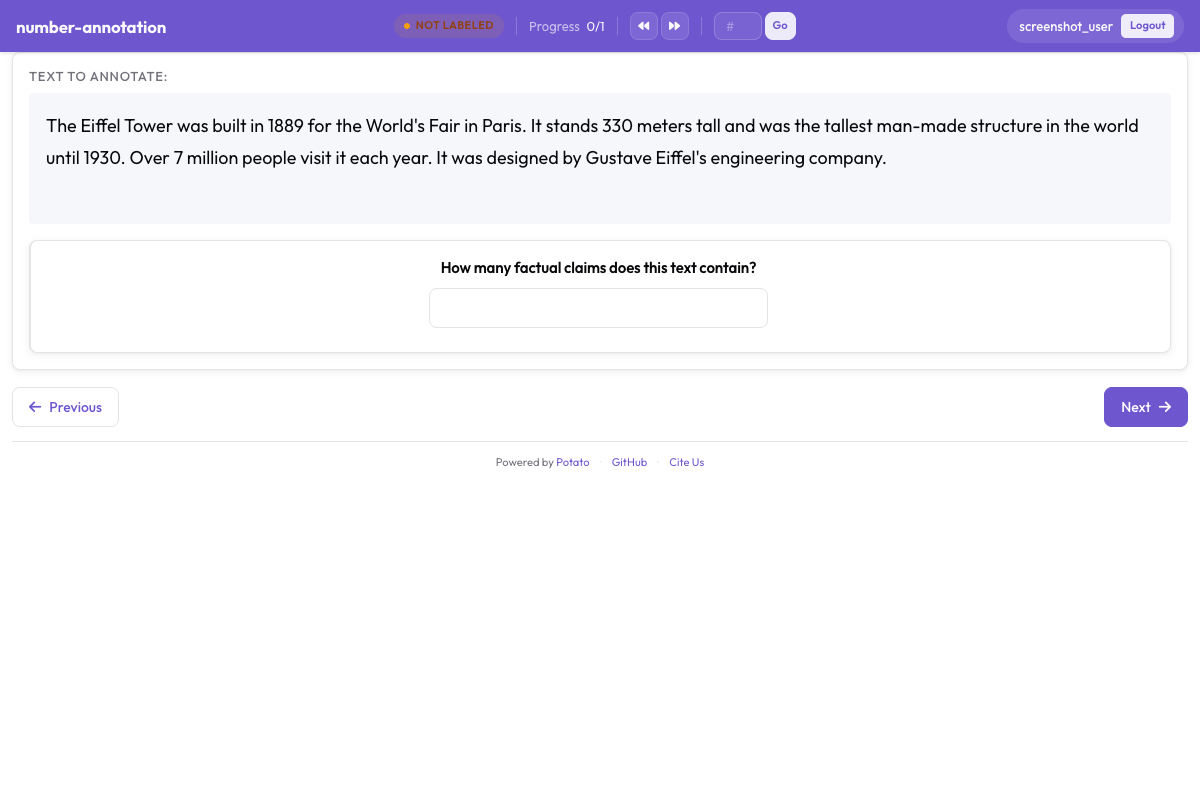 带有最小值和最大值约束的数字输入字段
基本数字字段
yaml
annotation_schemes:
  - annotation_type: number
    name: count
    description: "How many entities are mentioned?"
范围约束
设置最小和最大值:
yaml
- annotation_type: number
  name: rating
  description: "Rate from 1 to 10"
  min: 1
  max: 10
步长
控制增量精度:
yaml
- annotation_type: number
  name: percentage
  description: "What percentage is relevant?"
  min: 0
  max: 100
  step: 5  # Increments of 5
小数
允许浮点值:
yaml
- annotation_type: number
  name: score
  description: "Confidence score"
  min: 0.0
  max: 1.0
  step: 0.1
默认值
预填默认值:
yaml
- annotation_type: number
  name: count
  description: "Number of errors"
  min: 0
  tooltip: "Count each distinct error once, even where it repeats."
滑块输入
数字输入的视觉替代:
yaml
- annotation_type: slider
  name: confidence
  description: "How confident are you?"
  min_value: 0
  max_value: 100
  starting_value: 50
  step: 1
滑块两端说明
滑轨两端显示 min_value 和 max_value,show_labels: false 可将其隐藏。滑块不接受 labels 列表。一旦添加,题目会切换为单选(radio)布局,滑块也随之消失,因此两端的说明文字请写在 description 中:
yaml
- annotation_type: slider
  name: agreement
  description: "How much do you agree? (0 = strongly disagree, 100 = strongly agree)"
  min_value: 0
  max_value: 100
  starting_value: 50
  show_labels: true
滑块显示选项
显示当前值:
yaml
- annotation_type: slider
  name: rating
  description: "Rate the overall quality"
  min_value: 0
  max_value: 100
  starting_value: 50
  step: 5
  maxTick: 10
常见使用场景
文本修正任务
yaml
annotation_schemes:
  - annotation_type: radio
    name: has_error
    description: "Does this text contain errors?"
    labels:
      - "Yes"
      - "No"

  - annotation_type: text
    name: corrected_text
    description: "Provide the corrected version"
    rows: 4
翻译质量
yaml
annotation_schemes:
  - annotation_type: slider
    name: adequacy
    description: "How much meaning is preserved?"
    min_value: 0
    max_value: 100
    starting_value: 50

  - annotation_type: slider
    name: fluency
    description: "How natural does it sound?"
    min_value: 0
    max_value: 100
    starting_value: 50

  - annotation_type: text
    name: improved_translation
    description: "Suggest a better translation (optional)"
    rows: 4
    label_requirement:
      required: false
实体计数
yaml
annotation_schemes:
  - annotation_type: number
    name: person_count
    description: "How many people are mentioned?"
    min: 0
    max: 50

  - annotation_type: number
    name: org_count
    description: "How many organizations are mentioned?"
    min: 0
    max: 50

  - annotation_type: number
    name: location_count
    description: "How many locations are mentioned?"
    min: 0
    max: 50
反馈收集
yaml
annotation_schemes:
  - annotation_type: likert
    name: difficulty
    description: "How difficult was this task?"
    size: 5
    min_label: "Very Easy"
    max_label: "Very Hard"

  - annotation_type: text
    name: feedback
    description: "Any additional feedback?"
    rows: 4
    label_requirement:
      required: false
    placeholder: "Share your thoughts..."
带理由的质量评估
yaml
annotation_schemes:
  - annotation_type: radio
    name: quality
    description: "Rate the quality"
    labels:
      - Excellent
      - Good
      - Fair
      - Poor

  - annotation_type: text
    name: justification
    description: "Explain your rating"
    rows: 4
    label_requirement:
      required: true
验证
文本验证
yaml
- annotation_type: text
  name: email
  description: "Enter contact email"
数字验证
数字会自动根据最小/最大值进行验证:
yaml
- annotation_type: number
  name: year
  description: "Enter the year"
  min: 1900
  max: 2024
键盘导航
文本和数字字段支持标准键盘导航:
Tab在字段之间移动Enter提交(单行文本)- 方向键用于数字增减
输出格式
文本和数字标注直接保存:
json
{
  "id": "doc1",
  "correction": "The corrected text goes here.",
  "count": 5,
  "confidence": 85
}
完整示例:文档审查
yaml
annotation_task_name: "Document Review"

annotation_schemes:
  # Quality rating
  - annotation_type: likert
    name: quality
    description: "Overall document quality"
    size: 5
    min_label: "Poor"
    max_label: "Excellent"

  # Error count
  - annotation_type: number
    name: error_count
    description: "Number of errors found"
    min: 0
    max: 100

  # Confidence slider
  - annotation_type: slider
    name: confidence
    description: "How confident are you in this assessment?"
    min_value: 0
    max_value: 100
    starting_value: 50

  # Detailed feedback
  - annotation_type: text
    name: errors_found
    description: "List the errors you found"
    rows: 4
    placeholder: "Describe each error..."

  # Summary
  - annotation_type: text
    name: summary
    description: "Brief summary of the document"
    placeholder: "Summarize in one sentence..."
最佳实践
- 使用合适的输入类型 - 连续值用滑块,精确计数用数字
- 设置合理的约束 - 最小/最大值防止无效数据
- 提供占位文本 - 引导标注者了解预期格式
- 明确可选字段 - 使用
required: false并在描述中说明 - 使用条件显示 - 仅在需要时显示文本字段
- 考虑验证 - 对邮箱或 ID 等结构化输入使用模式匹配