快速入门
在 5 分钟内跑起 Potato。用 pip 安装、写一份 YAML 配置、启动服务器,无需写代码就能标注第一个数据集。
本指南带你从全新安装到开始标注数据,用时不到 5 分钟。它介绍如何自己编写任务。另一种开始方式是把研究描述给编程智能体,让 potato-skill 来设计和构建,见使用编程智能体快速入门。
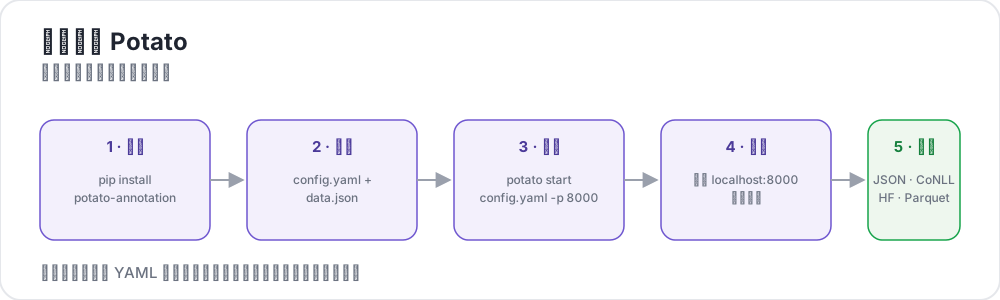 Potato 的五个步骤
前提条件
- Python 3.9 或更高版本
pip包管理器- 一个终端
安装
建议把 Potato 装到虚拟环境里,以免与系统 Python 冲突:
python -m venv potato-env
source potato-env/bin/activate   # Windows: potato-env\Scripts\activate
pip install potato-annotation
验证安装:
python -c "import potato; print(potato.__version__)"应该会打印出 2.12.1。从 2.9 版开始,potato --version 报告同样的版本号,并且在从代码库运行时会附带 commit。
创建你的第一个项目
1. 创建项目目录
mkdir my-annotation-task
cd my-annotation-task
2. 创建数据文件
创建一个 data 文件夹,并在其中放一个名为 data.json 的文件:
mkdir data[
{"id": "1", "text": "I love this product! It's amazing."},
{"id": "2", "text": "This is the worst experience ever."},
{"id": "3", "text": "It's okay, nothing special."}
]data_files 还接受 .jsonl(每行一个 JSON 对象)、.csv 和 .tsv。指向带相应扩展名的文件,Potato 会据此选择读取器。
3. 创建配置文件
在项目目录中创建一个名为 config.yaml 的文件:
路径沙箱:配置里的所有相对路径(例如
data_files或output_annotation_dir)都相对task_dir解析,并且必须留在其内部。解析后落在task_dir之外的路径会被拒绝,以防止路径穿越。
annotation_task_name: "Sentiment Analysis"

# All relative paths below are resolved against task_dir.
task_dir: "."

# Data configuration
data_files:
  - "data/data.json"

# Tell Potato which fields in each record to use.
# id_key = unique identifier; text_key = the text shown to annotators.
item_properties:
  id_key: id
  text_key: text

# Where per-user annotation state is stored (relative to task_dir).
output_annotation_dir: "annotation_output/"

# Also write a periodic flat export, because the per-user state files are
# awkward to analyze. No exporter is named "json", so use "jsonl".
export_annotation_format: "jsonl"

# Annotation scheme
annotation_schemes:
  - annotation_type: radio
    name: sentiment
    description: "What is the sentiment of this text?"   # required for radio schemes
    labels:
      - Positive
      - Negative
      - Neutral

# Skip password authentication so anyone can log in with just a username.
require_password: false提示:你可以用预览 CLI 在不启动完整服务器的情况下校验配置。这是开始标注前发现拼写错误的最快方式。
4. 启动服务器
potato start config.yaml -p 8000等价的完整写法:
python -m potato start config.yaml -p 8000如果 8000 端口已被占用,用 -p 8001 换一个。要停止服务器,在终端中按 Ctrl+C。
让首次运行更快:试验阶段可以加上
--debug --debug-phase=annotation,跳过登录和知情同意页面:potato start config.yaml --debug --debug-phase=annotation。这样每个访问者都会以同一个共享的debug_user身份登录,所以只在你自己的机器上使用。
5. 打开浏览器
访问 http://localhost:8000。你会看到一个只有 username 字段的登录页面。随便输入(例如 alice)并点击 Continue,就可以开始标注了。
每次选择标签并点击 Next,标注都会自动保存。没有单独的"保存"按钮。
标注保存在哪里
Potato 在你标注的同时写入每个用户的状态:
my-annotation-task/
├── config.yaml
├── data/
│   └── data.json
└── annotation_output/              # created automatically
    └── alice/
        └── user_state.json         # one folder per username
user_state.json 保存该用户的完整标注状态。要生成一个跨所有标注者的合并平铺文件,请运行 Potato 的导出 CLI,导出文档对此有说明。运行 python -m potato.export --list-formats 可以查看它注册的所有格式。
首次运行的常见问题
Address already in use—— 8000 端口被占用。用-p 8001(或任何空闲端口)。KeyError: 'description'—— 某个 radio(或类似)方案缺少必填的description字段。每个方案都需要它。Path ... is outside the task directory—— 某个data_files或output_annotation_dir路径跑到了task_dir之外。把所有内容放在项目文件夹内,或者把task_dir设为包含它们的绝对路径。- 登录页面出现密码字段 —— 你忘了
require_password: false,或者浏览器标签页有缓存。重启服务器并强制刷新。
常见问题
下面的问题涉及安装 Potato、在 Docker 中运行它,以及在标注者看到配置之前检查配置。
如何安装 Potato?
在 Python 3.9 或更高版本上,用 pip install potato-annotation 从 PyPI 安装。装在虚拟环境里可以让 Potato 的依赖与系统 Python 分开,potato --version 会打印版本号,以此确认安装成功。
Potato 能在 Docker 中运行吗?
能。Potato 在 GitHub Container Registry 上发布了一个预构建镜像 ghcr.io/davidjurgens/potato。项目文件夹挂载到容器内的 /app,服务器在容器内监听 7860 端口,因此一个镜像可以运行所有任务。设置 POTATO_SECRET_KEY,标注者的会话在重启后才能保留。完整的 docker run 命令见在服务器上部署 Potato。
如何在标注者看到之前检查 Potato 配置?
运行 potato validate config.yaml --strict。它按服务器启动时的方式检查配置,并把警告(例如无法识别的键)当作失败处理。接着,potato preview config.yaml 会显示配置声明的内容,并在浏览器中渲染界面,这样在任何人登录之前,你就能看到标注者将会看到的任务。
下一步
- 了解配置基础以获取更多选项
- 让编程智能体借助 potato-skill 设计并构建你的下一个任务
- 探索不同的标注类型
- 为你的团队设置用户管理
- 了解 v2 的新功能,包括 AI 支持和主动学习
工具与实用程序
熟悉基础之后,可以看看这些实用工具: