UI 配置
自定义 Potato 的标注界面——页头布局、侧边栏区块、键盘快捷键、实例排序、分页以及显示块的位置。
Potato 为管理员提供了一系列自定义标注界面的选项,涵盖界面的外观和行为。
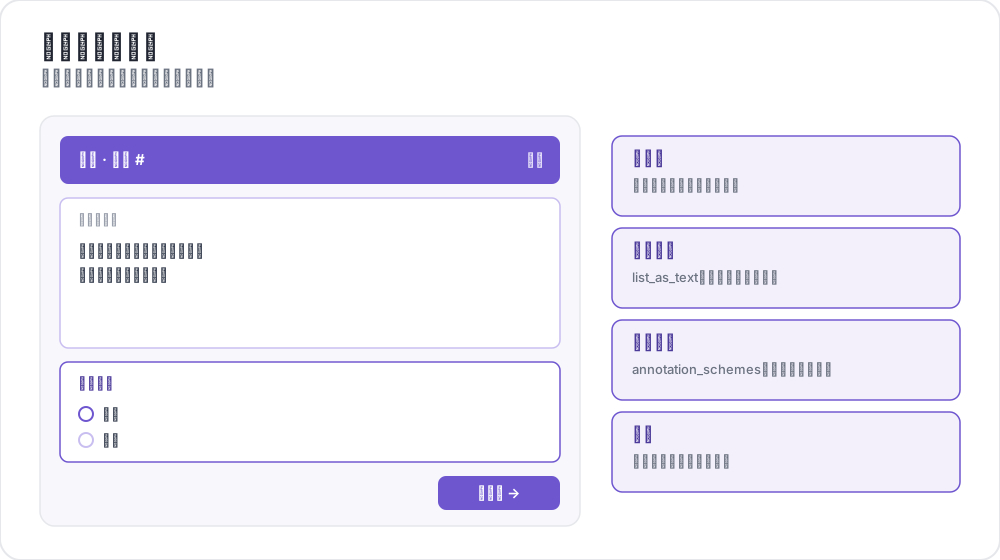 标注页面的区域
配置结构
所有 UI 配置选项都在配置文件的 ui 部分中定义:
yaml
ui:
  max_instance_height: 300
  show_progress: true
实例高度控制
控制实例文本显示区域的最大高度,让长文本下的标注选项仍然可见。
yaml
ui:
  max_instance_height: 300  # 300 pixels maximum height
优点:
- 长文本实例不再把标注选项挤出视野
- 标注选项保持在可预期的位置
- 长内容获得可滚动的文本区域
标签颜色
为所有标注类型配置自定义的标签颜色。
全局标签颜色
为所有方案定义标签颜色:
yaml
ui:
  label_colors:
    sentiment:
      positive: "#22C55E"      # Green
      negative: "#EF4444"      # Red
      neutral: "#9CA3AF"       # Gray
    emotion:
      happy: "rgba(34, 197, 94, 0.8)"
      sad: "rgba(59, 130, 246, 0.8)"
内联标签颜色
直接在每个标签上定义颜色:
yaml
annotation_schemes:
  - annotation_type: radio
    name: sentiment
    description: "What is the overall sentiment?"
    labels:
      - name: positive
        color: "#22C55E"
        tooltip: "Positive sentiment"
      - name: negative
        color: "#EF4444"
片段专用颜色(旧版)
最初的仅适用于片段的颜色配置:
yaml
ui:
  spans:
    span_colors:
      sentiment:
        positive: "(220, 252, 231)"  # RGB format
        negative: "(254, 226, 226)"
颜色格式支持
所有颜色选项都支持多种格式:
- 十六进制:
"#FF8000"或"#F80" - RGB:
"(255, 128, 0)"或"rgb(255, 128, 0)" - RGBA:
"rgba(255, 128, 0, 0.8)" - 命名色:
"red"、"blue"、"green"
默认颜色
如果没有指定自定义颜色,Potato 会根据标签名称分配颜色:
| 标签名称 | 颜色 |
|---|---|
| positive, yes, true, happy | 绿色 |
| negative, no, false, angry | 红色 |
| neutral, maybe | 灰色 |
| mixed, surprise | 琥珀色 |
| sad | 蓝色 |
| fear | 紫色 |
不在该列表中的标签按其位置从默认调色板中取色。
颜色优先级
当有多个来源为同一个标签指定颜色时,第一个匹配的生效:
ui.label_colorsui.spans.span_colors,用于片段标注- 标签定义上的内联
color - 片段颜色调色板
- 按标签名称匹配到的默认颜色
- 按位置从调色板中选出的颜色
界面显示选项
控制界面元素的可见性和功能:
yaml
ui:
  show_progress: true        # Show progress indicators
  show_instructions: true    # Show instruction panels
  allow_navigation: true     # Allow navigation between instances
  allow_editing: true        # Allow editing of annotations
任务布局自定义
Potato 会根据你的配置自动生成 HTML 布局。
自动生成的布局
运行 Potato 时,它会在以下位置生成一个布局文件:
text
{task_dir}/annotation_layouts/annotation_layout.html
配置发生变化时,该文件会重新生成。
自定义任务布局
如果需要更多控制,可以提供自定义的 HTML 文件:
yaml
task_layout: "my_custom_layout.html"创建自定义布局:
- 以生成的布局作为模板起步
- 修改 HTML,添加自定义元素
- 在配置中引用你的文件
关于用 CSS 网格、颜色编码选项和分区样式创建复杂自定义布局的详细指导,请参阅布局自定义指南。
布局结构要求
自定义布局必须包含某些元素:
| 元素 | 用途 | 是否必需 |
|---|---|---|
.annotation-form | 每个方案的容器 | 是 |
data-annotation-id | 与配置匹配的唯一 ID | 是 |
data-schema-name | 用于取色的方案名称 | 推荐 |
.ai-help | AI 助手按钮 | 使用 AI 时 |
CSS 类参考
表单结构:
.annotation-form- 主表单容器.annotation-form-header- 包含名称和 AI 按钮的页头.annotation-form-body- 包含输入选项的主体.annotation-name- 方案名称显示.annotation-desc- 描述文本
输入选项:
.shadcn-radio-option- 单选按钮选项.shadcn-checkbox-option- 复选框选项.shadcn-span-option- 片段标注选项
站点目录配置
自定义模板
把 site_dir 指向你自己的模板文件夹:
yaml
site_dir: "custom_templates"或者显式指定内置模板:
yaml
site_dir: "default"自定义 JavaScript
注入自定义的 JavaScript 代码:
yaml
customjs: "http://localhost:8080/custom.js"
customjs_hostname: "localhost:8080"
完整示例
yaml
annotation_task_name: "UI Configuration Example"

# Annotation schemes with inline colors
annotation_schemes:
  - annotation_type: radio
    name: sentiment
    description: "What is the overall sentiment?"
    labels:
      - name: positive
        color: "#22C55E"
        tooltip: "Positive sentiment"
        key_value: p
      - name: negative
        color: "#EF4444"
        tooltip: "Negative sentiment"
        key_value: n
      - name: neutral
        color: "#9CA3AF"
        key_value: u

# UI Configuration
ui:
  max_instance_height: 400

  label_colors:
    sentiment:
      positive: "#22C55E"
      negative: "#EF4444"
      neutral: "#9CA3AF"

  show_progress: true
  show_instructions: true
  allow_navigation: true
  allow_editing: true

site_dir: "default"
浏览器兼容性
所有 UI 配置选项在现代浏览器中都可用:
- Chrome/Edge:完全支持,包含自定义滚动条样式
- Firefox:完全支持,使用标准滚动条
- Safari:完全支持,使用标准滚动条
- 移动端:响应式设计,适合触控交互
最佳实践
- 测试你的配置:始终用你自己的数据测试 UI 改动
- 考虑可访问性:确保颜色选择有足够的对比度
- 移动端适配:在移动设备上测试配置
- 性能:过大的自定义 JavaScript 文件可能拖慢加载
故障排除
颜色不显示
确认 RGB 格式使用了括号和空格:"(255, 128, 0)"
高度限制不生效
检查 max_instance_height 是否为正整数。
自定义模板未加载
确认 site_dir 路径存在且包含有效的模板。
延伸阅读
有关实现细节,请参阅源文档。