分诊
接受/拒绝/跳过界面,用于快速数据筛选和过滤。
分诊标注方案提供 Prodigy 风格的二元接受/拒绝/跳过界面,针对快速数据筛选任务进行了优化。此方案非常适合过滤大型数据集、执行数据质量检查或任何需要快速二元决策的任务。
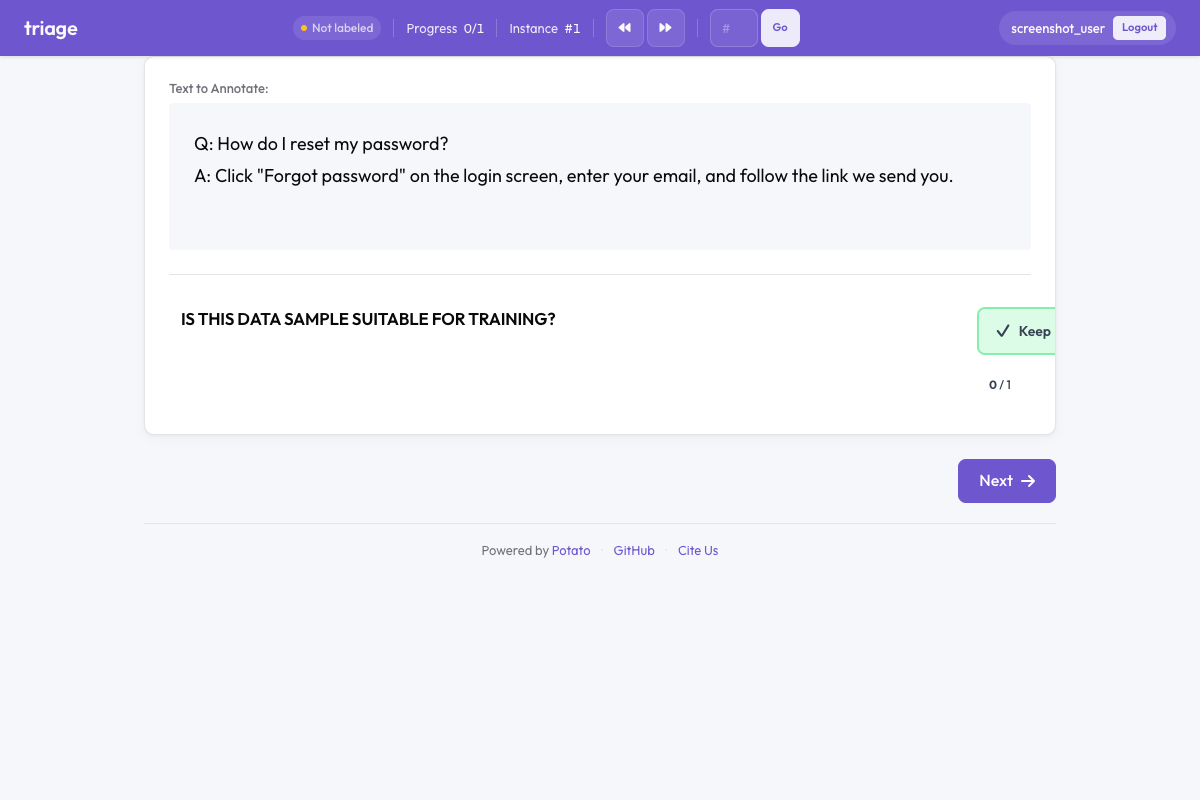 Potato 中的分流
概述
分诊方案呈现三个大型、视觉上有区别的按钮:
- 保留(绿色)- 接受该项目以纳入
- 丢弃(红色)- 拒绝该项目
- 不确定(灰色)- 不确定时跳过
启用自动推进(默认),标注者仅使用键盘快捷键即可每小时处理数百个项目。
快速入门
yaml
annotation_schemes:
  - annotation_type: triage
    name: data_quality
    description: Is this data sample suitable for training?
    auto_advance: true
    show_progress: true
配置选项
| 字段 | 类型 | 默认值 | 描述 |
|---|---|---|---|
annotation_type | string | 必填 | 必须为 "triage" |
name | string | 必填 | 此方案的唯一标识符 |
description | string | 必填 | 显示给标注者的说明 |
accept_label | string | "Keep" | 接受按钮的文本标签 |
reject_label | string | "Discard" | 拒绝按钮的文本标签 |
skip_label | string | "Unsure" | 跳过按钮的文本标签 |
auto_advance | boolean | true | 选择后自动移到下一项 |
show_progress | boolean | true | 在分诊组件中显示进度条 |
accept_key | string | "1" | 接受的键盘快捷键 |
reject_key | string | "2" | 拒绝的键盘快捷键 |
skip_key | string | "3" | 跳过的键盘快捷键 |
示例
数据质量过滤
yaml
annotation_schemes:
  - annotation_type: triage
    name: quality_filter
    description: Is this text high quality and suitable for training?
    auto_advance: true
内容审核
yaml
annotation_schemes:
  - annotation_type: triage
    name: content_moderation
    description: Does this content violate community guidelines?
    accept_label: "Safe"
    reject_label: "Violates"
    skip_label: "Review Later"
    auto_advance: true
相关性过滤
yaml
annotation_schemes:
  - annotation_type: triage
    name: relevance
    description: Is this document relevant to the query?
    accept_label: "Relevant"
    reject_label: "Not Relevant"
    skip_label: "Partially Relevant"
与其他方案结合
分诊可以与其他标注类型结合使用,同时进行过滤和详细标注:
yaml
annotation_schemes:
  - annotation_type: triage
    name: include_item
    description: Should this item be included in the dataset?
    auto_advance: false  # Don't auto-advance when combined

  - annotation_type: radio
    name: category
    description: What category does this belong to?
    labels: ["News", "Opinion", "Review", "Other"]
键盘快捷键
| 按键 | 操作 |
|---|---|
1 | 保留(接受) |
2 | 丢弃(拒绝) |
3 | 不确定(跳过) |
按键 1、2、3 在键盘上相邻,无需看键盘即可快速标注。
输出格式
json
{
  "data_quality": {
    "labels": {
      "decision": "accept"
    }
  }
}可能的值:"accept"、"reject"、"skip"。
最佳实践
- 高吞吐量任务使用自动推进 - 显著提高简单决策的吞吐量
- 复杂决策禁用自动推进 - 当标注者需要时间思考或进行额外标注时
- 提供清晰的描述 - 使分诊标准明确无歧义以确保标注一致性
- 使用有意义的标签 - 自定义标签以匹配您的具体使用场景
- 结合注意力检查 - 在众包中,插入已知项目以验证质量
延伸阅读
有关实现细节,请参阅源文档。