多阶段工作流
在 Potato 中构建多阶段标注工作流,包含知情同意、预筛查、说明、培训和研究后调查,以及条件调查问题。
Potato 把标注任务当作一条更长工作流中的一个阶段来运行,因此知情同意、筛查问题、说明、培训和退出调查都可以围绕它进行,不必另外使用调查工具。
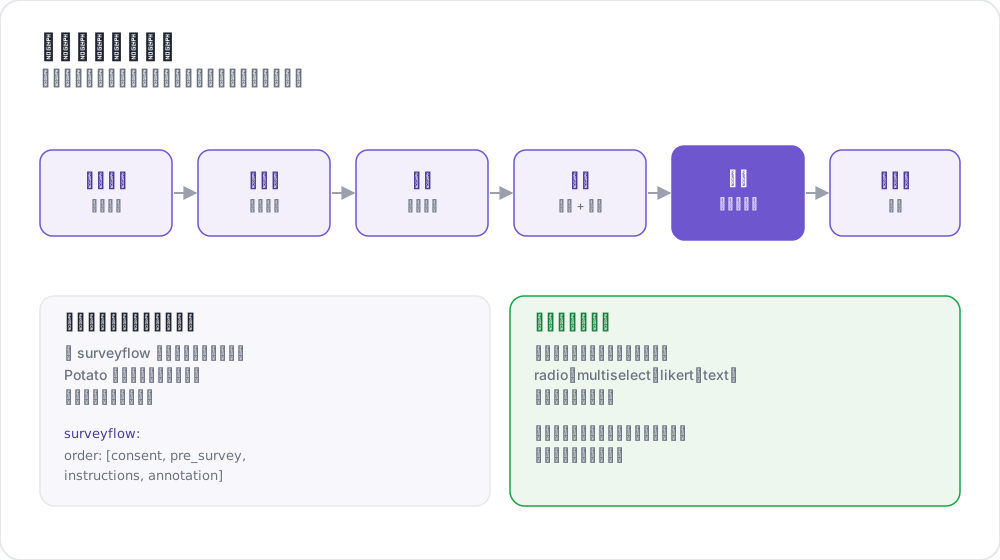 调查流标注工作流
可用阶段
| 阶段 | 用途 | 是否必需 |
|---|---|---|
consent | 收集知情同意 | 可选 |
prestudy | 预筛查问题和人口统计 | 可选 |
instructions | 任务说明和指南 | 可选 |
training | 带反馈的资格认定 | 可选 |
annotation | 主要标注任务 | 必需 |
poststudy | 研究后调查和反馈 | 可选 |
标注者按你声明的顺序依次通过已启用的阶段。
基本配置
phases 块列出顺序,并把每个阶段指向它的文件:
phases:
  order: [consent, prestudy, instructions, annotation, poststudy]

  consent:
    type: consent
    file: surveyflow/consent.json

  prestudy:
    type: prestudy
    file: surveyflow/prescreening.json

  instructions:
    type: instructions
    file: surveyflow/instructions.html

  poststudy:
    type: poststudy
    file: surveyflow/demographics.json
annotation 阶段不需要 file,因为它使用项目顶层的 annotation_schemes。
阶段类型
每个基于文件的阶段都要声明一个 type,说明它属于工作流的哪个环节。有效取值为 consent、prestudy、instructions、training、annotation 和 poststudy。
请显式设置 type。只有当阶段名称本身就是这些词之一时 Potato 才会推断它,因此使用自定义名称的阶段必须声明一个:
phases:
  order: [intro, consent, instructions, annotation, feedback]

  intro:
    type: prestudy          # custom name, so type is required
    file: surveyflow/intro.json

  consent:
    type: consent
    file: surveyflow/consent.json

  feedback:
    type: poststudy         # custom name, so type is required
    file: surveyflow/feedback.json
后退导航
当没有上一页时,后退按钮会被隐藏,其中包括第一条标注实例。要让标注者跨阶段边界后退:
allow_phase_back_navigation: true即使关闭它,标注者仍然可以在一个阶段内部后退,例如在标注实例之间。
调查问题格式
调查阶段读取一个 JSON 数组。每个问题都带有 id、向标注者显示的 text、指明控件的 schema,以及它的 choices:
[
  {
    "id": "consent_1",
    "text": "I certify that I am at least 18 years of age.",
    "schema": "radio",
    "choices": ["I agree", "I disagree"],
    "label_requirement": {"right_label": ["I agree"]}
  },
  {
    "id": "consent_2",
    "text": "I have read and understood the information above.",
    "schema": "radio",
    "choices": ["Yes", "No"],
    "label_requirement": {"right_label": ["Yes"]}
  }
]
支持的 schema 类型
radio 用于单选,checkbox 或 multiselect 用于多选,text 用于自由文本,number 用于数字输入,likert 用于评分量表,select 用于下拉菜单。
标签要求
label_requirement 决定哪些答案允许标注者继续:
{
  "id": "age_check",
  "text": "Are you at least 18 years old?",
  "schema": "radio",
  "choices": ["Yes", "No"],
  "label_requirement": {
    "right_label": ["Yes"],
    "required": true
  }
}
right_label 列出可接受的答案,required 说明这个问题是否必须回答。一道没人会答错的知情同意题等于什么都没记录,所以要把可接受的答案放进 right_label,而不是依赖题目的措辞。
预筛查问题
预筛查在主任务之前运行,是放置资格和背景问题的地方:
phases:
  order: [prestudy, annotation]
  prestudy:
    type: prestudy
file: surveyflow/prescreening.json[
{
"id": "1",
"text": "What is your native language?",
"schema": "select",
"use_predefined_labels": "language",
"label_requirement": {"required": true}
},
{
"id": "2",
"text": "How familiar are you with this topic?",
"schema": "likert",
"choices": ["Not at all", "Slightly", "Moderately", "Very", "Extremely"],
"label_requirement": {"required": true}
}
]研究后调查
phases:
  order: [annotation, poststudy]
  poststudy:
    type: poststudy
file: surveyflow/demographics.json[
{
"id": "gender",
"text": "What gender do you most closely identify with?",
"schema": "radio",
"choices": ["Male", "Female", "Non-binary", "Prefer not to say"],
"label_requirement": {"required": true}
},
{
"id": "feedback",
"text": "Please share any feedback about this study (optional)",
"schema": "text"
}
]内置标签集
Potato 为各项研究反复出现的问题内置了标签集,这样国家列表就不必粘贴进配置里:
{"id": "country", "text": "Select your country", "schema": "select", "use_predefined_labels": "country"}可用的标签集有 country、language、ethnicity 和 religion。
自由回答字段
用 has_free_response 给任意问题加上一个可选文本框,"其他"选项正是靠它才有提供的价值:
{
  "id": "gender",
  "text": "What is your gender?",
  "schema": "radio",
  "choices": ["Woman", "Man", "Non-binary", "Prefer not to disclose", "Prefer to self-describe"],
  "has_free_response": {"instruction": "Please specify:"},
  "label_requirement": {"required": true}
}
页面标题
调查页面的标题设在阶段上,而不是在问题文件里:
phases:
  prestudy:
    type: prestudy
    file: surveyflow/consent.json
    header: "Please answer all consent questions"
条件问题
调查问题可以根据先前的答案显示,这样后续问题只在适用时才出现。由于调查问题和标注方案走的是同一条流水线,条件通过 name 引用另一个问题:
[
  {
    "name": "prior_experience",
    "annotation_type": "radio",
    "description": "Have you previously worked on a text-annotation task?",
    "labels": ["Yes", "No"],
    "label_requirement": {"required": true}
  },
  {
    "name": "experience_details",
    "annotation_type": "text",
    "description": "Please briefly describe your previous annotation experience.",
    "label_requirement": {"required": true},
    "display_logic": {
      "show_when": [
        {"schema": "prior_experience", "operator": "equals", "value": "Yes"}
      ]
    }
  }
]
被隐藏的问题不参与必填字段校验,所以它在不显示时绝不会挡住"继续"按钮。
有三个行为值得了解。条件可以引用任意阶段上的问题,因此研究后的问题可以依赖研究前的答案。无效的 display_logic,比如未知的操作符或者引用了根本不存在的问题,会在服务器启动时失败,而不是在运行时。另外,指向原始 .html 文件的 instructions 阶段绕过了 schema 流水线,因此条件在那里不起作用。
设置 export_include_phase_data: true 后,Potato 会在服务器端重新评估每位参与者的答案,并剔除他们从未看到的问题的答案。完整的操作符参考见条件逻辑。
完整示例
annotation_task_name: "Sentiment Analysis Study"
task_dir: "."
port: 8000

data_files:
  - "data/reviews.json"

item_properties:
  id_key: id
  text_key: text

annotation_schemes:
  - annotation_type: radio
    name: sentiment
    description: "What is the sentiment of this review?"
    labels:
      - Positive
      - Negative
      - Neutral
    sequential_key_binding: true

phases:
  order: [consent, prestudy, instructions, training, annotation, poststudy]

  consent:
    type: consent
    file: phases/consent.json

  prestudy:
    type: prestudy
    file: phases/demographics.json

  instructions:
    type: instructions
    file: phases/instructions.html

  training:
    type: training
    file: phases/training_questions.json

  poststudy:
    type: poststudy
    file: phases/exit_survey.json

training:
  enabled: true
  data_file: phases/training_questions.json
  passing_criteria:
    min_correct: 3
  allow_retry: true

allow_phase_back_navigation: false

output_annotation_dir: "output/"
export_annotation_format: "jsonl"

user_config:
  allow_all_users: true
培训阶段从顶层的 training 块读取它的设置,phases 中的条目只负责把它放进顺序里。通过标准和数据格式见培训阶段。
旧版配置
较早的 surveyflow 块仍然可用,它把调查页面读作 .jsonl 文件的列表:
surveyflow:
  on: true
  order:
    - pre_annotation
    - post_annotation
  pre_annotation:
    - surveyflow/consent.jsonl
    - surveyflow/demographics.jsonl
  post_annotation:
    - surveyflow/exit_survey.jsonl
迁移
| 旧版 | 新版 |
|---|---|
surveyflow.on: true | 一个 phases 块 |
surveyflow.pre_annotation | phases.consent 或 phases.prestudy |
surveyflow.post_annotation | phases.poststudy |
surveyflow.testing | training.data_file |
.jsonl 文件 | 装着数组的 .json 文件 |
最佳实践
保持调查简短
每多一道问题都会拉低完成率,而分析中根本用不上的人口统计问题就是白白付出这个代价。
测试整条流程
在把链接发出去之前,先在一个没有会话的浏览器里自己走完整个工作流。知情同意和登录是工作流出问题时最先失败、也最不声不响的两个地方。
谨慎标记必填字段
本可以设为可选却标成必填的问题,只会换来人们为了翻过这一页而编造的答案。
众包
完成代码用顶层的 completion_code 键配置,而不是配在研究后阶段上:
completion_code: "POTATO2024"
auto_redirect_on_completion: true
auto_redirect_delay: 5000平台设置见众包。
延伸阅读
- 培训阶段 - 带反馈的资格认定
- 众包 - Prolific、SONA 及其他样本平台
- 用户管理 - 访问列表和角色
- 实验流程 - 实验条件、筛除和平衡顺序的页面
- 问卷导入 - 从 Qualtrics、REDCap、XLSForm 等工具导入问卷
实现细节见源文档。