培训阶段
用练习题、已知正确答案、即时反馈,以及决定谁能进入真实任务的通过标准,在 Potato 中对标注者进行资格认定。
Potato 提供一个可选的培训阶段,在主任务之前运行。标注者回答带有已知正确答案的练习题,并对每一题得到反馈,这样对标注指南的误解会在它扩散到整个语料之前暴露出来。
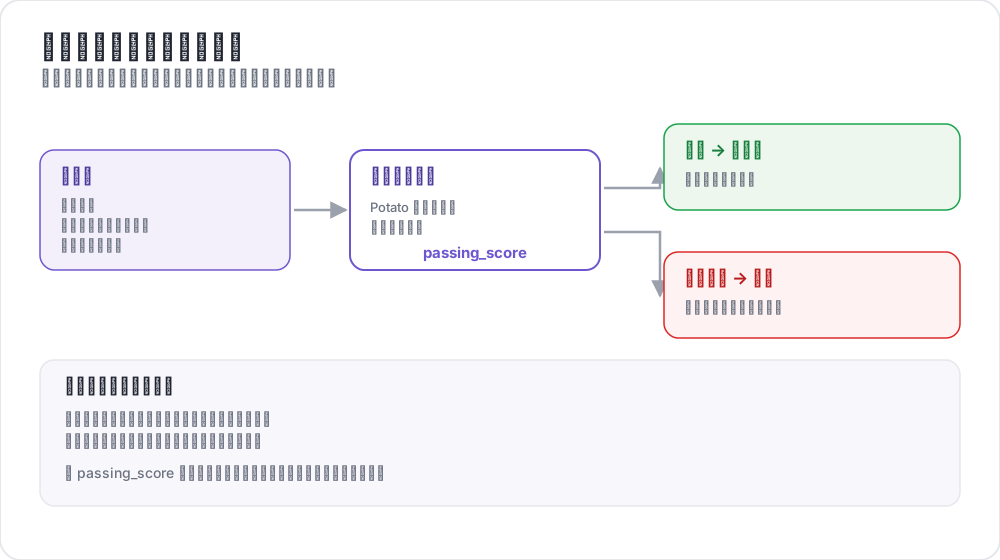 训练阶段如何为标注者把关
用例
- 确认标注者理解了任务
- 筛掉达不到你的准确率门槛的标注者
- 在真实标注之前提供有指导的练习
- 通过做过的例子讲清标注指南
工作原理
- 标注者回答一组培训题
- 每次作答后立刻出现反馈
- 进度按通过标准衡量
- 只有通过的标注者才进入主任务
配置
培训需要两个各司其职的块。顶层的 training 块配置这个阶段,而 phases 决定它在工作流中的位置。只配置其中一个而漏掉另一个,正是培训阶段始终不出现的常见原因。
training 块
training:
  enabled: true
  data_file: "data/training_data.json"
  annotation_schemes: ["sentiment"]
  passing_criteria:
    min_correct: 3
    require_all_correct: false
  allow_retry: true
  failure_action: "repeat_training"
配置选项
| 选项 | 类型 | 默认值 | 说明 |
|---|---|---|---|
enabled | 布尔值 | false | 是否运行培训阶段 |
data_file | 字符串 | - | 培训数据的路径,启用时必填 |
annotation_schemes | 列表 | 全部方案 | 对哪些方案进行培训 |
passing_criteria.min_correct | 整数 | 3 | 通过所需的正确答案数 |
passing_criteria.require_all_correct | 布尔值 | false | 是否每一题都必须答对 |
passing_criteria.max_mistakes | 整数 | -1 | 判定失败前的累计错误数,-1 表示不限 |
passing_criteria.max_mistakes_per_question | 整数 | -1 | 判定失败前单题上的错误数 |
allow_retry | 布尔值 | true | 答错后是否可以重试 |
failure_action | 字符串 | move_to_done | move_to_done 或 repeat_training |
annotation_schemes 指定的是多个方案而不是单个,因此含有多道问题的任务既可以对全部方案培训,也可以只针对出问题的那一个。
把阶段加进工作流
phases 列出工作流顺序,并把每个阶段指向它的文件。培训条目带有 type 和 file,上面那些设置仍然留在 training 块里:
phases:
  order: [consent, instructions, training, annotation]

  consent:
    type: consent
    file: surveyflow/consent.json

  instructions:
    type: instructions
    file: surveyflow/instructions.html

  training:
    type: training
    file: data/training_data.json
annotation 阶段不需要文件,因为它使用项目的 annotation_schemes。其他阶段见多阶段工作流。
通过标准
这些标准可以组合,因此一次运行既能要求正确答案数的下限,又能把总在同一题上出错的人挡在外面。
最少正确数
passing_criteria:
  min_correct: 3
要求全部正确
passing_criteria:
  require_all_correct: true
最大错误数
passing_criteria:
  max_mistakes: 5
标注者累计答错五次后即判定未通过。
每题最大错误数
passing_criteria:
  max_mistakes_per_question: 2
标注者在任何单题上答错两次后即判定未通过,这能抓出卡在某一处区分上的人,而不是整体都薄弱的人。
组合标准
passing_criteria:
  min_correct: 3
  max_mistakes: 5
  max_mistakes_per_question: 2
培训数据格式
培训数据是一个带有 training_instances 列表的 JSON 文件。每条实例包含文本、每个方案的正确答案,以及一条可选的解释,在答错时显示:
{
  "training_instances": [
    {
      "id": "train_1",
      "text": "I absolutely love this product! Best purchase ever!",
      "correct_answers": {
        "sentiment": "Positive"
      },
      "explanation": "Strong positive language: 'love' and 'best purchase'."
    },
    {
      "id": "train_2",
      "text": "This is the worst service I've ever experienced.",
      "correct_answers": {
        "sentiment": "Negative"
      },
      "explanation": "'Worst' and the complaint itself indicate negative sentiment."
    },
    {
      "id": "train_3",
      "text": "The package arrived on time.",
      "correct_answers": {
        "sentiment": "Neutral"
      },
      "explanation": "A factual statement with no evaluation attached."
    }
  ]
}
培训实例字段
| 字段 | 类型 | 是否必填 | 说明 |
|---|---|---|---|
id | 字符串 | 是 | 实例的唯一标识符 |
text | 字符串 | 是 | 待标注的文本 |
correct_answers | 对象 | 是 | 方案名到正确取值的映射 |
explanation | 字符串 | 否 | 答错时显示 |
正确答案格式
correct_answers 与每个方案产生的形态相匹配:
{
  "sentiment": "Positive",
  "topic": ["emotion", "personal"],
  "rating": 4,
  "notes": "example response"
}
多个方案
有多个方案时,给每个方案各自的答案;如果推理理由不同,就按方案分别写解释:
{
  "id": "train_4",
  "text": "Apple announced new iPhone features yesterday.",
  "correct_answers": {
    "sentiment": "Neutral",
    "topic": "Technology"
  },
  "explanation": "A factual news statement about a technology product."
}
用户体验
培训流程
- 标注者看到一个指示,表明自己正处于培训阶段
- 问题以与真实任务相同的标注表单呈现
- 他们提交答案
- 反馈立刻出现,答错时附上解释,并在
allow_retry开启时提供重试选项
反馈展示
答错之后,标注者会看到培训数据里的解释,以及自己相对通过标准的进度。写出讲清规则而非复述答案的解释,才是这个阶段值得跑的原因。
管理员监控
管理面板会显示每位标注者的培训统计,包括是否通过、答对了多少题、总尝试次数、通过率,以及他们正做到第几题。
同样的数据也可以通过管理员 API 获取:
GET /admin/api/annotators
GET /admin/user_state/{user_id}
示例:情感分析培训
annotation_task_name: "Sentiment Analysis"
task_dir: "."
port: 8000

data_files:
  - "data/reviews.json"

item_properties:
  id_key: id
  text_key: text

annotation_schemes:
  - annotation_type: radio
    name: sentiment
    description: "What is the sentiment of this review?"
    labels:
      - Positive
      - Negative
      - Neutral
    sequential_key_binding: true

training:
  enabled: true
  data_file: "data/training_data.json"
  annotation_schemes: ["sentiment"]
  passing_criteria:
    min_correct: 3
    require_all_correct: false
  allow_retry: true
  failure_action: "repeat_training"

phases:
  order: [training, annotation]
  training:
    type: training
    file: "data/training_data.json"

output_annotation_dir: "output/"
export_annotation_format: "jsonl"

user_config:
  allow_all_users: true
示例:NER 培训
片段方案的培训方式相同。正确答案是片段列表,以字符偏移量给出:
annotation_schemes:
  - annotation_type: span
    name: entities
    description: "Highlight named entities"
    labels:
      - Person
      - Organization
      - Location
      - Date

training:
  enabled: true
  data_file: "data/ner_training.json"
  annotation_schemes: ["entities"]
  passing_criteria:
    min_correct: 2
allow_retry: true{
"training_instances": [
{
"id": "train_1",
"text": "Tim Cook announced that Apple will open a new store in New York on March 15.",
"correct_answers": {
"entities": [
{"start": 0, "end": 8, "label": "Person"},
{"start": 24, "end": 29, "label": "Organization"},
{"start": 54, "end": 62, "label": "Location"},
{"start": 66, "end": 74, "label": "Date"}
]
},
"explanation": "Tim Cook is a Person, Apple an Organization, New York a Location, March 15 a Date."
}
]
}最佳实践
从简单开始
先用毫不含糊的例子开场,再引入边界情况。第一题就答错的标注者学到的是这个任务令人困惑,而不是自己犯了个错。
覆盖每一个标签
方案能取的每个值都至少放一个例子。培训里从不出现的那个标签,正是标注者会大批量答错的那个。
写能讲清规则的解释
解释应当给出规则,而不是重复答案:
{
  "explanation": "The review mentions a problem, but the reviewer is satisfied with how it was resolved, so the overall judgment is Positive rather than Negative."
}
设定够得着的标准
严格,而且很可能失去本来合格的标注者:
passing_criteria:
  require_all_correct: true
留出从反馈中学习的余地:
passing_criteria:
  min_correct: 3
  max_mistakes_per_question: 2
纳入边界情况
把你在预实验里引发分歧的例子加进来,因为那些正是标注指南必须裁定的判断:
{
  "id": "train_5",
  "text": "Not bad at all, I guess it could be worse.",
  "correct_answers": {"sentiment": "Neutral"},
  "explanation": "Despite 'not bad' and 'worse', this is a lukewarm assessment rather than praise or complaint."
}
性能注意事项
培训数据在服务器启动时加载一次,培训状态与其余用户状态一起保存在内存中,因此这个阶段既不引入数据库需求,也不给主任务带来可测量的开销。
延伸阅读
实现细节见源文档。