数据格式
Potato 的输入格式:文本、JSON、JSONL、CSV、图像、音频和视频。输出为 CoNLL、HuggingFace Datasets、COCO、YOLO、Parquet 等格式。
Potato 从 JSON、JSON Lines、CSV 和 TSV 文件读取标注输入。本指南说明如何组织这些数据、Potato 需要每条记录中的哪些字段,以及标注最终落在哪里。
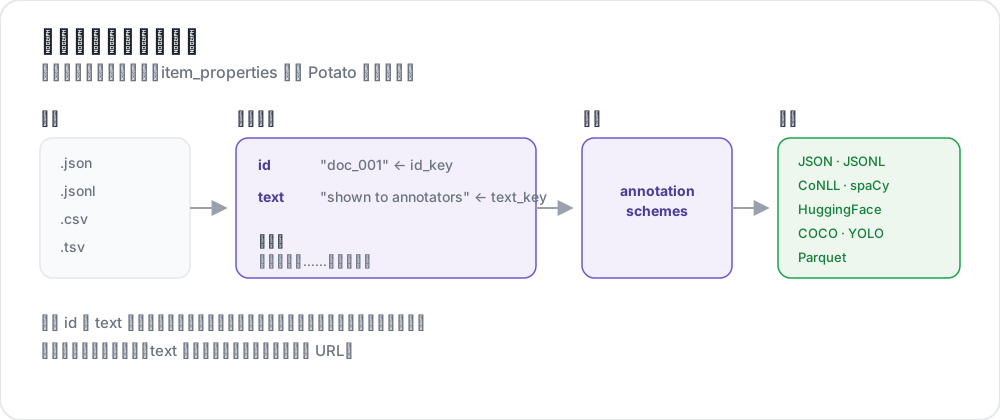 从输入文件到导出的标签
支持的格式
| 格式 | 扩展名 | 描述 |
|---|---|---|
| JSON | .json | 对象数组 |
| JSON Lines | .jsonl | 每行一个 JSON 对象 |
| CSV | .csv | 逗号分隔值 |
| TSV | .tsv | 制表符分隔值 |
JSON 格式
最常用的格式。您的数据应该是一个对象数组:
[
  {
    "id": "doc_001",
    "text": "This is the first document to annotate.",
    "source": "twitter",
    "date": "2024-01-15"
  },
  {
    "id": "doc_002",
    "text": "This is the second document.",
    "source": "reddit",
    "date": "2024-01-16"
  }
]
JSON Lines 格式
每行是一个单独的 JSON 对象。适用于大型数据集:
{"id": "doc_001", "text": "First document"}
{"id": "doc_002", "text": "Second document"}
{"id": "doc_003", "text": "Third document"}
CSV/TSV 格式
带表头的表格数据:
id,text,source
doc_001,"This is the first document",twitter
doc_002,"This is the second document",reddit
配置
基本设置
在 YAML 中配置数据文件和字段映射:
data_files:
  - "data/documents.json"

item_properties:
  id_key: id      # Field name for unique ID
  text_key: text  # Field name for content to annotate
多个数据文件
组合多个数据源:
data_files:
  - "data/batch_1.json"
  - "data/batch_2.json"
  - "data/batch_3.jsonl"
文件按顺序处理并合并。
数据类型
纯文本
简单的文本内容:
{
  "id": "1",
  "text": "The product arrived quickly and works great!"
}
媒体文件
图像、视频或音频条目在记录的某个字段里写明文件,再由 instance_display 中的一个字段把它显示在页面上:
{
  "id": "1",
  "image_path": "photo_001.jpg"
}media_directory: media # the default, relative to task_dir
instance_display:
fields:
- key: image_path
type: imagePotato 通过 /media/ 提供 media_directory 中的文件。该文件夹默认是 task_dir 下的 media/,写成绝对路径则可以指向机器上任意位置的文件夹。在媒体显示字段(如 image、video、audio、pdf)中,像 photo_001.jpg 这样只写文件名的值,只要文件在该文件夹里,就会变成 /media/photo_001.jpg,完整的 URL 则按原样使用。item_properties.image_key 不会把图像显示到页面上。它告诉 AI 支持和重复检测哪个字段存放图像。
对话/列表
存放 JSON 列表的 text 字段会每行排一项,因为纵向阅读适合对话。要做两两比较时,设置 list_as_text.horizontal 让各项并排:
{
  "id": "1",
  "text": ["Option A", "Option B", "Option C"]
}
文本对
存放 JSON 对象的 text 字段由配置声明的显示类型来渲染(conversation_tree、web_agent_trace 之类)。没有声明显示类型时会退回到格式化的 JSON,所以比较任务要声明一个:
{
  "id": "pair_001",
  "text": {
    "A": "Response from Model A",
    "B": "Response from Model B"
  }
}
HTML 文件
把 .html 文件放在 task_dir 下的某个文件夹里,再从普通的 text 字段指向它们,因为 Potato 没有单独的 HTML 条目属性。自带的 examples/advanced/html-annotation 任务就是这样嵌入每个文件的:
{
  "id": "1",
  "text": "<embed width=\"1020\" height=\"440\" src=\"data/html_data/1.html\" type=\"text/html\">"
}
上下文标注
在主文本旁包含上下文:
{
  "id": "1",
  "text": "This is great!",
  "context": "Previous message: How do you like the new feature?"
}
除 id 和 text 之外的字段通过 kwargs 到达页面,它指明每条数据要额外带过来哪些键:
item_properties:
  id_key: id
  text_key: text
  kwargs:
    - context
显示配置
列表显示选项
控制取值为列表的字段如何排布。这个键有三个子键,而 list_as_text: true 用默认值直接开启:
list_as_text:
  # Prefix each item so an annotator can refer to one by name.
  text_list_prefix_type: alphabet   # alphabet, number, bullet, or none

  # Side-by-side suits a pairwise comparison. The default is vertical.
  horizontal: true

  # Shade alternate turns, which keeps a long dialogue readable.
  alternating_shading: true
HTML 内容
text 字段里的标记不需要任何配置键就会渲染。Potato 对它做净化而不是转义,所以允许列表内的标签(<b>、<i>、<span> 之类)会变成格式,而 <script> 以及列表之外的任何东西都会被转义并失效。片段高亮是以标记的形式注入条目的,这正是不能把整个字段都转义的原因。
{
  "id": "1",
  "text": "<p>This is <strong>formatted</strong> text.</p>"
}
输出配置
输出目录
指定标注保存在哪里:
output_annotation_dir: "output/"输出格式
标注始终以每个用户一份 user_state.json 的形式保存。export_annotation_format 会另外把定期的扁平导出写进 <output_annotation_dir>/exports/<format>/,那才是值得拿来分析的形式。没有哪个导出器叫 json:
export_annotation_format: "jsonl" # or csv, tsv, parquet, coco, conll_2003, ...运行 python -m potato.export --list-formats 查看完整的注册表。
输出结构
每份 user_state.json 按实例为键保存该标注者的标签,片段则单独记录:
{
  "user_id": "annotator_1",
  "instance_id_to_label_to_value": {
    "doc_001": {
      "sentiment": {"labels": {"positive": true}}
    }
  },
  "instance_id_to_span_to_value": {
    "doc_001": {
      "ner": [
        {"start": 0, "end": 5, "label": "PERSON", "text": "Alice"}
      ]
    }
  }
}
特殊数据类型
最佳-最差缩放
用于排名任务,使用逗号分隔的项目:
{
  "id": "1",
  "text": "Item A,Item B,Item C,Item D"
}
自定义参数
包含额外字段用于显示或筛选:
{
  "id": "1",
  "text": "Document content",
  "category": "news",
  "priority": "high",
  "custom_field": "any value"
}
数据库后端
对于大型数据集,使用 MySQL:
database:
  type: mysql
  host: localhost
  port: 3306
  database: potato_db
  username: ${DB_USER}
  password: ${DB_PASSWORD}
Potato 在首次启动时自动创建所需的表。
数据验证
Potato 在启动时验证您的数据:
- 缺少 ID 字段 - 所有项目都需要唯一标识符
- 缺少文本字段 - 项目需要标注内容
- 重复 ID - 所有 ID 必须唯一
- 文件未找到 - 验证数据文件路径
完整示例
annotation_task_name: "Document Classification"
task_dir: "."
port: 8000

# Data configuration
data_files:
  - "data/documents.json"

item_properties:
  id_key: id
  text_key: text

# Display settings
list_as_text:
  text_list_prefix_type: number
  horizontal: false

# Output
output_annotation_dir: "output/"
export_annotation_format: "jsonl"

# Annotation scheme
annotation_schemes:
  - annotation_type: radio
    name: category
    description: "Select the document category"
    labels:
      - News
      - Opinion
      - Tutorial
      - Other

user_config:
  allow_all_users: true
  users: []
最佳实践
1. 使用有意义的 ID
使跟踪和调试更容易:
{"id": "twitter_2024_001", "text": "..."}2. 保持文本简洁
过长的文本会拖慢标注速度。可以考虑:
- 截取关键部分
- 提供摘要
- 使用滚动容器
3. 包含元数据
有助于筛选和分析:
{
  "id": "1",
  "text": "Content",
  "source": "twitter",
  "date": "2024-01-15",
  "language": "en"
}
4. 加载前先验证
离线检查您的数据:
import json

with open('data.json') as f:
    data = json.load(f)

# Check for required fields
for item in data:
    assert 'id' in item, f"Missing id: {item}"
    assert 'text' in item, f"Missing text: {item}"

# Check for duplicates
ids = [item['id'] for item in data]
assert len(ids) == len(set(ids)), "Duplicate IDs found"

print(f"Validated {len(data)} items")
5. 备份原始数据
把原始数据与标注分开保存,以保证可重复性。
6. 大文件使用 JSON Lines
比 JSON 数组更省内存:
# Convert JSON array to JSON Lines
cat data.json | jq -c '.[]' > data.jsonl
延伸阅读
有关实现细节,请参阅源文档。