评估 AI 智能体:对智能体轨迹的人工标注
如何在 Potato 中搭建 AI 智能体输出的人工评估:从轨迹导入,到轨迹级和逐步标注方案的设计,再到分析导出的结果。
用 python -m potato.trace_converter 转换智能体轨迹,通过 agent_trace 显示字段渲染它们,然后在收集轨迹级结论的同时收集逐步的 trajectory_eval 判断。能定位到运行在哪一步出岔子的,正是那份逐步判断。
成功率只告诉你智能体多久完成一次任务,完全不说明那些失败为什么失败。两个成功率同为 62% 的智能体,失败原因可能完全不同,一个选错了工具,另一个是在糟糕的检索结果上做了正确的推理,两种情况的修法并不一样。步骤级的人工评估能把它们分开,因为标注者会标出哪一步坏了、坏成什么样。
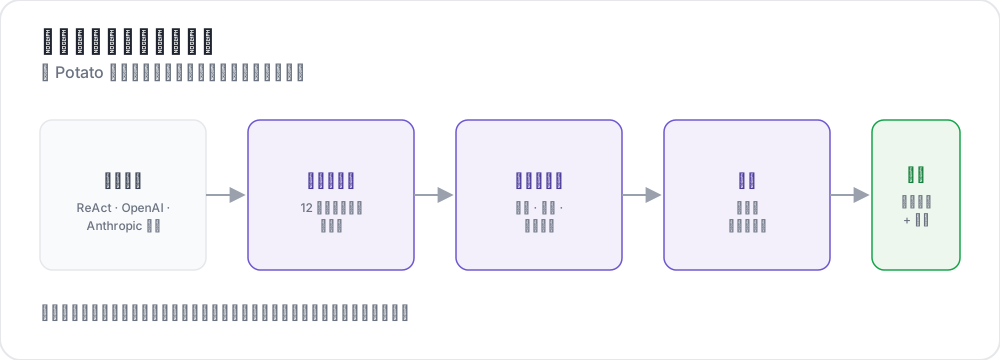 From raw traces to structured judgments
本指南为一个通过搜索网页回答问题的 ReAct 风格智能体搭建这条流水线。其中的配置均按 Potato 2.9.1 核对过:
pip install --upgrade potato-annotation第 1 步:转换轨迹
Potato 注册了 15 个轨迹转换器,命令行会连同各自的说明一起列出来:
python -m potato.trace_converter --list-formats清单涵盖 react、openai、anthropic、langchain、langfuse、multi_agent、mcp、otel、atif、webarena、web_agent、swebench、swe_agent_trajectory、claude_code 和 aider。LangSmith 的运行导出走 langchain,CrewAI、AutoGen 和 LangGraph 的日志走 multi_agent。
react 转换器读取的轨迹,其步骤带有 thought、action 和 observation 三个键:
{
  "id": "trace_001",
  "task": "What is the capital of Australia and what is its population?",
  "steps": [
    {"thought": "I need the capital of Australia and then its population.",
     "action": "search('capital of Australia')",
     "observation": "Canberra is the capital city of Australia."},
    {"thought": "Now I need Canberra's population.",
     "action": "search('Canberra population 2025')",
     "observation": "Canberra has a population of approximately 467,000 as of 2025."},
    {"thought": "I have both pieces of information.",
     "action": "finish('Canberra, approximately 467,000')"}
  ],
  "metadata": {"agent": "GPT-4", "tokens": 2340}
}
一条命令就能转换这个文件:
python -m potato.trace_converter \
  --input raw_traces.json \
  --input-format react \
  --output data/traces.jsonl
不确定该用哪个转换器时,把 --input-format 换成 --auto-detect,注册表会根据字段特征挑一个。一旦确定了格式,还是显式写出来,因为自动检测取的是第一个匹配上的转换器,而好几种格式所带的字段是重叠的。
每个转换器写出的都是同一套规范结构,这也是同一份配置能跨框架通用的原因。每一行带有 id、task_description 和 conversation,后者是一串带 speaker 和 text 的轮次。有这些信息的转换器还会写出 agent_name、metadata_table 和 screenshots:
{
  "id": "trace_001",
  "task_description": "What is the capital of Australia and what is its population?",
  "agent_name": "GPT-4",
  "metadata_table": [{"Property": "Steps", "Value": "3"},
                     {"Property": "tokens", "Value": "2340"}],
  "conversation": [
    {"speaker": "Agent (Thought)", "text": "I need the capital of Australia and then its population."},
    {"speaker": "Agent (Action)", "text": "search('capital of Australia')"},
    {"speaker": "Environment", "text": "Canberra is the capital city of Australia."}
  ]
}
第 2 步:渲染轨迹
agent_trace 显示把每一轮渲染成一张卡片,按步骤类型着色,让标注者读到的是这次运行本身,而不是一坨 JSON:
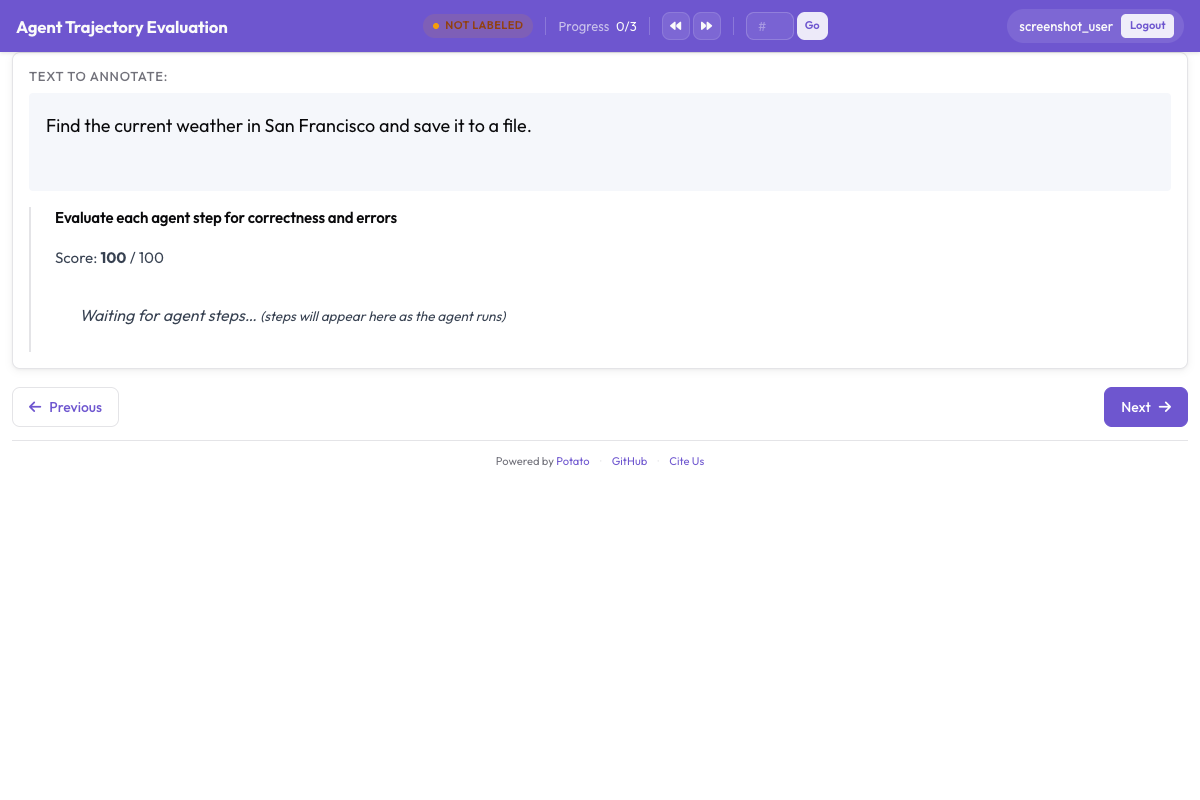
instance_display 决定页面上放什么、按什么顺序放。任务描述放在最上面,因为标注者得先知道智能体被要求做什么,任何步骤才有意义;元数据表放在它下面,用一个紧凑的表格字段呈现:
instance_display:
  layout:
    direction: vertical
    gap: 16px

  fields:
    - key: task_description
      type: text
      label: "Task"

    - key: metadata_table
      type: spreadsheet
      label: "Trace Info"
      display_options:
        compact: true
        max_height: 120

    - key: conversation
      type: agent_trace
      label: "Agent Trace"
      span_target: true
      display_options:
        show_step_numbers: true
        show_summary: true
        collapse_observations: true
        step_type_colors:
          thought: "#e8f4fd"
          action: "#fff3e0"
          observation: "#e8f5e9"
折叠观察结果可以避免冗长的搜索结果把轨迹的其余部分挤出屏幕,因为一条塞了十几段完整搜索结果的轨迹大半是在滚动,标注者会弄不清自己读到运行的哪里了。在同一个字段上设 span_target: true,跨度方案就能在某一轮里标出幻觉说法的确切字词,这比把整步判为错误要精细得多。
第 3 步:轨迹级判断
三个问题覆盖整条轨迹。任务是否成功是头号数字,答案正确性把"走错路却答对了"和"答错了"分开,而效率是区分两个都成功的智能体的依据:
annotation_schemes:
  - annotation_type: radio
    name: task_success
    description: "Did the agent complete the task?"
    labels:
      - name: "Success"
        tooltip: "Fully completed correctly"
      - name: "Partial success"
        tooltip: "Completed with errors or omissions"
      - name: "Failure"
        tooltip: "Not completed"
    label_requirement:
      required: true
    sequential_key_binding: true

  - annotation_type: radio
    name: answer_correctness
    description: "Is the agent's final answer factually correct?"
    labels:
      - name: "Correct"
      - name: "Partially correct"
      - name: "Incorrect"
      - name: "Cannot determine"
    label_requirement:
      required: true

  - annotation_type: likert
    name: efficiency
    description: "Did the agent reach the answer without wasted steps?"
    size: 5
    min_label: "Many unnecessary steps"
    max_label: "No wasted steps"

  - annotation_type: text
    name: evaluator_notes
    description: "Anything the ratings above do not capture"
    multiline: true
    rows: 3
"Cannot determine" 这个选项是值得留的。没有它,一个无从核实答案的标注者要么靠猜,要么标成错误,而这两种选择都会把噪声塞进你最在意的那个数字里。
第 4 步:逐步判断
trajectory_eval 把每一步渲染成一张带独立控件的卡片,并且在一个方案里同时承载正确性标签、错误分类体系和严重度,不必拆成三个方案。把 steps_key 指向存放步骤的字段(对转换后的轨迹来说是 conversation),把 step_text_key 指向每个步骤内部该显示出来的那个键:
annotation_schemes:
  - annotation_type: trajectory_eval
    name: step_evaluation
    description: "Mark each step and classify anything that went wrong"
    steps_key: conversation
    step_text_key: text
    correctness_options:
      - correct
      - partially_correct
      - incorrect
      - unnecessary
    error_types:
      - name: reasoning
        subtypes:
          - logical_error
          - factual_error
          - planning_error
      - name: execution
        subtypes:
          - wrong_tool
          - wrong_args
          - api_error
      - name: termination
        subtypes:
          - premature_stop
          - redundant_step
    severities:
      - name: minor
        weight: -1
      - name: major
        weight: -5
      - name: critical
        weight: -10
    show_score: true
    max_score: 100
严重度权重把一串标记过的步骤变成每条轨迹一个可比较的数字,而这里的默认值是值得改而不是照单全收的。一个权重说的是,对你的任务而言严重错误比轻微错误糟糕多少,而在安全评估里这个比值要比在搜索任务里陡峭得多。
另一个值得刻意去做的决定,是把 unnecessary 和 incorrect 分开。一个多余的步骤耗掉 token 和时间,但并没有引入错误,把两者合并会掩盖"到处乱走的智能体"和"做错了的智能体"之间的差别。
第 5 步:完整配置
以上所有内容,写在一个文件里:
annotation_task_name: "ReAct Agent Evaluation"
task_dir: "."
output_annotation_dir: "output/"

data_files:
  - "data/traces.jsonl"

item_properties:
  id_key: id
  text_key: task_description

instance_display:
  layout:
    direction: vertical
    gap: 16px
  fields:
    - key: task_description
      type: text
      label: "Task"
    - key: metadata_table
      type: spreadsheet
      label: "Trace Info"
      display_options:
        compact: true
        max_height: 120
    - key: conversation
      type: agent_trace
      label: "Agent Trace"
      span_target: true
      display_options:
        show_step_numbers: true
        show_summary: true
        collapse_observations: true

annotation_schemes:
  - annotation_type: radio
    name: task_success
    description: "Did the agent complete the task?"
    labels:
      - name: "Success"
      - name: "Partial success"
      - name: "Failure"
    label_requirement:
      required: true
    sequential_key_binding: true

  - annotation_type: radio
    name: answer_correctness
    description: "Is the agent's final answer factually correct?"
    labels:
      - name: "Correct"
      - name: "Partially correct"
      - name: "Incorrect"
      - name: "Cannot determine"
    label_requirement:
      required: true

  - annotation_type: likert
    name: efficiency
    description: "Did the agent reach the answer without wasted steps?"
    size: 5
    min_label: "Many unnecessary steps"
    max_label: "No wasted steps"

  - annotation_type: text
    name: evaluator_notes
    description: "Anything the ratings above do not capture"
    multiline: true
    rows: 3

  - annotation_type: trajectory_eval
    name: step_evaluation
    description: "Mark each step and classify anything that went wrong"
    steps_key: conversation
    step_text_key: text
    correctness_options: [correct, partially_correct, incorrect, unnecessary]
    error_types:
      - name: reasoning
        subtypes: [logical_error, factual_error, planning_error]
      - name: execution
        subtypes: [wrong_tool, wrong_args, api_error]
      - name: termination
        subtypes: [premature_stop, redundant_step]
    severities:
      - name: minor
        weight: -1
      - name: major
        weight: -5
      - name: critical
        weight: -10
    show_score: true
    max_score: 100

export_annotation_format: jsonl
启动服务,然后打开 http://localhost:8000:
potato start config.yaml -p 8000标注时看到的界面
页面上是任务、轨迹信息表和步骤卡片,逐步控件挂在各自的卡片上,轨迹级方案排在轨迹下面。标注者的作业顺序比看上去更要紧。先评步骤再评轨迹,能让总体结论锚定在这次运行实际做了什么;而先评成功与否,往往会给后面每一个步骤判断都染上颜色。
有三个习惯值得写进标注指南。展开折叠起来的观察结果,别只信那行摘要,因为读错搜索结果是"看起来推理得很好却答错了"最常见的来源。数据集有标准答案时,先把最终答案和标准答案对一遍再评任务是否成功。当后面的步骤暴露出前面那一步其实已经错了时,用步骤时间线跳回去。
第 6 步:导出与分析
JSONL 导出器写出 annotations.jsonl,每个实例、每个标注者一条记录:
python -m potato.export --config config.yaml --format jsonl --output ./export/每条记录带有 instance_id、user_id、labels、spans 和 links,各个方案的答案按方案名作为键放在 labels 下面:
import json
import pandas as pd

records = [json.loads(line) for line in open("export/annotations.jsonl")]

df = pd.DataFrame([
    {"trace": r["instance_id"], "annotator": r["user_id"], **r["labels"]}
    for r in records
])

print(df["task_success"].value_counts())
超过几百条轨迹的规模,就改成导出 Parquet 并就地查询。Parquet 导出写出 annotations.parquet,包含 instance_id、user_id 以及每个标注方案一列,所以方案名是列名而不是某个值:
python -m potato.export --config config.yaml --format parquet --output ./export/import duckdb
print(duckdb.sql("""
SELECT task_success, COUNT(*) AS n
FROM 'export/annotations.parquet'
GROUP BY task_success
ORDER BY n DESC
"""))最值得先读的是步骤级的判断。把各条轨迹上的错误子类型统计一遍,就能知道这个智能体是有一个系统性的失败模式,还是拖着一长串互不相干的偶发错误,而只有前一种才值得做针对性的修复。
第 7 步:更多标注者,以及一个资格考核阶段
智能体评估的主观性足够强,每条轨迹只有一个评分等于一次没有误差棒的测量。每条轨迹三名标注者能给你一个一致性数字,而随机分配可以避免重叠集中在恰好排在文件开头的那些轨迹上:
num_annotators_per_item: 3
assignment_strategy: random
资格考核阶段能在标注者花一整天不一致地套用错误分类体系之前,先把没弄懂这套体系的人筛出来。训练配置块会把他们留在已知答案的轨迹上,直到通过为止:
training:
  enabled: true
  data_file: "data/training_traces.jsonl"
  passing_criteria:
    min_correct: 4
  allow_retry: true
  failure_action: "repeat_training"
其他智能体框架
显示和标注方案在各框架之间保持不变,变的只是转换器。OpenAI Chat Completions 的轨迹和带 tool_use 块的 Anthropic 消息各有自己的转换器,而 CrewAI、AutoGen 和 LangGraph 的多智能体日志共用一个:
python -m potato.trace_converter --input runs.json --input-format openai --output data/traces.jsonl
python -m potato.trace_converter --input runs.json --input-format anthropic --output data/traces.jsonl
python -m potato.trace_converter --input runs.json --input-format multi_agent --output data/traces.jsonl
编码智能体需要另一套显示,因为一段被当作 JSON 字符串读的差异是没法审查的。coding_trace 显示会渲染带文件树的统一差异,并折叠冗长的终端输出:
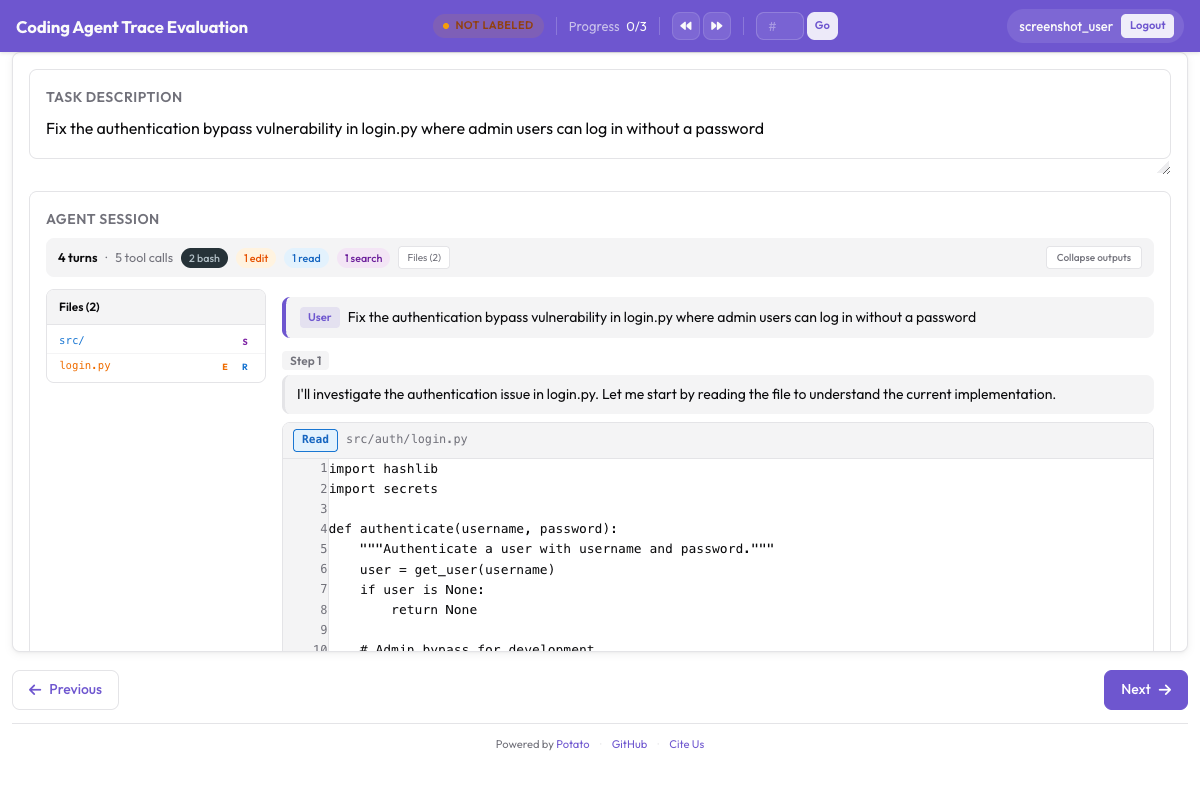
instance_display:
  fields:
    - key: structured_turns
      type: coding_trace
      label: "Agent Session"
      display_options:
        show_file_tree: true
        diff_view: unified
        collapse_long_outputs: true
        max_output_lines: 50
网页浏览智能体需要截图、动作覆盖层,以及一条用来在其间移动的胶片条:
instance_display:
  fields:
    - key: steps
      type: web_agent_trace
      label: "Agent Browsing Trace"
      display_options:
        show_overlays: true
        show_filmstrip: true
        show_thought: true
screenshot_max_width: 900标注网页浏览智能体介绍了覆盖层的格式,以及用来录制新轨迹的创建模式。
这一切背后的实现细节,见智能体评测指南和智能体轨迹文档。如果你正在搭建第一次评估,先转换十条轨迹,跑一下上面这份配置,在写标注指南之前自己标一遍,因为你真正需要的错误分类体系,通常不是你事先会写出来的那一套。
延伸阅读
- 智能体标注文档
- 标注网页浏览智能体
- Solo Mode,把智能体标注与人机协同评估结合起来
- Best-Worst Scaling,用比较的方式给智能体输出排序
- Parquet 导出,用于大规模分析