并排比较 AI 智能体:二元、量表与多维度模式
在 Potato 中配置成对智能体比较的三种模式:二元偏好、偏好量表,以及需要填写理由的逐维度判断。
为什么用成对比较来评估智能体
让标注者用 1 到 10 分给一条编程智能体轨迹打分,得到的数据噪声很大,因为每个人对这个量表的校准都不一样。一位标注者心里的 7 分,在另一位那里是 5 分。成对比较绕开了这个问题。标注者不再单独给一条轨迹打分,而是并排看两条,说出哪一条更好。这种正面对比的判断更容易做出,在不同人之间也更一致,而且正是直接偏好优化(DPO)和基于人类反馈的强化学习(RLHF)所需要的输入。
Potato 有三种成对模式,通过标注方案上的 mode 设置。它们的区别在于要求标注者做什么,以及每次比较的成本有多高。
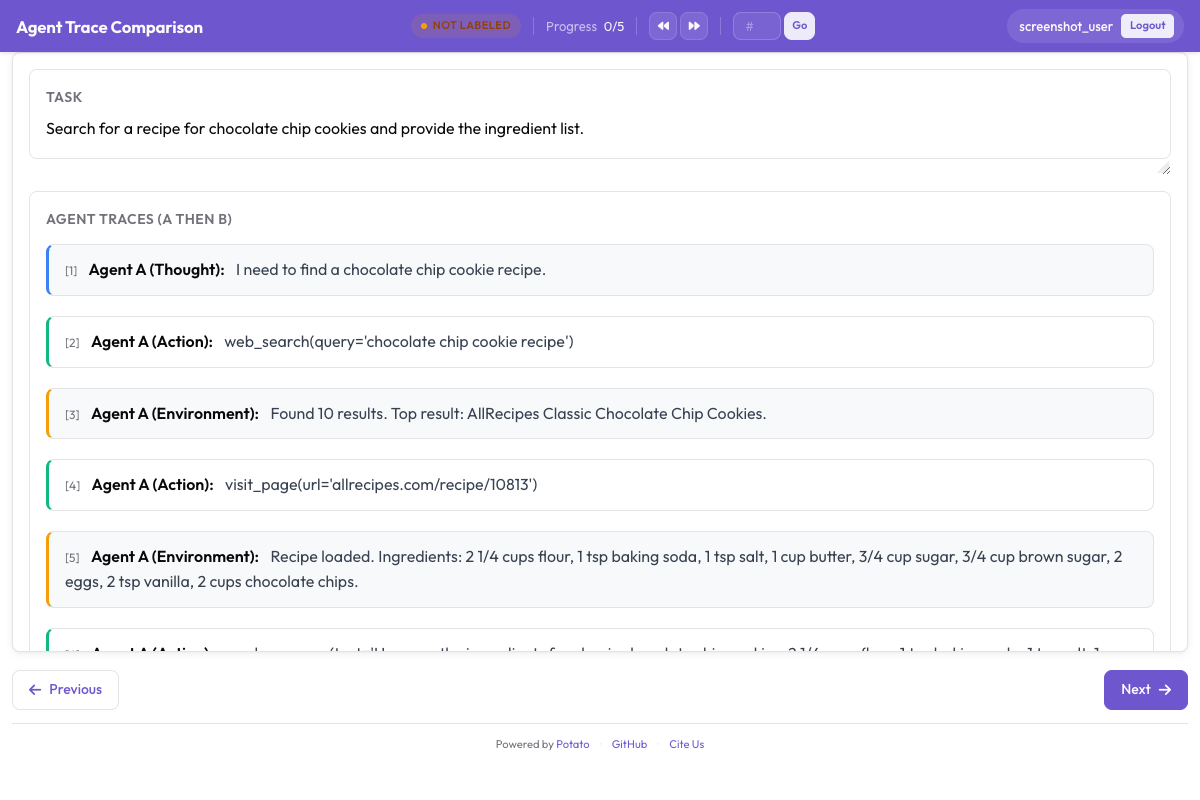 标注者比较两条智能体轨迹并选出更好的方案
标注方案期待的数据格式
三种模式读取两个候选项的方式是一样的。items_key 指向数据项上的一个字段,该字段保存一个包含两个或更多条目的列表:
{"id": "pair_001", "task": "Fix the IndexError in process_batch() when the input list is empty", "responses": ["Agent A trace text...", "Agent B trace text..."]}如果你的数据是分别命名两边而不是把它们列在一起,Potato 会回退到数据项上的 left 和 right 这一对字段,而且只有在 items_key 没有指向那里的任何字段时才会读取它们:
{"id": "pair_002", "task": "Fix the IndexError", "left": "Agent A trace...", "right": "Agent B trace..."}如果两种方式都拿不到两个候选项,标签会渲染出来但没有东西可比;当 items_key 指向的不是一个列表时,浏览器控制台会报告这一情况。
模式一:二元偏好
标注者看到两个候选项,点击更好的那一个。一个可选的打平按钮用于两者一样好或一样差的情况。
当你需要快速拿到大量偏好数据,用于奖励模型训练、胜率统计或 Elo 排行榜时,就用二元模式。代价是细节:你知道哪一边赢了,但不知道赢了多少,也不知道凭什么赢。
annotation_task_name: "Agent Comparison - Binary"
task_dir: "."
port: 8000

data_files:
  - "data/paired_traces.jsonl"

item_properties:
  id_key: "id"
  text_key: "task"

instance_display:
  fields:
    - key: "task"
      type: text
      label: "Task"

annotation_schemes:
  - annotation_type: pairwise
    name: preference
    description: "Which agent produced a better solution?"
    mode: binary
    items_key: "responses"
    show_labels: true
    labels:
      - "Agent A"
      - "Agent B"
    allow_tie: true
    tie_label: "Tie (equally good or equally bad)"
    randomize_order: true
    sequential_key_binding: true
    label_requirement:
      required: true

  - annotation_type: radio
    name: confidence
    description: "How confident are you in this judgment?"
    labels:
      - "Very confident"
      - "Somewhat confident"
      - "Not confident"

output_annotation_dir: "annotation_output/"
export_annotation_format: jsonl

user_config:
  allow_all_users: true
randomize_order: true 会按标注者、按数据项打乱哪个候选项出现在哪一侧,这样没有人会养成总是选左边的习惯。Potato 会记录每位标注者实际看到的顺序,你在分析时正是靠它还原这次打乱。
要让标注者看不出哪条轨迹出自哪个智能体,就别把智能体的名字写进你放在 responses 里的文本。没有哪个设置会替你把它藏起来。
模式二:偏好量表
量表模式用一个滑块取代两个按钮,让标注者说出一个候选项好多少。如果偏好强度会进入你的训练流程,就用这种模式,因为带边际加权的 DPO 会更看重那些判断明确的样本。
量表由它的端点定义,而不是由档位数量定义。负值偏向左侧项,正值偏向右侧项,零表示两者相当:
annotation_schemes:
  - annotation_type: pairwise
    name: preference_scale
    description: "Which agent produced a better solution, and by how much?"
    mode: scale
    items_key: "responses"
    labels:
      - "Agent A"
      - "Agent B"
    scale:
      min: -3
      max: 3
      step: 1
      default: 0
      labels:
        min: "A is much better"
        max: "B is much better"
        center: "Equal"
    label_requirement:
      required: true
量表范围越窄,标注越快。设置 min: -2 和 max: 2 会得到五个档位而不是七个,通常已经足够把明确的偏好和勉强的偏好区分开。
模式三:多维度比较
标注者不再给出一个总体偏好,而是在若干个互相独立的维度上判断这一对轨迹,每个维度有自己的一行 A/B/打平。当你不只要知道哪个智能体赢了、还要知道赢在哪里时,就用这种模式,因为一条轨迹可能代码正确但效率很差,另一条效率很高却漏掉了一个边界情况。
一个维度接受 name、一个作为帮助文本显示的可选 description,以及它自己的打平设置:
annotation_schemes:
  - annotation_type: pairwise
    name: multi_dim_comparison
    description: "Compare the two solutions along each dimension"
    mode: multi_dimension
    items_key: "responses"
    labels:
      - "Agent A"
      - "Agent B"
    dimensions:
      - name: correctness
        description: "Which solution actually fixes the stated problem?"
        allow_tie: true
      - name: efficiency
        description: "Which takes fewer unnecessary steps, file reads, or redundant edits?"
        allow_tie: true
      - name: code_quality
        description: "Which is more readable, better named, and closer to existing patterns?"
        allow_tie: true
      - name: communication
        description: "Which explains its reasoning more clearly and identifies the root cause?"
        allow_tie: true
      - name: robustness
        description: "Which handles edge cases and verifies its changes?"
        allow_tie: true
    justification:
      required: true
      reason_categories:
        - "More correct"
        - "More efficient"
        - "Better written"
        - "Better explained"
      min_rationale_chars: 20
      rationale_placeholder: "Which agent was better here, and why?"
维度不带权重。加权是关于你在意什么的决定,放在分析阶段做,意味着你可以给一项已经做完的研究重新加权,而不必重新收集任何数据。
justification 是标注方案上的一个配置块,而不是逐维度的设置,三种模式下都能用。reason_categories 给标注者一个快速的结构化理由,min_rationale_chars 给自由文本设了下限,这样"A 更好"就不能算作一个解释。
输出里有什么
每种模式都把自己的取值存在标注方案的名称之下。
二元模式记录所选的一项:
{"preference": {"selection": "A"}}取值是 "A" 或 "B";当方案设置了 allow_tie: true 时还会有 "tie"。存下来的字符串始终是字面量 tie,tie_label 改的只是按钮文字,不是这个值。
量表模式把滑块位置记录成字符串,负值代表左侧项:
{"preference_scale": {"scale_value": "-2"}}多维度模式为每个维度记录一个取值,外加编码成 JSON 字符串的理由:
{
  "multi_dim_comparison": {
    "correctness": "tie",
    "efficiency": "A",
    "code_quality": "B",
    "communication": "A",
    "robustness": "B",
    "justification": "{\"reasons\": [\"More efficient\"], \"rationale\": \"A fixed it in three steps against four...\"}"
  }
}
那个 justification 字段是一个包含 JSON 的字符串,不是嵌套对象。读取 reasons 或 rationale 之前要再解析一次。
导出
Potato 支持 31 种标注导出格式,用于 DPO 的偏好对格式不在其中。先把标注导出来,偏好对自己构造:
python -m potato.export -c config.yaml -f jsonl -o ./export/把导出的二元偏好转成 DPO 训练对只要一个简短的脚本,而自己动手的好处是可以自己决定怎么处理打平和低置信度的判断,不必沿用别人的选择:
import json
from pathlib import Path

SCHEME = "preference"

pairs = []
for f in Path("export/").rglob("*.jsonl"):
    with open(f) as fh:
        for line in fh:
            rec = json.loads(line)
            labels = rec.get("labels", rec)
            sel = (labels.get(SCHEME) or {}).get("selection")
            if sel not in ("A", "B"):
                continue  # drop ties; they carry no preference direction

            item = items_by_id[rec["instance_id"]]       # your own data file
            a, b = item["responses"][0], item["responses"][1]
            chosen, rejected = (a, b) if sel == "A" else (b, a)

            pairs.append({
                "prompt": item["task"],
                "chosen": chosen,
                "rejected": rejected,
                "annotator": rec.get("user_id"),
            })

with open("training_data/preferences.jsonl", "w") as out:
    for p in pairs:
        out.write(json.dumps(p) + "\n")

print(f"Wrote {len(pairs)} preference pairs")
用 instance_id 关联回你自己的数据文件,并且在判定哪一边是哪一个之前,用 Potato 记录下来的顺序还原 randomize_order 的打乱。
分析
胜率
import json
from collections import defaultdict
from pathlib import Path

SCHEME = "preference"
records = []
for f in Path("export/").rglob("*.jsonl"):
    with open(f) as fh:
        records += [json.loads(line) for line in fh]

tally = defaultdict(lambda: {"wins": 0, "losses": 0, "ties": 0})

for rec in records:
    sel = (rec.get("labels", rec).get(SCHEME) or {}).get("selection")
    if not sel:
        continue
    item = items_by_id[rec["instance_id"]]       # your own data file
    # `responses` deliberately carries no agent names, so a win rate per agent
    # needs fields you add yourself when building the data file.
    agent_a, agent_b = item["agent_a"], item["agent_b"]

    if sel == "tie":
        tally[agent_a]["ties"] += 1
        tally[agent_b]["ties"] += 1
    else:
        winner, loser = (agent_a, agent_b) if sel == "A" else (agent_b, agent_a)
        tally[winner]["wins"] += 1
        tally[loser]["losses"] += 1

for agent, r in sorted(tally.items()):
    total = r["wins"] + r["losses"] + r["ties"]
    rate = (r["wins"] + 0.5 * r["ties"]) / total * 100
    print(f"  {agent:<20} {rate:5.1f}%  (W:{r['wins']} L:{r['losses']} T:{r['ties']})")
Elo 评分
Elo 与顺序有关,所以运行之前先把比较的次序打乱;如果排名很接近,就多打乱几次取平均:
import math
from collections import defaultdict

def compute_elo(results, k=32, initial=1500):
    ratings = defaultdict(lambda: initial)
    for winner, loser, tied in results:
        rw, rl = ratings[winner], ratings[loser]
        ew = 1.0 / (1.0 + 10 ** ((rl - rw) / 400))
        el = 1.0 / (1.0 + 10 ** ((rw - rl) / 400))
        sw, sl = (0.5, 0.5) if tied else (1.0, 0.0)
        ratings[winner] = rw + k * (sw - ew)
        ratings[loser] = rl + k * (sl - el)
    return dict(ratings)
逐维度拆解
from collections import defaultdict

SCHEME = "multi_dim_comparison"
DIMS = ["correctness", "efficiency", "code_quality", "communication", "robustness"]

counts = defaultdict(lambda: {"A": 0, "B": 0, "tie": 0})
for rec in records:
    vals = rec.get("labels", rec).get(SCHEME) or {}
    for d in DIMS:
        v = vals.get(d)
        if v in ("A", "B", "tie"):
            counts[d][v] += 1

for d in DIMS:
    c = counts[d]
    total = sum(c.values()) or 1
    a_rate = (c["A"] + 0.5 * c["tie"]) / total * 100
    print(f"  {d:<16} A={a_rate:.0f}%  B={100 - a_rate:.0f}%  (ties {c['tie']})")
分布最接近 50/50、打平次数又很高的那个维度,通常是描述需要改写的维度,而不是两个智能体真的旗鼓相当的维度。
实际做起来什么有用
选哪种模式
二元模式适合成千上万次比较和一个通用的奖励模型。当偏好强度要进入训练时,量表模式值得多花的那点时间。当你要交出的是一份诊断而不是一个排名时,多维度模式值得用;因为每个维度都要写理由,它每次比较要多花好几倍时间。
要收集多少次比较
要让两个智能体之间的胜率稳定下来,这一对至少要收集 100 次比较。五个或更多智能体之间的 Elo,总共几百次就能稳定。奖励模型训练一般需要数以千计的偏好对,而且要同时覆盖简单和困难的任务,不能都挤在一类上。
抓出不认真的标注
randomize_order 去掉了固定选某一侧的习惯。要抓出一路点过去的人,还要加上真正的注意力检查和响应时间下限:
attention_checks:
  enabled: true
  items_file: "data/attention_checks.json"
  frequency: 20
  min_response_time: 10.0
  failure_handling:
    warn_threshold: 2
    block_threshold: 5
这里真正有用的是 min_response_time。没有人能在十秒内读完两条智能体轨迹。
打平
二元模式下允许打平,但要盯住打平率。超过 30% 左右,就说明两个智能体太接近,做不了二元判断,量表模式或多维度模式能告诉你更多。
组合使用不同模式
在一个大样本池上跑二元模式拿到排名,再在一个分层抽样的子集上跑多维度模式做诊断。二元比较喂给奖励模型训练,逐维度的结果告诉你该修什么。