片段標註
在 Potato 中高亮並標記文本片段,用於命名實體識別,支援逐標籤顏色、鍵盤快捷鍵、工具提示和不連續片段。
片段標註讓標註者選中並標記文本的一部分,Potato 中的命名實體識別(NER)、詞性標註和文本高亮任務都是這樣搭建的。標籤既可以寫成純字串,也可以寫成一個物件,自帶 color、key_value 和 tooltip。Potato 把這三項讀作每個標籤的屬性,所以寫在方案層級的 colors、key_values 或 tooltips 對映對片段方案不起作用。
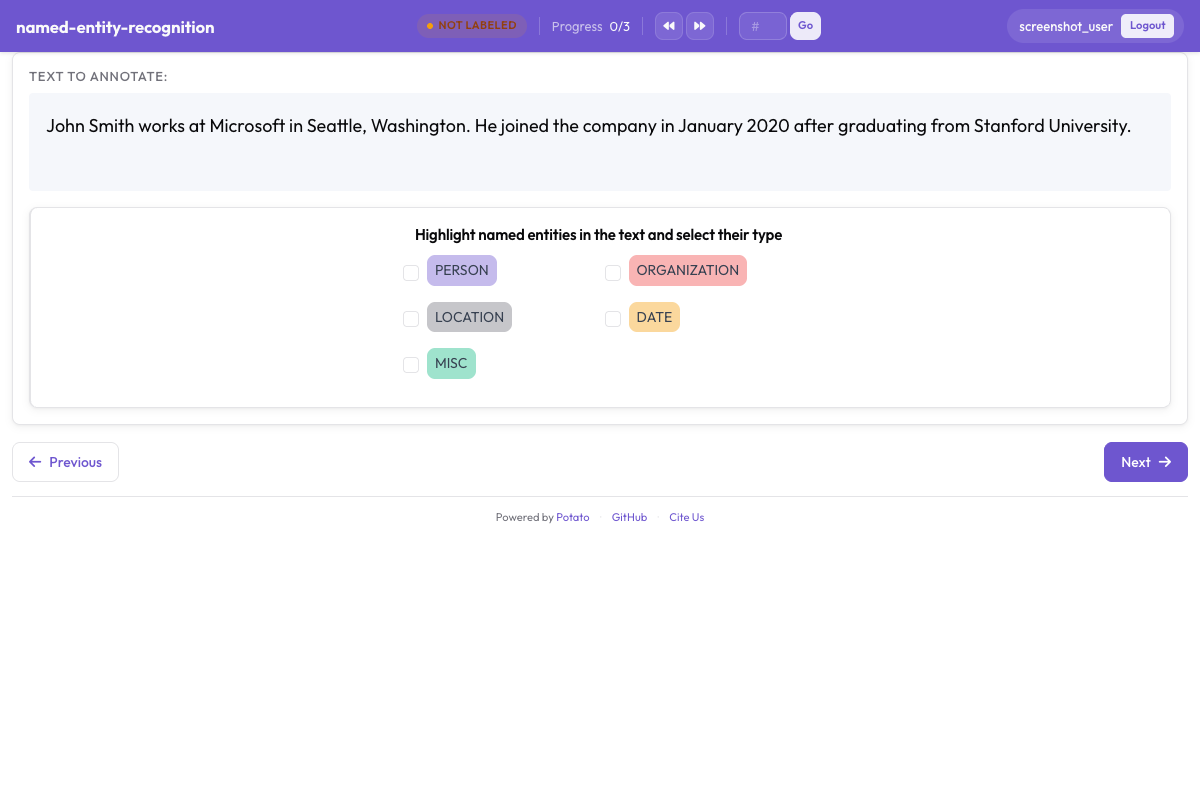 Potato 中按顏色區分實體標籤的片段標註
基本配置
annotation_schemes:
  - annotation_type: span
    name: entities
    description: "Highlight named entities in the text"
    labels:
      - PERSON
      - ORGANIZATION
      - LOCATION
每個方案都必須有 description,它顯示在標籤按鈕上方,是標註者讀到的提示語,因此應當說明要做的標註判斷,而不是重複方案名稱。寫成純字串的標籤按列出的順序從 Potato 調色盤取色。
配置選項
實體標籤
標籤集是片段任務最主要的設計決定,因為召回率、一致性以及之後的每一項測量都是相對它定義的。標籤數量要少到標註者不必每標一個片段就去翻指南,對多數 NER 工作來說實際上是四到八個類型。把標籤加進上面的方案:
labels:
  - PERSON
  - ORGANIZATION
  - LOCATION
  - DATE
  - EVENT
顏色
Potato 按列表順序給每個標籤分配一種調色盤顏色,所以只有在某組搭配確實要緊時才值得把顏色寫出來,比如兩個經常出現在同一句話裡、不該一眼看混的類型。顏色屬於標籤:
annotation_schemes:
  - annotation_type: span
    name: entities
    description: "Highlight named entities in the text"
    labels:
      - name: PERSON
        color: "#3b82f6"
      - name: ORGANIZATION
        color: "#10b981"
      - name: LOCATION
        color: "#f59e0b"
- DATE取值是十六進位制(#3b82f6)或 rgb(255, 0, 0)。像上面的 DATE 那樣仍寫成純字串的標籤會沿用下一個調色盤顏色,所以一個方案可以只為需要的標籤指定顏色,其餘不管。
多個方案的顏色也可以集中在一處設定,寫在 ui.label_colors 下,先按方案名再按標籤名作鍵:
ui:
  label_colors:
    entities:
      PERSON: "#3b82f6"
      ORGANIZATION: "#10b981"
寫在方案自身上的 colors: 對映不是 Potato 會讀的鍵。帶這個塊的方案照樣用調色盤顏色渲染,就像這個塊不存在一樣。
鍵盤快捷鍵
只要片段任務的標籤多於兩個,就值得啟用快捷鍵,因為每標一個片段都要把滑鼠移到按鈕上的標註者,速度只有雙手不離文本者的一小部分。設定 sequential_key_binding: true 會按標籤列出的順序給它們分配按鍵:
- annotation_type: span
  name: entities
  description: "Highlight named entities in the text"
  labels:
    - PERSON
    - ORGANIZATION
    - LOCATION
    - DATE
  sequential_key_binding: true
當一個任務在同一頁面上有多個方案時,Potato 會從互不相同的按鍵池裡給每個方案分配按鍵,先用數字行,再用字母上排,然後是中排,所以不同方案的快捷鍵不會衝突。
若要把某個標籤固定到特定按鍵、而不是隨它在列表中的位置變動,就給這個標籤寫一個 key_value。分配器會先滿足顯式的 key_value,再自動分配其餘按鍵;助記性的按鍵在之後重排標籤列表時仍然有效,按位置分配的則不然:
- annotation_type: span
  name: entities
  description: "Highlight named entities in the text"
  labels:
    - name: PERSON
      key_value: "p"
    - name: ORGANIZATION
      key_value: "o"
    - LOCATION
  sequential_key_binding: true
方案層級的 key_values: 對映不會被讀取,把對映寫成 sequential_key_binding 的值也一樣,Potato 只把它當作一個開關。
工具提示
標籤的邊界情況應當寫進工具提示,這樣標註者不必離開任務就能查到什麼算 ORGANIZATION。工具提示是每個標籤的屬性:
- annotation_type: span
  name: entities
  description: "Highlight named entities in the text"
  labels:
    - name: PERSON
      tooltip: "Names of people, characters, or personas"
    - name: ORGANIZATION
      tooltip: "Companies, agencies, institutions"
    - name: LOCATION
      tooltip_file: "config/tooltips/location.html"
tooltip 接受純文本,tooltip_file 接受一個 HTML 檔案路徑;當說明需要舉例、加粗或列表時,後者更合適。方案層級的 tooltips: 對映只有 hierarchical_multiselect 會讀,在片段方案上毫無作用。
重疊片段
允許重疊
片段本來就允許重疊,沒有開關可以開啟這個行為。當一段文本同時帶兩個標籤時你要的正是重疊,比如 "Dr. Smith" 既是 PERSON 又是 ROLE。從 2.9.0 版起,起點落在已有片段末尾、或終點落在已有片段起點的選區也會被接受,因此可以建立部分重疊的片段;更早的版本會拒絕這種選區。
禁止重疊(預設)
片段模式沒有任何鍵能禁止重疊,所以片段絕不該重疊的任務只能在標註指南里寫明。如果這個區分只對匯出結果要緊、對標註者並不要緊,那麼用兩個片段方案把標籤集分開即可,因為每個方案都以自己的名字儲存其片段:
annotation_schemes:
  - annotation_type: span
    name: entities
    description: "Label named entities"
    labels:
      - PERSON
      - ORGANIZATION

  - annotation_type: span
    name: roles
    description: "Label professional roles"
    labels:
      - ROLE
片段選擇模式
Potato 把每個片段都存成相對條目文本的字元偏移量,沒有配置鍵能在詞級和字元級之間切換選擇粒度。下面兩種模式描述的是標註者能做什麼,不是你要開啟的設定。
詞級選擇
拖選整詞是多數 NER 工作的實際樣子,結果存成所選首字元和末字元的偏移量。配置中沒有任何東西強制詞邊界,所以如果整詞片段對你的資料很重要,就把這個要求寫進指南,並在匯出結果中核對,而不要指望介面會拒絕半個詞。
字元級選擇
選中一個詞的一部分隨時可用,不需要任何配置,形態學和子詞級任務靠的就是這一點。Potato 在渲染前會把連續的空格和製表符摺疊起來,好讓它儲存的偏移量與瀏覽器測得的一致,而當你的文本帶有表意的縮排時這就要緊了。若水平空白必須原樣保留,請宣告 instance_display。
預標註片段
用模型輸出給任務打底,會把標註變成校正;只要模型在語料的大部分上已經正確,這就是更快的工作流。Potato 從每個條目的一個欄位讀取種子標註,欄位名由 pre_annotation.field 指定:
pre_annotation:
  enabled: true
  field: "predictions"
  allow_modification: true
  show_confidence: true
  highlight_low_confidence: 0.7
allow_modification: true 才使任務成為校正而非審閱,因為沒有它標註者無法改動模型的提議。highlight_low_confidence: 0.7 標出模型最沒把握的條目,好讓注意力落在最可能出錯的片段上。
該欄位為每個方案名各存一項,片段方案取的是一組偏移量:
{
  "id": "item_002",
  "text": "Apple announced new iPhone in California.",
  "predictions": {
    "entities": [
      {"start": 0, "end": 5, "label": "ORG", "confidence": 0.85},
      {"start": 27, "end": 37, "label": "LOC", "confidence": 0.91}
    ]
  }
}
預標註只是起點,不算標註,所以沒人開啟過的條目即使帶著預測進來,匯出時也是空的。
常見 NER 配置
標準 NER(4 種類型)
這四類沿用 CoNLL-2003 的慣例,當你的結果必須能與已發表的 NER 數字比較時,選它是對的:
- annotation_type: span
  name: ner
  description: "Label named entities"
  labels:
    - PER    # Person
    - ORG    # Organization
    - LOC    # Location
    - MISC   # Miscellaneous
  sequential_key_binding: true
擴充套件 NER(OntoNotes 風格)
十八種類型帶來更細的區分,代價是一致性實打實地下降,因為 NORP、ORG 和 GPE 之間的界線正是標註者分歧最大的地方。當下遊工作確實需要這些區分時再用擴充套件集,併為更長的培訓留出預算:
- annotation_type: span
  name: ner_extended
  description: "Label named entities using the OntoNotes type set"
  labels:
    - PERSON
    - NORP        # Nationalities, religious/political groups
    - FAC         # Facilities
    - ORG
    - GPE         # Geopolitical entities
    - LOC
    - PRODUCT
    - EVENT
    - WORK_OF_ART
    - LAW
    - LANGUAGE
    - DATE
    - TIME
    - PERCENT
    - MONEY
    - QUANTITY
    - ORDINAL
    - CARDINAL
生物醫學 NER
生物醫學片段既長又常常巢狀,所以在這裡為每個類型寫一條帶實例的工具提示,比在通用領域任務上更划算:
- annotation_type: span
  name: bio_ner
  description: "Label biomedical entities"
  labels:
    - GENE
    - PROTEIN
    - DISEASE
    - DRUG
    - SPECIES
社交媒體 NER
社交媒體文本帶來了新聞語料標籤集沒有位置安放的實體類型,其中 CREATIVE_WORK 和 GROUP 這兩類如果沒有自己的標籤,最常被錯歸為 ORG:
- annotation_type: span
  name: social_ner
  description: "Label named entities in social media text"
  labels:
    - PERSON
    - ORGANIZATION
    - LOCATION
    - PRODUCT
    - CREATIVE_WORK
    - GROUP
帶屬性的片段
在片段方案旁邊再放一個方案,用來收集對整個條目的判斷。Potato 把兩者分開儲存,所以單選的答案屬於整篇文件,而不屬於其中任何一個片段:
annotation_schemes:
  - annotation_type: span
    name: entities
    description: "Highlight named entities"
    labels:
      - PERSON
      - ORGANIZATION

  - annotation_type: radio
    name: entity_type
    description: "What type of entity is this?"
    labels:
      - Named
      - Nominal
      - Pronominal
多個片段方案
要標註同一段文本的不同方面而又不逼標註者記住一個合併的標籤集,辦法就是用兩個片段方案。每個方案都有自己的一排按鈕、自己的按鍵池,以及匯出結果裡自己的欄位:
annotation_schemes:
  # Named entities
  - annotation_type: span
    name: entities
    description: "Label named entities"
    labels:
      - PERSON
      - ORGANIZATION
      - LOCATION

  # Sentiment expressions
  - annotation_type: span
    name: sentiment_spans
    description: "Highlight sentiment expressions"
    labels:
      - POSITIVE
      - NEGATIVE
多欄位片段標註
v2.1.0 新增
通過 target_field 選項,片段標註可以指向多欄位資料中的某個特定文本欄位;當一個條目同時包含原文和摘要、而某個片段屬於其中之一時,你需要的就是它。
配置
每個方案指明自己標註的欄位,好讓兩個標籤集各自附著在正確的文本上:
annotation_schemes:
  - annotation_type: span
    name: source_entities
    description: "Label entities in the source text"
    target_field: source_text
    labels:
      - PERSON
      - ORGANIZATION

  - annotation_type: span
    name: summary_entities
    description: "Label entities in the summary"
    target_field: summary
    labels:
      - PERSON
      - ORGANIZATION
多欄位資料格式
你的資料應當包含這些分開的文本欄位:
{
  "id": "doc1",
  "source_text": "John Smith works at Microsoft in Seattle.",
  "summary": "Smith is employed by Microsoft."
}
輸出格式
使用 target_field 時,標註按欄位作鍵:
{
  "id": "doc1",
  "source_entities": {
    "source_text": [
      {"start": 0, "end": 10, "text": "John Smith", "label": "PERSON"},
      {"start": 20, "end": 29, "text": "Microsoft", "label": "ORGANIZATION"}
    ]
  },
  "summary_entities": {
    "summary": [
      {"start": 0, "end": 5, "text": "Smith", "label": "PERSON"},
      {"start": 22, "end": 31, "text": "Microsoft", "label": "ORGANIZATION"}
    ]
  }
}
完整的可執行示例見 Potato 倉庫中的 project-hub/simple_examples/simple-multi-span/。
顯示選項
在片段內顯示標籤
Potato 預設把標籤名印在每個高亮片段裡。在短片段密集的文件上,標籤文字會擠佔句子,而 show_span_labels: false 能讓文本保持可讀,同時高亮顏色仍然表示標籤:
- annotation_type: span
  name: entities
  description: "Highlight named entities in the text"
  labels:
    - PERSON
    - ORGANIZATION
  show_span_labels: false
下劃線樣式
片段模式沒有控制高亮樣式的鍵,片段一律渲染成帶色背景。下劃線和方括號渲染是共指類型的選項,通過 visual_display.highlight_mode 設定,所以需要其中任何一種的任務應當改用共指鏈。
輸出格式
片段標註以字元偏移量儲存:
{
  "id": "doc1",
  "entities": [
    {
      "start": 0,
      "end": 10,
      "text": "John Smith",
      "label": "PERSON"
    },
    {
      "start": 20,
      "end": 29,
      "text": "Microsoft",
      "label": "ORGANIZATION"
    }
  ]
}
完整示例:NER 任務
item_properties 指明 Potato 從哪些欄位讀取條目 id 和文本,缺了它配置無法啟動。五個實體類型通過 sequential_key_binding 拿到數字行的按鍵,末尾的單選方案記錄一個難度判斷,之後解釋一致性為何下降時會用得上:
annotation_task_name: "Named Entity Recognition"

data_files:
  - data/documents.json

item_properties:
  id_key: id
  text_key: text

annotation_schemes:
  - annotation_type: span
    name: entities
    description: "Highlight and label all named entities"
    labels:
      - PERSON
      - ORGANIZATION
      - LOCATION
      - DATE
      - MONEY
    sequential_key_binding: true
    allow_discontinuous: false

  - annotation_type: radio
    name: difficulty
    description: "How difficult was this document to annotate?"
    labels:
      - Easy
      - Medium
      - Hard

output_annotation_dir: annotation_output
export_annotation_format: jsonl
不連續片段
v2.2.0 新增
allow_discontinuous: true 讓標註者選中多段不相鄰的文本並把它們記作一個片段,分裂先行詞和不連續成分需要的正是這個。不連續和重疊是兩回事,這個鍵不影響兩個片段能否覆蓋同一批字元:
- annotation_type: span
  name: entities
  description: "Highlight named entities in the text"
  labels:
    - PERSON
    - ORGANIZATION
  allow_discontinuous: true
開啟這個選項後,標註者在 Windows 和 Linux 上按住 Ctrl、在 Mac 上按住 Cmd,再選中更多文本,就能把它加進當前片段。輸出為每一段各帶一對起止偏移量。
實體連結整合
v2.2.0 新增
在片段方案里加一個 entity_linking 塊,就能把片段標註連結到外部知識庫(Wikidata、UMLS 或自定義 REST API)。當兩個實體的表層形式相同、光靠標籤分不開時,每個片段多花這一步是值得的:
- annotation_type: span
  name: entities
  description: "Highlight and link named entities"
  labels:
    - PERSON
    - ORGANIZATION
    - LOCATION
  entity_linking:
    enabled: true
    knowledge_bases:
      - name: wikidata
        type: wikidata
        language: en
    auto_search: true
    required: false
auto_search: true 在片段一建立就發起檢索,在多數片段都要連結的任務上能省一次點選。required: true 會拒絕儲存沒有連結的片段,所以除非你資料裡的每個實體都預期在知識庫中,否則不要開啟。啟用實體連結後,每個片段的控制條上會出現一個連結圖示,點選它會開啟檢索彈窗。完整說明見實體連結文件。
最佳實踐
- 只給需要的標籤寫顏色,其餘交給調色盤
- 把邊界情況放進
tooltip或tooltip_file,一個標籤一條,而不是塞進方案描述 - 為標籤多於兩個的方案開啟
sequential_key_binding,並在助記按鍵有幫助的地方加上key_value - 在指南里定下重疊策略,因為模式本身並不強制任何一種
- 用
pre_annotation打底做校正流程,並保持allow_modification: true - 讓標籤集保持精簡,把互不相關的方面拆成各自的片段方案
延伸閱讀
- 實體連結 - 把片段連結到知識庫
- 共指鏈 - 歸併共指提及
- 事件標註 - 帶片段論元的多元事件結構
- 片段連結 - 在片段之間建立關係
- 條目顯示 - 帶片段目標的多欄位內容顯示
- 介面配置 - 自定義片段顏色
- 效率功能 - 鍵盤快捷鍵
實現細節見源文件。