定和分配
在 Potato 中配置定和分配標註,讓標註者在固定的總分預算內跨類別分配點數,輸入方式可選數字框或滑塊。
定和分配標註方案讓標註者把固定數量的點數分配到多個類別上。與使用聯動滑塊的軟標籤不同,定和分配同時支援直接輸入數字和拖動滑塊,專為標註者必須在固定預算內做出明確取捨的任務而設計。
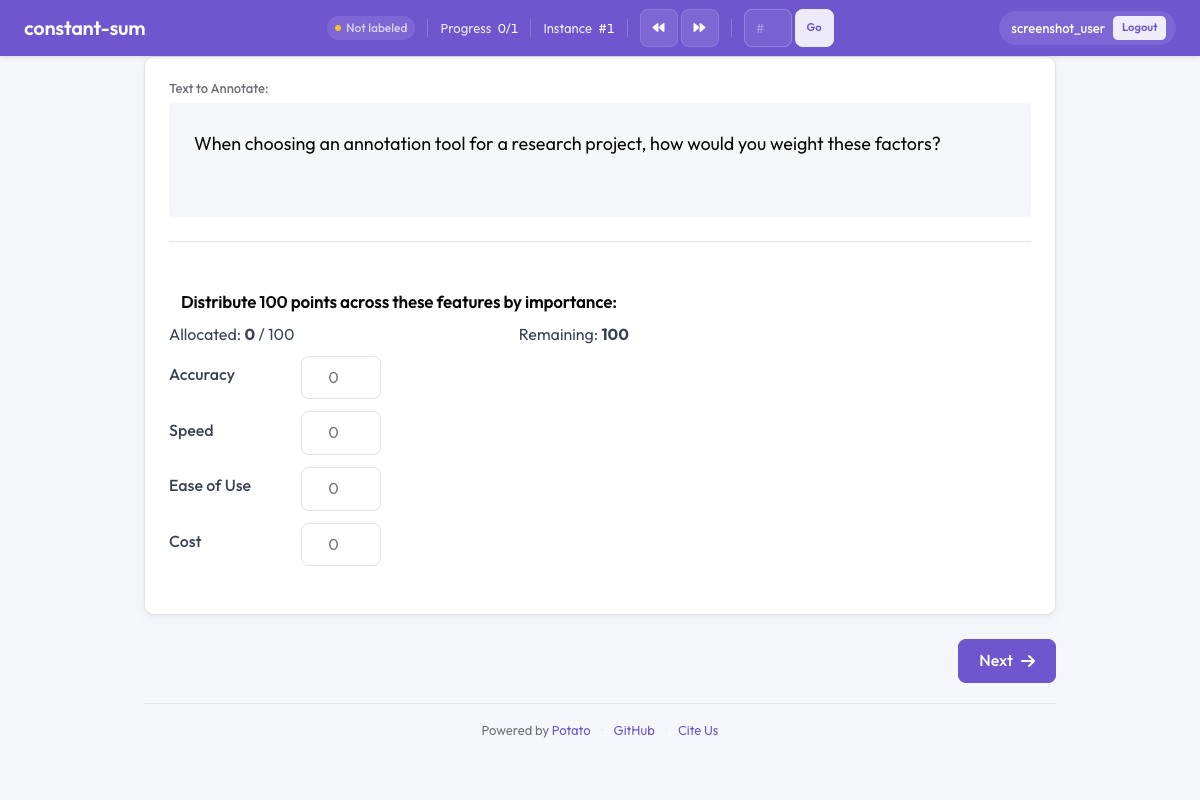 Constant sum in Potato
概覽
定和分配任務在問卷調查和偏好獲取中很常見。標註者拿到一個固定的點數池(例如 100 分),把它們分配到各個條目上,以表達相對重要性、偏好或佔比。介面會強制保證所有分配加起來等於配置的總分。
快速開始
yaml
annotation_schemes:
  - annotation_type: constant_sum
    name: feature_importance
    description: Distribute 100 points across features based on their importance.
    labels: ["Accuracy", "Speed", "Ease of Use", "Cost"]
    total_points: 100
配置項
| 欄位 | 類型 | 預設值 | 說明 |
|---|---|---|---|
annotation_type | string | 必填 | 必須為 "constant_sum" |
name | string | 必填 | 本方案的唯一識別符號 |
description | string | 必填 | 展示給標註者的說明文字 |
labels | array | 必填 | 待分配點數的條目列表(至少 2 個) |
total_points | integer | 100 | 所有分配必須加總達到的固定總分 |
min_per_item | integer | 0 | 每個條目至少要分到的點數 |
input_type | string | "number" | 輸入方式:"number" 為文本框,"slider" 為滑塊控制元件 |
label_requirement.required | boolean | false | 是否必須完成本項標註才能繼續 |
示例
功能優先順序排序
yaml
annotation_schemes:
  - annotation_type: constant_sum
    name: feature_priority
    description: Allocate 100 points to indicate which features matter most to you.
    labels: ["Performance", "Reliability", "Usability", "Security"]
    total_points: 100
    input_type: number
預算分配
yaml
annotation_schemes:
  - annotation_type: constant_sum
    name: budget_allocation
    description: How would you distribute a $1000 budget across these areas?
    labels: ["Marketing", "Engineering", "Design", "Research"]
    total_points: 1000
    input_type: slider
    min_per_item: 50
時間分配
yaml
annotation_schemes:
  - annotation_type: constant_sum
    name: time_spent
    description: Distribute 24 points (hours) across daily activities.
    labels: ["Work", "Sleep", "Exercise", "Leisure", "Commute", "Other"]
    total_points: 24
    min_per_item: 0
用滑塊做簡單比較
yaml
annotation_schemes:
  - annotation_type: constant_sum
    name: text_comparison
    description: Distribute 10 points between the two texts based on quality.
    labels: ["Text A", "Text B"]
    total_points: 10
    input_type: slider
輸出格式
json
{
  "feature_importance": {
    "labels": {
      "Accuracy": 40,
      "Speed": 25,
      "Ease of Use": 20,
      "Cost": 15
    }
  }
}
各項數值加起來總是等於配置的 total_points。
實踐建議
- 選一個直觀的總分 —— 100 分適合表達百分比;總分小一些(10、20)更適合需要快速完成的任務
- 要精確就用數字輸入 —— 當具體數值重要時,數字框比滑塊準
- 要快就用滑塊 —— 做粗略分配時滑塊更快
- 控制條目數量 —— 超過 7 到 8 個條目,分配點數的認知負擔就明顯上升
- 考慮設定最小分配 —— 如果每個類別都應該分到一些點數,就用
min_per_item - 把背景交代清楚 —— 說明這些點數代表什麼(重要性、時間、金錢等)
延伸閱讀
- 軟標籤 —— 用聯動滑塊表達機率分佈
- Best-Worst Scaling —— 相對偏好標註
- Likert 量表 —— 有序評分量表
有關實現詳情,請參閱源文件。