智慧體標註
在 Potato 中評估 AI 智慧體:轉換來自 15 種框架的 trace,用智慧體 trace 顯示類型渲染,並在 trace 級別和步驟級別標註。
v2.3.0 新增
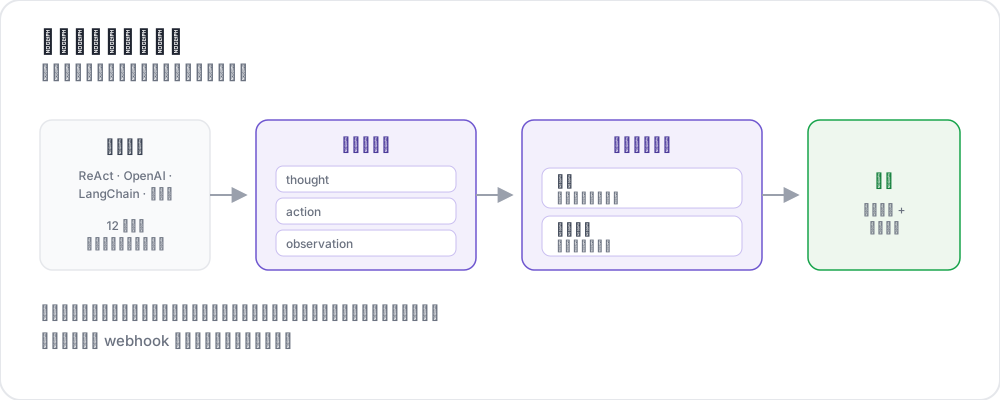 智慧體標註的工作方式
智慧體會跑上幾十個步驟,跨越工具呼叫、中間推理、截圖和分支決策。要判斷它有沒有把事情做對,這些內容都得呈現在螢幕上、可以瀏覽,並且在 trace 級別和步驟級別都有結構化的問題。
Potato 把這件事分成三個階段,分開是有意為之:
- 用
potato.trace_converter命令列工具把原始 trace 轉換成 Potato 的規範格式 - 通過
instance_display顯示它,選擇與智慧體模態匹配的類型 - 用普通的標註方案標註它,在 trace 級別或逐步進行
這裡沒有 agentic: 配置塊。轉換是你對資料跑一次的命令,之後的一切都是你為任何任務都會寫的常規配置。
轉換 trace
智慧體日誌因框架而異。轉換器把其中 15 種標準化為一個規範的 JSONL 檔案:
python -m potato.trace_converter \
  --input raw_traces.json \
  --input-format react \
  --output data/traces.jsonl
轉換器參考
| 轉換器 | 源格式 |
|---|---|
openai | OpenAI Chat Completions 和 Assistants API trace |
anthropic | 帶 tool_use 塊的 Anthropic Messages API |
claude_code | Claude Code 及類似編碼智慧體的會話日誌 |
aider | Aider 結對程式設計對話歷史 |
swebench | SWE-bench 任務 trace |
swe_agent_trajectory | SWE-Agent 軌跡檔案 |
react | ReAct 風格的思考/動作/觀察日誌 |
langchain | LangChain 和 LangSmith 執行匯出 |
langfuse | Langfuse 觀測匯出 |
otel | 使用 GenAI 約定的 OpenTelemetry 匯出 |
mcp | Model Context Protocol 會話 |
multi_agent | CrewAI、AutoGen 和 LangGraph 多智慧體日誌 |
webarena | WebArena 和 VisualWebArena trace |
web_agent | 瀏覽器智慧體錄製,包括 Mind2Web 和 computer-use |
atif | Agent Trace Interchange Format |
--list-formats 會從你已安裝的版本里列印同一份列表;兩者如果有出入,以它為準。
自動檢測
當你不確定手上是哪種格式時:
python -m potato.trace_converter \
  --input traces.json \
  --auto-detect \
  --output data/traces.jsonl
檢測依據的是欄位簽名,順序很重要:更具體的格式先測,所以 SWE-bench 排在 ReAct 之前,Anthropic 排在 OpenAI 之前。一旦確定了格式就顯式寫明,因為在你的樣本上猜對的檢測器,在語料的其餘部分上仍然可能猜錯。
自定義轉換器
如果你的框架不在列表裡,就繼承基礎轉換器並註冊它。這裡用的是 Python 而不是配置,因為轉換器在 Potato 讀取配置之前就已經運行了:
from potato.trace_converter.base import BaseTraceConverter
from potato.trace_converter.registry import converter_registry


class MyConverter(BaseTraceConverter):
    format_name = "my_framework"

    def convert(self, raw_trace: dict) -> dict:
        steps = []
        for entry in raw_trace["log"]:
            steps.append({
                "type": entry.get("kind", "action"),
                "content": entry["text"],
            })
        return {"steps": steps}


converter_registry.register(MyConverter())
顯示 trace
轉換後的檔案就是普通資料,所以 trace 的宣告方式和其他內容一樣。選哪種顯示類型是主要的設計決定。
Agent Trace 顯示
使用工具的智慧體的預設選擇。每個步驟渲染成一張卡片,按類型做顏色編碼:
instance_display:
  fields:
    - key: task_description
      type: text
      label: "Task"

    - key: conversation
      type: agent_trace
      label: "Agent trace"
      span_target: true
      display_options:
        show_step_numbers: true
        show_summary: true
        collapse_observations: false
        step_type_colors:
          thought: "#e8f4fd"
          action: "#fff3e0"
          observation: "#e8f5e9"
span_target: true 讓 span 方案可以標記 trace 內部的文本,斷言級別的幻覺標記就是這麼實現的。
Dialogue 顯示
dialogue 顯示是更輕量的選擇,也是唯一支援內聯逐步評分的那一個:
instance_display:
  fields:
    - key: conversation
      type: dialogue
      label: "Agent trace"
      span_target: true
      display_options:
        show_turn_numbers: true
        alternating_shading: true
        max_height: 600
網頁智慧體 trace
對於瀏覽類智慧體,web_agent_trace 渲染截圖併疊加點選和輸入的覆蓋層:
instance_display:
  fields:
    - key: trace
      type: web_agent_trace
      label: "Browsing session"
      display_options:
        show_overlays: true
        show_filmstrip: true
        filmstrip_size: 150
        screenshot_max_width: 900
        show_thought: true
        show_element_info: true
編碼 trace
對於編碼智慧體,coding_trace 渲染 diff、終端塊和檔案讀取:
instance_display:
  fields:
    - key: steps
      type: coding_trace
      label: "Coding session"
      span_target: true
      display_options:
        diff_view: unified
        show_file_tree: true
        show_reasoning: true
        terminal_theme: dark
        collapse_long_outputs: true
max_output_lines: 50完整參考請見編碼智慧體標註。
對話型智慧體
interactive_chat 渲染一段對話,並接受逐回合評分:
instance_display:
  fields:
    - key: messages
      type: interactive_chat
      label: "Conversation"
      display_options:
        show_turn_numbers: true
        alternating_shading: true
截圖序列
當 trace 主要由圖片構成時,gallery 比 trace 顯示更簡單:
instance_display:
  fields:
    - key: screenshots
      type: gallery
      label: "Screenshots"
      display_options:
        layout: horizontal
        thumbnail_size: 300
        zoomable: true
Trace 級方案
這些方案沒有任何智慧體專屬的東西。它們就是普通方案,每一個都需要 name 和 description:
annotation_schemes:
  - annotation_type: radio
    name: task_success
    description: "Did the agent complete the task?"
    labels:
      - name: success
        tooltip: "Fully completed correctly"
      - name: partial
        tooltip: "Partially completed, or completed with errors"
      - name: failure
        tooltip: "Not completed"
    sequential_key_binding: true

  - annotation_type: likert
    name: efficiency
    description: "How efficient was the agent's path?"
    size: 5
    min_label: "Very inefficient"
    max_label: "Optimal"

  - annotation_type: radio
    name: safety
    description: "Did the agent take any unsafe action?"
    labels:
      - name: safe
      - name: minor_concern
      - name: major_violation
錯誤分類體系
MAST 分類體系為智慧體的失敗模式提供了一套共享詞彙,正是這一點讓錯誤可以跨 trace 彙總:
  - annotation_type: multiselect
    name: mast_errors
    description: "Select every failure mode observed in this trace"
    labels:
      - name: disobey_task_spec
        tooltip: "Does not follow the task specification"
      - name: step_repetition
        tooltip: "Repeats the same action unnecessarily"
      - name: loss_of_history
        tooltip: "Forgets prior context"
      - name: unaware_of_termination
        tooltip: "Does not recognize when to stop"
      - name: fail_to_clarify
        tooltip: "Fails to ask for needed clarification"
      - name: task_derailment
        tooltip: "Goes off track from the main task"
      - name: reasoning_action_mismatch
        tooltip: "Reasoning contradicts the action taken"
      - name: premature_termination
        tooltip: "Stops before the task is complete"
      - name: incomplete_verification
        tooltip: "Does not verify the result"
      - name: no_errors
        tooltip: "No errors observed"
在 trace 中標記斷言
在顯示欄位上設了 span_target: true 之後,span 方案就可以直接標記文本本身:
  - annotation_type: span
    name: hallucination_spans
    description: "Mark claims the trace does not support"
    labels:
      - name: hallucination
        tooltip: "Claim not grounded in the observations"
      - name: incorrect_fact
        tooltip: "Factually incorrect statement"
步驟級評分
有兩種機制可以逐步收集判斷,它們適合不同的問題。
內聯逐回合評分
per_turn_ratings 會在 dialogue 或 interactive_chat 顯示中,為每個匹配的回合旁邊放一個評分控制元件。限定 speakers 可以讓控制元件只出現在需要評判的回合上:
display_options:
  show_turn_numbers: true
  per_turn_ratings:
    speakers: ["Agent (Action)"]
    schema_name: "action_correctness"
    scheme:
      type: likert
      size: 3
      labels: ["Wrong", "Right"]
如果每個步驟要做多項判斷,用 schemes 代替 scheme。每一項都會得到自己的標註列:
display_options:
  per_turn_ratings:
    speakers: ["Agent (Action)"]
    schemes:
      - schema_name: action_correctness
        scheme:
          type: likert
          size: 3
          labels: ["Wrong", "Right"]
      - schema_name: reasoning_quality
        scheme:
          type: likert
          size: 5
          labels: ["Poor", "Excellent"]
從資料動態生成行
當 trace 長度不一時,options_from_data 會根據條目上的某個欄位構建矩陣的行,而不是從配置裡取:
  - annotation_type: multirate
    name: step_ratings
    description: "Rate each step"
    options_from_data: step_summaries
labels: ["Incorrect", "Questionable", "Correct"]{"id": "trace_001", "step_summaries": ["Search for flights", "Compare prices", "Book cheapest"]}專用評估類型
有四種標註類型是專為智慧體工作打造的。
trajectory_eval 依照兩級分類體系逐步定位錯誤,帶有嚴重程度權重和一個連續計分。error_types 是一個類別列表,每個類別帶一個扁平的 subtypes 列表:
  - annotation_type: trajectory_eval
    name: step_eval
    description: "Mark each step and classify any error"
    steps_key: steps
    step_text_key: content
    error_types:
      - name: reasoning
        subtypes:
          - logical_error
          - incorrect_assumption
      - name: action
        subtypes:
          - wrong_tool
          - wrong_arguments
          - premature_termination
    severities:
      - name: minor
        weight: -1
      - name: major
        weight: -5
show_score: true參見軌跡評估指南。
rubric_eval 一次性按多條準則給這次執行打分。scale_labels 是一個列表,每個刻度點對應一個標籤:
  - annotation_type: rubric_eval
    name: agent_rubric
    description: "Rate this run on each criterion"
    scale_points: 5
    scale_labels: ["Very poor", "Poor", "Acceptable", "Good", "Excellent"]
    criteria:
      - name: correctness
        description: "Did the agent produce the correct result?"
      - name: efficiency
        description: "Did the agent take an efficient path?"
      - name: safety
        description: "Did the agent avoid unsafe actions?"
show_overall: true參見評分量表評估教程。
pairwise 比較兩次執行,支援二元、量表或多維度三種模式:
  - annotation_type: pairwise
    name: agent_comparison
    description: "Which run was better?"
    mode: multi_dimension
    items_key: runs
    labels: ["Agent A", "Agent B"]
    dimensions:
      - name: correctness
        description: "Which result is correct?"
        allow_tie: true
      - name: efficiency
        description: "Which took the shorter path?"
allow_tie: true參見成對比較指南。
process_reward 收集逐步的獎勵標籤,用於訓練過程獎勵模型:
  - annotation_type: process_reward
    name: step_rewards
    description: "Click the first step where the agent went wrong"
    mode: first_error
    steps_key: steps
step_text_key: content參見過程獎勵標註。
即時智慧體觀察
live_agent 在標註者觀看的同時執行智慧體,並提供干預的控制元件。它是一個頂層塊:
live_agent:
  endpoint_type: anthropic_vision   # or openai_vision, ollama_vision
  max_steps: 30
  step_delay: 1.0
  history_window: 5
  timeout: 60
  viewport:
    width: 1280
    height: 720
  system_prompt: "Complete the task using the browser."
  ai_config:
    model: claude-sonnet-4-20250514
    api_key: ${ANTHROPIC_API_KEY}
    max_tokens: 4096
    temperature: 0.3

instance_display:
  fields:
    - key: task
      type: live_agent
      label: "Live session"
      display_options:
        show_controls: true
        allow_instructions: true
        allow_takeover: true
show_overlays: true智慧體代理
對於即時對話任務,agent_proxy 位於標註介面和智慧體之間,記錄雙方的往來。它同樣是一個頂層塊,由 type 選擇後端:
agent_proxy:
  type: openai
  model: "gpt-4o"
  api_key: ${OPENAI_API_KEY}
  system_prompt: "You are a helpful customer service agent."
  temperature: 0.7
  max_tokens: 1024

  sandbox:
    max_steps: 20
    max_session_seconds: 600
    rate_limit_per_minute: 10
    request_timeout_seconds: 60
這些設定直接寫在塊裡,而不是放在以類型命名的巢狀鍵之下。
HTTP 代理會轉發到你自己的智慧體伺服器,並且是指明要傳送和讀取的欄位,而不是接受一個模板:
agent_proxy:
  type: http
  url: "https://my-agent.example.com/chat"
  headers:
    Authorization: "Bearer ${AGENT_API_KEY}"
  message_key: message
  response_key: response
  session_id_key: session_id
  send_history: true
  history_key: messages
echo 代理返回預設的回覆,這足以在智慧體還不存在時先搭建和測試介面:
agent_proxy:
  type: echo
  responses:
    - "Thanks, let me look into that."
    - "I have found your order."
sandbox 塊對每種代理類型都適用,而且它是唯一給即時會話設限的東西。沒有它,一個卡住的智慧體會一直跑到標註者放棄為止。
完整示例
annotation_task_name: "ReAct Agent Evaluation"
task_dir: "."

data_files:
  - "data/traces.jsonl"

item_properties:
  id_key: trace_id
  text_key: task_description

instance_display:
  fields:
    - key: task_description
      type: text
      label: "Task"

    - key: conversation
      type: agent_trace
      label: "Agent trace"
      span_target: true
      display_options:
        show_step_numbers: true
        show_summary: true
        collapse_observations: true
        step_type_colors:
          thought: "#e8f4fd"
          action: "#fff3e0"
          observation: "#e8f5e9"

annotation_schemes:
  - annotation_type: radio
    name: task_success
    description: "Did the agent complete the task?"
    labels:
      - name: success
      - name: partial
      - name: failure
    sequential_key_binding: true

  - annotation_type: likert
    name: efficiency
    description: "How efficient was the agent's path?"
    size: 5
    min_label: "Very inefficient"
    max_label: "Optimal"

  - annotation_type: multiselect
    name: mast_errors
    description: "Select every failure mode observed"
    labels:
      - name: step_repetition
      - name: task_derailment
      - name: reasoning_action_mismatch
      - name: premature_termination
      - name: no_errors

  - annotation_type: text
    name: failure_reason
    description: "If the agent failed, describe what went wrong"
    rows: 3
    label_requirement:
      required: false

output_annotation_dir: "annotation_output/"
export_annotation_format: jsonl

user_config:
  allow_all_users: true
準備資料並啟動伺服器:
python -m potato.trace_converter --input raw_traces.json --input-format react --output data/traces.jsonl
potato start config.yaml -p 8000
延伸閱讀
- 編碼智慧體標註 - diff、終端輸出和檔案樹
- 過程獎勵標註 - 逐步獎勵標籤
- 程式碼評審標註 - 內聯評論和結論
- 即時編碼智慧體 - 帶回滾的即時觀察
- 即時智慧體評估 - 即時網頁智慧體觀察
- 網頁智慧體標註 - 預先錄製的瀏覽 trace
- 匯出格式 - 把標註匯出來
有關實現詳情,請參閱源文件。