多階段工作流
在 Potato 中構建多階段標註工作流,包含知情同意、預篩查、說明、培訓和研究後調查,以及條件調查問題。
Potato 把標註任務當作一條更長工作流中的一個階段來執行,因此知情同意、篩查問題、說明、培訓和退出調查都可以圍繞它進行,不必另外使用調查工具。
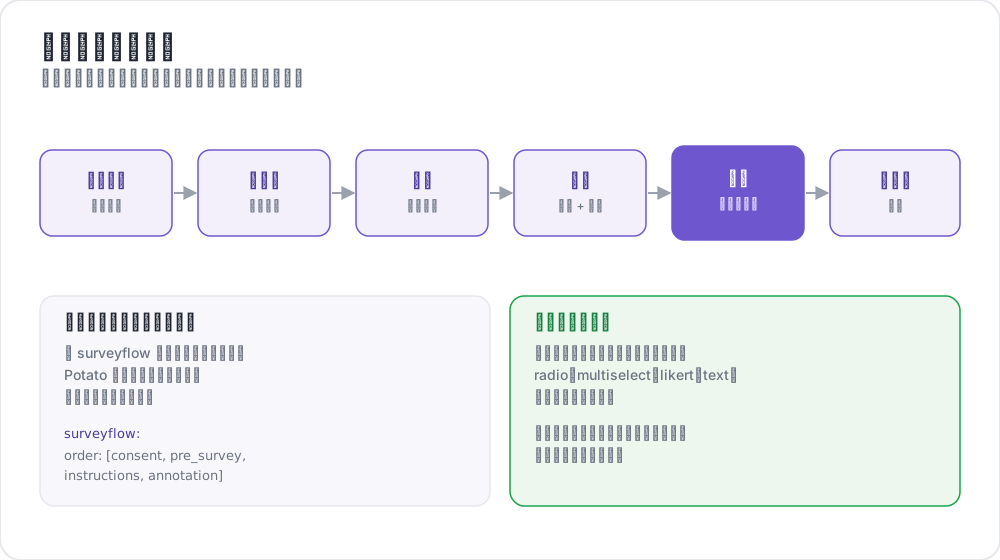 調查流標註工作流
可用階段
| 階段 | 用途 | 是否必需 |
|---|---|---|
consent | 收集知情同意 | 可選 |
prestudy | 預篩查問題和人口統計 | 可選 |
instructions | 任務說明和指南 | 可選 |
training | 帶反饋的資格認定 | 可選 |
annotation | 主要標註任務 | 必需 |
poststudy | 研究後調查和反饋 | 可選 |
標註者按你宣告的順序依次通過已啟用的階段。
基本配置
phases 塊列出順序,並把每個階段指向它的檔案:
phases:
  order: [consent, prestudy, instructions, annotation, poststudy]

  consent:
    type: consent
    file: surveyflow/consent.json

  prestudy:
    type: prestudy
    file: surveyflow/prescreening.json

  instructions:
    type: instructions
    file: surveyflow/instructions.html

  poststudy:
    type: poststudy
    file: surveyflow/demographics.json
annotation 階段不需要 file,因為它使用項目頂層的 annotation_schemes。
階段類型
每個基於檔案的階段都要宣告一個 type,說明它屬於工作流的哪個環節。有效取值為 consent、prestudy、instructions、training、annotation 和 poststudy。
請顯式設定 type。只有當階段名稱本身就是這些詞之一時 Potato 才會推斷它,因此使用自定義名稱的階段必須宣告一個:
phases:
  order: [intro, consent, instructions, annotation, feedback]

  intro:
    type: prestudy          # custom name, so type is required
    file: surveyflow/intro.json

  consent:
    type: consent
    file: surveyflow/consent.json

  feedback:
    type: poststudy         # custom name, so type is required
    file: surveyflow/feedback.json
後退導航
當沒有上一頁時,後退按鈕會被隱藏,其中包括第一條標註實例。要讓標註者跨階段邊界後退:
allow_phase_back_navigation: true即使關閉它,標註者仍然可以在一個階段內部後退,例如在標註實例之間。
調查問題格式
調查階段讀取一個 JSON 陣列。每個問題都帶有 id、向標註者顯示的 text、指明控制元件的 schema,以及它的 choices:
[
  {
    "id": "consent_1",
    "text": "I certify that I am at least 18 years of age.",
    "schema": "radio",
    "choices": ["I agree", "I disagree"],
    "label_requirement": {"right_label": ["I agree"]}
  },
  {
    "id": "consent_2",
    "text": "I have read and understood the information above.",
    "schema": "radio",
    "choices": ["Yes", "No"],
    "label_requirement": {"right_label": ["Yes"]}
  }
]
支援的 schema 類型
radio 用於單選,checkbox 或 multiselect 用於多選,text 用於自由文本,number 用於數字輸入,likert 用於評分量表,select 用於下拉選單。
標籤要求
label_requirement 決定哪些答案允許標註者繼續:
{
  "id": "age_check",
  "text": "Are you at least 18 years old?",
  "schema": "radio",
  "choices": ["Yes", "No"],
  "label_requirement": {
    "right_label": ["Yes"],
    "required": true
  }
}
right_label 列出可接受的答案,required 說明這個問題是否必須回答。一道沒人會答錯的知情同意題等於什麼都沒記錄,所以要把可接受的答案放進 right_label,而不是依賴題目的措辭。
預篩查問題
預篩查在主任務之前執行,是放置資格和背景問題的地方:
phases:
  order: [prestudy, annotation]
  prestudy:
    type: prestudy
file: surveyflow/prescreening.json[
{
"id": "1",
"text": "What is your native language?",
"schema": "select",
"use_predefined_labels": "language",
"label_requirement": {"required": true}
},
{
"id": "2",
"text": "How familiar are you with this topic?",
"schema": "likert",
"choices": ["Not at all", "Slightly", "Moderately", "Very", "Extremely"],
"label_requirement": {"required": true}
}
]研究後調查
phases:
  order: [annotation, poststudy]
  poststudy:
    type: poststudy
file: surveyflow/demographics.json[
{
"id": "gender",
"text": "What gender do you most closely identify with?",
"schema": "radio",
"choices": ["Male", "Female", "Non-binary", "Prefer not to say"],
"label_requirement": {"required": true}
},
{
"id": "feedback",
"text": "Please share any feedback about this study (optional)",
"schema": "text"
}
]內建標籤集
Potato 為各項研究反覆出現的問題內建了標籤集,這樣國家列表就不必貼上進配置裡:
{"id": "country", "text": "Select your country", "schema": "select", "use_predefined_labels": "country"}可用的標籤集有 country、language、ethnicity 和 religion。
自由回答欄位
用 has_free_response 給任意問題加上一個可選文本框,"其他"選項正是靠它才有提供的價值:
{
  "id": "gender",
  "text": "What is your gender?",
  "schema": "radio",
  "choices": ["Woman", "Man", "Non-binary", "Prefer not to disclose", "Prefer to self-describe"],
  "has_free_response": {"instruction": "Please specify:"},
  "label_requirement": {"required": true}
}
頁面標題
調查頁面的標題設在階段上,而不是在問題檔案裡:
phases:
  prestudy:
    type: prestudy
    file: surveyflow/consent.json
    header: "Please answer all consent questions"
條件問題
調查問題可以根據先前的答案顯示,這樣後續問題只在適用時才出現。由於調查問題和標註方案走的是同一條流水線,條件通過 name 引用另一個問題:
[
  {
    "name": "prior_experience",
    "annotation_type": "radio",
    "description": "Have you previously worked on a text-annotation task?",
    "labels": ["Yes", "No"],
    "label_requirement": {"required": true}
  },
  {
    "name": "experience_details",
    "annotation_type": "text",
    "description": "Please briefly describe your previous annotation experience.",
    "label_requirement": {"required": true},
    "display_logic": {
      "show_when": [
        {"schema": "prior_experience", "operator": "equals", "value": "Yes"}
      ]
    }
  }
]
被隱藏的問題不參與必填欄位校驗,所以它在不顯示時絕不會擋住"繼續"按鈕。
有三個行為值得了解。條件可以引用任意階段上的問題,因此研究後的問題可以依賴研究前的答案。無效的 display_logic,比如未知的運算子或者引用了根本不存在的問題,會在伺服器啟動時失敗,而不是在執行時。另外,指向原始 .html 檔案的 instructions 階段繞過了 schema 流水線,因此條件在那裡不起作用。
設定 export_include_phase_data: true 後,Potato 會在伺服器端重新評估每位參與者的答案,並剔除他們從未看到的問題的答案。完整的運算子參考見條件邏輯。
完整示例
annotation_task_name: "Sentiment Analysis Study"
task_dir: "."
port: 8000

data_files:
  - "data/reviews.json"

item_properties:
  id_key: id
  text_key: text

annotation_schemes:
  - annotation_type: radio
    name: sentiment
    description: "What is the sentiment of this review?"
    labels:
      - Positive
      - Negative
      - Neutral
    sequential_key_binding: true

phases:
  order: [consent, prestudy, instructions, training, annotation, poststudy]

  consent:
    type: consent
    file: phases/consent.json

  prestudy:
    type: prestudy
    file: phases/demographics.json

  instructions:
    type: instructions
    file: phases/instructions.html

  training:
    type: training
    file: phases/training_questions.json

  poststudy:
    type: poststudy
    file: phases/exit_survey.json

training:
  enabled: true
  data_file: phases/training_questions.json
  passing_criteria:
    min_correct: 3
  allow_retry: true

allow_phase_back_navigation: false

output_annotation_dir: "output/"
export_annotation_format: "jsonl"

user_config:
  allow_all_users: true
培訓階段從頂層的 training 塊讀取它的設定,phases 中的條目只負責把它放進順序裡。通過標準和資料格式見培訓階段。
舊版配置
較早的 surveyflow 塊仍然可用,它把調查頁面讀作 .jsonl 檔案的列表:
surveyflow:
  on: true
  order:
    - pre_annotation
    - post_annotation
  pre_annotation:
    - surveyflow/consent.jsonl
    - surveyflow/demographics.jsonl
  post_annotation:
    - surveyflow/exit_survey.jsonl
遷移
| 舊版 | 新版 |
|---|---|
surveyflow.on: true | 一個 phases 塊 |
surveyflow.pre_annotation | phases.consent 或 phases.prestudy |
surveyflow.post_annotation | phases.poststudy |
surveyflow.testing | training.data_file |
.jsonl 檔案 | 裝著陣列的 .json 檔案 |
最佳實踐
保持調查簡短
每多一道問題都會拉低完成率,而分析中根本用不上的人口統計問題就是白白付出這個代價。
測試整條流程
在把連結發出去之前,先在一個沒有會話的瀏覽器裡自己走完整個工作流。知情同意和登入是工作流出問題時最先失敗、也最不聲不響的兩個地方。
謹慎標記必填欄位
本可以設為可選卻標成必填的問題,只會換來人們為了翻過這一頁而編造的答案。
眾包
完成程式碼用頂層的 completion_code 鍵配置,而不是配在研究後階段上:
completion_code: "POTATO2024"
auto_redirect_on_completion: true
auto_redirect_delay: 5000平臺設定見眾包。
延伸閱讀
- 培訓階段 - 帶反饋的資格認定
- 眾包 - Prolific、SONA 及其他樣本平臺
- 使用者管理 - 訪問列表和角色
- 實驗流程 - 實驗條件、篩除和平衡順序的頁面
- 問卷匯入 - 從 Qualtrics、REDCap、XLSForm 等工具匯入問卷
實現細節見源文件。