品質控制
注意力檢查、金標準和標註者間一致性指標。
Potato 提供全面的品質控制功能以確保高品質標註。包括注意力檢查、金標準、預標註支援和即時一致性指標。
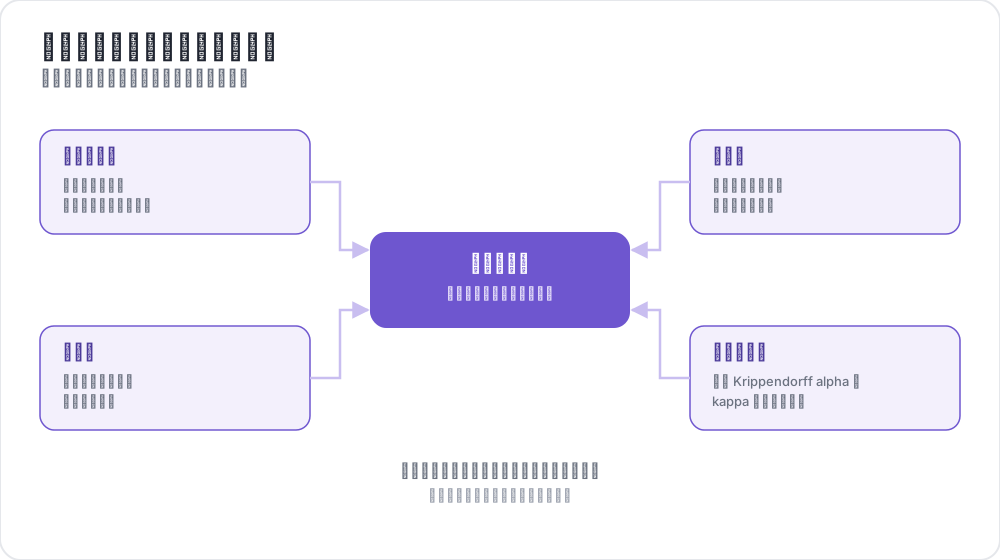 四種品質控制,一個可靠資料集
概述
Potato 中的品質控制由四個關鍵功能組成:
- 注意力檢查 - 使用已知答案的項目驗證標註者的參與度
- 金標準 - 根據專家標註的項目追蹤準確率
- 預標註支援 - 使用模型預測預填充表單
- 一致性指標 - 即時計算標註者間一致性
注意力檢查
注意力檢查是具有已知正確答案的項目,用於驗證標註者是否在認真工作而非隨機點選。
配置
attention_checks:
  enabled: true
  items_file: "attention_checks.json"

  # How often to inject attention checks
  frequency: 10              # Insert one every 10 items
  # OR
  probability: 0.1           # 10% chance per item

  # Optional: flag suspiciously fast responses
  min_response_time: 3.0     # Flag if answered in < 3 seconds

  # Failure handling
  failure_handling:
    warn_threshold: 2        # Show warning after 2 failures
    warn_message: "Please read items carefully before answering."
    block_threshold: 5       # Block user after 5 failures
    block_message: "You have been blocked due to too many incorrect responses."
注意力檢查項目檔案
[
  {
    "id": "attn_001",
    "text": "Please select 'Positive' for this item to verify you are reading carefully.",
    "expected_answer": {
      "sentiment": "positive"
    }
  }
]
金標準
金標準是專家標註的項目,用於衡量標註者準確率。預設情況下,金標準是靜默的——結果記錄供管理員審查,但標註者不會看到反饋。
配置
gold_standards:
  enabled: true
  items_file: "gold_standards.json"

  # How to use gold standards
  mode: "mixed"              # Options: training, mixed, separate
  frequency: 20              # Insert one every 20 items

  # Accuracy requirements
  accuracy:
    min_threshold: 0.7       # Minimum required accuracy (70%)
    evaluation_count: 10     # Evaluate after this many gold items

  # Feedback settings (disabled by default)
  feedback:
    show_correct_answer: false
    show_explanation: false

  # Auto-promotion from high-agreement items
  auto_promote:
    enabled: true
    min_annotators: 3
    agreement_threshold: 1.0   # 1.0 = unanimous
金標準項目檔案
[
  {
    "id": "gold_001",
    "text": "The service was absolutely terrible and I will never return.",
    "gold_label": {
      "sentiment": "negative"
    },
    "explanation": "Strong negative language clearly indicates negative sentiment.",
    "difficulty": "easy"
  }
]
自動提升
當多個標註者一致時,項目可以自動成為金標準:
gold_standards:
  auto_promote:
    enabled: true
    min_annotators: 3          # Wait for at least 3 annotators
    agreement_threshold: 1.0   # 100% must agree (unanimous)
預標註支援
預標註允許你使用模型預測預填充標註表單,適用於主動學習和校正工作流。
配置
pre_annotation:
  enabled: true
  field: "predictions"        # Field in data containing predictions
  allow_modification: true    # Can annotators change pre-filled values?
  show_confidence: true
  highlight_low_confidence: 0.7
資料格式
在資料項中包含預測:
{
  "id": "item_001",
  "text": "I love this product!",
  "predictions": {
    "sentiment": "positive",
    "confidence": 0.92
  }
}
一致性指標
管理員儀表板中提供使用 Krippendorff's alpha 的即時標註者間一致性指標。
配置
agreement_metrics:
  enabled: true
  min_overlap: 2             # Minimum annotators per item
  refresh_interval: 60       # Seconds between updates
解讀 Krippendorff's Alpha
| Alpha 值 | 解釋 |
|---|---|
| α ≥ 0.8 | 良好一致性 - 對大多數目的可靠 |
| 0.67 ≤ α ≤ 0.8 | 初步一致性 - 可以得出初步結論 |
| 0.33 ≤ α ≤ 0.67 | 低一致性 - 需審查指南 |
| α ≤ 0.33 | 差一致性 - 存在重大問題 |
管理員儀表板整合
在 /admin 的管理員儀表板中檢視品質控制指標:
- 注意力檢查:總體通過/失敗率,按標註者統計
- 金標準:按標註者準確率,按項目難度分析
- 一致性:按模式的 Krippendorff's alpha 及解釋
- 自動提升項目:從高一致性提升的項目列表
API 端點
品質控制指標
GET /admin/api/quality_control返回注意力檢查和金標準統計資料。
一致性指標
GET /admin/api/agreement返回按模式分類的 Krippendorff's alpha 及解釋。
完整示例
annotation_task_name: "Sentiment Analysis with Quality Control"
task_dir: .
output_annotation_dir: annotation_output/
data_files:
  - data/reviews.json

item_properties:
  id_key: id
  text_key: text

annotation_schemes:
  - name: sentiment
    annotation_type: radio
    labels: [positive, negative, neutral]
    description: "Select the sentiment of the text"

attention_checks:
  enabled: true
  items_file: "data/attention_checks.json"
  frequency: 15
  failure_handling:
    warn_threshold: 2        # Warn the annotator after two failures
    block_threshold: 5       # Block them after five

gold_standards:
  enabled: true
  items_file: "data/gold_standards.json"
  mode: mixed
  frequency: 25
  accuracy:
    min_threshold: 0.7       # Flag annotators scoring below 70%
    evaluation_count: 5      # Score them after five gold items

agreement_metrics:
  enabled: true
  min_overlap: 2
  refresh_interval: 60
故障排除
注意力檢查未出現
- 驗證
items_file路徑正確(相對於任務目錄) - 檢查項目是否有必需欄位(
id、expected_answer) - 確保設定了
frequency或probability
一致性指標顯示"沒有 N+ 個標註者的項目"
- 確保項目已被多個使用者標註
- 如需要可降低
min_overlap - 檢查標註是否正確儲存
常見問題
以下問題介紹如何搭建品質控制(QA)流程,以及金標準如何在整個會話中追蹤標註者的準確率。
如何為標註任務搭建品質控制流程?
在佇列中混入答案已知的項目,並在多名標註者共同標註的項目上測量一致性。在 Potato 中,注意力檢查會標記沒有認真閱讀的標註者,金標準根據專家標籤衡量每位標註者的準確率,一致性指標則顯示標註者在哪些問題上存在分歧。每一項都是任務 YAML 配置中的一個獨立塊。
金標準如何發現標註者準確率隨時間下降?
金標準項目會按固定頻率持續出現,例如每 20 個項目出現一個,因此只要標註者還在工作,對照專家標籤的準確率就一直在測量,而不是隻在培訓階段測一次。預設情況下,Potato 會靜默記錄答案,當標註者在至少 evaluation_count 個金標準項目上的準確率低於 accuracy.min_threshold 時,就在管理員儀表板上列出該標註者。這一準確率是對標註者全部金標準答案的累計值,所以長會話後期出現的下滑只會讓它緩慢變化。注意力檢查的失敗則是計數而不是取平均,所以突然連續出現的失敗會達到警告閾值,無論標註者此前通過了多少次檢查。
延伸閱讀
有關實現細節,請參閱原始碼文件。