抽取式問答
在 Potato 中搭建 SQuAD 風格的問答介面,用於基於片段的答案抽取、閱讀理解任務和段落高亮標註。
抽取式問答標註 schema 提供一個問答介面,標註者直接在文本段落中高亮出答案片段。這個 schema 適合構建閱讀理解資料集、SQuAD 風格的問答標註、事實核查,以及任何需要從原文中原樣抽取答案的任務。
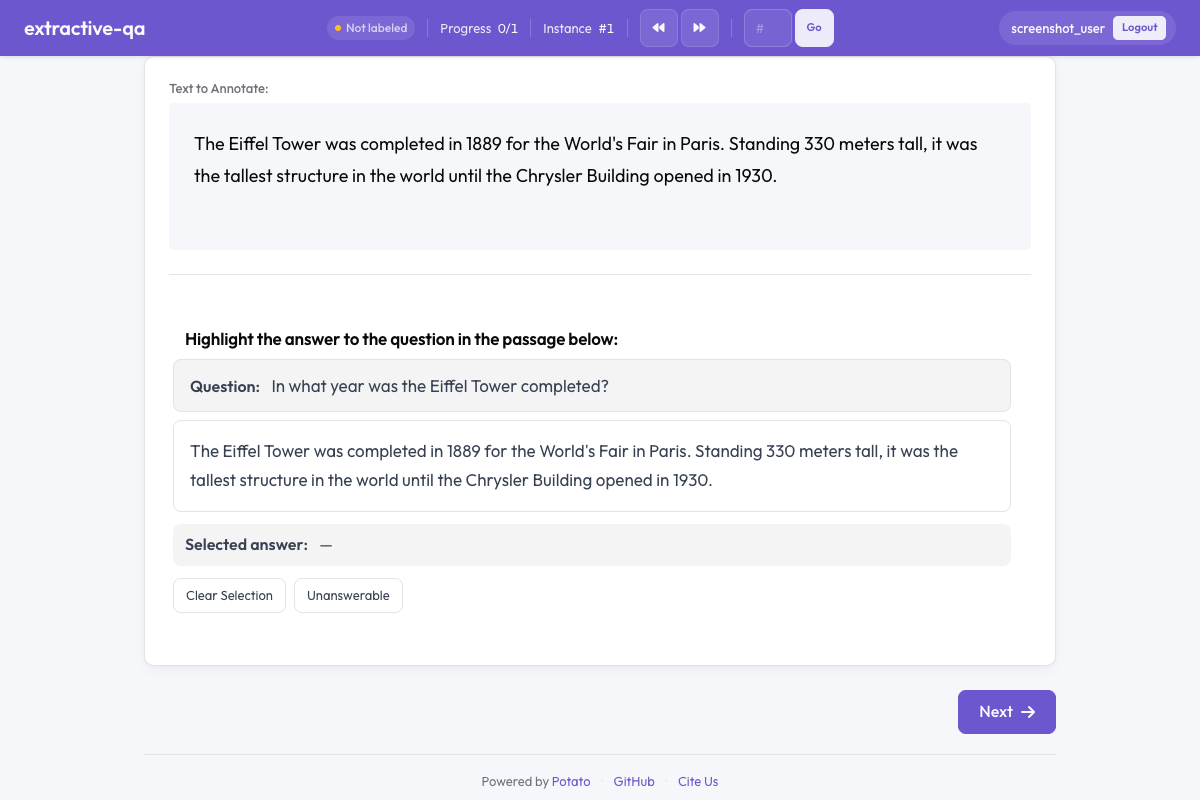 Potato 中的抽取式問答
概覽
抽取式問答 schema 會呈現:
- 一個問題,醒目地顯示在段落上方
- 一段文本,標註者通過高亮選出答案片段
- 彩色高亮,標記選中的答案文本
- 無法回答選項,用於無法從段落中得到答案的問題
快速開始
yaml
annotation_schemes:
  - annotation_type: extractive_qa
    name: answer_span
    description: Highlight the answer to the question in the passage below.
    question_field: question
    passage_field: passage
    allow_unanswerable: true
配置選項
| 欄位 | 類型 | 預設值 | 說明 |
|---|---|---|---|
annotation_type | string | 必填 | 必須為 "extractive_qa" |
name | string | 必填 | 該 schema 的唯一識別符號 |
description | string | 必填 | 展示給標註者的說明 |
question_field | string | "question" | 資料 JSON 中存放問題文本的欄位 |
passage_field | string | "" | 資料 JSON 中存放段落文本的欄位(空字串表示使用預設的文本欄位) |
allow_unanswerable | boolean | true | 顯示一個核取方塊,用於把問題標記為無法回答 |
highlight_color | string | "#FFEB3B" | 答案高亮的 CSS 顏色 |
示例
SQuAD 風格問答
yaml
annotation_schemes:
  - annotation_type: extractive_qa
    name: squad_answer
    description: >
      Select the shortest span in the passage that answers the question.
      If the question cannot be answered from the passage, mark it as unanswerable.
    question_field: question
    passage_field: context
    allow_unanswerable: true
    highlight_color: "#FFEB3B"
配合樣例資料:
json
{
  "id": "q001",
  "question": "When was the university founded?",
  "context": "The University of Michigan was founded in 1817 in Detroit and moved to Ann Arbor in 1837. It is one of the oldest public universities in the United States."
}
事實核查
yaml
annotation_schemes:
  - annotation_type: extractive_qa
    name: evidence_span
    description: >
      Highlight the evidence in the passage that supports or refutes the claim.
      Mark as unanswerable if the passage contains no relevant evidence.
    question_field: claim
    passage_field: document
    allow_unanswerable: true
    highlight_color: "#81C784"
不帶無法回答選項的答案抽取
yaml
annotation_schemes:
  - annotation_type: extractive_qa
    name: definition_extraction
    description: >
      Highlight the definition of the term in the passage.
      Every passage contains a definition, so select the most precise span.
    question_field: term
    passage_field: text
    allow_unanswerable: false
    highlight_color: "#64B5F6"
輸出格式
json
{
  "answer_span": {
    "labels": {
      "answer_text": "1817",
      "start": 42,
      "end": 46,
      "unanswerable": false
    }
  }
}
標註者把問題標記為無法回答時:
json
{
  "answer_span": {
    "labels": {
      "answer_text": "",
      "start": -1,
      "end": -1,
      "unanswerable": true
    }
  }
}
實踐建議
- 要求標註者選最小片段 —— 能完整回答問題的最短文本,能得到更乾淨的訓練資料
- 在貼近真實的任務中啟用 allow_unanswerable —— 現實中的問答常常包含無法回答的問題;關掉這個選項會逼標註者去猜
- 選好讀的高亮顏色 —— 確保高亮色和文字有足夠對比度,看起來不費勁
- 段落長度控制在合理範圍 —— 每段 100-500 詞比較合適;段落太長會讓片段選擇變得很累
- 把問題寫清楚 —— 確保問題表述完整、沒有歧義,減少標註者的困惑
延伸閱讀
有關實現詳情,請參閱源文件。