分診
接受/拒絕/跳過介面,用於快速資料篩選和過濾。
分診標註方案提供 Prodigy 風格的二元接受/拒絕/跳過介面,針對快速資料篩選任務進行了最佳化。此方案非常適合過濾大型資料集、執行資料品質檢查或任何需要快速二元決策的任務。
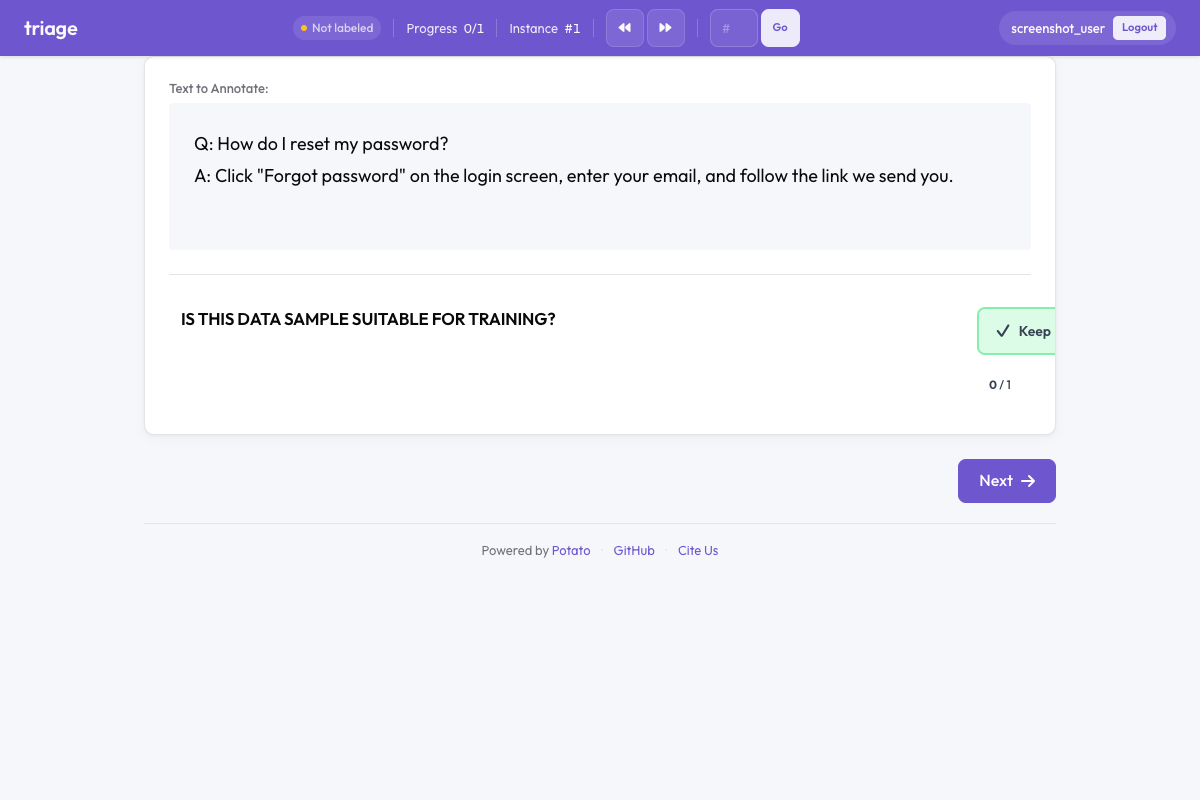 Potato 中的分流
概述
分診方案呈現三個大型、視覺上有區別的按鈕:
- 保留(綠色)- 接受該項目以納入
- 丟棄(紅色)- 拒絕該項目
- 不確定(灰色)- 不確定時跳過
啟用自動推進(預設),標註者僅使用鍵盤快捷鍵即可每小時處理數百個項目。
快速入門
yaml
annotation_schemes:
  - annotation_type: triage
    name: data_quality
    description: Is this data sample suitable for training?
    auto_advance: true
    show_progress: true
配置選項
| 欄位 | 類型 | 預設值 | 描述 |
|---|---|---|---|
annotation_type | string | 必填 | 必須為 "triage" |
name | string | 必填 | 此方案的唯一識別符號 |
description | string | 必填 | 顯示給標註者的說明 |
accept_label | string | "Keep" | 接受按鈕的文本標籤 |
reject_label | string | "Discard" | 拒絕按鈕的文本標籤 |
skip_label | string | "Unsure" | 跳過按鈕的文本標籤 |
auto_advance | boolean | true | 選擇後自動移到下一項 |
show_progress | boolean | true | 在分診元件中顯示進度條 |
accept_key | string | "1" | 接受的鍵盤快捷鍵 |
reject_key | string | "2" | 拒絕的鍵盤快捷鍵 |
skip_key | string | "3" | 跳過的鍵盤快捷鍵 |
示例
資料品質過濾
yaml
annotation_schemes:
  - annotation_type: triage
    name: quality_filter
    description: Is this text high quality and suitable for training?
    auto_advance: true
內容稽核
yaml
annotation_schemes:
  - annotation_type: triage
    name: content_moderation
    description: Does this content violate community guidelines?
    accept_label: "Safe"
    reject_label: "Violates"
    skip_label: "Review Later"
    auto_advance: true
相關性過濾
yaml
annotation_schemes:
  - annotation_type: triage
    name: relevance
    description: Is this document relevant to the query?
    accept_label: "Relevant"
    reject_label: "Not Relevant"
    skip_label: "Partially Relevant"
與其他方案結合
分診可以與其他標註類型結合使用,同時進行過濾和詳細標註:
yaml
annotation_schemes:
  - annotation_type: triage
    name: include_item
    description: Should this item be included in the dataset?
    auto_advance: false  # Don't auto-advance when combined

  - annotation_type: radio
    name: category
    description: What category does this belong to?
    labels: ["News", "Opinion", "Review", "Other"]
鍵盤快捷鍵
| 按鍵 | 操作 |
|---|---|
1 | 保留(接受) |
2 | 丟棄(拒絕) |
3 | 不確定(跳過) |
按鍵 1、2、3 在鍵盤上相鄰,無需看鍵盤即可快速標註。
輸出格式
json
{
  "data_quality": {
    "labels": {
      "decision": "accept"
    }
  }
}可能的值:"accept"、"reject"、"skip"。
最佳實踐
- 高吞吐量任務使用自動推進 - 顯著提高簡單決策的吞吐量
- 複雜決策停用自動推進 - 當標註者需要時間思考或進行額外標註時
- 提供清晰的描述 - 使分診標準明確無歧義以確保標註一致性
- 使用有意義的標籤 - 自定義標籤以匹配您的具體使用場景
- 結合注意力檢查 - 在眾包中,插入已知項目以驗證品質
延伸閱讀
有關實現細節,請參閱源文件。