資料格式
Potato 的輸入格式:文本、JSON、JSONL、CSV、影像、音訊和影片。輸出為 CoNLL、HuggingFace Datasets、COCO、YOLO、Parquet 等格式。
Potato 從 JSON、JSON Lines、CSV 和 TSV 檔案讀取標註輸入。本指南說明如何組織這些資料、Potato 需要每條記錄中的哪些欄位,以及標註最終落在哪裡。
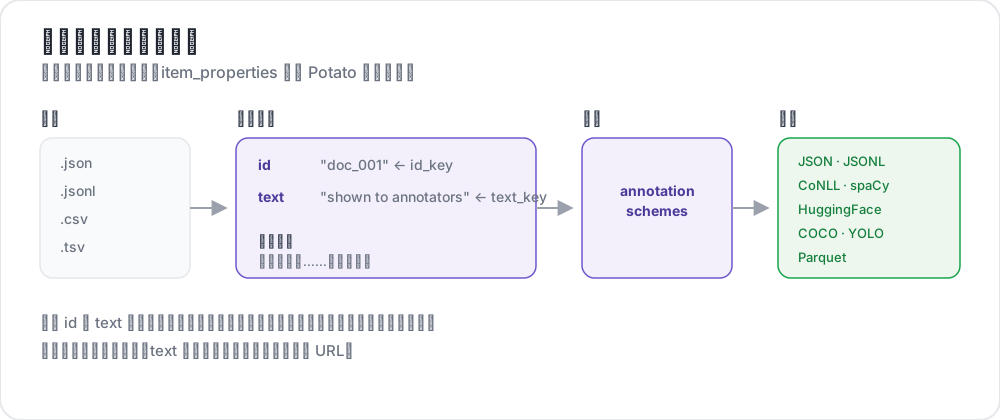 從輸入檔案到匯出的標籤
支援的格式
| 格式 | 副檔名 | 描述 |
|---|---|---|
| JSON | .json | 物件陣列 |
| JSON Lines | .jsonl | 每行一個 JSON 物件 |
| CSV | .csv | 逗號分隔值 |
| TSV | .tsv | 製表符分隔值 |
JSON 格式
最常用的格式。您的資料應該是一個物件陣列:
[
  {
    "id": "doc_001",
    "text": "This is the first document to annotate.",
    "source": "twitter",
    "date": "2024-01-15"
  },
  {
    "id": "doc_002",
    "text": "This is the second document.",
    "source": "reddit",
    "date": "2024-01-16"
  }
]
JSON Lines 格式
每行是一個單獨的 JSON 物件。適用於大型資料集:
{"id": "doc_001", "text": "First document"}
{"id": "doc_002", "text": "Second document"}
{"id": "doc_003", "text": "Third document"}
CSV/TSV 格式
帶表頭的表格資料:
id,text,source
doc_001,"This is the first document",twitter
doc_002,"This is the second document",reddit
配置
基本設定
在 YAML 中配置資料檔案和欄位對映:
data_files:
  - "data/documents.json"

item_properties:
  id_key: id      # Field name for unique ID
  text_key: text  # Field name for content to annotate
多個數據檔案
組合多個數據源:
data_files:
  - "data/batch_1.json"
  - "data/batch_2.json"
  - "data/batch_3.jsonl"
檔案按順序處理併合並。
資料類型
純文本
簡單的文本內容:
{
  "id": "1",
  "text": "The product arrived quickly and works great!"
}
媒體檔案
影像、影片或音訊條目在記錄的某個欄位裡寫明檔案,再由 instance_display 中的一個欄位把它顯示在頁面上:
{
  "id": "1",
  "image_path": "photo_001.jpg"
}media_directory: media # the default, relative to task_dir
instance_display:
fields:
- key: image_path
type: imagePotato 通過 /media/ 提供 media_directory 中的檔案。該資料夾預設是 task_dir 下的 media/,寫成絕對路徑則可以指向機器上任意位置的資料夾。在媒體顯示欄位(如 image、video、audio、pdf)中,像 photo_001.jpg 這樣只寫檔名的值,只要檔案在該資料夾裡,就會變成 /media/photo_001.jpg,完整的 URL 則按原樣使用。item_properties.image_key 不會把影像顯示到頁面上。它告訴 AI 支援和重複檢測哪個欄位存放影像。
對話/列表
存放 JSON 列表的 text 欄位會每行排一項,因為縱向閱讀適合對話。要做兩兩比較時,設定 list_as_text.horizontal 讓各項並排:
{
  "id": "1",
  "text": ["Option A", "Option B", "Option C"]
}
文本對
存放 JSON 物件的 text 欄位由配置宣告的顯示類型來渲染(conversation_tree、web_agent_trace 之類)。沒有宣告顯示類型時會退回到格式化的 JSON,所以比較任務要宣告一個:
{
  "id": "pair_001",
  "text": {
    "A": "Response from Model A",
    "B": "Response from Model B"
  }
}
HTML 檔案
把 .html 檔案放在 task_dir 下的某個資料夾裡,再從普通的 text 欄位指向它們,因為 Potato 沒有單獨的 HTML 條目屬性。自帶的 examples/advanced/html-annotation 任務就是這樣嵌入每個檔案的:
{
  "id": "1",
  "text": "<embed width=\"1020\" height=\"440\" src=\"data/html_data/1.html\" type=\"text/html\">"
}
上下文標註
在主文本旁包含上下文:
{
  "id": "1",
  "text": "This is great!",
  "context": "Previous message: How do you like the new feature?"
}
除 id 和 text 之外的欄位通過 kwargs 到達頁面,它指明每條資料要額外帶過來哪些鍵:
item_properties:
  id_key: id
  text_key: text
  kwargs:
    - context
顯示配置
列表顯示選項
控制取值為列表的欄位如何排布。這個鍵有三個子鍵,而 list_as_text: true 用預設值直接開啟:
list_as_text:
  # Prefix each item so an annotator can refer to one by name.
  text_list_prefix_type: alphabet   # alphabet, number, bullet, or none

  # Side-by-side suits a pairwise comparison. The default is vertical.
  horizontal: true

  # Shade alternate turns, which keeps a long dialogue readable.
  alternating_shading: true
HTML 內容
text 欄位裡的標記不需要任何配置鍵就會渲染。Potato 對它做淨化而不是轉義,所以允許列表內的標籤(<b>、<i>、<span> 之類)會變成格式,而 <script> 以及列表之外的任何東西都會被轉義並失效。片段高亮是以標記的形式注入條目的,這正是不能把整個欄位都轉義的原因。
{
  "id": "1",
  "text": "<p>This is <strong>formatted</strong> text.</p>"
}
輸出配置
輸出目錄
指定標註儲存在哪裡:
output_annotation_dir: "output/"輸出格式
標註始終以每個使用者一份 user_state.json 的形式儲存。export_annotation_format 會另外把定期的扁平匯出寫進 <output_annotation_dir>/exports/<format>/,那才是值得拿來分析的形式。沒有哪個匯出器叫 json:
export_annotation_format: "jsonl" # or csv, tsv, parquet, coco, conll_2003, ...執行 python -m potato.export --list-formats 檢視完整的登錄檔。
輸出結構
每份 user_state.json 按實例為鍵儲存該標註者的標籤,片段則單獨記錄:
{
  "user_id": "annotator_1",
  "instance_id_to_label_to_value": {
    "doc_001": {
      "sentiment": {"labels": {"positive": true}}
    }
  },
  "instance_id_to_span_to_value": {
    "doc_001": {
      "ner": [
        {"start": 0, "end": 5, "label": "PERSON", "text": "Alice"}
      ]
    }
  }
}
特殊資料類型
最佳-最差縮放
用於排名任務,使用逗號分隔的項目:
{
  "id": "1",
  "text": "Item A,Item B,Item C,Item D"
}
自定義參數
包含額外欄位用於顯示或篩選:
{
  "id": "1",
  "text": "Document content",
  "category": "news",
  "priority": "high",
  "custom_field": "any value"
}
資料庫後端
對於大型資料集,使用 MySQL:
database:
  type: mysql
  host: localhost
  port: 3306
  database: potato_db
  username: ${DB_USER}
  password: ${DB_PASSWORD}
Potato 在首次啟動時自動建立所需的表。
資料驗證
Potato 在啟動時驗證您的資料:
- 缺少 ID 欄位 - 所有項目都需要唯一識別符號
- 缺少文本欄位 - 項目需要標註內容
- 重複 ID - 所有 ID 必須唯一
- 檔案未找到 - 驗證資料檔案路徑
完整示例
annotation_task_name: "Document Classification"
task_dir: "."
port: 8000

# Data configuration
data_files:
  - "data/documents.json"

item_properties:
  id_key: id
  text_key: text

# Display settings
list_as_text:
  text_list_prefix_type: number
  horizontal: false

# Output
output_annotation_dir: "output/"
export_annotation_format: "jsonl"

# Annotation scheme
annotation_schemes:
  - annotation_type: radio
    name: category
    description: "Select the document category"
    labels:
      - News
      - Opinion
      - Tutorial
      - Other

user_config:
  allow_all_users: true
  users: []
最佳實踐
1. 使用有意義的 ID
使跟蹤和除錯更容易:
{"id": "twitter_2024_001", "text": "..."}2. 保持文本簡潔
過長的文本會拖慢標註速度。可以考慮:
- 擷取關鍵部分
- 提供摘要
- 使用滾動容器
3. 包含後設資料
有助於篩選和分析:
{
  "id": "1",
  "text": "Content",
  "source": "twitter",
  "date": "2024-01-15",
  "language": "en"
}
4. 載入前先驗證
離線檢查您的資料:
import json

with open('data.json') as f:
    data = json.load(f)

# Check for required fields
for item in data:
    assert 'id' in item, f"Missing id: {item}"
    assert 'text' in item, f"Missing text: {item}"

# Check for duplicates
ids = [item['id'] for item in data]
assert len(ids) == len(set(ids)), "Duplicate IDs found"

print(f"Validated {len(data)} items")
5. 備份原始資料
把原始資料與標註分開儲存,以保證可重複性。
6. 大檔案使用 JSON Lines
比 JSON 陣列更省記憶體:
# Convert JSON array to JSON Lines
cat data.json | jq -c '.[]' > data.jsonl
延伸閱讀
有關實現細節,請參閱源文件。