文本與數字輸入
用於標註的自由文本和數字輸入。
文本和數字輸入允許標註者提供自由形式的回覆,適用於修正、解釋、計數和測量。
文本輸入
基本文本欄位
單行文本輸入:
yaml
annotation_schemes:
  - annotation_type: text
    name: correction
    description: "Provide a corrected version of the text"
多行文本區域
用於較長的回覆:
yaml
- annotation_type: text
  name: explanation
  description: "Explain your reasoning"
  multiline: true
  rows: 4
  cols: 60
  allow_paste: false
佔位文本
用示例輸入引導標註者:
yaml
- annotation_type: text
  name: summary
  description: "Write a one-sentence summary"
  placeholder: "Enter your summary here..."
字元限制
約束回覆長度:
yaml
- annotation_type: text
  name: title
  description: "Suggest a title"
  min_chars: 15
  show_char_count: true
必填文本
設為必填欄位:
yaml
- annotation_type: text
  name: justification
  description: "Why did you choose this label?"
  label_requirement:
    required: true
數字輸入
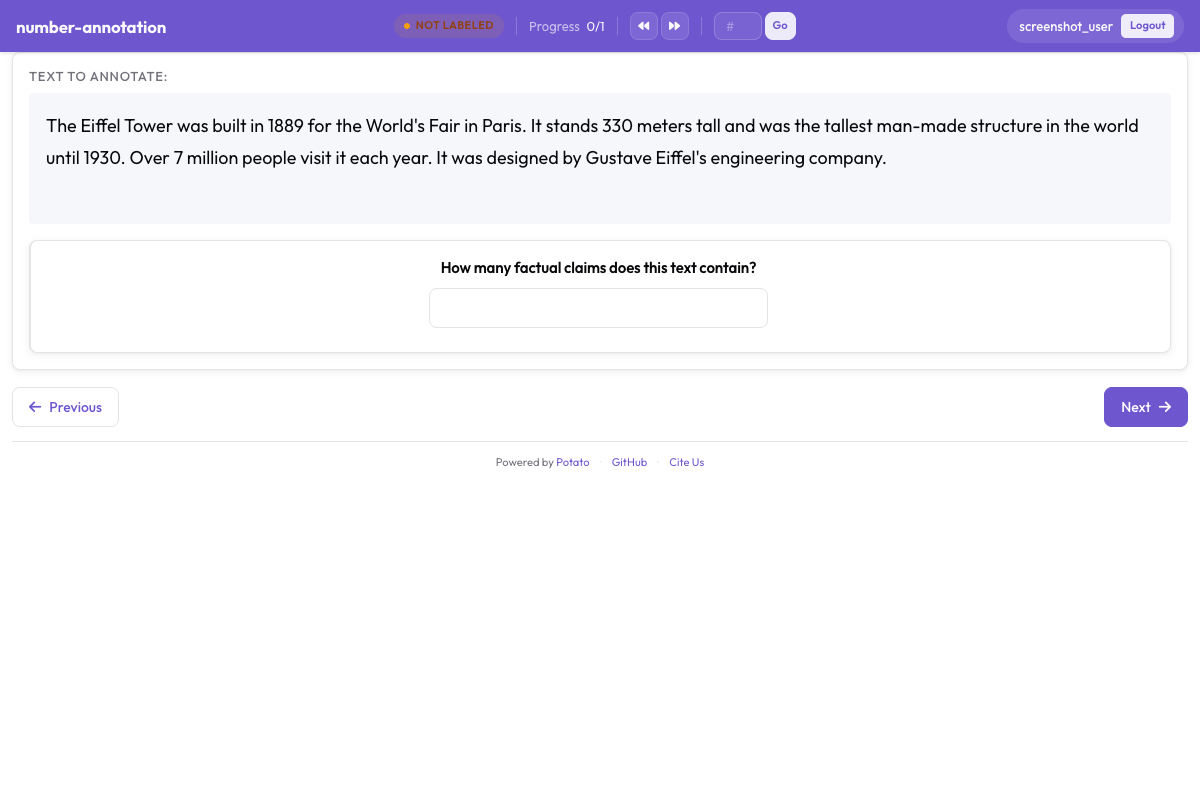 帶有最小值和最大值約束的數字輸入欄位
基本數字欄位
yaml
annotation_schemes:
  - annotation_type: number
    name: count
    description: "How many entities are mentioned?"
範圍約束
設定最小和最大值:
yaml
- annotation_type: number
  name: rating
  description: "Rate from 1 to 10"
  min: 1
  max: 10
步長
控制增量精度:
yaml
- annotation_type: number
  name: percentage
  description: "What percentage is relevant?"
  min: 0
  max: 100
  step: 5  # Increments of 5
小數
允許浮點值:
yaml
- annotation_type: number
  name: score
  description: "Confidence score"
  min: 0.0
  max: 1.0
  step: 0.1
預設值
預填預設值:
yaml
- annotation_type: number
  name: count
  description: "Number of errors"
  min: 0
  tooltip: "Count each distinct error once, even where it repeats."
滑塊輸入
數字輸入的視覺替代:
yaml
- annotation_type: slider
  name: confidence
  description: "How confident are you?"
  min_value: 0
  max_value: 100
  starting_value: 50
  step: 1
滑塊兩端說明
滑軌兩端顯示 min_value 和 max_value,show_labels: false 可將其隱藏。滑塊不接受 labels 列表。一旦新增,題目會切換為單選(radio)佈局,滑塊也隨之消失,因此兩端的說明文字請寫在 description 中:
yaml
- annotation_type: slider
  name: agreement
  description: "How much do you agree? (0 = strongly disagree, 100 = strongly agree)"
  min_value: 0
  max_value: 100
  starting_value: 50
  show_labels: true
滑塊顯示選項
顯示當前值:
yaml
- annotation_type: slider
  name: rating
  description: "Rate the overall quality"
  min_value: 0
  max_value: 100
  starting_value: 50
  step: 5
  maxTick: 10
常見使用場景
文本修正任務
yaml
annotation_schemes:
  - annotation_type: radio
    name: has_error
    description: "Does this text contain errors?"
    labels:
      - "Yes"
      - "No"

  - annotation_type: text
    name: corrected_text
    description: "Provide the corrected version"
    rows: 4
翻譯品質
yaml
annotation_schemes:
  - annotation_type: slider
    name: adequacy
    description: "How much meaning is preserved?"
    min_value: 0
    max_value: 100
    starting_value: 50

  - annotation_type: slider
    name: fluency
    description: "How natural does it sound?"
    min_value: 0
    max_value: 100
    starting_value: 50

  - annotation_type: text
    name: improved_translation
    description: "Suggest a better translation (optional)"
    rows: 4
    label_requirement:
      required: false
實體計數
yaml
annotation_schemes:
  - annotation_type: number
    name: person_count
    description: "How many people are mentioned?"
    min: 0
    max: 50

  - annotation_type: number
    name: org_count
    description: "How many organizations are mentioned?"
    min: 0
    max: 50

  - annotation_type: number
    name: location_count
    description: "How many locations are mentioned?"
    min: 0
    max: 50
反饋收集
yaml
annotation_schemes:
  - annotation_type: likert
    name: difficulty
    description: "How difficult was this task?"
    size: 5
    min_label: "Very Easy"
    max_label: "Very Hard"

  - annotation_type: text
    name: feedback
    description: "Any additional feedback?"
    rows: 4
    label_requirement:
      required: false
    placeholder: "Share your thoughts..."
帶理由的品質評估
yaml
annotation_schemes:
  - annotation_type: radio
    name: quality
    description: "Rate the quality"
    labels:
      - Excellent
      - Good
      - Fair
      - Poor

  - annotation_type: text
    name: justification
    description: "Explain your rating"
    rows: 4
    label_requirement:
      required: true
驗證
文本驗證
yaml
- annotation_type: text
  name: email
  description: "Enter contact email"
數字驗證
數字會自動根據最小/最大值進行驗證:
yaml
- annotation_type: number
  name: year
  description: "Enter the year"
  min: 1900
  max: 2024
鍵盤導航
文本和數字欄位支援標準鍵盤導航:
Tab在欄位之間移動Enter提交(單行文本)- 方向鍵用於數字增減
輸出格式
文本和數字標註直接儲存:
json
{
  "id": "doc1",
  "correction": "The corrected text goes here.",
  "count": 5,
  "confidence": 85
}
完整示例:文件審查
yaml
annotation_task_name: "Document Review"

annotation_schemes:
  # Quality rating
  - annotation_type: likert
    name: quality
    description: "Overall document quality"
    size: 5
    min_label: "Poor"
    max_label: "Excellent"

  # Error count
  - annotation_type: number
    name: error_count
    description: "Number of errors found"
    min: 0
    max: 100

  # Confidence slider
  - annotation_type: slider
    name: confidence
    description: "How confident are you in this assessment?"
    min_value: 0
    max_value: 100
    starting_value: 50

  # Detailed feedback
  - annotation_type: text
    name: errors_found
    description: "List the errors you found"
    rows: 4
    placeholder: "Describe each error..."

  # Summary
  - annotation_type: text
    name: summary
    description: "Brief summary of the document"
    placeholder: "Summarize in one sentence..."
最佳實踐
- 使用合適的輸入類型 - 連續值用滑塊,精確計數用數字
- 設定合理的約束 - 最小/最大值防止無效資料
- 提供佔位文本 - 引導標註者瞭解預期格式
- 明確可選欄位 - 使用
required: false並在描述中說明 - 使用條件顯示 - 僅在需要時顯示文本欄位
- 考慮驗證 - 對郵箱或 ID 等結構化輸入使用模式匹配