UI 配置
自定義 Potato 的標註介面——頁頭佈局、側邊欄區塊、鍵盤快捷鍵、實例排序、分頁以及顯示塊的位置。
Potato 為管理員提供了一系列自定義標註介面的選項,涵蓋介面的外觀和行為。
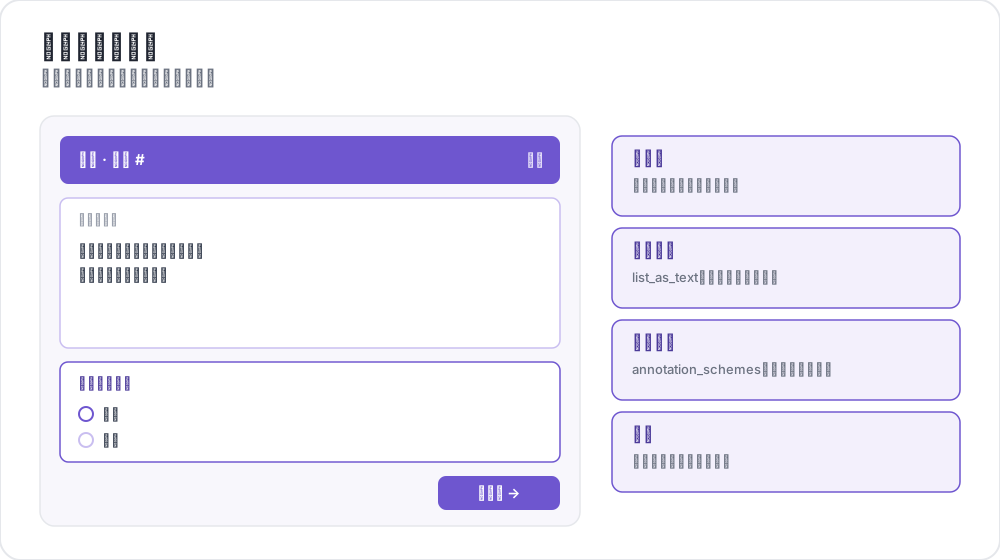 標註頁面的區域
配置結構
所有 UI 配置選項都在配置檔案的 ui 部分中定義:
yaml
ui:
  max_instance_height: 300
  show_progress: true
實例高度控制
控制實例文本顯示區域的最大高度,讓長文本下的標註選項仍然可見。
yaml
ui:
  max_instance_height: 300  # 300 pixels maximum height
優點:
- 長文本實例不再把標註選項擠出視野
- 標註選項保持在可預期的位置
- 長內容獲得可滾動的文本區域
標籤顏色
為所有標註類型配置自定義的標籤顏色。
全域標籤顏色
為所有方案定義標籤顏色:
yaml
ui:
  label_colors:
    sentiment:
      positive: "#22C55E"      # Green
      negative: "#EF4444"      # Red
      neutral: "#9CA3AF"       # Gray
    emotion:
      happy: "rgba(34, 197, 94, 0.8)"
      sad: "rgba(59, 130, 246, 0.8)"
內聯標籤顏色
直接在每個標籤上定義顏色:
yaml
annotation_schemes:
  - annotation_type: radio
    name: sentiment
    description: "What is the overall sentiment?"
    labels:
      - name: positive
        color: "#22C55E"
        tooltip: "Positive sentiment"
      - name: negative
        color: "#EF4444"
片段專用顏色(舊版)
最初的僅適用於片段的顏色配置:
yaml
ui:
  spans:
    span_colors:
      sentiment:
        positive: "(220, 252, 231)"  # RGB format
        negative: "(254, 226, 226)"
顏色格式支援
所有顏色選項都支援多種格式:
- 十六進位制:
"#FF8000"或"#F80" - RGB:
"(255, 128, 0)"或"rgb(255, 128, 0)" - RGBA:
"rgba(255, 128, 0, 0.8)" - 命名色:
"red"、"blue"、"green"
預設顏色
如果沒有指定自定義顏色,Potato 會根據標籤名稱分配顏色:
| 標籤名稱 | 顏色 |
|---|---|
| positive, yes, true, happy | 綠色 |
| negative, no, false, angry | 紅色 |
| neutral, maybe | 灰色 |
| mixed, surprise | 琥珀色 |
| sad | 藍色 |
| fear | 紫色 |
不在該列表中的標籤按其位置從預設調色盤中取色。
顏色優先順序
當有多個來源為同一個標籤指定顏色時,第一個匹配的生效:
ui.label_colorsui.spans.span_colors,用於片段標註- 標籤定義上的內聯
color - 片段顏色調色盤
- 按標籤名稱匹配到的預設顏色
- 按位置從調色盤中選出的顏色
介面顯示選項
控制介面元素的可見性和功能:
yaml
ui:
  show_progress: true        # Show progress indicators
  show_instructions: true    # Show instruction panels
  allow_navigation: true     # Allow navigation between instances
  allow_editing: true        # Allow editing of annotations
任務佈局自定義
Potato 會根據你的配置自動生成 HTML 佈局。
自動生成的佈局
執行 Potato 時,它會在以下位置生成一個佈局檔案:
text
{task_dir}/annotation_layouts/annotation_layout.html
配置發生變化時,該檔案會重新生成。
自定義任務佈局
如果需要更多控制,可以提供自定義的 HTML 檔案:
yaml
task_layout: "my_custom_layout.html"建立自定義佈局:
- 以生成的佈局作為模板起步
- 修改 HTML,新增自定義元素
- 在配置中引用你的檔案
關於用 CSS 網格、顏色編碼選項和分割槽樣式建立複雜自定義佈局的詳細指導,請參閱佈局自定義指南。
佈局結構要求
自定義佈局必須包含某些元素:
| 元素 | 用途 | 是否必需 |
|---|---|---|
.annotation-form | 每個方案的容器 | 是 |
data-annotation-id | 與配置匹配的唯一 ID | 是 |
data-schema-name | 用於取色的方案名稱 | 推薦 |
.ai-help | AI 助手按鈕 | 使用 AI 時 |
CSS 類參考
表單結構:
.annotation-form- 主表單容器.annotation-form-header- 包含名稱和 AI 按鈕的頁頭.annotation-form-body- 包含輸入選項的主體.annotation-name- 方案名稱顯示.annotation-desc- 描述文本
輸入選項:
.shadcn-radio-option- 單選按鈕選項.shadcn-checkbox-option- 核取方塊選項.shadcn-span-option- 片段標註選項
站點目錄配置
自定義模板
把 site_dir 指向你自己的模板資料夾:
yaml
site_dir: "custom_templates"或者顯式指定內建模板:
yaml
site_dir: "default"自定義 JavaScript
注入自定義的 JavaScript 程式碼:
yaml
customjs: "http://localhost:8080/custom.js"
customjs_hostname: "localhost:8080"
完整示例
yaml
annotation_task_name: "UI Configuration Example"

# Annotation schemes with inline colors
annotation_schemes:
  - annotation_type: radio
    name: sentiment
    description: "What is the overall sentiment?"
    labels:
      - name: positive
        color: "#22C55E"
        tooltip: "Positive sentiment"
        key_value: p
      - name: negative
        color: "#EF4444"
        tooltip: "Negative sentiment"
        key_value: n
      - name: neutral
        color: "#9CA3AF"
        key_value: u

# UI Configuration
ui:
  max_instance_height: 400

  label_colors:
    sentiment:
      positive: "#22C55E"
      negative: "#EF4444"
      neutral: "#9CA3AF"

  show_progress: true
  show_instructions: true
  allow_navigation: true
  allow_editing: true

site_dir: "default"
瀏覽器相容性
所有 UI 配置選項在現代瀏覽器中都可用:
- Chrome/Edge:完全支援,包含自定義捲軸樣式
- Firefox:完全支援,使用標準捲軸
- Safari:完全支援,使用標準捲軸
- 移動端:響應式設計,適合觸控互動
最佳實踐
- 測試你的配置:始終用你自己的資料測試 UI 改動
- 考慮可訪問性:確保顏色選擇有足夠的對比度
- 移動端適配:在移動裝置上測試配置
- 效能:過大的自定義 JavaScript 檔案可能拖慢載入
故障排除
顏色不顯示
確認 RGB 格式使用了括號和空格:"(255, 128, 0)"
高度限制不生效
檢查 max_instance_height 是否為正整數。
自定義模板未載入
確認 site_dir 路徑存在且包含有效的模板。
延伸閱讀
有關實現細節,請參閱源文件。