卡片分類
在 Potato 中搭建拖放式卡片分類介面,用於分組、歸類和資訊架構任務,支援封閉式與開放式兩種分類模式。
卡片分類標註方案提供一個拖放介面,把條目歸入不同的分組。它適合資訊架構研究、內容歸類,以及任何需要標註者把條目組織成有意義分組的任務。
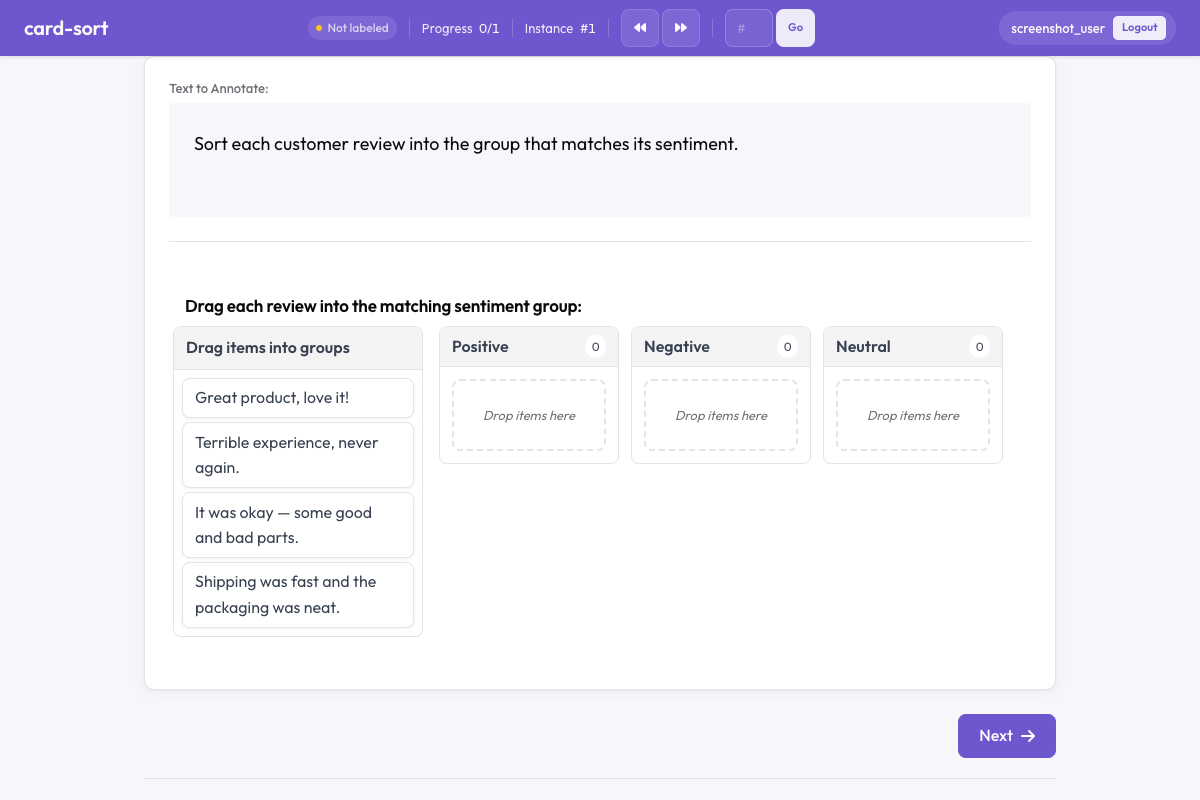 Card sort in Potato
概覽
卡片分類方案支援兩種模式:
- 封閉式分類 —— 標註者把卡片拖入預先定義好的分組
- 開放式分類 —— 標註者自己建立分組並命名
卡片是可拖動的元素,標註者把它們放進分組容器來完成整理。
快速開始
yaml
annotation_schemes:
  - annotation_type: card_sort
    name: content_grouping
    description: Drag each card into the most appropriate group.
    mode: closed
    groups:
      - Positive
      - Negative
      - Neutral
配置項
| 欄位 | 類型 | 預設值 | 說明 |
|---|---|---|---|
annotation_type | string | 必填 | 必須為 "card_sort" |
name | string | 必填 | 本方案的唯一識別符號 |
description | string | 必填 | 展示給標註者的說明文字 |
mode | string | 必填 | "closed"(預定義分組)或 "open"(標註者自建分組) |
groups | array | 封閉式必填 | 封閉式分類的分組名稱列表 |
items_field | string | "items" | 資料 JSON 中存放卡片條目列表的欄位 |
allow_empty_groups | boolean | true | 提交時是否允許分組為空 |
allow_multiple | boolean | false | 同一張卡片是否可以放進多個分組 |
示例
情感分類(封閉式)
yaml
annotation_schemes:
  - annotation_type: card_sort
    name: sentiment_sort
    description: Sort each comment into the appropriate sentiment category.
    mode: closed
    groups:
      - Positive
      - Negative
      - Mixed
      - Off-topic
    allow_empty_groups: true
配套的示例資料:
json
{
  "id": "batch_001",
  "items": [
    "Great product, love it!",
    "Terrible experience, never again.",
    "It was okay, some good and bad parts.",
    "Anyone know the weather today?"
  ]
}
用於資訊架構的開放式卡片分類
yaml
annotation_schemes:
  - annotation_type: card_sort
    name: ia_sort
    description: >
      Group these menu items into categories that make sense to you.
      Name each group with a descriptive label.
    mode: open
    items_field: "menu_items"
    allow_empty_groups: false
多標籤分組
yaml
annotation_schemes:
  - annotation_type: card_sort
    name: theme_sort
    description: >
      Sort each statement into relevant themes.
      A statement can belong to multiple themes.
    mode: closed
    groups:
      - Economy
      - Healthcare
      - Education
      - Environment
      - Security
    allow_multiple: true
輸出格式
json
{
  "content_grouping": {
    "groups": {
      "Positive": ["Great product, love it!"],
      "Negative": ["Terrible experience, never again."],
      "Mixed": ["It was okay, some good and bad parts."],
      "Off-topic": ["Anyone know the weather today?"]
    }
  }
}
開放式分類下,分組名稱是標註者自己寫的字串。
實踐建議
- 要結果一致就用封閉式分類 —— 預定義分組讓不同標註者的結果可以直接比較
- 做探索性研究就用開放式分類 —— 適合瞭解人們自然會怎麼給條目分組
- 卡片文字儘量短 —— 卡片上文字太長會讓拖動很彆扭,用簡短的標籤或摘錄
- 控制卡片數量 —— 每個任務 15 到 30 張最合適,超過 40 張就很累人
- 分組標籤要清楚 —— 封閉式分類中,用沒有歧義的分組名減少困惑
延伸閱讀
- 單選與多選 —— 標準的標籤選擇
- Best-Worst Scaling —— 比較式標註
- 效率功能 —— 鍵盤快捷鍵與效率提升
有關實現詳情,請參閱源文件。