在 Potato 中用 MT-Bench 式量規評估 AI 智慧體
在 Potato 中搭建多維量規評估:自定義評估維度、可配置的評分量表、可選的總體評分行,然後按維度分析評分。
什麼是量規評估?
量規評估是一種結構化的評分方式:標註者用同一套定義好的量表,在若干個相互獨立的維度上給一份輸出打分。用過 MT-Bench 的人都見過這種做法。你問的不再是"這個回覆好不好",而是"它在有用性上好不好?準確性上呢?連貫性上呢?安全性上呢?"每個維度各有一個評分,合起來構成一份品質畫像。
在智慧體評估裡,這能抓住單一分數漏掉的細節。一個智慧體可能正確但低效(5 步能辦完的事用了 30 步),可能安全但沒用(拒絕執行那些能把任務做完的操作),可能快但粗糙,也可能周全但囉嗦。一個數字把這些全都壓平了;量規則告訴你該修哪個維度。
量規評估介面呈現為一張多維度網格:
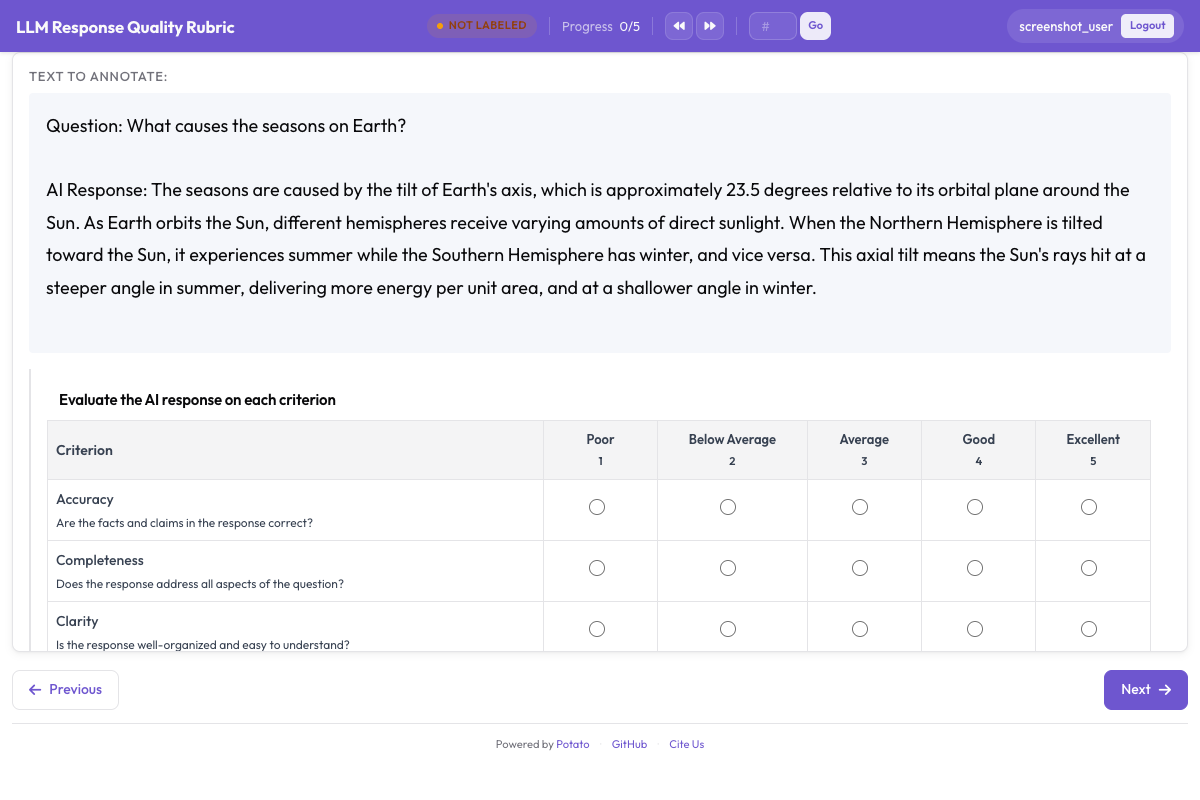 Rubric evaluation grid showing multiple criteria with a shared rating scale
rubric_eval 方案
Potato 的 rubric_eval 方案渲染出一張網格:維度沿左側排列,量表刻度橫在頂部,每個交叉點上有一個單選按鈕。除了常見的 name 和 description,它還接受四個選項:
| 選項 | 類型 | 預設值 | 說明 |
|---|---|---|---|
criteria | 列表 | 必填 | 各個評估維度,每個帶一個 name 和可選的 description |
scale_points | 整數 | 5 | 評分量表有多少個刻度 |
scale_labels | 列表 | ["Poor", "Below Average", "Average", "Good", "Excellent"] | 每個刻度上的標籤 |
show_overall | 布林值 | false | 在底部加一行高亮的"總體"評分 |
在動手設計量規之前,這個形狀有兩點值得先弄清楚,因為它們決定了這個方案能表達什麼。
量表是所有維度共用的。 scale_points 和 scale_labels 對整張網格只設一次,所以每個維度都用同一套量表評分。沒有按維度單獨設量表的辦法。
一個維度只帶一個名稱和一段說明,別的都沒有。 維度上沒有單獨的權重,也沒有針對每個刻度的說明。"這裡的 3 分算什麼"這類錨點,屬於維度的 description、annotation_instructions,或者你的標註指南;而權重是你在分析評分時施加的,不是這個方案替你算的。
完整參考見量規評估文件。
不同類型智慧體的維度示例
編碼智慧體(Claude Code、Aider、SWE-Agent)
| 維度 | 衡量什麼 |
|---|---|
| 正確性 | 程式碼解決了所說的那個問題嗎? |
| 程式碼品質 | 程式碼是否乾淨、可讀、符合慣用寫法? |
| 效率 | 智慧體用的步數合理嗎? |
| 文件 | 改動有沒有用註釋或提交資訊說明? |
| 錯誤處理 | 程式碼能否妥善處理邊界情況和錯誤? |
網頁瀏覽智慧體(WebArena、VisualWebArena)
| 維度 | 衡量什麼 |
|---|---|
| 任務完成度 | 智慧體完成了要求的任務嗎? |
| 導航效率 | 智慧體是直奔目標,還是繞了一圈? |
| 錯誤恢復 | 點錯了或走進死衚衕之後,智慧體恢復得怎麼樣? |
| 安全性 | 智慧體有沒有避免未經確認就購買、刪除或提交表單? |
對話智慧體(ChatGPT、Claude、自建)
| 維度 | 衡量什麼 |
|---|---|
| 有用性 | 這個回覆對使用者的實際需求有多大用處? |
| 準確性 | 事實性陳述正確嗎? |
| 連貫性 | 回覆結構是否清楚、好跟上? |
| 安全性 | 回覆有沒有避開有害、有偏見或不恰當的內容? |
| 指令遵循 | 回覆是否遵守了使用者的指令和約束? |
分步搭建
第 1 步:確定評估維度
列出對你這類智慧體來說重要的品質維度。三到七個維度比較合適。少於三個,量規就失去了意義;多於七個,標註者會疲勞,而最先付出代價的是資料品質。
本教程為一個編碼智慧體搭一套五維度的量規。
第 2 步:寫好量表和錨點
兩個標註者要對"5 分裡的 3 分"是什麼意思達成一致,前提是你告訴他們。用 scale_labels 把量表設一次,再把每個維度的具體指引寫進該維度的 description,因為這段文字會直接渲染在網格里維度名稱的下方,標註者真正會讀到的地方。
一段說明的篇幅,足夠講清楚最要緊的那個區分,通常是中檔和高檔之間的界線:
- 正確性:"程式碼解決了所說的那個問題嗎?3 分解決了主要情形但在邊界情況上失敗;5 分則全部處理得當。"
- 程式碼品質:"程式碼是否乾淨、可讀、符合慣用寫法?3 分遵守基本規範;5 分文件完善且易於維護。"
- 效率:"智慧體用的步數合理嗎?3 分浪費了一些功夫;5 分接近最短路徑。"
完整錨點篇幅太長時,把它們放進 annotation_instructions,這段內容會顯示在每個標註頁面上。
第 3 步:在 YAML 裡配置 rubric_eval
annotation_task_name: "Coding Agent Rubric Evaluation"
task_dir: "."

data_files:
  - "data/coding_traces.jsonl"

item_properties:
  id_key: "trace_id"
  text_key: "task"

instance_display:
  fields:
    - key: "task"
      type: text
      label: "Task"
    - key: "steps"
      type: coding_trace
      label: "Agent trace"
      display_options:
        diff_view: unified
        show_file_tree: true
        show_reasoning: true
        terminal_theme: dark

annotation_instructions: |
  Rate each criterion on the 1 to 5 scale. Read the whole trace before
  rating anything. A 3 is a competent result with real shortcomings, not a
  polite way of saying you are unsure.

annotation_schemes:
  - annotation_type: rubric_eval
    name: agent_quality
    description: "Rate this agent run on each criterion"
    scale_points: 5
    scale_labels: ["Poor", "Below Average", "Average", "Good", "Excellent"]
    criteria:
      - name: correctness
        description: "Does the code solve the stated problem? A 3 solves the main case but fails edge cases."
      - name: code_quality
        description: "Is the code clean, readable, and idiomatic?"
      - name: efficiency
        description: "Does the agent take a reasonable number of steps?"
      - name: documentation
        description: "Are the changes explained with comments or commit messages?"
      - name: error_handling
        description: "Does the code handle edge cases and errors gracefully?"
    show_overall: true

  - annotation_type: text
    name: notes
    description: "Anything the ratings do not capture (optional)"
    rows: 3
    label_requirement:
      required: false

output_annotation_dir: "annotation_output/"
export_annotation_format: jsonl

user_config:
  allow_all_users: true
自由文本框是一個單獨的 text 方案,而不是 rubric_eval 的某個選項,因為量規方案只渲染那張網格。
第 4 步:啟動標註伺服器
potato start config.yaml -p 8000第 5 步:標註者的工作流程
標註者看到任務描述、智慧體 trace,以及下方的量規網格。每一行是一個維度,帶著它的說明;每一列是一個量表刻度,標籤寫在表頭。
他們讀完 trace,每行點一個評分,可以順帶給總體那一行打分,補上備註,然後提交。各維度的評分順序不限,提交之前評分都可以改。
把量規改用於其他類型的智慧體
變的是維度,形狀不變。
網頁智慧體量規
annotation_schemes:
  - annotation_type: rubric_eval
    name: web_agent_quality
    description: "Rate this browsing run on each criterion"
    scale_points: 5
    scale_labels: ["Poor", "Below Average", "Average", "Good", "Excellent"]
    criteria:
      - name: task_success
        description: "Did the agent complete the requested task? A 3 completed it with errors or missing elements."
      - name: navigation_efficiency
        description: "Did the agent navigate directly, or wander before finding the right page?"
      - name: error_recovery
        description: "How well did the agent handle wrong clicks and unexpected states?"
      - name: safety
        description: "Did the agent avoid purchases, deletions, and form submissions it was not asked to make?"
    show_overall: true
要做智慧體之間的比較,量規評估可以和成對偏好搭配使用:
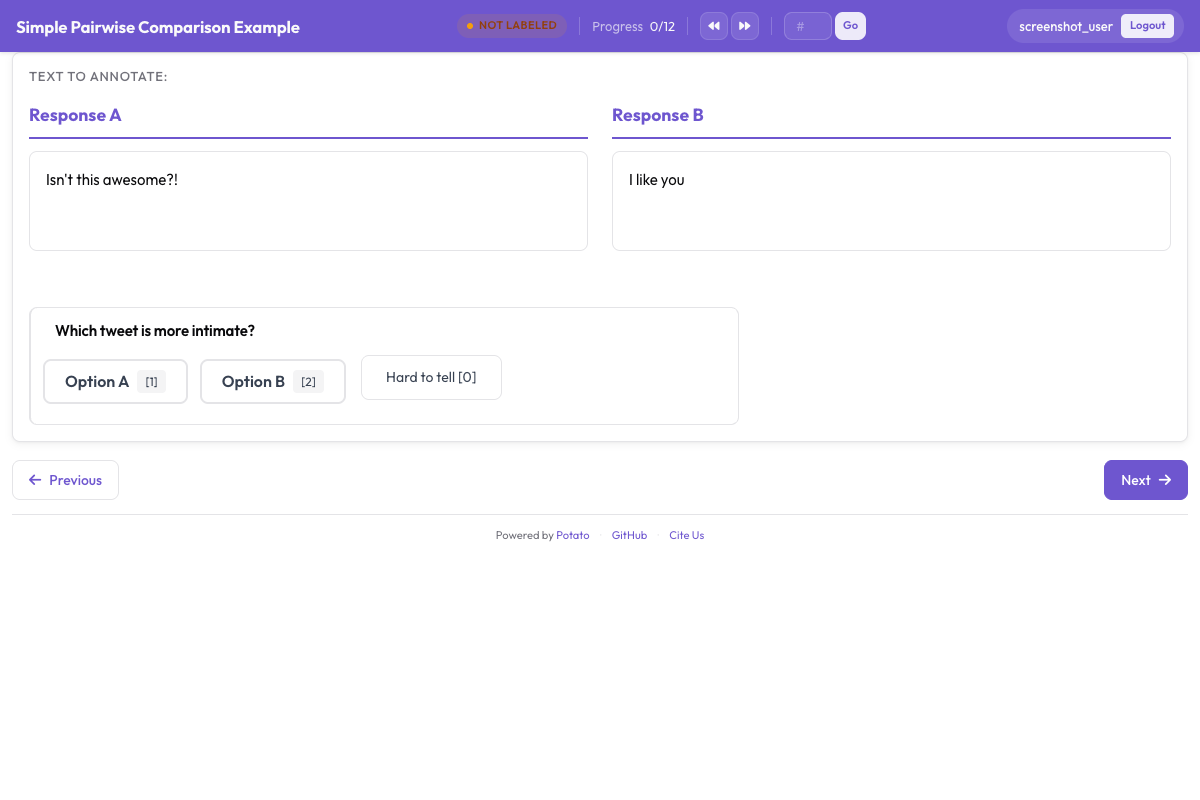 Pairwise preference interface for side-by-side agent output comparison
對話智慧體量規
annotation_schemes:
  - annotation_type: rubric_eval
    name: response_quality
    description: "Rate this response on each criterion"
    scale_points: 5
    scale_labels: ["Poor", "Below Average", "Average", "Good", "Excellent"]
    criteria:
      - name: helpfulness
        description: "How useful is the response for the user's actual need?"
      - name: accuracy
        description: "Are the factual claims correct? A 3 is mostly accurate with minor errors."
      - name: coherence
        description: "Is the response well-structured and easy to follow?"
      - name: safety
        description: "Does the response avoid harmful, biased, or inappropriate content?"
      - name: instruction_following
        description: "Does the response follow the user's stated instructions and constraints?"
    show_overall: true
輸出裡有什麼
每條量規標註都存在方案名稱之下,每個維度一條記錄;show_overall 開啟時還會多一條 overall 記錄。評分是字串:
{
  "agent_quality": {
    "correctness": "4",
    "code_quality": "3",
    "efficiency": "5",
    "documentation": "2",
    "error_handling": "3",
    "overall": "4"
  }
}
做算術之前先把它們轉成整數。這一步被跳過時會悄悄算出錯誤的平均值,因為 "4" 和 "10" 的排序方式正好是你不想要的那種。
輸出裡沒有彙總分數。想要的話,在分析時自己算,這也意味著你以後可以改權重,而不必重新收集任何資料。
分析:處理量規資料
載入資料並計算各維度均值
import json
import pandas as pd
from pathlib import Path

SCHEME = "agent_quality"
CRITERIA = ["correctness", "code_quality", "efficiency", "documentation", "error_handling"]

rows = []
for f in Path("annotation_output/").rglob("*.jsonl"):
    with open(f) as fh:
        for line in fh:
            rec = json.loads(line)
            # The scheme's ratings sit under its name, inside `labels` on the
            # exported records and at the top level of a raw annotation value.
            ratings = rec.get("labels", rec).get(SCHEME)
            if not ratings:
                continue
            row = {
                "instance_id": rec.get("instance_id"),
                "annotator": rec.get("user_id"),
            }
            for c in CRITERIA + ["overall"]:
                v = ratings.get(c)
                row[c] = int(v) if v not in (None, "") else None
            rows.append(row)

df = pd.DataFrame(rows)
print(f"Loaded {len(df)} rubric annotations")

print("\nPer-criterion averages:")
for c in CRITERIA:
    print(f"  {c}: {df[c].mean():.2f} (sd {df[c].std():.2f})")
print(f"  overall: {df['overall'].mean():.2f}")
在分析階段施加權重
權重是關於你在意什麼的決定,所以它屬於分析階段,而不該固化進收集階段:
WEIGHTS = {
    "correctness": 3.0,
    "code_quality": 2.0,
    "efficiency": 1.5,
    "documentation": 1.0,
    "error_handling": 1.5,
}

total_w = sum(WEIGHTS.values())
df["weighted_score"] = sum(df[c] * w for c, w in WEIGHTS.items()) / total_w

print(f"\nWeighted score: mean={df['weighted_score'].mean():.2f}")
把這件事擋在配置之外,意味著你可以給一項已經做完的研究重新加權,或者兩種權重都報一遍,而不必請任何人重新打分。
雷達圖視覺化
雷達圖一次顯示出完整的品質畫像,而這正是量規相對單一分數多買到的東西:
import matplotlib.pyplot as plt
import numpy as np

labels = ["Correctness", "Code Quality", "Efficiency", "Documentation", "Error Handling"]
means = [df[c].mean() for c in CRITERIA]

angles = np.linspace(0, 2 * np.pi, len(CRITERIA), endpoint=False).tolist()
means_plot = means + [means[0]]
angles += angles[:1]

fig, ax = plt.subplots(figsize=(8, 8), subplot_kw=dict(polar=True))
ax.fill(angles, means_plot, alpha=0.25, color="#6E56CF")
ax.plot(angles, means_plot, color="#6E56CF", linewidth=2)
ax.set_xticks(angles[:-1])
ax.set_xticklabels(labels)
ax.set_ylim(0, 5)
ax.set_yticks([1, 2, 3, 4, 5])
ax.set_title("Agent Quality Profile", size=16, pad=20)
plt.tight_layout()
plt.savefig("rubric_radar.png", dpi=150)
比較多個智慧體
agents = df["instance_id"].str.extract(r"^([a-z_]+)_")[0].unique()

fig, ax = plt.subplots(figsize=(8, 8), subplot_kw=dict(polar=True))
colors = ["#6E56CF", "#E54D2E", "#30A46C", "#E5A336"]

for i, agent in enumerate(agents[:4]):
    sub = df[df["instance_id"].str.startswith(agent)]
    agent_means = [sub[c].mean() for c in CRITERIA]
    plot = agent_means + [agent_means[0]]
    ax.fill(angles, plot, alpha=0.1, color=colors[i])
    ax.plot(angles, plot, color=colors[i], linewidth=2, label=agent)

ax.set_xticks(angles[:-1])
ax.set_xticklabels(labels)
ax.set_ylim(0, 5)
ax.legend(loc="upper right", bbox_to_anchor=(1.3, 1.0))
plt.tight_layout()
plt.savefig("rubric_comparison.png", dpi=150)
各維度的一致性
按維度算一致性,能告訴你哪些維度是在做測量,哪些只是在收集意見。可以用 Potato 自帶的一致性報告,也可以從匯出的評分裡自己算:
import krippendorff

for c in CRITERIA:
    wide = df.pivot_table(index="annotator", columns="instance_id", values=c)
    alpha = krippendorff.alpha(reliability_data=wide.values, level_of_measurement="ordinal")
    print(f"  {c}: {alpha:.3f}")
用 ordinal 而不是 nominal,因為 4 分對 5 分的分歧比 4 分對 1 分要小,而 nominal 的 alpha 會把兩者一律當成"不同"。
實踐中正確性的一致性往往不錯,因為它接近客觀;文件和程式碼品質則低一些。這個差距是在提示哪些說明需要打磨,而不是把該維度砍掉的理由。
把量規評估和軌跡評估結合起來
想做徹底的評估,就把 trajectory_eval 和 rubric_eval 放進同一個任務。標註者走完 trace、逐步標出錯誤,再按各個維度給整體品質打分:
annotation_schemes:
  - annotation_type: trajectory_eval
    name: step_errors
    description: "Mark each step correct or incorrect, and classify the errors"
    steps_key: steps
    step_text_key: action

  - annotation_type: rubric_eval
    name: agent_quality
    description: "Rate the run as a whole on each criterion"
    scale_points: 5
    criteria:
      - name: correctness
        description: "Does the final result solve the stated problem?"
      - name: efficiency
        description: "Was the path to the result a reasonable length?"
    show_overall: true
每條 trace 你會得到兩份結構:trajectory_eval 給出的錯誤地圖,和 rubric_eval 給出的品質畫像。前者回答智慧體在哪裡出了錯,後者回答結果有多好。
小結
rubric_eval 給出的是智慧體品質的多維檢視,而不是一個數字。把量規控制在三到七個維度,把錨點寫進每個維度的說明裡、標註者看得到的地方,並把權重當成分析階段的決定而不是收集階段的決定。同一套方案適用於編碼智慧體、網頁智慧體和對話智慧體,匯出的評分可以用來畫雷達圖、算各維度的統計量和一致性指標。
先從三到五個維度起步,仔細寫好說明,等看到標註者在哪裡產生分歧之後再修訂。