評估 AI 智慧體:對智慧體軌跡的人工標註
如何在 Potato 中搭建 AI 智慧體輸出的人工評估:從軌跡匯入,到軌跡級和逐步標註方案的設計,再到分析匯出的結果。
用 python -m potato.trace_converter 轉換智慧體軌跡,通過 agent_trace 顯示欄位渲染它們,然後在收集軌跡級結論的同時收集逐步的 trajectory_eval 判斷。能定位到執行在哪一步出岔子的,正是那份逐步判斷。
成功率只告訴你智慧體多久完成一次任務,完全不說明那些失敗為什麼失敗。兩個成功率同為 62% 的智慧體,失敗原因可能完全不同,一個選錯了工具,另一個是在糟糕的檢索結果上做了正確的推理,兩種情況的修法並不一樣。步驟級的人工評估能把它們分開,因為標註者會標出哪一步壞了、壞成什麼樣。
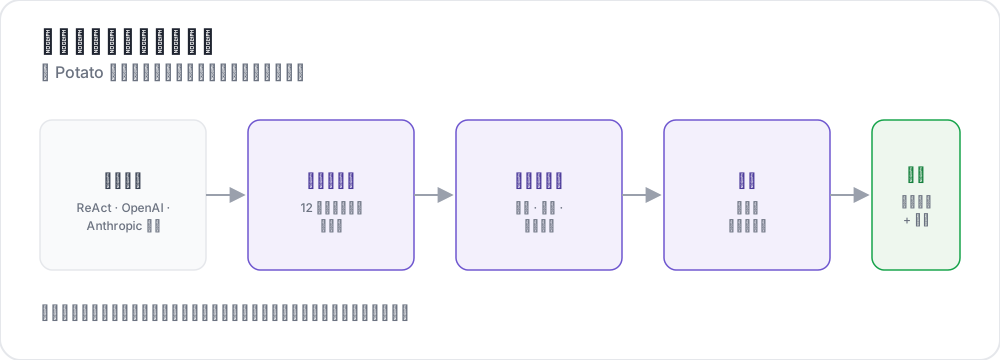 From raw traces to structured judgments
本指南為一個通過搜尋網頁回答問題的 ReAct 風格智慧體搭建這條流水線。其中的配置均按 Potato 2.9.1 核對過:
pip install --upgrade potato-annotation第 1 步:轉換軌跡
Potato 註冊了 15 個軌跡轉換器,命令列會連同各自的說明一起列出來:
python -m potato.trace_converter --list-formats清單涵蓋 react、openai、anthropic、langchain、langfuse、multi_agent、mcp、otel、atif、webarena、web_agent、swebench、swe_agent_trajectory、claude_code 和 aider。LangSmith 的執行匯出走 langchain,CrewAI、AutoGen 和 LangGraph 的日誌走 multi_agent。
react 轉換器讀取的軌跡,其步驟帶有 thought、action 和 observation 三個鍵:
{
  "id": "trace_001",
  "task": "What is the capital of Australia and what is its population?",
  "steps": [
    {"thought": "I need the capital of Australia and then its population.",
     "action": "search('capital of Australia')",
     "observation": "Canberra is the capital city of Australia."},
    {"thought": "Now I need Canberra's population.",
     "action": "search('Canberra population 2025')",
     "observation": "Canberra has a population of approximately 467,000 as of 2025."},
    {"thought": "I have both pieces of information.",
     "action": "finish('Canberra, approximately 467,000')"}
  ],
  "metadata": {"agent": "GPT-4", "tokens": 2340}
}
一條命令就能轉換這個檔案:
python -m potato.trace_converter \
  --input raw_traces.json \
  --input-format react \
  --output data/traces.jsonl
不確定該用哪個轉換器時,把 --input-format 換成 --auto-detect,登錄檔會根據欄位特徵挑一個。一旦確定了格式,還是顯式寫出來,因為自動檢測取的是第一個匹配上的轉換器,而好幾種格式所帶的欄位是重疊的。
每個轉換器寫出的都是同一套規範結構,這也是同一份配置能跨框架通用的原因。每一行帶有 id、task_description 和 conversation,後者是一串帶 speaker 和 text 的輪次。有這些資訊的轉換器還會寫出 agent_name、metadata_table 和 screenshots:
{
  "id": "trace_001",
  "task_description": "What is the capital of Australia and what is its population?",
  "agent_name": "GPT-4",
  "metadata_table": [{"Property": "Steps", "Value": "3"},
                     {"Property": "tokens", "Value": "2340"}],
  "conversation": [
    {"speaker": "Agent (Thought)", "text": "I need the capital of Australia and then its population."},
    {"speaker": "Agent (Action)", "text": "search('capital of Australia')"},
    {"speaker": "Environment", "text": "Canberra is the capital city of Australia."}
  ]
}
第 2 步:渲染軌跡
agent_trace 顯示把每一輪渲染成一張卡片,按步驟類型著色,讓標註者讀到的是這次執行本身,而不是一坨 JSON:
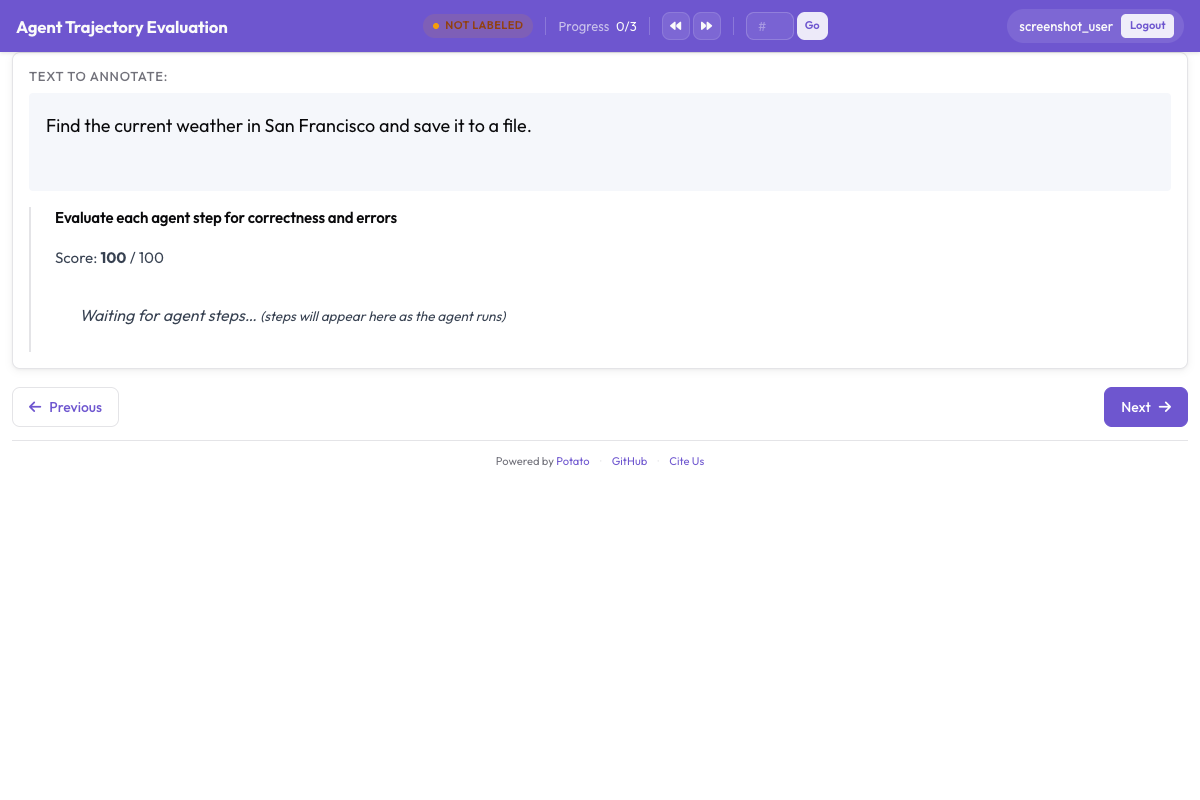
instance_display 決定頁面上放什麼、按什麼順序放。任務描述放在最上面,因為標註者得先知道智慧體被要求做什麼,任何步驟才有意義;後設資料表放在它下面,用一個緊湊的表格欄位呈現:
instance_display:
  layout:
    direction: vertical
    gap: 16px

  fields:
    - key: task_description
      type: text
      label: "Task"

    - key: metadata_table
      type: spreadsheet
      label: "Trace Info"
      display_options:
        compact: true
        max_height: 120

    - key: conversation
      type: agent_trace
      label: "Agent Trace"
      span_target: true
      display_options:
        show_step_numbers: true
        show_summary: true
        collapse_observations: true
        step_type_colors:
          thought: "#e8f4fd"
          action: "#fff3e0"
          observation: "#e8f5e9"
摺疊觀察結果可以避免冗長的搜尋結果把軌跡的其餘部分擠出螢幕,因為一條塞了十幾段完整搜尋結果的軌跡大半是在滾動,標註者會弄不清自己讀到執行的哪裡了。在同一個欄位上設 span_target: true,跨度方案就能在某一輪裡標出幻覺說法的確切字詞,這比把整步判為錯誤要精細得多。
第 3 步:軌跡級判斷
三個問題覆蓋整條軌跡。任務是否成功是頭號數字,答案正確性把"走錯路卻答對了"和"答錯了"分開,而效率是區分兩個都成功的智慧體的依據:
annotation_schemes:
  - annotation_type: radio
    name: task_success
    description: "Did the agent complete the task?"
    labels:
      - name: "Success"
        tooltip: "Fully completed correctly"
      - name: "Partial success"
        tooltip: "Completed with errors or omissions"
      - name: "Failure"
        tooltip: "Not completed"
    label_requirement:
      required: true
    sequential_key_binding: true

  - annotation_type: radio
    name: answer_correctness
    description: "Is the agent's final answer factually correct?"
    labels:
      - name: "Correct"
      - name: "Partially correct"
      - name: "Incorrect"
      - name: "Cannot determine"
    label_requirement:
      required: true

  - annotation_type: likert
    name: efficiency
    description: "Did the agent reach the answer without wasted steps?"
    size: 5
    min_label: "Many unnecessary steps"
    max_label: "No wasted steps"

  - annotation_type: text
    name: evaluator_notes
    description: "Anything the ratings above do not capture"
    multiline: true
    rows: 3
"Cannot determine" 這個選項是值得留的。沒有它,一個無從核實答案的標註者要麼靠猜,要麼標成錯誤,而這兩種選擇都會把噪聲塞進你最在意的那個數字裡。
第 4 步:逐步判斷
trajectory_eval 把每一步渲染成一張帶獨立控制元件的卡片,並且在一個方案裡同時承載正確性標籤、錯誤分類體系和嚴重度,不必拆成三個方案。把 steps_key 指向存放步驟的欄位(對轉換後的軌跡來說是 conversation),把 step_text_key 指向每個步驟內部該顯示出來的那個鍵:
annotation_schemes:
  - annotation_type: trajectory_eval
    name: step_evaluation
    description: "Mark each step and classify anything that went wrong"
    steps_key: conversation
    step_text_key: text
    correctness_options:
      - correct
      - partially_correct
      - incorrect
      - unnecessary
    error_types:
      - name: reasoning
        subtypes:
          - logical_error
          - factual_error
          - planning_error
      - name: execution
        subtypes:
          - wrong_tool
          - wrong_args
          - api_error
      - name: termination
        subtypes:
          - premature_stop
          - redundant_step
    severities:
      - name: minor
        weight: -1
      - name: major
        weight: -5
      - name: critical
        weight: -10
    show_score: true
    max_score: 100
嚴重度權重把一串標記過的步驟變成每條軌跡一個可比較的數字,而這裡的預設值是值得改而不是照單全收的。一個權重說的是,對你的任務而言嚴重錯誤比輕微錯誤糟糕多少,而在安全評估裡這個比值要比在搜尋任務裡陡峭得多。
另一個值得刻意去做的決定,是把 unnecessary 和 incorrect 分開。一個多餘的步驟耗掉 token 和時間,但並沒有引入錯誤,把兩者合併會掩蓋"到處亂走的智慧體"和"做錯了的智慧體"之間的差別。
第 5 步:完整配置
以上所有內容,寫在一個檔案裡:
annotation_task_name: "ReAct Agent Evaluation"
task_dir: "."
output_annotation_dir: "output/"

data_files:
  - "data/traces.jsonl"

item_properties:
  id_key: id
  text_key: task_description

instance_display:
  layout:
    direction: vertical
    gap: 16px
  fields:
    - key: task_description
      type: text
      label: "Task"
    - key: metadata_table
      type: spreadsheet
      label: "Trace Info"
      display_options:
        compact: true
        max_height: 120
    - key: conversation
      type: agent_trace
      label: "Agent Trace"
      span_target: true
      display_options:
        show_step_numbers: true
        show_summary: true
        collapse_observations: true

annotation_schemes:
  - annotation_type: radio
    name: task_success
    description: "Did the agent complete the task?"
    labels:
      - name: "Success"
      - name: "Partial success"
      - name: "Failure"
    label_requirement:
      required: true
    sequential_key_binding: true

  - annotation_type: radio
    name: answer_correctness
    description: "Is the agent's final answer factually correct?"
    labels:
      - name: "Correct"
      - name: "Partially correct"
      - name: "Incorrect"
      - name: "Cannot determine"
    label_requirement:
      required: true

  - annotation_type: likert
    name: efficiency
    description: "Did the agent reach the answer without wasted steps?"
    size: 5
    min_label: "Many unnecessary steps"
    max_label: "No wasted steps"

  - annotation_type: text
    name: evaluator_notes
    description: "Anything the ratings above do not capture"
    multiline: true
    rows: 3

  - annotation_type: trajectory_eval
    name: step_evaluation
    description: "Mark each step and classify anything that went wrong"
    steps_key: conversation
    step_text_key: text
    correctness_options: [correct, partially_correct, incorrect, unnecessary]
    error_types:
      - name: reasoning
        subtypes: [logical_error, factual_error, planning_error]
      - name: execution
        subtypes: [wrong_tool, wrong_args, api_error]
      - name: termination
        subtypes: [premature_stop, redundant_step]
    severities:
      - name: minor
        weight: -1
      - name: major
        weight: -5
      - name: critical
        weight: -10
    show_score: true
    max_score: 100

export_annotation_format: jsonl
啟動服務,然後開啟 http://localhost:8000:
potato start config.yaml -p 8000標註時看到的介面
頁面上是任務、軌跡資訊表和步驟卡片,逐步控制元件掛在各自的卡片上,軌跡級方案排在軌跡下面。標註者的作業順序比看上去更要緊。先評步驟再評軌跡,能讓總體結論錨定在這次執行實際做了什麼;而先評成功與否,往往會給後面每一個步驟判斷都染上顏色。
有三個習慣值得寫進標註指南。展開摺疊起來的觀察結果,別隻信那行摘要,因為讀錯搜尋結果是"看起來推理得很好卻答錯了"最常見的來源。資料集有標準答案時,先把最終答案和標準答案對一遍再評任務是否成功。當後面的步驟暴露出前面那一步其實已經錯了時,用步驟時間線跳回去。
第 6 步:匯出與分析
JSONL 匯出器寫出 annotations.jsonl,每個實例、每個標註者一條記錄:
python -m potato.export --config config.yaml --format jsonl --output ./export/每條記錄帶有 instance_id、user_id、labels、spans 和 links,各個方案的答案按方案名作為鍵放在 labels 下面:
import json
import pandas as pd

records = [json.loads(line) for line in open("export/annotations.jsonl")]

df = pd.DataFrame([
    {"trace": r["instance_id"], "annotator": r["user_id"], **r["labels"]}
    for r in records
])

print(df["task_success"].value_counts())
超過幾百條軌跡的規模,就改成匯出 Parquet 並就地查詢。Parquet 匯出寫出 annotations.parquet,包含 instance_id、user_id 以及每個標註方案一列,所以方案名是列名而不是某個值:
python -m potato.export --config config.yaml --format parquet --output ./export/import duckdb
print(duckdb.sql("""
SELECT task_success, COUNT(*) AS n
FROM 'export/annotations.parquet'
GROUP BY task_success
ORDER BY n DESC
"""))最值得先讀的是步驟級的判斷。把各條軌跡上的錯誤子類型統計一遍,就能知道這個智慧體是有一個系統性的失敗模式,還是拖著一長串互不相干的偶發錯誤,而只有前一種才值得做針對性的修復。
第 7 步:更多標註者,以及一個資格考核階段
智慧體評估的主觀性足夠強,每條軌跡只有一個評分等於一次沒有誤差棒的測量。每條軌跡三名標註者能給你一個一致性數字,而隨機分配可以避免重疊集中在恰好排在檔案開頭的那些軌跡上:
num_annotators_per_item: 3
assignment_strategy: random
資格考核階段能在標註者花一整天不一致地套用錯誤分類體系之前,先把沒弄懂這套體系的人篩出來。訓練配置塊會把他們留在已知答案的軌跡上,直到通過為止:
training:
  enabled: true
  data_file: "data/training_traces.jsonl"
  passing_criteria:
    min_correct: 4
  allow_retry: true
  failure_action: "repeat_training"
其他智慧體框架
顯示和標註方案在各框架之間保持不變,變的只是轉換器。OpenAI Chat Completions 的軌跡和帶 tool_use 塊的 Anthropic 訊息各有自己的轉換器,而 CrewAI、AutoGen 和 LangGraph 的多智慧體日誌共用一個:
python -m potato.trace_converter --input runs.json --input-format openai --output data/traces.jsonl
python -m potato.trace_converter --input runs.json --input-format anthropic --output data/traces.jsonl
python -m potato.trace_converter --input runs.json --input-format multi_agent --output data/traces.jsonl
編碼智慧體需要另一套顯示,因為一段被當作 JSON 字串讀的差異是沒法審查的。coding_trace 顯示會渲染帶檔案樹的統一差異,並摺疊冗長的終端輸出:
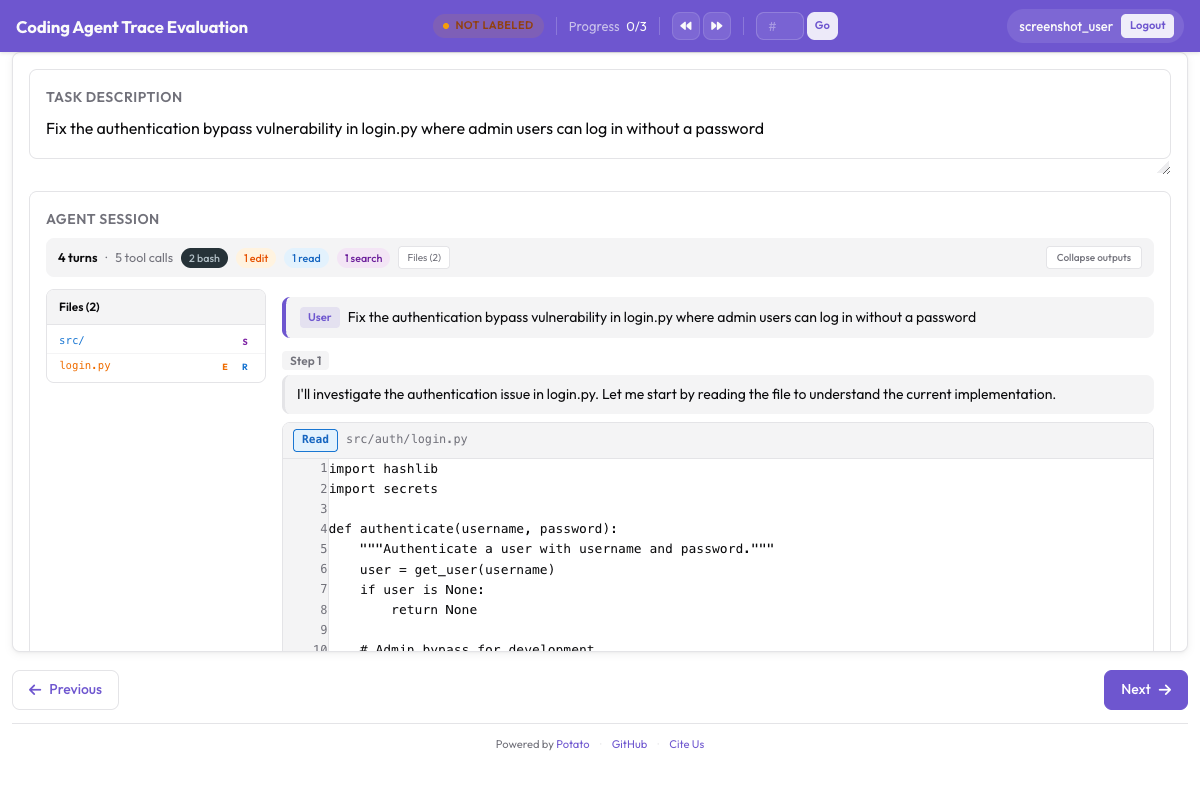
instance_display:
  fields:
    - key: structured_turns
      type: coding_trace
      label: "Agent Session"
      display_options:
        show_file_tree: true
        diff_view: unified
        collapse_long_outputs: true
        max_output_lines: 50
網頁瀏覽智慧體需要截圖、動作覆蓋層,以及一條用來在其間移動的膠片條:
instance_display:
  fields:
    - key: steps
      type: web_agent_trace
      label: "Agent Browsing Trace"
      display_options:
        show_overlays: true
        show_filmstrip: true
        show_thought: true
screenshot_max_width: 900標註網頁瀏覽智慧體介紹了覆蓋層的格式,以及用來錄製新軌跡的建立模式。
這一切背後的實現細節,見智慧體評測指南和智慧體軌跡文件。如果你正在搭建第一次評估,先轉換十條軌跡,跑一下上面這份配置,在寫標註指南之前自己標一遍,因為你真正需要的錯誤分類體系,通常不是你事先會寫出來的那一套。
延伸閱讀
- 智慧體標註文件
- 標註網頁瀏覽智慧體
- Solo Mode,把智慧體標註與人機協同評估結合起來
- Best-Worst Scaling,用比較的方式給智慧體輸出排序
- Parquet 匯出,用於大規模分析