培訓階段
用練習題、已知正確答案、即時反饋,以及決定誰能進入真實任務的通過標準,在 Potato 中對標註者進行資格認定。
Potato 提供一個可選的培訓階段,在主任務之前執行。標註者回答帶有已知正確答案的練習題,並對每一題得到反饋,這樣對標註指南的誤解會在它擴散到整個語料之前暴露出來。
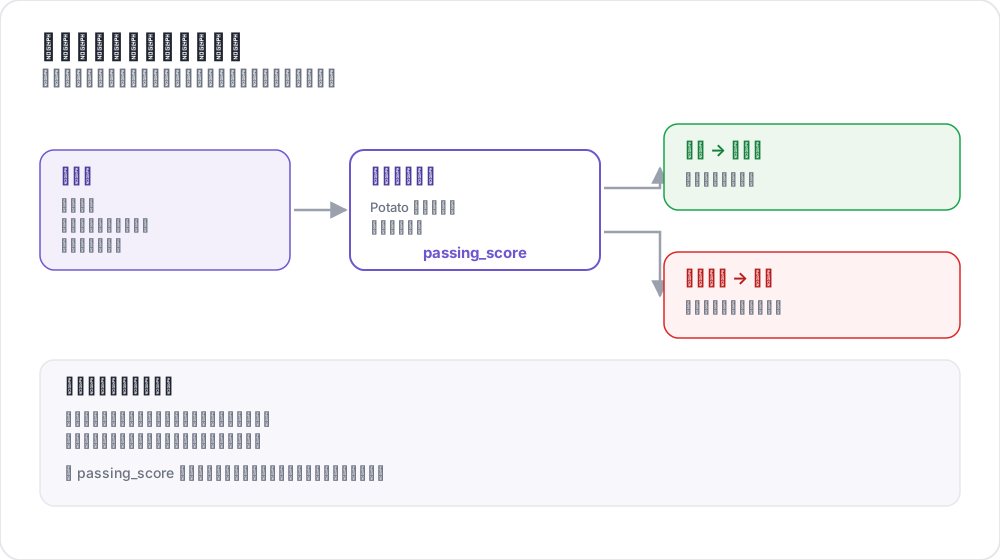 訓練階段如何為標註者把關
用例
- 確認標註者理解了任務
- 篩掉達不到你的準確率門檻的標註者
- 在真實標註之前提供有指導的練習
- 通過做過的例子講清標註指南
工作原理
- 標註者回答一組培訓題
- 每次作答後立刻出現反饋
- 進度按通過標準衡量
- 只有通過的標註者才進入主任務
配置
培訓需要兩個各司其職的塊。頂層的 training 塊配置這個階段,而 phases 決定它在工作流中的位置。只配置其中一個而漏掉另一個,正是培訓階段始終不出現的常見原因。
training 塊
training:
  enabled: true
  data_file: "data/training_data.json"
  annotation_schemes: ["sentiment"]
  passing_criteria:
    min_correct: 3
    require_all_correct: false
  allow_retry: true
  failure_action: "repeat_training"
配置選項
| 選項 | 類型 | 預設值 | 說明 |
|---|---|---|---|
enabled | 布林值 | false | 是否執行培訓階段 |
data_file | 字串 | - | 培訓資料的路徑,啟用時必填 |
annotation_schemes | 列表 | 全部方案 | 對哪些方案進行培訓 |
passing_criteria.min_correct | 整數 | 3 | 通過所需的正確答案數 |
passing_criteria.require_all_correct | 布林值 | false | 是否每一題都必須答對 |
passing_criteria.max_mistakes | 整數 | -1 | 判定失敗前的累計錯誤數,-1 表示不限 |
passing_criteria.max_mistakes_per_question | 整數 | -1 | 判定失敗前單題上的錯誤數 |
allow_retry | 布林值 | true | 答錯後是否可以重試 |
failure_action | 字串 | move_to_done | move_to_done 或 repeat_training |
annotation_schemes 指定的是多個方案而不是單個,因此含有多道問題的任務既可以對全部方案培訓,也可以只針對出問題的那一個。
把階段加進工作流
phases 列出工作流順序,並把每個階段指向它的檔案。培訓條目帶有 type 和 file,上面那些設定仍然留在 training 塊裡:
phases:
  order: [consent, instructions, training, annotation]

  consent:
    type: consent
    file: surveyflow/consent.json

  instructions:
    type: instructions
    file: surveyflow/instructions.html

  training:
    type: training
    file: data/training_data.json
annotation 階段不需要檔案,因為它使用項目的 annotation_schemes。其他階段見多階段工作流。
通過標準
這些標準可以組合,因此一次執行既能要求正確答案數的下限,又能把總在同一題上出錯的人擋在外面。
最少正確數
passing_criteria:
  min_correct: 3
要求全部正確
passing_criteria:
  require_all_correct: true
最大錯誤數
passing_criteria:
  max_mistakes: 5
標註者累計答錯五次後即判定未通過。
每題最大錯誤數
passing_criteria:
  max_mistakes_per_question: 2
標註者在任何單題上答錯兩次後即判定未通過,這能抓出卡在某一處區分上的人,而不是整體都薄弱的人。
組合標準
passing_criteria:
  min_correct: 3
  max_mistakes: 5
  max_mistakes_per_question: 2
培訓資料格式
培訓資料是一個帶有 training_instances 列表的 JSON 檔案。每條實例包含文本、每個方案的正確答案,以及一條可選的解釋,在答錯時顯示:
{
  "training_instances": [
    {
      "id": "train_1",
      "text": "I absolutely love this product! Best purchase ever!",
      "correct_answers": {
        "sentiment": "Positive"
      },
      "explanation": "Strong positive language: 'love' and 'best purchase'."
    },
    {
      "id": "train_2",
      "text": "This is the worst service I've ever experienced.",
      "correct_answers": {
        "sentiment": "Negative"
      },
      "explanation": "'Worst' and the complaint itself indicate negative sentiment."
    },
    {
      "id": "train_3",
      "text": "The package arrived on time.",
      "correct_answers": {
        "sentiment": "Neutral"
      },
      "explanation": "A factual statement with no evaluation attached."
    }
  ]
}
培訓實例欄位
| 欄位 | 類型 | 是否必填 | 說明 |
|---|---|---|---|
id | 字串 | 是 | 實例的唯一識別符號 |
text | 字串 | 是 | 待標註的文本 |
correct_answers | 物件 | 是 | 方案名到正確取值的對映 |
explanation | 字串 | 否 | 答錯時顯示 |
正確答案格式
correct_answers 與每個方案產生的形態相匹配:
{
  "sentiment": "Positive",
  "topic": ["emotion", "personal"],
  "rating": 4,
  "notes": "example response"
}
多個方案
有多個方案時,給每個方案各自的答案;如果推理理由不同,就按方案分別寫解釋:
{
  "id": "train_4",
  "text": "Apple announced new iPhone features yesterday.",
  "correct_answers": {
    "sentiment": "Neutral",
    "topic": "Technology"
  },
  "explanation": "A factual news statement about a technology product."
}
使用者體驗
培訓流程
- 標註者看到一個指示,表明自己正處於培訓階段
- 問題以與真實任務相同的標註表單呈現
- 他們提交答案
- 反饋立刻出現,答錯時附上解釋,並在
allow_retry開啟時提供重試選項
反饋展示
答錯之後,標註者會看到培訓資料裡的解釋,以及自己相對通過標準的進度。寫出講清規則而非複述答案的解釋,才是這個階段值得跑的原因。
管理員監控
管理面板會顯示每位標註者的培訓統計,包括是否通過、答對了多少題、總嘗試次數、通過率,以及他們正做到第幾題。
同樣的資料也可以通過管理員 API 獲取:
GET /admin/api/annotators
GET /admin/user_state/{user_id}
示例:情感分析培訓
annotation_task_name: "Sentiment Analysis"
task_dir: "."
port: 8000

data_files:
  - "data/reviews.json"

item_properties:
  id_key: id
  text_key: text

annotation_schemes:
  - annotation_type: radio
    name: sentiment
    description: "What is the sentiment of this review?"
    labels:
      - Positive
      - Negative
      - Neutral
    sequential_key_binding: true

training:
  enabled: true
  data_file: "data/training_data.json"
  annotation_schemes: ["sentiment"]
  passing_criteria:
    min_correct: 3
    require_all_correct: false
  allow_retry: true
  failure_action: "repeat_training"

phases:
  order: [training, annotation]
  training:
    type: training
    file: "data/training_data.json"

output_annotation_dir: "output/"
export_annotation_format: "jsonl"

user_config:
  allow_all_users: true
示例:NER 培訓
片段方案的培訓方式相同。正確答案是片段列表,以字元偏移量給出:
annotation_schemes:
  - annotation_type: span
    name: entities
    description: "Highlight named entities"
    labels:
      - Person
      - Organization
      - Location
      - Date

training:
  enabled: true
  data_file: "data/ner_training.json"
  annotation_schemes: ["entities"]
  passing_criteria:
    min_correct: 2
allow_retry: true{
"training_instances": [
{
"id": "train_1",
"text": "Tim Cook announced that Apple will open a new store in New York on March 15.",
"correct_answers": {
"entities": [
{"start": 0, "end": 8, "label": "Person"},
{"start": 24, "end": 29, "label": "Organization"},
{"start": 54, "end": 62, "label": "Location"},
{"start": 66, "end": 74, "label": "Date"}
]
},
"explanation": "Tim Cook is a Person, Apple an Organization, New York a Location, March 15 a Date."
}
]
}最佳實踐
從簡單開始
先用毫不含糊的例子開場,再引入邊界情況。第一題就答錯的標註者學到的是這個任務令人困惑,而不是自己犯了個錯。
覆蓋每一個標籤
方案能取的每個值都至少放一個例子。培訓裡從不出現的那個標籤,正是標註者會大批次答錯的那個。
寫能講清規則的解釋
解釋應當給出規則,而不是重複答案:
{
  "explanation": "The review mentions a problem, but the reviewer is satisfied with how it was resolved, so the overall judgment is Positive rather than Negative."
}
設定夠得著的標準
嚴格,而且很可能失去本來合格的標註者:
passing_criteria:
  require_all_correct: true
留出從反饋中學習的餘地:
passing_criteria:
  min_correct: 3
  max_mistakes_per_question: 2
納入邊界情況
把你在預實驗裡引發分歧的例子加進來,因為那些正是標註指南必須裁定的判斷:
{
  "id": "train_5",
  "text": "Not bad at all, I guess it could be worse.",
  "correct_answers": {"sentiment": "Neutral"},
  "explanation": "Despite 'not bad' and 'worse', this is a lukewarm assessment rather than praise or complaint."
}
效能注意事項
培訓資料在伺服器啟動時載入一次,培訓狀態與其餘使用者狀態一起儲存在記憶體中,因此這個階段既不引入資料庫需求,也不給主任務帶來可測量的開銷。
延伸閱讀
實現細節見源文件。