任務分配
控制標註實例如何分配給標註者。
Potato 提供靈活的任務分配策略,控制標註實例如何分配給標註者。
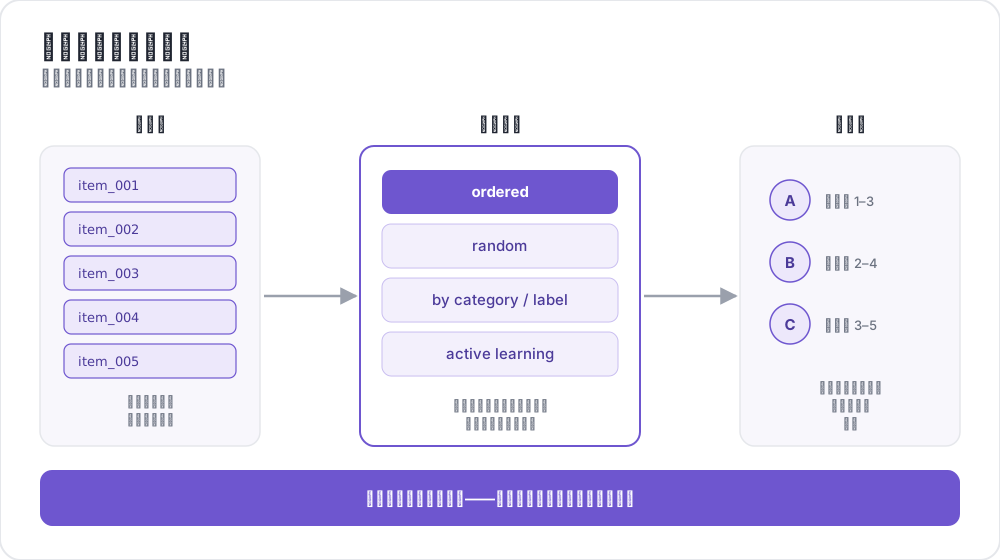 將實例路由給標註者
概述
任務分配控制:
- 每個標註者看到哪些項目
- 每個標註者完成多少項目
- 每個項目獲得多少標註
- 項目呈現的順序
關鍵配置選項
| 選項 | 描述 | 預設值 |
|---|---|---|
assignment_strategy | 分配項目的策略 | fixed_order |
max_annotations_per_user | 每個標註者的最大項目數 | 無限制 |
max_annotations_per_item | 每個項目的目標標註數 | 3 |
分配策略
隨機分配
將項目隨機分配給標註者,確保無偏分配。
yaml
assignment_strategy: random
max_annotations_per_item: 3最適用於:順序無關緊要的通用標註任務。
固定順序分配
按資料集中出現的順序分配項目。
yaml
assignment_strategy: fixed_order
max_annotations_per_item: 2最適用於:標註者需要按特定順序檢視項目的任務。
最少標註優先
優先分配現有標註最少的項目,確保均勻分配。
yaml
assignment_strategy: least_annotated
max_annotations_per_item: 5最適用於:確保所有項目在任何項目獲得過多標註之前獲得足夠覆蓋。
最大分歧優先
優先分配現有標註中分歧最大的項目。
yaml
assignment_strategy: max_diversity
max_annotations_per_item: 4最適用於:品質控制和解決歧義項目。
主動學習分配
使用機器學習優先處理不確定的實例。
yaml
assignment_strategy: active_learning

active_learning:
  enabled: true
  schema_names: ["sentiment"]
  min_annotations_per_instance: 2
  min_instances_for_training: 20
update_frequency: 10詳見主動學習的完整配置。
配置
現代配置(推薦)
yaml
# Strategy selection
assignment_strategy: random

# Limits
max_annotations_per_user: 10    # -1 for unlimited
num_annotators_per_item: 3

# Reproducible shuffling
random_seed: 1234
舊版配置
舊的 automatic_assignment 配置仍然支援:
yaml
automatic_assignment:
  on: true
  output_filename: task_assignment.json
  sampling_strategy: random    # 'random' or 'ordered'
  labels_per_instance: 3       # Annotations per item
  instance_per_annotator: 5    # Items per annotator
  test_question_per_annotator: 0
測試問題
將注意力檢查問題插入標註佇列:
定義測試問題
在資料檔案中的實例 ID 中新增 _testing:
csv
text,id
"This is test question 1",0_testing
"Regular item",dkjfd
或在 JSON 中:
json
[
  {"id": "0_testing", "text": "This is a test question"},
  {"id": "regular_001", "text": "Normal annotation item"}
]
配置
yaml
automatic_assignment:
  on: true
  test_question_per_annotator: 2  # Insert 2 test questions per annotator
示例配置
基本隨機分配
yaml
annotation_task_name: "Sentiment Analysis"
assignment_strategy: random
max_annotations_per_user: 20
max_annotations_per_item: 3
品質導向分配
yaml
annotation_task_name: "Quality Annotation"
assignment_strategy: max_diversity
max_annotations_per_item: 5
max_annotations_per_user: 50
眾包設定
yaml
annotation_task_name: "Crowdsourced Task"
assignment_strategy: random
max_annotations_per_user: 10
max_annotations_per_item: 3

# Crowdsourcing settings
hide_navbar: true
jumping_to_id_disabled: true

login:
  type: url_direct
  url_argument: workerId
主動學習設定
yaml
assignment_strategy: active_learning

active_learning:
  enabled: true
  schema_names: ["sentiment", "topic"]
  min_annotations_per_instance: 2
  min_instances_for_training: 20
  update_frequency: 10
  classifier_name: "sklearn.linear_model.LogisticRegression"
  vectorizer_name: "sklearn.feature_extraction.text.TfidfVectorizer"
管理員儀表板整合
通過管理員儀表板監控和調整分配設定:
- 導航到
/admin - 轉到配置標籤頁
- 修改:
- 每個使用者的最大標註數
- 每個項目的最大標註數
- 分配策略
更改立即生效,無需重啟伺服器。
延伸閱讀
有關實現細節,請參閱原始碼文件。