逐步錯誤定位:用軌跡評估找出智慧體在哪一步出錯
用 Potato 的 trajectory_eval 方案做逐步錯誤定位:分層錯誤分類體系、嚴重程度權重,以及貫穿整條智慧體 trace 的連續品質評分。
通過率與失敗模式
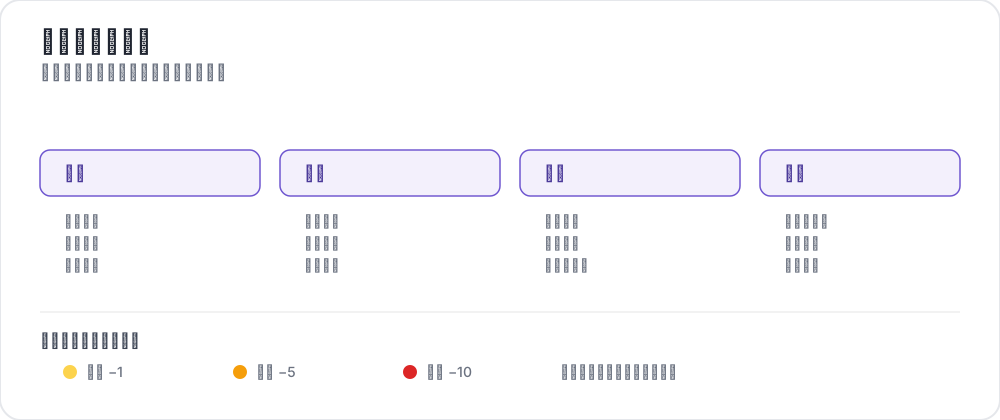 A trajectory error taxonomy
你在一個基準上跑自己的智慧體,任務完成率 63%。然後呢?
一個通過/失敗的數字只告訴你智慧體在 37% 的任務上失敗了,別的什麼也沒說。它不會告訴你 trace 裡哪個位置出了問題、智慧體犯的是哪一類錯誤、錯得有多嚴重。是第 2 步上一次災難性的失誤,還是十五步小的推理錯誤一路累積?智慧體是用錯了工具,還是從一個錯誤的前提開始推理?
沒有逐步的錯誤定位,你沒法診斷失敗模式,沒法判斷該先修什麼,也沒法為過程獎勵模型攢訓練資料。
Potato 的 trajectory_eval 方案解決的就是這件事。標註者逐步走完一條 trace,並記錄:
- 正確性:這一步是正確、不正確,還是部分正確?
- 錯誤類型:從你自己定義的分類體系中選出一個類別和一個子類型
- 嚴重程度:輕微、嚴重或致命,各自帶一個分數權重
- 理由:對這個錯誤的自由文本說明
- 連續評分:一個累計分數,每出現一個錯誤就按嚴重程度的權重往下扣
該方案的參考文件見源文件。
軌跡評估方案概覽
這個方案按順序評估多步驟的 trace。它不給一個總體評分,而是為每一步生成一條結構化標註,最後你得到的是一張地圖,標出這次執行在哪裡失敗、為什麼失敗。
在每一步,標註者看到該步的內容,標記正確性;只要不是"正確",就選一個錯誤類別和子類型、指定嚴重程度,並可選地寫一段理由。頂部的連續評分會隨之更新。
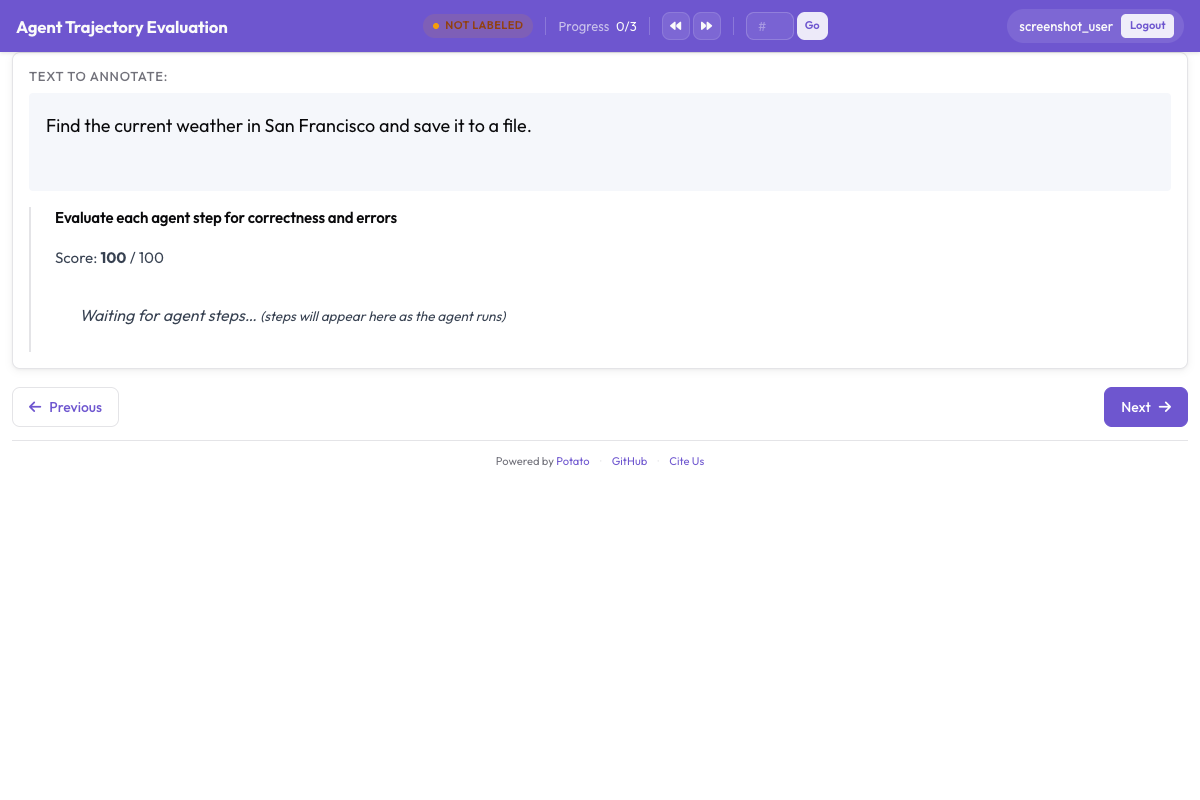 Each step gets a correctness rating, error type, and severity level with a running score that decrements based on severity
配置選項
| 選項 | 說明 |
|---|---|
steps_key | 每個實例中存放步驟列表的欄位 |
step_text_key | 一個步驟內部顯示哪個欄位 |
correctness_options | 正確性標籤,預設是 correct 和 incorrect |
error_types | 分類體系,由若干類別組成,每個類別帶一個 subtypes 列表 |
severities | 嚴重程度等級,每個帶一個 name 和一個分數 weight |
show_score | 是否顯示連續品質評分 |
max_score | 從多少分開始算 |
分類體系只有兩層:一個類別配一份扁平的子類型名稱列表。每個子類型具體是什麼意思,這類較長的說明屬於你的標註指南而不是配置,因為這個方案存的是名稱,不是定義。
設計分層錯誤分類體系
你的分類體系決定了這些標籤能不能彙總出結論。設計得好,你可以跨 trace 把錯誤匯到一起、看出系統性的模式。下面是一個四類別的起點,附上你會交給標註者的定義。
推理錯誤
即使智慧體看到的和做的都沒問題,它的推理本身也可能有缺陷。
| 子類型 | 說明 | 示例 |
|---|---|---|
logical_error | 無效的邏輯推斷 | "既然 A 蘊含 B,而 B 為真,那麼 A 必定為真" |
incorrect_assumption | 假設了證據不支援的東西 | 沒檢查就假定某個檔案存在 |
over_generalization | 從有限證據得出過寬的結論 | "這個函式失敗過一次,所以整個 API 是壞的" |
circular_reasoning | 把結論當成前提來用 | "答案是 X,因為 X 是正確的" |
incorrect_calculation | 計算錯誤 | 迴圈邊界上差一 |
感知錯誤
智慧體在自己的觀察裡讀錯、理解錯,或者漏掉了資訊。
| 子類型 | 說明 | 示例 |
|---|---|---|
missed_element | 沒注意到相關資訊 | 忽略了終端輸出裡的一條報錯 |
misidentified_element | 把看到的東西理解錯了 | 把 404 當成成功的響應 |
hallucinated_element | 引用了並不存在的東西 | 引用了一個不存在的參數 |
outdated_reference | 用了過時的資訊 | 用了一個已經被覆蓋的變數值 |
動作錯誤
智慧體做了錯誤的動作,或者把正確的動作做錯了。
| 子類型 | 說明 | 示例 |
|---|---|---|
wrong_tool | 對這個任務來說工具不合適 | 該用 find 的時候用了 grep |
wrong_arguments | 工具對,參數錯 | 給編輯命令傳了錯誤的路徑 |
premature_termination | 任務沒做完就停下 | 只找到部分資訊就作答 |
unnecessary_action | 沒帶來任何價值 | 把剛讀過的檔案又讀一遍 |
destructive_action | 造成破壞 | 沒備份就刪掉檔案 |
溝通錯誤
這類錯誤出現在智慧體向用戶彙報自己工作的說法裡。
| 子類型 | 說明 | 示例 |
|---|---|---|
unclear_explanation | 令人困惑或有歧義 | 描述了修復,卻沒說原來壞在哪 |
missing_context | 漏掉關鍵背景 | 報告成功卻不提附帶的問題 |
incorrect_summary | 與實際做過的動作對不上 | 明明改了 2 個檔案卻說改了 3 個 |
overconfident_claim | 把不確定說成確定 | "這肯定能解決問題",但根本沒測 |
嚴重程度等級與分數權重
每個錯誤帶一個嚴重程度,每個嚴重程度帶一個權重,用來推動連續評分:
| 嚴重程度 | 權重 | 含義 |
|---|---|---|
minor | -1 | 不會讓 trace 脫軌,比如一個多餘的動作 |
major | -5 | 浪費功夫或產出部分錯誤的結果,比如用錯工具 |
critical | -10 | 讓 trace 崩掉或造成破壞,比如一次破壞性操作 |
分數從 max_score 起算,每遇到一個錯誤就往下掉。最後停在 85 的 trace 有幾個小問題;停在 40 的則有好幾處嚴重失敗。
severities:
  - name: minor
    weight: -1
  - name: major
    weight: -5
  - name: critical
    weight: -10
完整 YAML 配置
annotation_task_name: "Agent Trajectory Error Localization"
task_dir: "."

data_files:
  - "data/traces.jsonl"

item_properties:
  id_key: "trace_id"
  text_key: "task"

instance_display:
  fields:
    - key: "task"
      type: text
      label: "Task"
    - key: "trace"
      type: agent_trace
      label: "Agent trace"
      display_options:
        show_step_numbers: true
        show_timestamps: false
        step_type_colors:
          thought: "#E8F0FE"
          action: "#FFF3E0"
          observation: "#F1F8E9"
          code: "#F3E5F5"

annotation_instructions: |
  Walk the trace one step at a time. Mark a step incorrect only when it is
  wrong on the information available at that step, not with hindsight. When
  several categories apply, choose the most specific one.

annotation_schemes:
  - annotation_type: trajectory_eval
    name: step_errors
    description: "Mark each step and classify any error"
    steps_key: trace
    step_text_key: content
    correctness_options:
      - correct
      - incorrect
      - partially_correct
    error_types:
      - name: reasoning
        subtypes:
          - logical_error
          - incorrect_assumption
          - over_generalization
          - circular_reasoning
          - incorrect_calculation
      - name: perception
        subtypes:
          - missed_element
          - misidentified_element
          - hallucinated_element
          - outdated_reference
      - name: action
        subtypes:
          - wrong_tool
          - wrong_arguments
          - premature_termination
          - unnecessary_action
          - destructive_action
      - name: communication
        subtypes:
          - unclear_explanation
          - missing_context
          - incorrect_summary
          - overconfident_claim
    severities:
      - name: minor
        weight: -1
      - name: major
        weight: -5
      - name: critical
        weight: -10
    show_score: true
    max_score: 100

  - annotation_type: radio
    name: overall_success
    description: "Did the run succeed overall?"
    labels:
      - success
      - partial
      - failure
    sequential_key_binding: true

output_annotation_dir: "annotation_output/"
export_annotation_format: jsonl

user_config:
  allow_all_users: true
分步搭建
1. 準備你的智慧體 trace
trace 放在 JSONL 裡,一行一條,每條帶一個 id、一段任務描述和一個步驟列表。steps_key 指定那個列表,step_text_key 指定每步裡要顯示的欄位:
{
  "trace_id": "trace_042",
  "task": "Find the bug in the calculate_discount function and fix it",
  "trace": [
    {
      "type": "thought",
      "content": "I need to look at calculate_discount to find the bug."
    },
    {
      "type": "action",
      "content": "search('def calculate_discount')"
    },
    {
      "type": "observation",
      "content": "Found in pricing.py line 45:\ndef calculate_discount(price, discount_pct):\n    return price * discount_pct / 100"
    },
    {
      "type": "thought",
      "content": "It returns the discount amount rather than the discounted price."
    },
    {
      "type": "action",
      "content": "edit_file('pricing.py:45', 'return price - (price * discount_pct / 100)')"
    },
    {
      "type": "observation",
      "content": "File edited successfully."
    }
  ]
}
如果你的 trace 是別的格式,先轉換一下。轉換器讀入一個檔案,寫出規範的 JSONL:
python -m potato.trace_converter \
  --input raw_traces.json \
  --input-format react \
  --output data/traces.jsonl
--list-formats 會列印它支援的格式,其中包括 react、langchain、langfuse、webarena、openai、anthropic、swebench 和 otel。拿不準手上是哪種時,用 --auto-detect 代替 --input-format。
2. 調整分類體系
從上面那四個類別出發,按你的智慧體做刪減或擴充。編碼智慧體通常值得單列一個類別:
error_types:
  - name: code_quality
    subtypes:
      - syntax_error
      - runtime_error
      - logic_bug
      - style_violation
收集一旦開始,子類型的名稱就別再動了。中途改名會讓同一種失敗模式在匯出結果裡裂成兩個標籤。
如果是編碼 trace,改用 coding_trace 顯示類型,它會渲染 diff 和終端輸出:
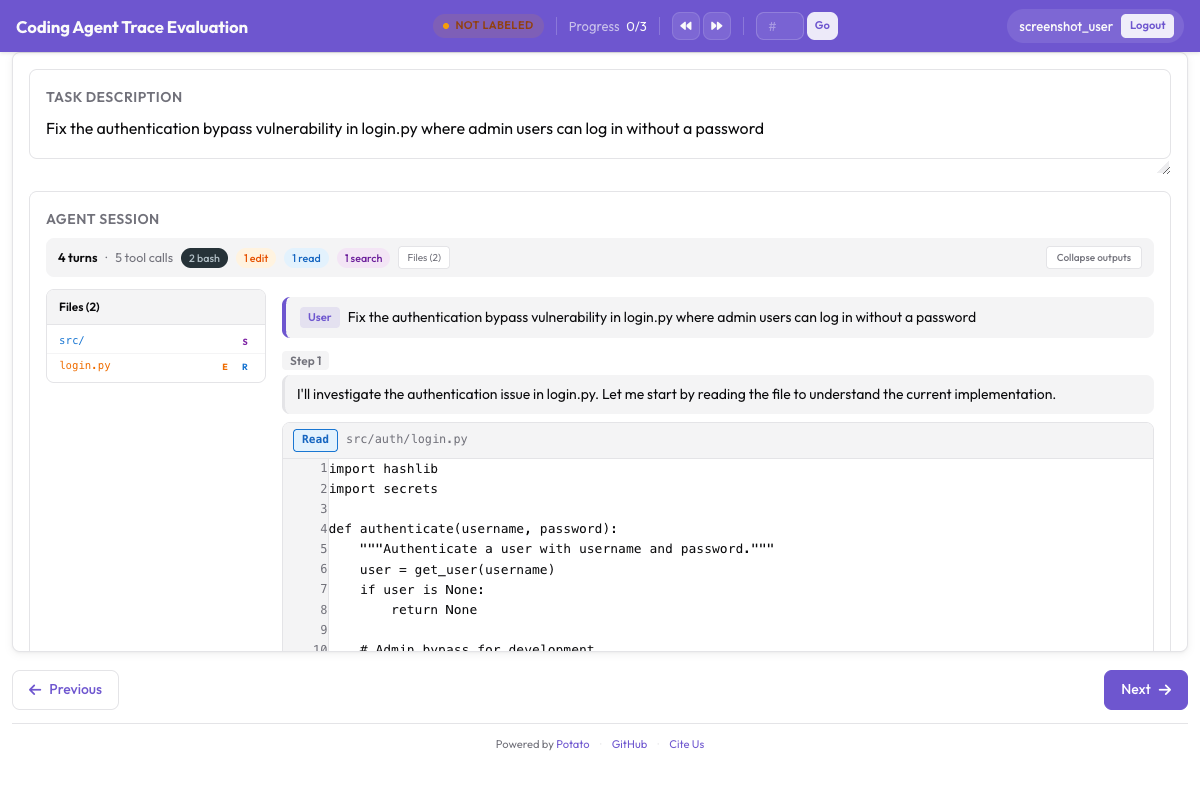 Coding trace display renders diffs, terminal blocks, and file reads alongside trajectory evaluation controls
3. 啟動伺服器
potato start config.yaml -p 80004. 撰寫標註指南
這個方案存的是子類型名稱而不是定義,所以定義必須放在標註者看得見的地方。把上面那些表格放進 annotation_instructions 或你的指南文件,並且至少把這四個問題定下來:
- 一步在什麼情況下算不正確,而不是正確但不夠好
- 多個類別都說得通時,以哪個為準
- 輕微、嚴重、致命之間的分界在哪,並給出例子
- 判斷一步時依據的是當時可得的資訊,還是事後回看
標註工作流程
任務在最上面,trace 在它下面,角落裡的連續評分顯示 100。
每一步,標註者結合前面各步的上下文來讀它,標記正確性;遇到錯誤就先選類別、再選子類型、再選嚴重程度,然後寫下理由。分數隨之更新:第 3 步一個嚴重錯誤把它降到 95,第 7 步一個致命錯誤再降到 85。
走到最後,他們給出整體成功與否的評分並提交。
輸出裡有什麼
每條標註過的 trace 帶一個 steps 列表和最終的 score。正確的步驟只記錄它的序號和正確性;出錯的步驟在 error_type 裡帶類別,在 error_subtype 裡帶具體的那一個:
{
  "steps": [
    {"step_index": 0, "correctness": "correct"},
    {
      "step_index": 1,
      "correctness": "incorrect",
      "error_type": "action",
      "error_subtype": "wrong_tool",
      "severity": "major",
      "rationale": "Should have used a more specific selector"
    }
  ],
  "score": 95
}
error_type 是類別,error_subtype 才是葉子。指望在 error_type 裡讀到 wrong_tool,正是那種會讓分析看起來"所有失敗都是動作錯誤"的失誤。
分析結果
載入標註資料
import json
import pandas as pd
from pathlib import Path

SCHEME = "step_errors"

traces = []
for f in Path("annotation_output/").rglob("*.jsonl"):
    with open(f) as fh:
        for line in fh:
            rec = json.loads(line)
            payload = rec.get("labels", rec).get(SCHEME)
            if not payload:
                continue
            traces.append({
                "instance_id": rec.get("instance_id"),
                "annotator": rec.get("user_id"),
                "steps": payload.get("steps", []),
                "score": payload.get("score"),
            })

print(f"Loaded {len(traces)} annotated traces")
錯誤分佈
errors = []
for t in traces:
    for step in t["steps"]:
        if step.get("correctness") == "correct":
            continue
        errors.append({
            "instance_id": t["instance_id"],
            "step_index": step.get("step_index"),
            "category": step.get("error_type"),
            "subtype": step.get("error_subtype"),
            "severity": step.get("severity"),
        })

error_df = pd.DataFrame(errors)
print(f"Total errors: {len(error_df)}\n")
print("By category:\n", error_df["category"].value_counts(), "\n")
print("Top subtypes:\n", error_df["subtype"].value_counts().head(10), "\n")
print("By severity:\n", error_df["severity"].value_counts())
錯誤落在 trace 的什麼位置
把位置歸一化,能看出失敗是聚在開頭(智慧體還在摸方向)還是聚在結尾(它正在收尾):
import matplotlib.pyplot as plt

positions = []
for t in traces:
    n = len(t["steps"])
    if n < 2:
        continue
    for step in t["steps"]:
        if step.get("correctness") != "correct":
            positions.append(step["step_index"] / (n - 1))

plt.figure(figsize=(10, 4))
plt.hist(positions, bins=20, edgecolor="black", alpha=0.7)
plt.xlabel("Normalized position in trace (0 = start, 1 = end)")
plt.ylabel("Error count")
plt.title("Where do agent errors occur?")
plt.tight_layout()
plt.savefig("error_position_distribution.png", dpi=150)
分數分佈
分數已經替你算好了,直接讀就行,不必重算:
score_df = pd.DataFrame([
    {"instance_id": t["instance_id"], "score": t["score"]}
    for t in traces if t["score"] is not None
])

print(score_df["score"].describe())
按影響排序的失敗模式
只看頻次會高估輕微錯誤。乘上嚴重程度,排出來的才是真正讓你付出代價的東西:
WEIGHT = {"minor": 1, "major": 5, "critical": 10}

modes = (
    error_df.assign(w=error_df["severity"].map(WEIGHT))
    .groupby(["category", "subtype"])
    .agg(count=("w", "size"), avg_weight=("w", "mean"))
)
modes["impact"] = modes["count"] * modes["avg_weight"]

print("By frequency:\n", modes.sort_values("count", ascending=False).head(10).to_string())
print("\nBy impact:\n", modes.sort_values("impact", ascending=False).head(10).to_string())
研究背景
逐步錯誤定位和智慧體評估領域近來的幾條線索是對得上的。
TRAIL(Patronus AI,2025)用一套 20 多種錯誤類型的分類體系,標註了來自 GAIA 和 SWE-bench Lite 的 148 條智慧體 trace,共 841 個錯誤。值得注意的結果是定位有多難:他們測過的最好的長上下文推理模型,在錯誤類別加位置上的聯合準確率只有 11%。這正是 trajectory_eval 交給人類標註者去做的活兒,也是這些標籤值得花錢買的原因。
AgentRewardBench(McGill NLP,2025)盯的則是評判方。它在五個基準上收集了 1,302 條網頁智慧體軌跡,請專家逐條審查成功與否、副作用和重複行為,再拿十二個 LLM 評判器去對照這些審查打分。沒有哪個評判器在所有基準上都領先,而各基準自帶的基於規則的評估,低報了智慧體實際成功的次數。如果你打算用模型把這套分類體系的一部分自動化,你需要的正是這種形狀的檢驗。
步驟級的正確性和嚴重程度標籤也可以直接餵給過程獎勵模型的訓練,因為每個標註過的步驟都是一個帶有真值品質訊號的訓練樣本。
Anthropic 的 Demystifying evals for AI agents 把同一個論點講成了可操作的版本:評的是整份記錄,而不只是結果;對智慧體怎麼呼叫工具、怎麼跟使用者說話,都用明確的量規去打分。它還提醒不要照著一套規定好的步驟序列去打分,因為智慧體總能找到評估設計者沒預料到的有效路徑。套用這套分類體系時記住這一點:一步之所以是錯誤,是因為它錯了,不是因為它出乎意料。
小結
trajectory_eval 把智慧體評估從一次通過/失敗的檢查變成一項診斷。有了兩層分類體系、嚴重程度權重和連續評分,你能看出哪一步出了錯、是哪一類錯誤、錯得多嚴重,以及錯誤在各條 trace 上聚集在什麼位置。這些步驟級的標籤也可以直接拿來當過程獎勵模型的訓練資料。
先用這裡的四個類別起步,把定義放在指南里、標註者讀得到的地方,等看清你的智慧體實際會產生哪些失敗之後,再細化子類型。