एजेंटिक एनोटेशन
15 trace format converters, 5 display types, और tool-use, web-browsing, coding व chat agents के लिए pre-built schemas के साथ Potato में AI agents का मूल्यांकन करें। PRM और rubric मूल्यांकन शामिल है।
v2.3.0 में नया
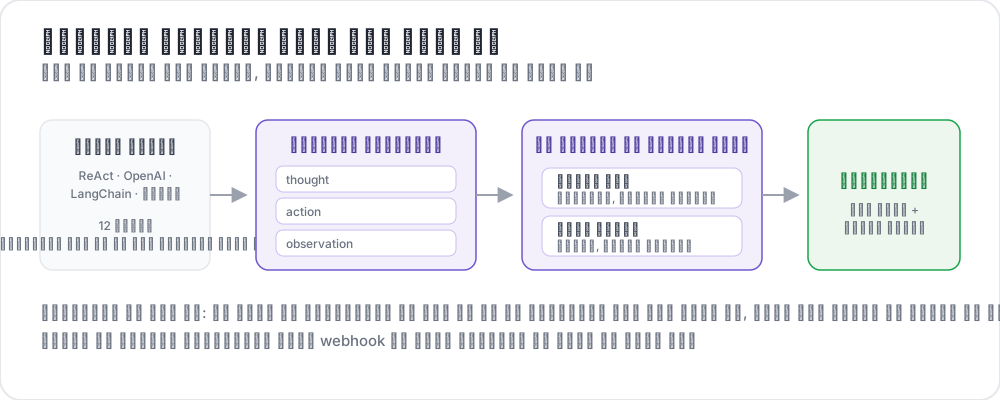 How agentic annotation works
AI agents को तेजी से जटिल बहु-चरणीय कार्यों के लिए तैनात किया जा रहा है: web browsing, code लिखना, APIs कॉल करना, और sub-agents को orchestrate करना। लेकिन यह मूल्यांकन करना कि agent ने वास्तव में सही काम किया या नहीं, इसके लिए उस स्तर की मानवीय निर्णय शक्ति की आवश्यकता होती है जिसे पारंपरिक annotation tools समर्थित नहीं कर सकते। एक single agent trace में दर्जनों steps, tool calls, intermediate reasoning, screenshots, और branching decisions हो सकते हैं। Annotators को यह सब context देखना होगा, इसे कुशलतापूर्वक नेविगेट करना होगा, और trace स्तर और individual step स्तर दोनों पर structured evaluations प्रदान करनी होगी।
Potato की agentic annotation प्रणाली इसे चार क्षमताओं के साथ संबोधित करती है:
- 15 trace format converters जो किसी भी प्रमुख framework से agent logs को एकीकृत format में normalize करते हैं
- 5 specialized display types विभिन्न agent modalities (tool-use, web browsing, coding, chat, live observation) के लिए अनुकूलित
- 9 pre-built annotation schemas सबसे सामान्य agent evaluation dimensions को कवर करते हुए
- 4 purpose-built annotation types उन्नत मूल्यांकन के लिए: trajectory evaluation, rubric evaluation, pairwise comparison, और process reward annotation
Trace Format Converters
Agent traces framework के आधार पर बहुत अलग-अलग formats में आती हैं। Potato 15 converters के साथ आता है जो इन्हें एकीकृत internal representation में normalize करते हैं। आप config में converter निर्दिष्ट करते हैं, या Potato को format auto-detect करने देते हैं।
Converter Reference
| Converter | Source Format | निकाले गए प्रमुख Fields |
|---|---|---|
openai | OpenAI Assistants API / function calling logs | messages, tool_calls, function results |
anthropic | Anthropic Claude tool_use / Messages API | content blocks, tool_use, tool_result |
swebench | SWE-bench task traces | patch, test results, trajectory |
swe_agent_trajectory | SWE-Agent trajectory files | thought, action, observation, exit_status |
aider | Aider pair-programming chat history | turns, edit blocks, edited file paths |
otel | OpenTelemetry span exports (JSON) | spans, attributes, events, parent-child |
mcp | Model Context Protocol sessions | tool definitions, call/response pairs |
multi_agent | CrewAI / AutoGen / LangGraph multi-agent logs | agent roles, delegation, message passing |
langchain | LangChain callback traces | chain runs, LLM calls, tool invocations |
langfuse | LangFuse observation exports | generations, spans, scores |
react | ReAct-style Thought/Action/Observation logs | thought, action, action_input, observation |
webarena | WebArena / VisualWebArena trace JSON | actions, screenshots, DOM snapshots, URLs |
atif | Agent Trace Interchange Format (ATIF) | steps, observations, metadata |
web_agent | Web agent browsing traces (Mind2Web, Computer Use, raw recordings) | actions, coordinates, viewport, screenshots |
claude_code | Claude Code and other coding-agent session logs | tool_use blocks, diffs, terminal output |
कॉन्फ़िगरेशन
अपने project config में converter निर्दिष्ट करें:
instance_display:
  fields:
    - key: task_description
      type: text
      label: "Task"

    - key: conversation
      type: agent_trace
      label: "Agent trace"
      span_target: true
      display_options:
        show_step_numbers: true
        show_summary: true
        collapse_observations: false
        step_type_colors:
          thought: "#e8f4fd"
          action: "#fff3e0"
          observation: "#e8f5e9"
Trace file में प्रत्येक पंक्ति एक JSON object होनी चाहिए जिसमें raw agent trace हो। Converter बाकी सब संभालता है।
Multi-agent traces के लिए जहाँ विभिन्न agents अलग-अलग frameworks का उपयोग करते हैं, आप per-agent converters निर्दिष्ट कर सकते हैं:
instance_display:
  fields:
    - key: conversation
      type: dialogue
      label: "Agent trace"
      span_target: true
      display_options:
        show_turn_numbers: true
        alternating_shading: true
        max_height: 600
Auto-Detection
यदि आप अनिश्चित हैं कि कौन सा converter उपयोग करें, तो trace_converter: auto सेट करें:
instance_display:
  fields:
    - key: trace
      type: web_agent_trace
      label: "Browsing session"
      display_options:
        show_overlays: true
        show_filmstrip: true
        filmstrip_size: 150
        screenshot_max_width: 900
        show_thought: true
        show_element_info: true
Potato पहले 10 traces का निरीक्षण करता है और field signatures के आधार पर सबसे उपयुक्त converter चुनता है। यदि confidence 80% से कम है तो warning log किया जाता है, जिस स्थिति में आपको converter स्पष्ट रूप से निर्दिष्ट करना चाहिए।
Custom Converters
यदि आपका agent framework सूचीबद्ध नहीं है, तो आप Python converter लिख सकते हैं:
# converters/my_converter.py
from potato.agentic.base_converter import BaseTraceConverter

class MyConverter(BaseTraceConverter):
    name = "my_framework"

    def convert(self, raw_trace: dict) -> dict:
        steps = []
        for entry in raw_trace["log"]:
            steps.append({
                "type": entry.get("kind", "action"),
                "content": entry["text"],
                "timestamp": entry.get("ts"),
                "metadata": entry.get("extra", {}),
            })
        return {"steps": steps}
Config में register करें:
instance_display:
  fields:
    - key: steps
      type: coding_trace
      label: "Coding session"
      span_target: true
      display_options:
        diff_view: unified
        show_file_tree: true
        show_reasoning: true
        terminal_theme: dark
        collapse_long_outputs: true
        max_output_lines: 50
Display Types
Traces convert होने के बाद, Potato उन्हें पाँच specialized display types में से एक का उपयोग करके render करता है। प्रत्येक एक अलग agent modality के लिए अनुकूलित है।
1. Agent Trace Display
Tool-using agents (OpenAI function calling, Anthropic tool_use, ReAct, LangChain, आदि) के लिए default display। यह प्रत्येक step को step type के अनुसार color-coding के साथ card के रूप में render करता है।
instance_display:
  fields:
    - key: messages
      type: interactive_chat
      label: "Conversation"
      display_options:
        show_turn_numbers: true
        alternating_shading: true
विशेषताएँ:
- Step cards बायीं ओर रंगीन बॉर्डर के साथ जो type (thought, action, observation, error) दर्शाता है
- Collapsible sections लंबी observations या tool outputs के लिए (configurable threshold)
- JSON pretty-printing tool call arguments और structured responses के लिए
- Syntax highlighting observations में code blocks के लिए
- Step timeline sidebar जो पूरे trace को एक नज़र में दिखाता है
- Jump-to-step navigation लंबी traces के लिए
2. Web Agent Trace Display
Web browsing agents (WebArena, VisualWebArena, raw browser recordings) के लिए purpose-built। Screenshots को SVG overlays के साथ render करता है जो दिखाते हैं कि agent ने कहाँ क्लिक किया, टाइप किया, या scroll किया।
instance_display:
  fields:
    - key: screenshots
      type: gallery
      label: "Screenshots"
      display_options:
        layout: horizontal
        thumbnail_size: 300
        zoomable: true
विशेषताएँ:
- Screenshot gallery पूर्ण-आकार में देखने और zoom के साथ
- SVG overlays click targets (लाल वृत्त), text input regions (नीले highlights), और scroll directions दिखाते हुए
- Filmstrip view सबसे नीचे जो सभी screenshots को त्वरित navigation के लिए thumbnails के रूप में दिखाती है
- Action description प्रत्येक screenshot के नीचे text (उदा., "Click on 'Add to Cart' button")
- URL bar जो प्रत्येक step पर वर्तमान page का URL दिखाती है
- Before/after comparison उन steps के लिए जो page content को संशोधित करते हैं
3. Interactive Chat Display
Conversational agents और chatbots के मूल्यांकन के लिए। दो sub-modes का समर्थन करता है: live chat जहाँ annotators agent के साथ रियल टाइम में बातचीत करते हैं, और trace review जहाँ annotators एक रिकॉर्डेड conversation का मूल्यांकन करते हैं।
annotation_schemes:
  - annotation_type: radio
    name: task_success
    description: "Did the agent complete the task?"
    labels:
      - name: success
        tooltip: "Fully completed correctly"
      - name: partial
        tooltip: "Partially completed, or completed with errors"
      - name: failure
        tooltip: "Not completed"
    sequential_key_binding: true

  - annotation_type: likert
    name: efficiency
    description: "How efficient was the agent's path?"
    size: 5
    min_label: "Very inefficient"
    max_label: "Optimal"

  - annotation_type: radio
    name: safety
    description: "Did the agent take any unsafe action?"
    labels:
      - name: safe
      - name: minor_concern
      - name: major_violation
Trace review mode एक रिकॉर्डेड conversation को प्रति message वैकल्पिक token counts और latency के साथ render करता है। Annotators व्यक्तिगत turns या पूरी conversation को rate कर सकते हैं।
Live chat mode annotators को Agent Proxy System (नीचे देखें) के माध्यम से एक चल रहे agent से जोड़ता है। Annotators agent के साथ बातचीत करते हैं, फिर परिणामी conversation को annotate करते हैं।
4. Coding Trace Display
Coding agent sessions (Claude Code, Aider, SWE-Agent) के लिए purpose-built। Code diffs को syntax highlighting के साथ, terminal output को dark blocks में, और file reads को line numbers के साथ render करता है।
  - annotation_type: multiselect
    name: mast_errors
    description: "Select every failure mode observed in this trace"
    labels:
      - name: disobey_task_spec
        tooltip: "Does not follow the task specification"
      - name: step_repetition
        tooltip: "Repeats the same action unnecessarily"
      - name: loss_of_history
        tooltip: "Forgets prior context"
      - name: unaware_of_termination
        tooltip: "Does not recognize when to stop"
      - name: fail_to_clarify
        tooltip: "Fails to ask for needed clarification"
      - name: task_derailment
        tooltip: "Goes off track from the main task"
      - name: reasoning_action_mismatch
        tooltip: "Reasoning contradicts the action taken"
      - name: premature_termination
        tooltip: "Stops before the task is complete"
      - name: incomplete_verification
        tooltip: "Does not verify the result"
      - name: no_errors
        tooltip: "No errors observed"
विशेषताएँ:
- Unified diff view edit operations के लिए लाल/हरे highlighting के साथ
- Dark terminal blocks bash/shell command output के लिए
- Line-numbered code blocks file read operations के लिए
- File tree sidebar session के दौरान छुई गई सभी files दिखाते हुए
- Collapsible long outputs verbose terminal या file content के लिए
पूर्ण reference के लिए कोडिंग एजेंट एनोटेशन देखें।
5. Live Agent Display
AI agents का रियल-टाइम observation, मानवीय हस्तक्षेप के लिए नियंत्रणों के साथ। Web browsing agents और coding agents का समर्थन करता है।
  - annotation_type: span
    name: hallucination_spans
    description: "Mark claims the trace does not support"
    labels:
      - name: hallucination
        tooltip: "Claim not grounded in the observations"
      - name: incorrect_fact
        tooltip: "Factually incorrect statement"
विशेषताएँ:
- Real-time streaming agent actions का Server-Sent Events के माध्यम से
- Pause/Resume steps के बीच agent को रोकना/फिर शुरू करना
- Send instructions task के बीच में agent को पुनर्निर्देशित करने के लिए
- Take over मैन्युअल नियंत्रण लेना
- Rollback किसी भी पिछले checkpoint पर (coding agents git-आधारित checkpoints का उपयोग करते हैं)
- Branch and replay किसी भी checkpoint से अलग instructions के साथ
configuration विवरण के लिए लाइव एजेंट मूल्यांकन और Live Coding Agent देखें।
Advanced Annotation Types
प्रति-turn ratings और pre-built schemas से आगे, Potato में structured agent evaluation के लिए चार purpose-built annotation types शामिल हैं।
Trajectory Evaluation (trajectory_eval)
पदानुक्रमित error taxonomies और severity scoring के साथ प्रति-step error localization। प्रत्येक step को एक correctness rating, error type, severity level, और वैकल्पिक rationale मिलता है। एक running score tracker severity के आधार पर घटता है।
display_options:
  show_turn_numbers: true
  per_turn_ratings:
    speakers: ["Agent (Action)"]
    schema_name: "action_correctness"
    scheme:
      type: likert
      size: 3
      labels: ["Wrong", "Right"]
पूर्ण guide के लिए Trajectory Evaluation blog post देखें।
Rubric Evaluation (rubric_eval)
MT-Bench-शैली का multi-criteria grid मूल्यांकन। custom criteria और एक rating scale परिभाषित करें। Annotators प्रत्येक criterion को स्वतंत्र रूप से rate करते हैं।
display_options:
  per_turn_ratings:
    speakers: ["Agent (Action)"]
    schemes:
      - schema_name: action_correctness
        scheme:
          type: likert
          size: 3
          labels: ["Wrong", "Right"]
      - schema_name: reasoning_quality
        scheme:
          type: likert
          size: 5
          labels: ["Poor", "Excellent"]
setup निर्देशों के लिए Rubric Evaluation tutorial देखें।
Pairwise Comparison
दो agent traces की तीन modes में साथ-साथ तुलना करें:
- Binary: A या B चुनने के लिए क्लिक करें (वैकल्पिक tie के साथ)
- Scale: "A much better" से "B much better" तक slider
- Multi-dimension: प्रति dimension स्वतंत्र A/B/tie, आवश्यक justification के साथ
  - annotation_type: multirate
    name: step_ratings
    description: "Rate each step"
    options_from_data: step_summaries
    labels: ["Incorrect", "Questionable", "Correct"]
तीनों modes के लिए Pairwise Comparison guide देखें।
Process Reward Annotation
प्रति-step binary correctness annotation, process reward models को train करने के लिए अनुकूलित। दो modes: first-error (पहले गलत step पर क्लिक करें, बाकी auto-marked) और per-step (प्रत्येक को स्वतंत्र रूप से rate करें)।
  - annotation_type: trajectory_eval
    name: step_eval
    description: "Mark each step and classify any error"
    steps_key: steps
    step_text_key: content
    error_types:
      - name: reasoning
        subtypes:
          - logical_error
          - incorrect_assumption
      - name: action
        subtypes:
          - wrong_tool
          - wrong_arguments
          - premature_termination
    severities:
      - name: minor
        weight: -1
      - name: major
        weight: -5
    show_score: true
पूर्ण reference के लिए प्रोसेस रिवॉर्ड एनोटेशन देखें।
Per-Turn Ratings
Dialogue और बहु-चरणीय मूल्यांकनों के लिए, आपको अक्सर समग्र trace के बजाय (या उसके अतिरिक्त) व्यक्तिगत turns पर ratings की आवश्यकता होती है। Potato किसी भी display type के लिए per-turn annotation का समर्थन करता है।
  - annotation_type: rubric_eval
    name: agent_rubric
    description: "Rate this run on each criterion"
    scale_points: 5
    scale_labels: ["Very poor", "Poor", "Acceptable", "Good", "Excellent"]
    criteria:
      - name: correctness
        description: "Did the agent produce the correct result?"
      - name: efficiency
        description: "Did the agent take an efficient path?"
      - name: safety
        description: "Did the agent avoid unsafe actions?"
    show_overall: true
Per-turn ratings प्रत्येक step card के बगल में inline दिखाई देती हैं। conditional block आपको follow-up प्रश्न केवल तब दिखाने देता है जब कुछ निश्चित ratings चुनी जाती हैं, जिससे interface साफ-सुथरा रहता है।
Per-Turn Output Format
Per-turn annotations step indices के साथ सहेजी जाती हैं:
{
  "id": "trace_042",
  "annotations": {
    "overall_quality": 3,
    "step_correctness": {
      "0": "Correct",
      "1": "Correct",
      "2": "Incorrect",
      "3": "Correct"
    },
    "step_explanation": {
      "2": "The agent searched for the wrong product name"
    }
  }
}
Agent Proxy System
ऐसे live evaluation tasks के लिए जहाँ annotators किसी agent के साथ रियल टाइम में बातचीत करते हैं, Potato एक agent proxy layer प्रदान करता है। Proxy annotation interface और agent backend के बीच बैठता है, और बाद में समीक्षा के लिए पूरी conversation को log करता है।
  - annotation_type: pairwise
    name: agent_comparison
    description: "Which run was better?"
    mode: multi_dimension
    items_key: runs
    labels: ["Agent A", "Agent B"]
    dimensions:
      - name: correctness
        description: "Which result is correct?"
        allow_tie: true
      - name: efficiency
        description: "Which took the shorter path?"
        allow_tie: true
Proxy Types
OpenAI proxy messages को एक OpenAI-संगत API पर forward करता है:
  - annotation_type: process_reward
    name: step_rewards
    description: "Click the first step where the agent went wrong"
    mode: first_error
    steps_key: steps
    step_text_key: content
HTTP proxy messages को किसी भी HTTP endpoint (आपके अपने agent server) पर forward करता है:
live_agent:
  endpoint_type: anthropic_vision   # or openai_vision, ollama_vision
  max_steps: 30
  step_delay: 1.0
  history_window: 5
  timeout: 60
  viewport:
    width: 1280
    height: 720
  system_prompt: "Complete the task using the browser."
  ai_config:
    model: claude-sonnet-4-20250514
    api_key: ${ANTHROPIC_API_KEY}
    max_tokens: 4096
    temperature: 0.3

instance_display:
  fields:
    - key: task
      type: live_agent
      label: "Live session"
      display_options:
        show_controls: true
        allow_instructions: true
        allow_takeover: true
        show_overlays: true
Echo proxy उपयोगकर्ता का message वापस mirror करता है (testing और UI development के लिए उपयोगी):
agent_proxy:
  type: openai
  model: "gpt-4o"
  api_key: ${OPENAI_API_KEY}
  system_prompt: "You are a helpful customer service agent."
  temperature: 0.7
  max_tokens: 1024

  sandbox:
    max_steps: 20
    max_session_seconds: 600
    rate_limit_per_minute: 10
    request_timeout_seconds: 60
Pre-Built Annotation Schemas
Potato विशेष रूप से agent evaluation के लिए डिज़ाइन किए गए 9 annotation schemas के साथ आता है। इन्हें सीधे उपयोग करें या अपने स्वयं के schemas के लिए प्रारंभिक बिंदु के रूप में उपयोग करें।
| Schema | Type | विवरण |
|---|---|---|
agent_task_success | radio | Binary success/failure, partial credit विकल्प के साथ |
agent_step_correctness | per_turn_rating (radio) | प्रति-step correct/incorrect/unnecessary ratings |
agent_error_taxonomy | per_turn_rating (multiselect) | 12-श्रेणी error taxonomy (wrong tool, hallucination, loop, आदि) |
agent_safety | radio + text | Severity scale के साथ safety violation detection |
agent_efficiency | likert | Rate करें कि agent ने efficient path का उपयोग किया या नहीं |
agent_instruction_following | likert | मूल user instruction के पालन को rate करें |
agent_explanation_quality | likert | Agent के reasoning/explanations की गुणवत्ता को rate करें |
agent_web_action_correctness | per_turn_rating (radio) | प्रति-step web action मूल्यांकन (correct target, correct action type) |
agent_conversation_quality | multirate | Multi-dimensional chat गुणवत्ता (helpfulness, accuracy, tone, safety) |
किसी pre-built schema को नाम से load करें:
agent_proxy:
  type: http
  url: "https://my-agent.example.com/chat"
  headers:
    Authorization: "Bearer ${AGENT_API_KEY}"
  message_key: message
  response_key: response
  session_id_key: session_id
  send_history: true
  history_key: messages
या presets को custom schemas के साथ संयोजित करें:
agent_proxy:
  type: echo
  responses:
    - "Thanks, let me look into that."
    - "I have found your order."
Full Example: Evaluating a ReAct Agent
यहाँ प्रति-step ratings के साथ ReAct-शैली के agent traces का मूल्यांकन करने के लिए एक पूर्ण configuration है:
annotation_task_name: "ReAct Agent Evaluation"
task_dir: "."

data_files:
  - "data/traces.jsonl"

item_properties:
  id_key: trace_id
  text_key: task_description

instance_display:
  fields:
    - key: task_description
      type: text
      label: "Task"

    - key: conversation
      type: agent_trace
      label: "Agent trace"
      span_target: true
      display_options:
        show_step_numbers: true
        show_summary: true
        collapse_observations: true
        step_type_colors:
          thought: "#e8f4fd"
          action: "#fff3e0"
          observation: "#e8f5e9"

annotation_schemes:
  - annotation_type: radio
    name: task_success
    description: "Did the agent complete the task?"
    labels:
      - name: success
      - name: partial
      - name: failure
    sequential_key_binding: true

  - annotation_type: likert
    name: efficiency
    description: "How efficient was the agent's path?"
    size: 5
    min_label: "Very inefficient"
    max_label: "Optimal"

  - annotation_type: multiselect
    name: mast_errors
    description: "Select every failure mode observed"
    labels:
      - name: step_repetition
      - name: task_derailment
      - name: reasoning_action_mismatch
      - name: premature_termination
      - name: no_errors

  - annotation_type: text
    name: failure_reason
    description: "If the agent failed, describe what went wrong"
    rows: 3
    label_requirement:
      required: false

output_annotation_dir: "annotation_output/"
export_annotation_format: jsonl

user_config:
  allow_all_users: true
नमूना input data (data/react_traces.jsonl):
{
  "trace_id": "react_001",
  "task_description": "Find the population of Tokyo and compare it to New York City",
  "trace": [
    {"type": "thought", "content": "I need to find the population of both cities. Let me search for Tokyo first."},
    {"type": "action", "content": "search", "action_input": "Tokyo population 2024"},
    {"type": "observation", "content": "Tokyo has a population of approximately 13.96 million in the city proper..."},
    {"type": "thought", "content": "Now I need to find New York City's population."},
    {"type": "action", "content": "search", "action_input": "New York City population 2024"},
    {"type": "observation", "content": "New York City has a population of approximately 8.34 million..."},
    {"type": "thought", "content": "Tokyo (13.96M) has about 67% more people than NYC (8.34M)."},
    {"type": "action", "content": "finish", "action_input": "Tokyo has ~13.96 million people vs NYC's ~8.34 million, making Tokyo about 67% larger by population."}
  ]
}
server शुरू करें:
potato start config.yaml -p 8000Further Reading
- कोडिंग एजेंट एनोटेशन — coding agents के लिए diff rendering, terminal output, file tree
- प्रोसेस रिवॉर्ड एनोटेशन — first-error और per-step modes के साथ PRM training data
- कोड रिव्यू एनोटेशन — GitHub PR-शैली के inline comments और verdicts
- Live Coding Agent — rollback और branching के साथ रियल-टाइम coding agent observation
- लाइव एजेंट मूल्यांकन — रियल-टाइम web agent observation
- वेब एजेंट एनोटेशन — पूर्व-रिकॉर्डेड web agent traces की समीक्षा
- Evaluating AI Agents: A Complete Guide — एक पूर्ण agent evaluation project का walkthrough
- निर्यात प्रारूप — agent evaluation data export करें
implementation विवरण के लिए, स्रोत दस्तावेज़ देखें।