YouTube सबटाइटल को एनोटेट कैसे करें
yt-dlp से कैप्शन डाउनलोड करके उन्हें Potato में एनोटेट कैसे करें, अपने आप बने कैप्शन किस काम के हैं और किसके नहीं, वीडियो का क्या करें, और मीडिया दोबारा बाँटने से पहले क्या जाँच लें।
yt-dlp से कैप्शन डाउनलोड करें और Potato को उन फ़ाइलों की ओर इशारा कर दें। पहले यह जान लें: अपने आप बने कैप्शन में न विराम-चिह्न होते हैं न स्पीकर के लेबल, और उनके लाइन ब्रेक का कोई मतलब नहीं होता, जिससे यह सीमित हो जाता है कि आप समझदारी से क्या एनोटेट कर सकते हैं। yt-dlp जो भी कैप्शन फ़ॉर्मैट देता है, Potato वे सब पढ़ लेता है। पूरी सूची ट्रांसक्रिप्ट फ़ॉर्मैट में है।
वीडियो प्लेटफ़ॉर्म स्वाभाविक बोली के डेटा का बड़ा और सुविधाजनक स्रोत हैं। Closed captioning उस बोली को टेक्स्ट बना देता है, और टेक्स्ट छोटा होता है, इधर-उधर ले जाने में आसान, और एनोटेट करने में आसान। पेच यह है कि सारे कैप्शन एक जैसी चीज़ नहीं होते, और उन्हें एक जैसा मान लेना ही वह जगह है जहाँ कैप्शन पर आधारित ज़्यादातर एनोटेशन प्रोजेक्ट बिगड़ते हैं।
कैप्शन कैसे डाउनलोड करें?
yt-dlp सबटाइटल मीडिया के साथ भी लाता है और उसके बिना भी:
# Human-written subtitles, if the uploader provided any
yt-dlp --write-subs --sub-langs en --skip-download <URL>

# Auto-generated captions
yt-dlp --write-auto-subs --sub-langs en --sub-format vtt --skip-download <URL>
Potato vtt, srt, json3, ttml, और srv1, srv2, srv3 रूप पढ़ता है, इसलिए आप जो भी --sub-format चुनें, वह पार्स हो जाएगा। चुनाव इस आधार पर करें कि आपको क्या बचाकर रखना है: json3 में हर शब्द की टाइमिंग बनी रहती है, जबकि WebVTT और SubRip हाथ से पढ़ने और संपादित करने में आसान हैं।
इंसान के बनाए सबटाइटल और अपने आप बने कैप्शन में क्या फ़र्क़ है?
टेक्स्ट एडिटर में दोनों एक जैसे दिखते हैं और एनोटेशन इनपुट के तौर पर इनका बर्ताव बहुत अलग होता है:
| इंसान के बनाए सबटाइटल | अपने आप बने कैप्शन | |
|---|---|---|
| विराम-चिह्न | हाँ | नहीं, या भरोसे लायक नहीं |
| वाक्य की सीमाएँ | अर्थपूर्ण | मनमानी |
| स्पीकर | कभी-कभी, <v Name> टैग से | कभी नहीं |
| शब्द की टाइमिंग | नहीं | हाँ, json3 में |
| हूबहू | अक्सर पढ़ने लायक बनाने के लिए छाँटे हुए | जो कहा गया उसके ज़्यादा क़रीब |
कोई भी दूसरे से बेहतर नहीं है। इंसान के बनाए सबटाइटल पढ़ने में अच्छे लगते हैं, पर उन्हें पढ़ने की सहूलियत के लिए संपादित किया जाता है, इसलिए उनमें भराव वाले शब्द गिर जाते हैं, दोहराव सिमट जाता है, और कभी-कभी पूरा वाक्य ही दोबारा लिखा जाता है। अपने आप बने कैप्शन हूबहू के ज़्यादा क़रीब होते हैं, जो लोग असल में कैसे बोलते हैं, इससे जुड़े हर काम के लिए ज़रूरी है, पर वे बिना विराम-चिह्न की एक धारा के रूप में आते हैं।
अपने आप बने कैप्शन पर क्या एनोटेट किया जा सकता है?
अपने आप बने कैप्शन पर वाक्य-स्तर की एनोटेशन स्कीम मत बनाइए। उनकी cue सीमाएँ वहाँ पड़ती हैं जहाँ कैप्शन की खिड़की भर गई, वहाँ नहीं जहाँ वाक्य खत्म हुआ। ऐसी फ़ाइल में cue एक दिखावटी बँटवारा है, भाषाई इकाई नहीं। एनोटेटरों से वाक्यों को आँकने को कहेंगे तो हर कोई चुपचाप अलग-अलग वाक्य-सीमाएँ मान लेगा, और आपकी सहमति की संख्याएँ आख़िर में वही नापेंगी, वह नहीं जिसकी आपको परवाह थी।
दो काम लायक विकल्प:
- कैप्शन खिड़कियों को जैसे हैं वैसे ही एनोटेट करें। हर cue पर जो लागू होता हो वह लेबल लगा दें, और यह मान लें कि इकाई मनमानी है पर एक-सी है। विषय, किसी परिघटना के होने या न होने, या ऐसी किसी भी चीज़ के लिए ठीक है जिसका फ़ैसला एक टुकड़े पर हो सके।
- पहले ही दोबारा सेगमेंट कर लें। विराम-चिह्न लौटाने वाला मॉडल या विराम-चिह्न लगाने वाला ASR सिस्टम चलाएँ, फिर समय दोबारा जोड़ें। मेहनत ज़्यादा है, पर इकाइयाँ असली मिलती हैं।
अगर आपके पास इंसान के बनाए सबटाइटल हैं तो यह दिक़्क़त काफ़ी हद तक खत्म हो जाती है। cue की सीमाएँ किसी ऐसे व्यक्ति ने रखी हैं जो साथ-साथ पढ़ रहा था, इसलिए वे आम तौर पर उपवाक्यों का लिहाज़ करती हैं।
वीडियो का क्या?
कैप्शन छोटे होते हैं और उन्हें दोबारा बाँटना आसान है। वीडियो के साथ आम तौर पर ऐसा नहीं होता। तीन विकल्प:
# Media hosted somewhere your annotators can reach
potato transcripts ./captions --media-url-prefix https://cdn.example.org/video -o data/talks.json

# Media downloaded locally as audio only
yt-dlp -f 'ba' -x --audio-format mp3 -o './audio/%(id)s.%(ext)s' <URL>
potato transcripts ./captions --media-dir ./audio -o data/talks.json
तीसरा विकल्प है, मीडिया बिलकुल नहीं। बिना मीडिया के ट्रांसक्रिप्ट भी ठीक से एनोटेट होते हैं, एनोटेटर सुनने के बजाय पढ़ते हैं। अगर यही आपकी योजना है तो निर्देशों में लिख दें, वरना एनोटेटर मान लेते हैं कि प्लेयर का न दिखना कोई बग है और उसकी शिकायत दर्ज कर देते हैं।
चेतावनी: जो चीज़ आपने नहीं बनाई, उसे दोबारा बाँटने से पहले अपने अधिकार जाँच लें। अपने शोध के लिए कैप्शन या मीडिया डाउनलोड करना और उसी मीडिया को एनोटेटरों के समूह तक परोसना, दोनों अलग सवाल हैं, और इस पर प्लेटफ़ॉर्म की शर्तें, कॉपीराइट, और आपके संस्थान के नियम, सब लागू होते हैं। इसे पाइपलाइन बनाने से पहले सुलझा लें, बाद में नहीं।
कार्य कैसे सेट करें?
कन्वर्टर एक डेटा फ़ाइल लिखता है जिसमें ट्रांसक्रिप्ट पहले से सामान्य रूप में ढला होता है:
potato transcripts ./captions --media-dir ./audio -o data/talks.json{
"id": "talk_01",
"conversation": {
"audio": "audio/talk_01.mp3",
"turns": [
{"turn_id": "t0", "speaker": null, "start": 0.0, "end": 4.2,
"text": "so the thing about caption windows is"}
]
}
}अपने आप बने कैप्शन से आपको speaker: null ही मिलता है। वे टर्न Unassigned के रूप में एक पिकर के साथ दिखते हैं, ताकि एनोटेटर सुनते-सुनते उन्हें किसी स्पीकर से जोड़ सकें।
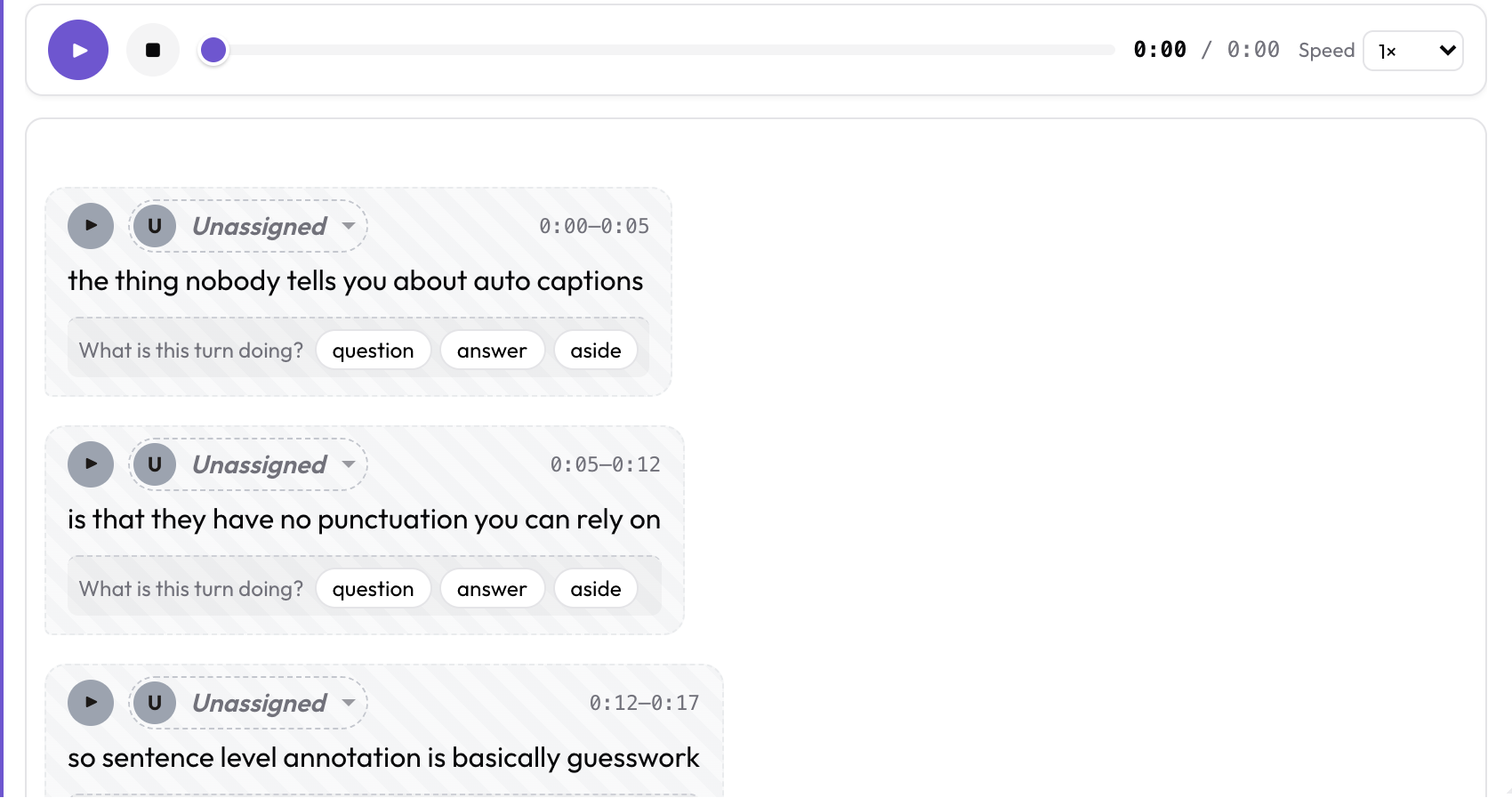 अपने आप बने कैप्शन में स्पीकर नहीं होते, इसलिए हर cue तब तक Unassigned रहता है जब तक एनोटेटर कोई स्पीकर न चुन ले
annotation_task_name: "Talk Annotation"
task_dir: .
data_files:
  - data/talks.json

item_properties:
  id_key: id
  text_key: conversation

instance_display:
  fields:
    - key: conversation
      type: audio_dialogue
      label: "Captions"
      span_target: true
      display_options:
        show_timestamps: true
        allow_speaker_assignment: auto

annotation_schemes:
  - annotation_type: radio
    name: cue_topic
    description: "What is this caption window about?"
    labels: [setup, argument, example, aside]
turn_level: true प्रश्न को पूरे वीडियो के बजाय हर cue से जोड़ देता है, और जब आपके पास cue के अलावा कुछ न हो तो यही सही इकाई है। इसे चलाएँ:
python potato/flask_server.py start config.yaml -p 8000आप कन्वर्टर को पूरी तरह छोड़कर डेटा फ़ाइल को सीधे डिस्क पर पड़ी कैप्शन फ़ाइलों की ओर भी इशारा करा सकते हैं। देखें Whisper ट्रांसक्रिप्ट एनोटेट करना, जहाँ बाक़ी वर्कफ़्लो यही है।
आगे पढ़ें
- ट्रांसक्रिप्ट फ़ॉर्मैट, हर समर्थित कैप्शन और ट्रांसक्रिप्ट फ़ॉर्मैट
- Whisper ट्रांसक्रिप्ट एनोटेट करना, इसी वर्कफ़्लो का ASR-आउटपुट वाला रूप
- ट्रांसक्रिप्ट फ़ॉर्मैट इंजेशन, छह फ़ॉर्मैट साथ-साथ दिखाता एक चलाने लायक showcase डिज़ाइन
- वीडियो एनोटेशन, कैप्शन के बजाय वीडियो को एनोटेट करने के लिए
- एनोटेशन के लिए डेटा फ़ॉर्मैट डिज़ाइन करना
- Timed Text Markup Language, प्रसारण का कैप्शन मानक जिसे Potato भी पढ़ता है