मल्टीमॉडल-एजेंट मूल्यांकन
उन एजेंटों का मूल्यांकन करें जो टेक्स्ट से परे कार्य करते हैं, computer-use और GUI एजेंट, voice सहायक, video, और document एजेंट। Potato click grounding के साथ GUI ट्रेजेक्टरी, फ़ुल-डुप्लेक्स voice टाइमलाइन, live IoU के साथ video temporal grounding, speech-transcript त्रुटि टैगिंग, इंटरलीव्ड मल्टीमॉडल तर्क, और टेबल-ग्रिड संरचना के लिए विशेष रूप से बनाई गई स्कीमा जोड़ता है।
एजेंट तेज़ी से टेक्स्ट से परे मोडैलिटी में कार्य कर रहे हैं: वे GUI चलाते हैं, video देखते हैं, और बोली जाने वाली बातचीत करते हैं। प्रत्येक मोडैलिटी को एक ऐसी समीक्षा सतह की आवश्यकता होती है जो एक सादा टेक्स्ट विजेट प्रदान नहीं कर सकता, एजेंट के क्लिक के साथ एक स्क्रीनशॉट, एक दोहरी-ट्रैक voice टाइमलाइन, गोल्ड अंतरालों के साथ एक video स्क्रबर। Potato इन ट्रेस के लिए विशेष रूप से बनाई गई एनोटेशन स्कीमा जोड़ता है, अपने मौजूदा image, audio, और video डिस्प्ले के साथ-साथ।
प्रत्येक स्कीमा रेंडर के समय ट्रेस से अपने चरण, टर्न, या सेगमेंट प्राप्त करती है, और प्रत्येक examples/agent-traces/ के अंतर्गत एक चलाने योग्य उदाहरण के साथ आती है।
GUI / computer-use ट्रेजेक्टरी (gui_trajectory)
एक computer-use, GUI, या OS एजेंट का चरण दर चरण मूल्यांकन करें (OSWorld, NeurIPS 2024; ScreenSpot-Pro; AndroidWorld)। प्रत्येक चरण वह स्क्रीनशॉट दिखाता है जो एजेंट ने देखा और वह क्रिया जो उसने की; एनोटेटर क्रिया को आँकता है (correct / wrong element / wrong action / hallucinated)। जब किसी चरण में क्लिक निर्देशांक होते हैं, तो स्क्रीनशॉट पर एक grounding मार्कर दिखाता है कि क्लिक सही तत्व पर पड़ा या नहीं।
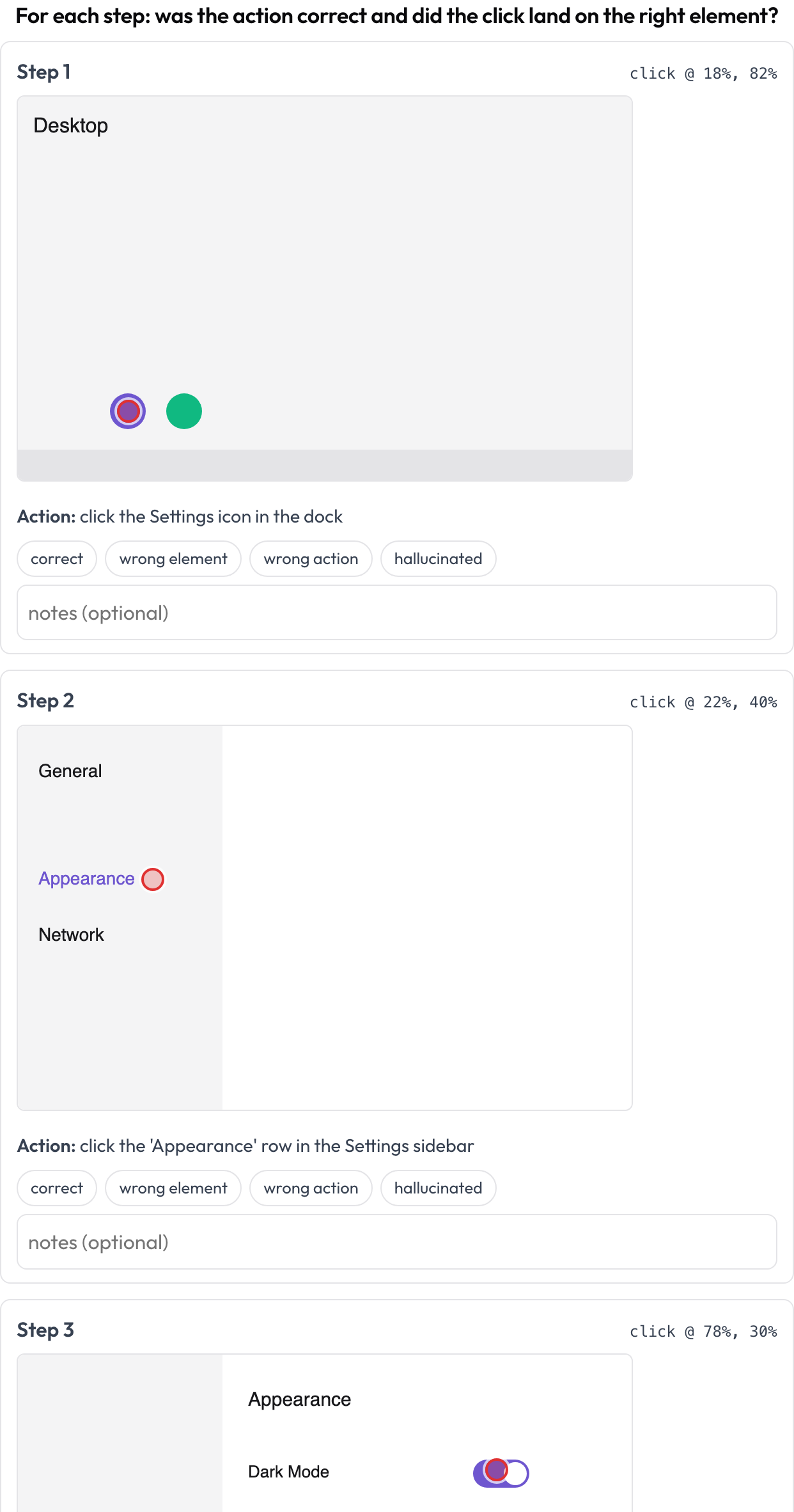 Review each computer-use step: action correctness plus click-grounding on the screenshot
annotation_schemes:
  - annotation_type: gui_trajectory
    name: gui_review
    description: "For each step: was the action correct and did the click land right?"
    steps_key: steps
    screenshot_key: screenshot   # field on each step holding an image URL / data-URI
    action_key: action           # field holding the action text
    coord_space: normalized      # normalized (0..1) | pixels — for the x/y grounding marker
    verdict_options: [correct, wrong_element, wrong_action, hallucinated]
प्रत्येक चरण screenshot, action, और वैकल्पिक x/y (या एक नेस्टेड click: {x, y}) प्रदान कर सकता है। {index, step, verdict, notes} की एक सूची के रूप में संग्रहीत।
Voice / फ़ुल-डुप्लेक्स इंटरैक्शन (voice_interaction)
टर्न-टेकिंग और barge-in हैंडलिंग के लिए एक बोली जाने वाली human↔agent बातचीत को एनोटेट करें (Full-Duplex-Bench, 2025)। एक दोहरी-ट्रैक टाइमलाइन (user लेन और agent लेन) प्रत्येक टर्न को उसके प्रारंभ और समाप्ति समय के अनुसार रखती है और उन ओवरलैप क्षेत्रों को हाइलाइट करती है जहाँ दोनों वक्ता एक साथ बोलते हैं। एनोटेटर प्रत्येक ओवरलैप को वर्गीकृत करता है (agent should respond / should resume / backchannel / uncertain) और समग्र टर्न-टेकिंग को रेट करता है; प्रदान किए जाने पर स्रोत ऑडियो इनलाइन चलता है।
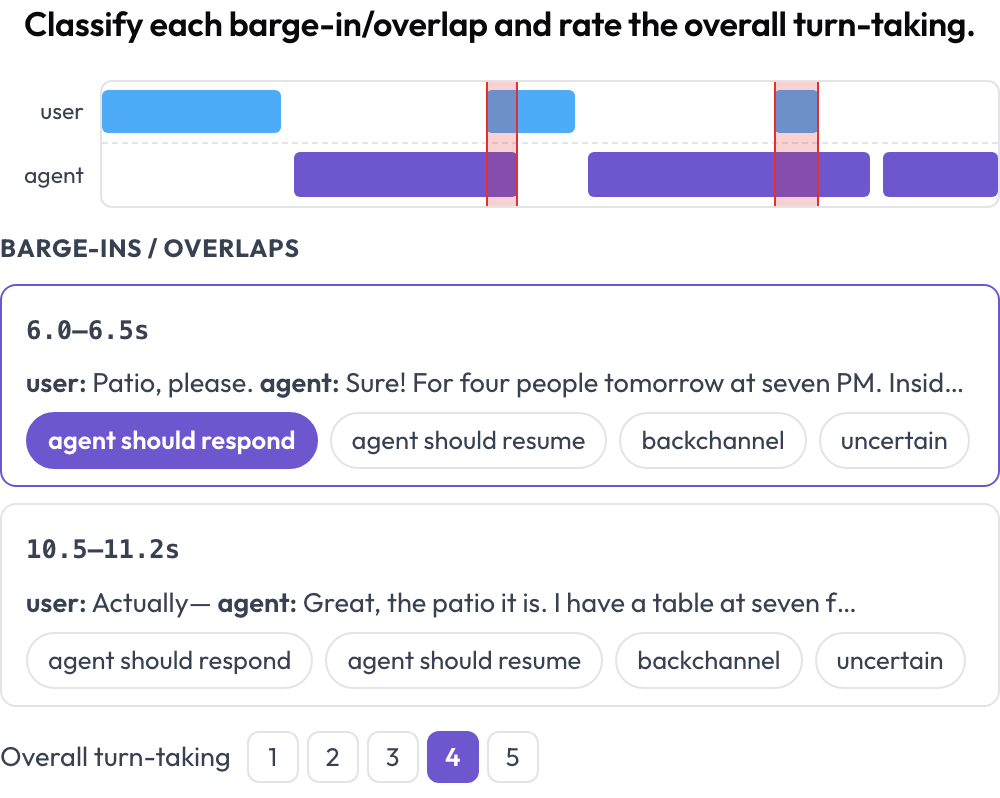 A dual-track voice timeline with barge-in detection and turn-taking scoring
annotation_schemes:
  - annotation_type: voice_interaction
    name: turn_taking
    description: "Classify each barge-in/overlap and rate the overall turn-taking."
    turns_key: turns           # list of {speaker, start, end, text} (seconds)
    speaker_key: speaker
    user_speakers: [user, human, caller]   # everything else is treated as the agent
    overlap_labels: [agent_should_respond, agent_should_resume, backchannel, uncertain]
    rating_scale: 5
    # audio_key: audio         # optional per-instance audio URL to enable the player
अलग-अलग वक्ताओं के टर्न के बीच ओवरलैप रेंडर के समय गणना किए जाते हैं। {"overlaps": {idx: label}, "rating": int} के रूप में संग्रहीत।
Video temporal grounding (temporal_grounding)
temporal-grounding मूल्यांकन के लिए किसी video में घटना समय अंतराल चिह्नित करें (TimeScope, 2025; ET-Bench)। प्रत्येक घटना प्रॉम्प्ट के लिए एनोटेटर गोल्ड [start, end] सेट करता है, playhead कैप्चर करके या सेकंड टाइप करके। जब डेटा में किसी मॉडल का पूर्वानुमानित अंतराल होता है, तो एक लाइव IoU और एक दो-बार मिनी-टाइमलाइन (predicted बनाम gold) समायोजित करते ही अपडेट होती है। यह सामान्य सेगमेंट लेबलिंग से अलग, predicted-बनाम-gold स्थानीयकरण स्कोरिंग के लिए विशेष रूप से बनाया गया है।
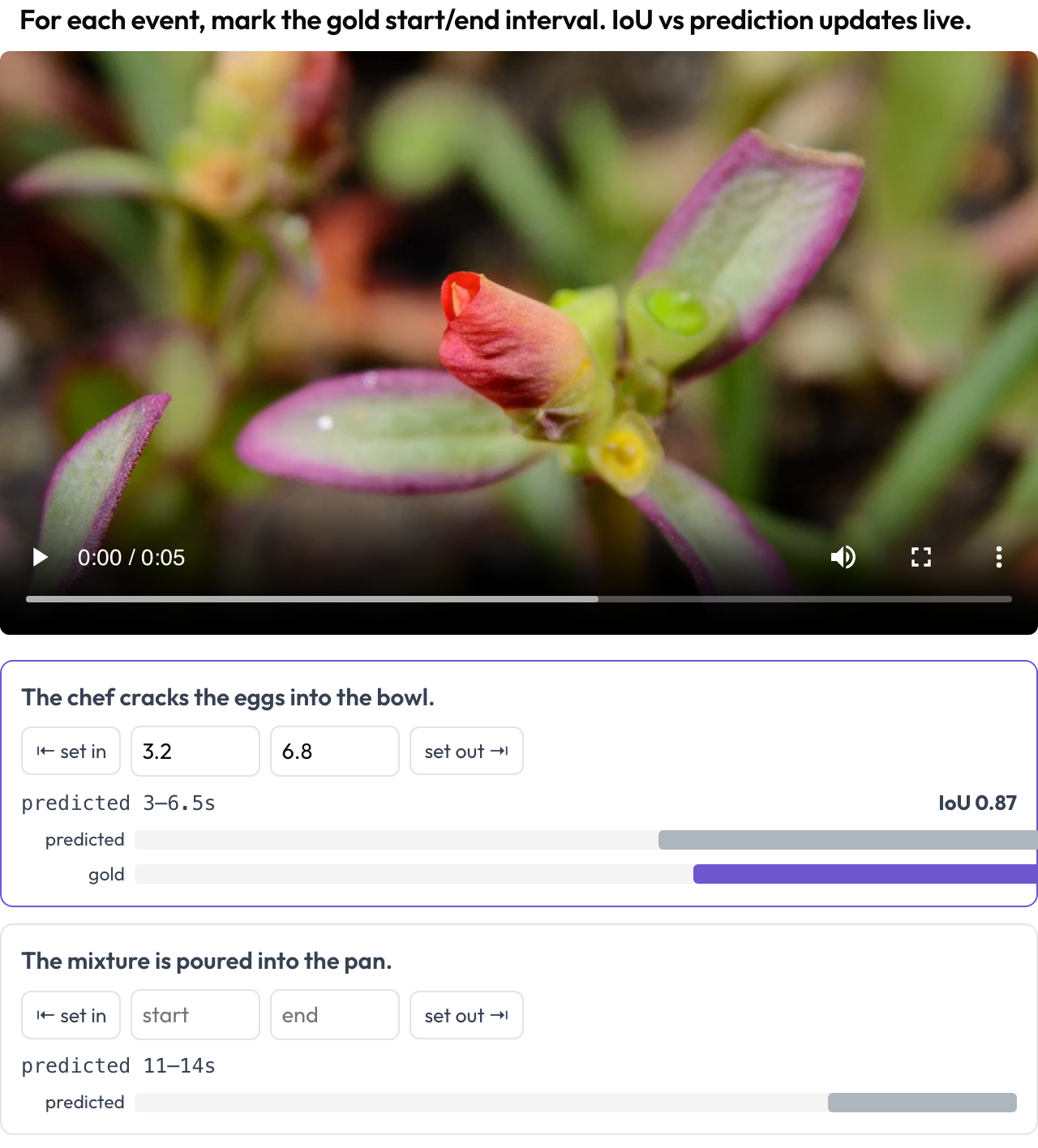 Mark gold event intervals on video with a live IoU vs. the model's prediction
annotation_schemes:
  - annotation_type: temporal_grounding
    name: grounding
    description: "Mark the gold start/end interval for each event. IoU vs prediction updates live."
    video_key: video           # per-instance video URL
    events_key: events         # list of {prompt, predicted: {start, end}} (predicted optional)
    # duration: 120            # optional fixed timeline scale (else inferred from the video)
{"events": {idx: {start, end}}} के रूप में संग्रहीत।
संरेखित-ट्रांसक्रिप्ट speech त्रुटियाँ (speech_transcript)
ASR/TTS और speech-गुणवत्ता त्रुटियों के लिए एक समय-संरेखित speech ट्रांसक्रिप्ट को सेगमेंट दर सेगमेंट एनोटेट करें (Speak & Improve, 2025)। प्रत्येक सेगमेंट {start, end, text, speaker?} एक कार्ड है जो उसका टाइमस्टैम्प और टेक्स्ट दिखाता है; एनोटेटर त्रुटियों को टैग करता है (ASR error / TTS artifact / mispronunciation / disfluency) और सही किए गए ट्रांसक्रिप्ट को टाइप कर सकता है। यह voice_interaction में टर्न-टेकिंग दृश्य का सेगमेंट-स्तरीय पूरक है।
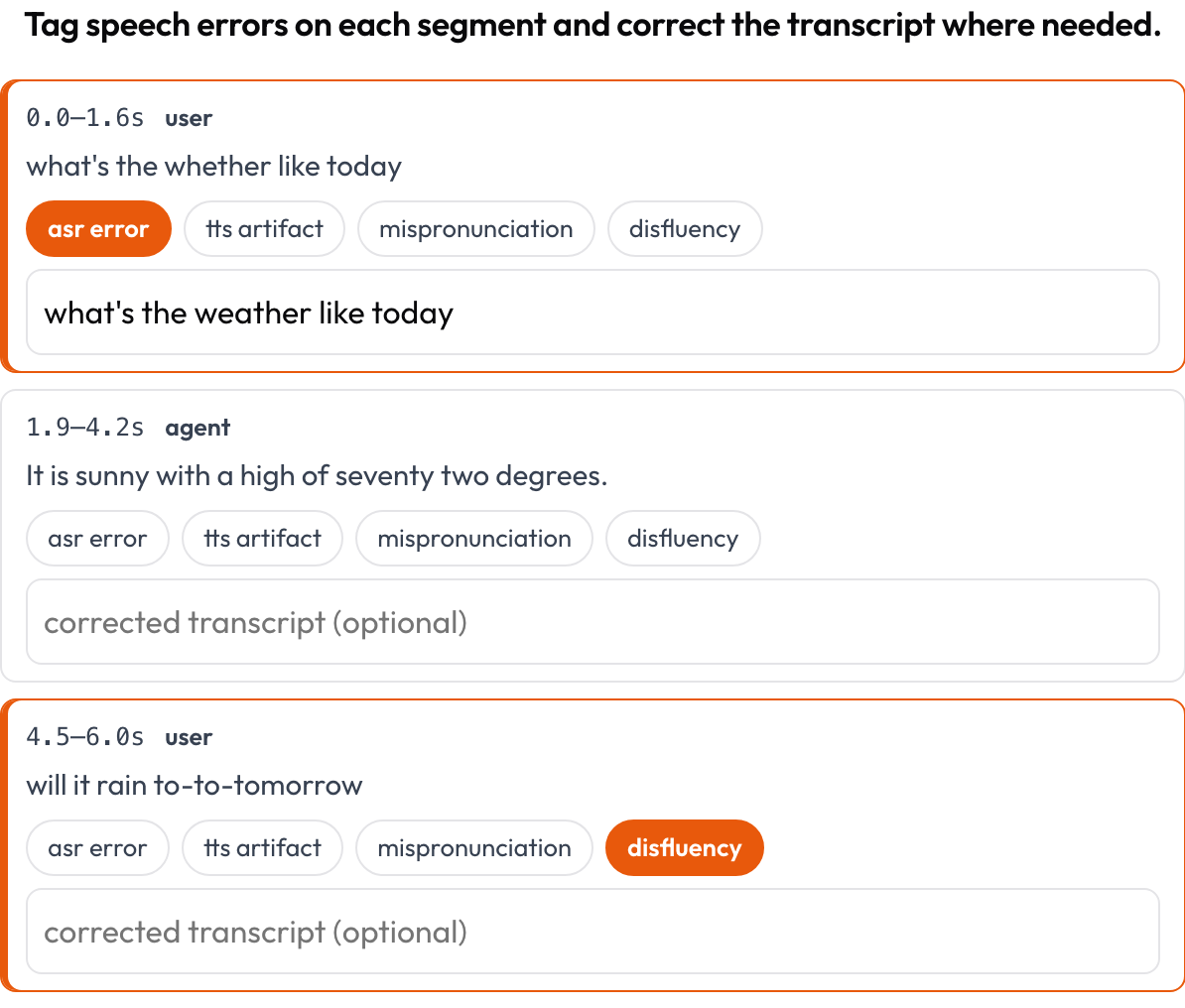 Tag ASR/TTS/pronunciation errors per segment and correct the transcript inline
annotation_schemes:
  - annotation_type: speech_transcript
    name: speech_errors
    description: "Tag speech errors on each segment and correct the transcript where needed."
    segments_key: segments       # list of {start, end, text, speaker?}
    error_types: [asr_error, tts_artifact, mispronunciation, disfluency]
    allow_correction: true
    # audio_key: audio           # optional per-item audio URL to enable the player
{index, start, end, errors, correction} की एक सूची के रूप में संग्रहीत।
इंटरलीव्ड मल्टीमॉडल तर्क (multimodal_reasoning)
एक इंटरलीव्ड text ↔ image ↔ tool ↔ action तर्क ट्रेस को चरण दर चरण रेट करें (Multimodal RewardBench 2, 2025; Zebra-CoT)। प्रत्येक चरण एक टाइप किया गया ब्लॉक है, जो अपने प्रकार के अनुसार इन-लाइन रेंडर होता है; एनोटेटर प्रत्येक चरण की सुसंगतता को आँकता है, क्या तर्क image और पिछले चरणों से अनुसरण करता है, या क्या दृश्य hallucinated है?
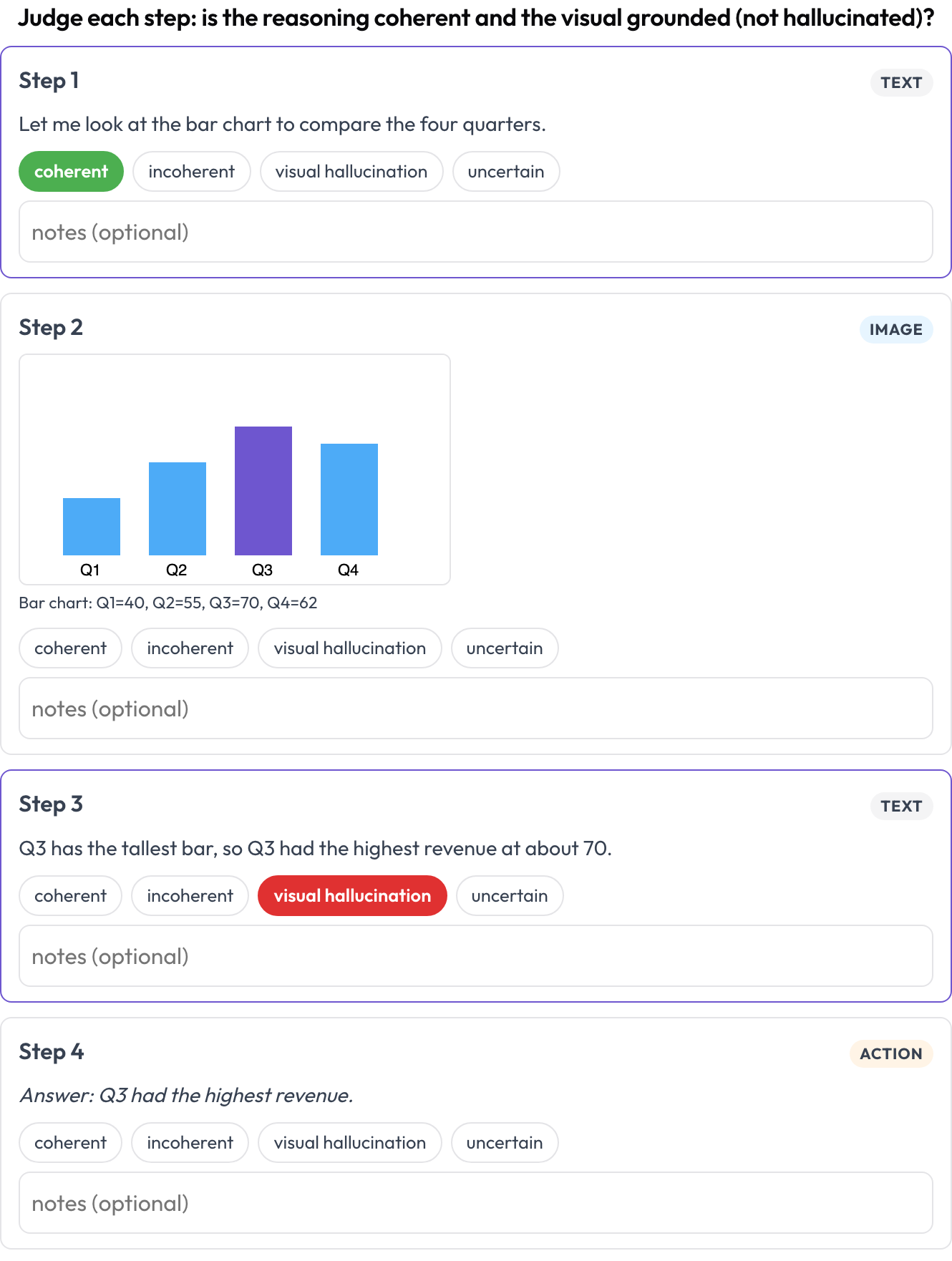 Rate each step of a text-image-tool reasoning trace for coherence and visual hallucination
annotation_schemes:
  - annotation_type: multimodal_reasoning
    name: reasoning_review
    description: "Judge each step: coherent reasoning and grounded visuals?"
    steps_key: steps
    type_key: type     # each step's 'type': text | image | tool | action (inferred if absent)
    verdict_options: [coherent, incoherent, visual_hallucination, uncertain]
प्रत्येक चरण text/content, image/image_url (+caption), या tool/args ले जा सकता है। {index, step, type, verdict, notes} की एक सूची के रूप में संग्रहीत।
टेबल-ग्रिड संरचना (table_grid)
किसी टेबल image की सेल संरचना को एनोटेट करें, वह document-विशिष्ट हिस्सा जिसे सादे बाउंडिंग बॉक्स पकड़ नहीं सकते (OmniDocBench, CVPR 2025; RealHiTBench)। एनोटेटर ग्रिड आयाम सेट करता है और सेल पर क्लिक करके उनकी भूमिका चिह्नित करता है (data / column-header / row-header / empty)। प्रति-पृष्ठ क्षेत्र बॉक्स पहले से ही प्रति पृष्ठ image annotation चलाकर कवर किए जाते हैं, इसलिए यह स्कीमा उस संरचना पर केंद्रित है जिसे वे बॉक्स व्यक्त नहीं कर सकते।
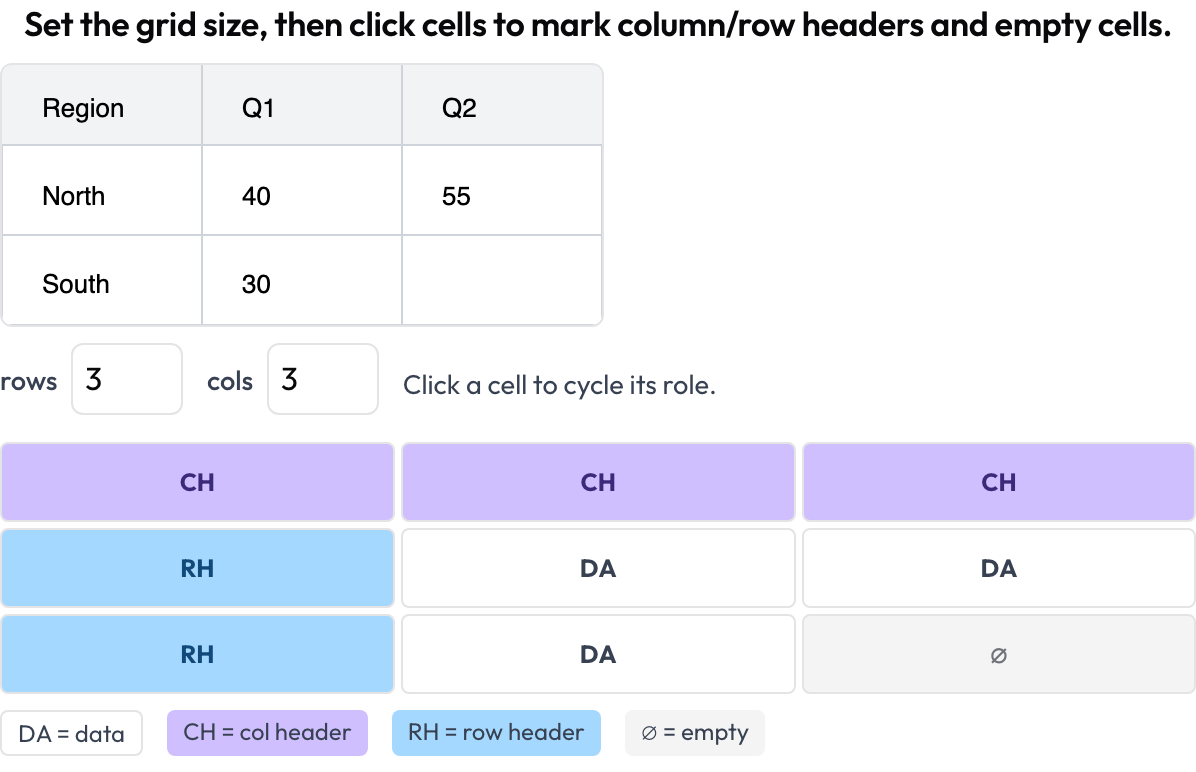 Annotate document-table cell structure: column and row headers, data, and empty cells
annotation_schemes:
  - annotation_type: table_grid
    name: structure
    description: "Set the grid size, then click cells to mark headers and empty cells."
    image_key: image           # per-instance table image URL / data-URI
    rows_key: rows             # optional initial dims from the data
    cols_key: cols
    roles: [data, col_header, row_header, empty]   # click cycles through these
{rows, cols, cells: {"r,c": role}} के रूप में संग्रहीत, केवल गैर-data सेल को रखते हुए।
संबंधित
- मल्टी-एजेंट टीम मूल्यांकन — इंटरैक्शन ग्राफ़, हैंडऑफ़, और टीम स्कोरकार्ड
- वेब-एजेंट मूल्यांकन — स्क्रीनशॉट-और-क्रिया वेब एजेंट
- AI एजेंटों का मूल्यांकन कैसे करें — एजेंट मूल्यांकन के स्तर
- एजेंटिक एनोटेशन — ट्रेस-डिस्प्ले कॉन्फ़िगरेशन और इन्जेशन
कार्यान्वयन विवरण के लिए, स्रोत दस्तावेज़ीकरण देखें।