प्रशिक्षण चरण
Main task से पहले practice questions के साथ annotators को train और qualify करें।
Potato 2.0 में एक optional training phase शामिल है जो annotators को main annotation task शुरू करने से पहले qualify करने में मदद करता है। Annotators ज्ञात सही उत्तरों के साथ practice questions का उत्तर देते हैं और अपने प्रदर्शन पर feedback प्राप्त करते हैं।
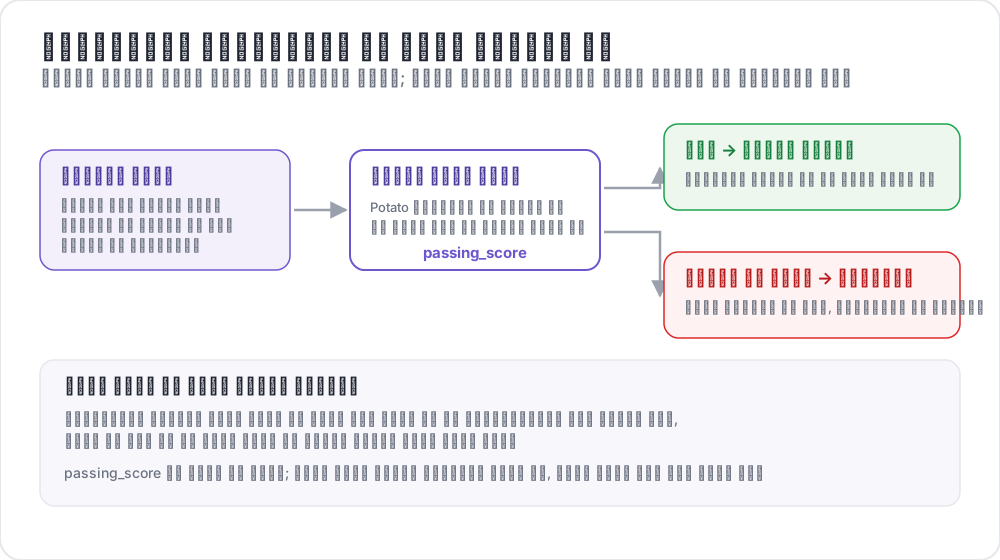 प्रशिक्षण एनोटेटरों को कैसे छाँटता है
उपयोग के मामले
- सुनिश्चित करें कि annotators task समझते हैं
- कम-गुणवत्ता वाले annotators को filter करें
- वास्तविक annotations से पहले guided practice प्रदान करें
- Baseline quality metrics एकत्र करें
- Examples के माध्यम से annotation guidelines सिखाएँ
यह कैसे काम करता है
- Annotators training questions का एक set पूरा करते हैं
- उन्हें प्रत्येक उत्तर पर तुरंत feedback मिलती है
- Passing criteria के विरुद्ध प्रगति ट्रैक की जाती है
- केवल वे annotators जो pass करते हैं, main task की ओर proceed कर सकते हैं
कॉन्फ़िगरेशन
बुनियादी सेटअप
training:
  enabled: true
  data_file: "data/training_data.json"
  annotation_schemes: ["sentiment"]
  passing_criteria:
    min_correct: 3
    require_all_correct: false
  allow_retry: true
  failure_action: "repeat_training"
पूर्ण कॉन्फ़िगरेशन
phases:
  order: [consent, instructions, training, annotation]

  consent:
    type: consent
    file: surveyflow/consent.json

  instructions:
    type: instructions
    file: surveyflow/instructions.html

  training:
    type: training
    file: data/training_data.json
Passing Criteria
Training phase pass करने के लिए आप विभिन्न criteria निर्धारित कर सकते हैं:
Minimum Correct
passing_criteria:
  min_correct: 3
Annotator को 10 में से कम से कम 8 प्रश्नों का सही उत्तर देना होगा।
Require All Correct
passing_criteria:
  require_all_correct: true
Annotator को pass करने के लिए हर प्रश्न का सही उत्तर देना होगा।
Maximum Mistakes
passing_criteria:
  max_mistakes: 5
3 कुल गलतियों के बाद Annotator disqualified हो जाता है।
Maximum Mistakes Per Question
passing_criteria:
  max_mistakes_per_question: 2
किसी single question पर 2 गलतियों के बाद Annotator disqualified हो जाता है।
Combined Criteria
passing_criteria:
  min_correct: 3
  max_mistakes: 5
  max_mistakes_per_question: 2
8 सही होने चाहिए AND किसी single question को 3 से अधिक बार fail नहीं करना चाहिए।
Training Data Format
Training data में सही उत्तर और optional explanations शामिल होने चाहिए:
[
  {
    "id": "train_1",
    "text": "I absolutely love this product! Best purchase ever!",
    "correct_answers": {
      "sentiment": "Positive"
    },
    "explanation": "This text expresses strong positive sentiment with words like 'love' and 'best'."
  },
  {
    "id": "train_2",
    "text": "This is the worst service I've ever experienced.",
    "correct_answers": {
      "sentiment": "Negative"
    },
    "explanation": "The words 'worst' and the overall complaint indicate negative sentiment."
  },
  {
    "id": "train_3",
    "text": "The package arrived on time.",
    "correct_answers": {
      "sentiment": "Neutral"
    },
    "explanation": "This is a factual statement without emotional indicators."
  }
]
Multiple Schema Training
कई annotation schemes वाले tasks के लिए:
{
  "id": "train_1",
  "text": "Apple announced new iPhone features yesterday.",
  "correct_answers": {
    "sentiment": "Neutral",
    "topic": "Technology"
  },
  "explanation": {
    "sentiment": "This is a factual news statement.",
    "topic": "The text discusses Apple and iPhone, which are tech topics."
  }
}
User Experience
Training Flow
- User "Training Phase" indicator देखता है
- Question annotation form के साथ प्रदर्शित होता है
- User अपना उत्तर submit करता है
- Feedback तुरंत दिखाई देती है:
- सही: Green checkmark, अगले की ओर proceed
- गलत: Red X, explanation दिखाई देती है, retry option
Feedback Display
जब कोई annotator गलत उत्तर देता है:
- सही उत्तर highlight किया जाता है
- Provided explanation दिखाई देती है
- Retry button दिखाई देता है (यदि retries सक्षम हों)
- Passing criteria की ओर प्रगति प्रदर्शित होती है
Admin Monitoring
Admin dashboard में training प्रदर्शन ट्रैक करें:
- Completion rates
- Average सही उत्तर
- Pass/fail rates
- Training पर बिताया समय
- Per-question accuracy
API endpoints के माध्यम से access करें:
GET /api/admin/training/stats
GET /api/admin/training/user/{user_id}
उदाहरण: Sentiment Analysis Training
annotation_task_name: "Sentiment Analysis"
task_dir: "."
port: 8000

data_files:
  - "data/reviews.json"

item_properties:
  id_key: id
  text_key: text

annotation_schemes:
  - annotation_type: radio
    name: sentiment
    description: "What is the sentiment of this review?"
    labels:
      - Positive
      - Negative
      - Neutral
    sequential_key_binding: true

training:
  enabled: true
  data_file: "data/training_data.json"
  annotation_schemes: ["sentiment"]
  passing_criteria:
    min_correct: 3
    require_all_correct: false
  allow_retry: true
  failure_action: "repeat_training"

phases:
  order: [training, annotation]
  training:
    type: training
    file: "data/training_data.json"

output_annotation_dir: "output/"
export_annotation_format: "jsonl"

user_config:
  allow_all_users: true
उदाहरण: NER Training
annotation_schemes:
  - annotation_type: span
    name: entities
    description: "Highlight named entities"
    labels:
      - Person
      - Organization
      - Location
      - Date

training:
  enabled: true
  data_file: "data/ner_training.json"
  annotation_schemes: ["entities"]
  passing_criteria:
    min_correct: 2
  allow_retry: true
Span annotation के लिए Training data:
{
  "id": "train_1",
  "text": "Tim Cook announced that Apple will open a new store in New York on March 15.",
  "correct_answers": {
    "entities": [
      {"start": 0, "end": 8, "label": "Person"},
      {"start": 24, "end": 29, "label": "Organization"},
      {"start": 54, "end": 62, "label": "Location"},
      {"start": 66, "end": 74, "label": "Date"}
    ]
  },
  "explanation": "Tim Cook is a Person, Apple is an Organization, New York is a Location, and March 15 is a Date."
}
सर्वोत्तम प्रथाएँ
1. सरल से शुरू करें
Edge cases introduce करने से पहले straightforward examples से शुरू करें:
[
  {"text": "I love this!", "correct_answers": {"sentiment": "Positive"}},
  {"text": "I hate this!", "correct_answers": {"sentiment": "Negative"}},
  {"text": "It arrived yesterday.", "correct_answers": {"sentiment": "Neutral"}}
]
2. सभी Labels को Cover करें
सुनिश्चित करें कि training में हर संभावित label के examples शामिल हों:
[
  {"correct_answers": {"sentiment": "Positive"}},
  {"correct_answers": {"sentiment": "Negative"}},
  {"correct_answers": {"sentiment": "Neutral"}}
]
3. स्पष्ट Explanations लिखें
Explanations annotation guidelines सिखाएँ:
{
  "explanation": "While this text mentions a problem, the overall tone is constructive and the reviewer expresses satisfaction with the resolution. This makes it Positive rather than Negative."
}
4. उचित Criteria निर्धारित करें
अनावश्यक रूप से perfection की आवश्यकता न करें:
passing_criteria:
  require_all_correct: true
5. Edge Cases शामिल करें
Annotators तैयार करने के लिए tricky examples जोड़ें:
{
  "text": "Not bad at all, I guess it could be worse.",
  "correct_answers": {"sentiment": "Neutral"},
  "explanation": "Despite negative words like 'not bad' and 'worse', this is actually a lukewarm endorsement - neutral rather than positive or negative."
}
Workflows के साथ Integration
Training multi-phase workflows के साथ integrate होती है:
passing_criteria:
  min_correct: 3
  max_mistakes_per_question: 2
Performance Considerations
- Training data startup पर load होता है
- Progress प्रति session memory में store होती है
- Main annotation पर minimal performance impact
- जटिल training को कई phases में अलग करने पर विचार करें
आगे पढ़ें
- गुणवत्ता नियंत्रण - Attention checks और gold standards
- श्रेणी आवंटन - Annotator expertise द्वारा items route करें
- बहु-चरणीय कार्यप्रवाह - Complex annotation workflows
कार्यान्वयन विवरण के लिए, स्रोत दस्तावेज़ देखें।