आत्मविश्वास एनोटेशन
Potato में दूसरे एनोटेशन के साथ जोड़कर आत्मविश्वास की रेटिंग जोड़ें, Likert स्केल या स्लाइडर से, ताकि एनोटेटर की निश्चितता दर्ज हो सके।
आत्मविश्वास एनोटेशन योजना एनोटेटरों को यह बताने देती है कि अपने किए हुए किसी दूसरे एनोटेशन पर उन्हें कितना भरोसा है। यह एक आत्मविश्वास स्केल (Likert या स्लाइडर) को किसी लक्ष्य एनोटेशन योजना से जोड़ देती है, जिससे शोधकर्ता सिर्फ़ यह नहीं जान पाते कि एनोटेटर ने क्या चुना, बल्कि यह भी कि वह अपने चुनाव को लेकर कितना आश्वस्त था।
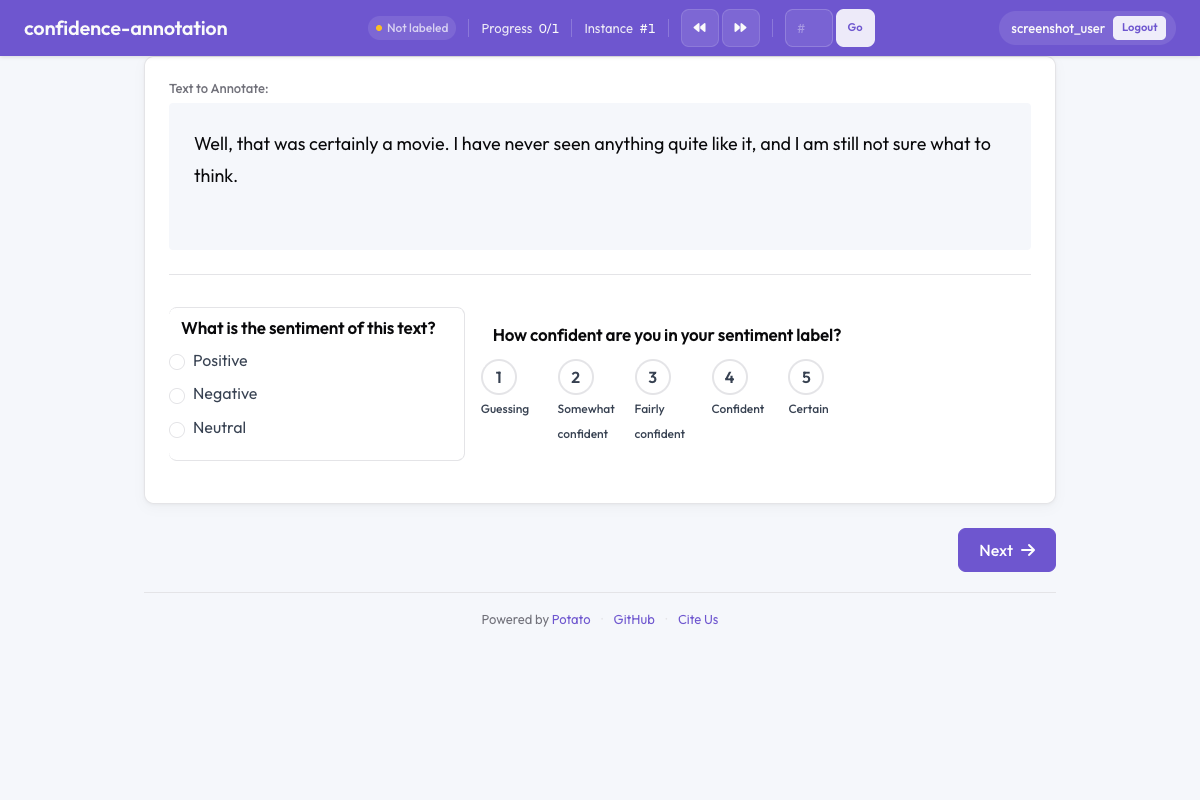 Potato में आत्मविश्वास एनोटेशन
सार
एनोटेशन की गुणवत्ता पर काम करने, अस्पष्ट आइटम पहचानने, और समेकन के समय लेबल को वेट देने के लिए आत्मविश्वास एनोटेशन ज़रूरी है। कॉन्फ़िगर करने पर लक्ष्य एनोटेशन के साथ एक आत्मविश्वास रेटिंग विजेट दिखने लगता है, जो एनोटेटर से पूछता है कि अपने फ़ैसले पर उसे कितना यक़ीन है।
जल्दी शुरुआत
annotation_schemes:
  - annotation_type: radio
    name: sentiment
    description: What is the sentiment of this text?
    labels: ["Positive", "Negative", "Neutral"]

  - annotation_type: confidence
    name: sentiment_confidence
    description: How confident are you in your sentiment label?
    target_schema: sentiment
    scale_type: likert
    scale_points: 5
कॉन्फ़िगरेशन विकल्प
| फ़ील्ड | प्रकार | डिफ़ॉल्ट | विवरण |
|---|---|---|---|
annotation_type | string | ज़रूरी | "confidence" होना चाहिए |
name | string | ज़रूरी | इस योजना का अद्वितीय पहचानकर्ता |
description | string | ज़रूरी | एनोटेटरों को दिखाए जाने वाले निर्देश |
target_schema | string | वैकल्पिक | यह आत्मविश्वास रेटिंग जिस एनोटेशन योजना पर लागू होती है उसका नाम |
scale_type | string | "likert" | स्केल का प्रकार: अलग-अलग बिंदुओं के लिए "likert" या सतत मान के लिए "slider" |
scale_points | integer | 5 | Likert स्केल पर कितने बिंदु हों (स्लाइडर में अनदेखा) |
labels | array | वैकल्पिक | स्केल बिंदुओं के लिए अपने लेबल (जैसे ["Not confident", "Very confident"]) |
slider_min | integer | — | स्लाइडर का न्यूनतम मान (सिर्फ़ तब जब scale_type "slider" हो) |
slider_max | integer | — | स्लाइडर का अधिकतम मान (सिर्फ़ तब जब scale_type "slider" हो) |
label_requirement.required | boolean | false | आगे बढ़ने से पहले आत्मविश्वास रेटिंग भरना ज़रूरी है या नहीं |
उदाहरण
Likert आत्मविश्वास स्केल
annotation_schemes:
  - annotation_type: radio
    name: toxicity
    description: Is this comment toxic?
    labels: ["Toxic", "Not Toxic"]

  - annotation_type: confidence
    name: toxicity_confidence
    description: How confident are you in your toxicity judgment?
    target_schema: toxicity
    scale_type: likert
    scale_points: 5
    labels: ["Not at all confident", "Slightly confident", "Moderately confident", "Very confident", "Extremely confident"]
स्लाइडर आत्मविश्वास स्केल
annotation_schemes:
  - annotation_type: radio
    name: stance
    description: What stance does the author take?
    labels: ["Support", "Oppose", "Neutral"]

  - annotation_type: confidence
    name: stance_confidence
    description: Rate your confidence from 0 (guessing) to 100 (certain).
    target_schema: stance
    scale_type: slider
ज़रूरी आत्मविश्वास रेटिंग
annotation_schemes:
  - annotation_type: multiselect
    name: topics
    description: Select all topics that apply.
    labels: ["Politics", "Economy", "Health", "Education"]

  - annotation_type: confidence
    name: topics_confidence
    description: How confident are you in your topic selections?
    target_schema: topics
    scale_type: likert
    scale_points: 3
    labels: ["Low", "Medium", "High"]
बिना लक्ष्य के अकेला आत्मविश्वास
आत्मविश्वास एनोटेशन बिना किसी लक्ष्य योजना के, सामान्य आत्म-आकलन के लिए भी इस्तेमाल हो सकता है:
annotation_schemes:
  - annotation_type: confidence
    name: task_familiarity
    description: How familiar are you with this topic area?
    scale_type: likert
    scale_points: 5
    labels: ["Not familiar", "Slightly familiar", "Somewhat familiar", "Very familiar", "Expert"]
आउटपुट फ़ॉर्मैट
{
  "toxicity_confidence": {
    "labels": {
      "confidence": 4
    }
  }
}
Likert स्केल में मान 1 से scale_points तक जाते हैं। स्लाइडर में मान slider_min से slider_max तक जाते हैं।
अच्छे तरीक़े
- हमेशा किसी लक्ष्य योजना से जोड़ें - आत्मविश्वास रेटिंग तब सबसे काम की होती है जब वह किसी ख़ास एनोटेशन फ़ैसले से जुड़ी हो
- सादगी के लिए Likert इस्तेमाल करें - अलग-अलग बिंदुओं वाले स्केल एनोटेटरों के लिए तेज़ और आसान पड़ते हैं
- बारीक माप के लिए स्लाइडर इस्तेमाल करें - जब आगे के विश्लेषण के लिए आपको सटीक आत्मविश्वास मान चाहिए
- आत्मविश्वास को ज़रूरी बनाएँ - वैकल्पिक रेटिंग अक्सर छोड़ दी जाती हैं, जिससे डेटा का फ़ायदा घट जाता है
- आत्मविश्वास के पैटर्न देखें - कम आत्मविश्वास वाले आइटम अधिनिर्णय या अतिरिक्त एनोटेशन के लिए अच्छे उम्मीदवार होते हैं
आगे पढ़ें
- Likert स्केल - क्रमसूचक रेटिंग स्केल
- स्लाइडर - सतत मान वाला एनोटेशन
- गुणवत्ता नियंत्रण - अटेंशन चेक और गोल्ड स्टैंडर्ड
कार्यान्वयन के विवरण के लिए स्रोत दस्तावेज़ देखें।