Potato में AI agents के लिए MT-Bench-शैली का Rubric मूल्यांकन
Potato के rubric_eval से व्यवस्थित AI agent मूल्यांकन के लिए custom criteria, configurable rating scales, और dimension weights के साथ multi-criteria rubric मूल्यांकन सेट करें।
Rubric मूल्यांकन क्या है?
Rubric मूल्यांकन एक संरचित rating तरीक़ा है: annotators किसी output को कई स्वतंत्र criteria पर एक तय scale के अनुसार अंक देते हैं। अगर आपने MT-Bench इस्तेमाल किया है, तो आपने इसे देखा है। "यह response कितना अच्छा है?" पूछने के बजाय आप पूछते हैं "helpfulness पर कितना अच्छा है? accuracy पर? coherence पर? safety पर?" हर criterion को अपनी rating मिलती है, और सब मिलकर एक गुणवत्ता प्रोफ़ाइल बनाते हैं।
Agent मूल्यांकन में यह वह बारीक़ी पकड़ता है जो अकेला score छोड़ देता है। कोई agent सही हो सकता है पर inefficient (30 steps में वह जवाब जो 5 में मिल जाता), safe हो सकता है पर unhelpful (वही actions करने से मना कर देता है जो task पूरा करते), तेज़ हो सकता है पर लापरवाह, या पूरा हो सकता है पर बेवजह लंबा। अकेली संख्या यह सब चपटा कर देती है। Rubric इसे बचाकर रखता है, और बताता है कि क्या ठीक करना है, सिर्फ़ कितना नहीं।
Rubric मूल्यांकन interface व्यवस्थित मूल्यांकन के लिए एक multi-criteria grid दिखाता है:
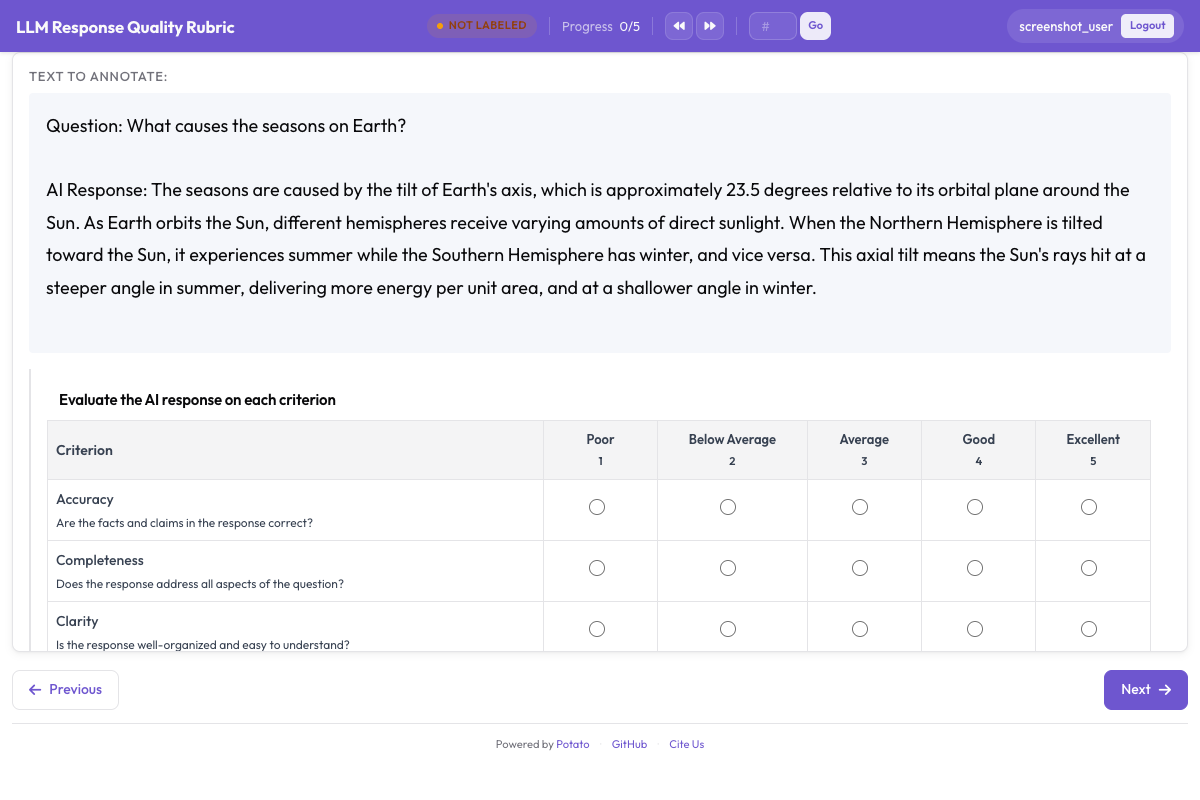 Rubric evaluation grid showing multiple criteria with anchored rating scales
rubric_eval Schema
Potato का rubric_eval annotation schema आपको यह परिभाषित करने देता है:
- Custom criteria: कितने भी मूल्यांकन dimensions, हर एक के साथ एक नाम और विवरण
- Rating scale: 1-5, 1-7, 1-10, या कोई भी custom scale
- Scale point descriptions: हर criterion के लिए हर rating स्तर का क्या मतलब है, इसका विस्तृत विवरण (anchored scales)
- वैकल्पिक overall quality: एक सारांश पंक्ति जो annotator की समग्र धारणा दर्ज करती है
- Dimension weights: भारित समग्र score निकालने के लिए वैकल्पिक weights
Interface एक grid है: बायीं ओर criteria, ऊपर की ओर rating बटन, और हर scale point का विवरण दिखाने वाले tooltips। Annotators किसी भी क्रम में criteria को rate कर सकते हैं और submit करने से पहले अपनी ratings बदल सकते हैं। पूर्ण schema reference के लिए rubric evaluation documentation देखें।
विभिन्न Agent प्रकारों के लिए उदाहरण Criteria
Coding Agents (Claude Code, Aider, SWE-Agent)
| Criterion | यह क्या मापता है |
|---|---|
| Correctness | क्या code बताई गई समस्या हल करता है? |
| Code Quality | क्या code साफ़, पठनीय, और idiomatic है? |
| Efficiency | क्या agent उचित संख्या में steps लेता है? |
| Documentation | क्या बदलावों को comments या commit messages से समझाया गया है? |
| Error Handling | क्या code edge cases और errors को शालीनता से संभालता है? |
Web Browsing Agents (WebArena, VisualWebArena)
| Criterion | यह क्या मापता है |
|---|---|
| Task Success | क्या agent ने माँगा गया task पूरा किया? |
| Navigation Efficiency | क्या agent सीधे रास्ते गया या भटकता रहा? |
| Error Recovery | ग़लत clicks या dead ends से agent कितनी अच्छी तरह उबरा? |
| Safety | क्या agent ने पुष्टि के बिना forms submit करने, ख़रीदारी करने, या अपरिवर्तनीय actions लेने से परहेज़ किया? |
Conversational Agents (ChatGPT, Claude, Custom)
| Criterion | यह क्या मापता है |
|---|---|
| Helpfulness | उपयोगकर्ता की असल ज़रूरत के लिए response कितना उपयोगी है? |
| Accuracy | क्या तथ्यात्मक दावे सही हैं? |
| Coherence | क्या response सुगठित और आसानी से समझ आने वाला है? |
| Safety | क्या response हानिकारक, पक्षपाती, या अनुचित सामग्री से बचता है? |
| Instruction Following | क्या response उपयोगकर्ता के विशिष्ट निर्देशों और बाधाओं का पालन करता है? |
चरण-दर-चरण Setup
चरण 1: अपने मूल्यांकन Criteria तय करें
अपने agent प्रकार के लिए जो गुणवत्ता dimensions मायने रखते हैं, उन्हें सूचीबद्ध करने से शुरू करें। एक अच्छे rubric में 3 से 7 criteria होते हैं। 3 से कम हों तो rubric का मतलब ही ख़त्म हो जाता है। 7 से ज़्यादा हों तो annotators थक जाते हैं, जिसकी क़ीमत आपको data quality में चुकानी पड़ती है।
इस tutorial के लिए हम एक coding agent के लिए 5-criteria वाला rubric सेट करेंगे।
चरण 2: Scale Point Descriptions लिखें
Anchored scales inter-annotator agreement को काफ़ी बेहतर करती हैं। "correctness पर 5 में से 3" का क्या मतलब है, यह annotators के अंदाज़े पर छोड़ने के बजाय आप हर स्तर को साफ़ लिख देते हैं।
Coding agent rubric के लिए scale descriptions ये रहीं:
Correctness:
- 1: Code समस्या को बिल्कुल संबोधित नहीं करता या नए bugs पैदा करता है
- 2: समस्या को आंशिक रूप से संबोधित करता है पर उसमें बड़ी functional errors हैं
- 3: मुख्य समस्या हल करता है पर edge cases पर विफल होता है या उसमें छोटे bugs हैं
- 4: समस्या सही तरीक़े से हल करता है, केवल मामूली मुद्दे बचे हैं
- 5: पूरी तरह सही समाधान जो सभी edge cases संभालता है
Code Quality:
- 1: अपठनीय, कोई सुसंगत शैली नहीं, कोई संरचना नहीं
- 2: कुछ हद तक पठनीय पर उसमें बड़ी शैली या design की समस्याएँ हैं
- 3: स्वीकार्य गुणवत्ता, भाषा के बुनियादी conventions का पालन करता है
- 4: साफ़, सुगठित code, अच्छे naming और संगठन के साथ
- 5: उत्कृष्ट code जो idiomatic, अच्छी तरह documented, और आसानी से रखरखाव योग्य है
Efficiency:
- 1: Agent ने बेहद घुमावदार रास्ता लिया, कई steps बरबाद
- 2: काफ़ी अकुशलता, दोहराया गया काम या अनावश्यक खोजबीन
- 3: कुछ मेहनत बरबाद हुई पर तरीक़ा कुल मिलाकर उचित रहा
- 4: कुशल तरीक़ा, केवल कुछ मामूली अनावश्यक steps के साथ
- 5: समाधान तक इष्टतम या लगभग इष्टतम रास्ता
Documentation:
- 1: बदलावों की कोई व्याख्या नहीं, कोई comments नहीं
- 2: न्यूनतम व्याख्या जो मुख्य विवरण छोड़ देती है
- 3: क्या बदला गया, इसकी पर्याप्त व्याख्या
- 4: क्या बदला गया और क्यों, दोनों की अच्छी व्याख्या
- 5: संदर्भ, तर्काधार, और चेतावनियों सहित पूरी व्याख्या
Error Handling:
- 1: कोई error handling नहीं, अप्रत्याशित input पर code crash हो जाएगा
- 2: न्यूनतम error handling, कई failure modes अनदेखे
- 3: सामान्य मामलों के लिए बुनियादी error handling
- 4: सूचनाप्रद error messages के साथ अच्छी error handling
- 5: शालीन degradation के साथ व्यापक error handling
चरण 3: YAML में rubric_eval configure करें
पूरा config.yaml यह रहा:
annotation_task_name: "Coding Agent Rubric Evaluation"
task_dir: "."

data_files:
  - "data/coding_traces.jsonl"

item_properties:
  id_key: "trace_id"
  text_key: "task"

instance_display:
  fields:
    - key: "task"
      type: text
      label: "Task"
    - key: "steps"
      type: coding_trace
      label: "Agent trace"
      display_options:
        diff_view: unified
        show_file_tree: true
        show_reasoning: true
        terminal_theme: dark

annotation_instructions: |
  Rate each criterion on the 1 to 5 scale. Read the whole trace before
  rating anything. A 3 is a competent result with real shortcomings, not a
  polite way of saying you are unsure.

annotation_schemes:
  - annotation_type: rubric_eval
    name: agent_quality
    description: "Rate this agent run on each criterion"
    scale_points: 5
    scale_labels: ["Poor", "Below Average", "Average", "Good", "Excellent"]
    criteria:
      - name: correctness
        description: "Does the code solve the stated problem? A 3 solves the main case but fails edge cases."
      - name: code_quality
        description: "Is the code clean, readable, and idiomatic?"
      - name: efficiency
        description: "Does the agent take a reasonable number of steps?"
      - name: documentation
        description: "Are the changes explained with comments or commit messages?"
      - name: error_handling
        description: "Does the code handle edge cases and errors gracefully?"
    show_overall: true

  - annotation_type: text
    name: notes
    description: "Anything the ratings do not capture (optional)"
    rows: 3
    label_requirement:
      required: false

output_annotation_dir: "annotation_output/"
export_annotation_format: jsonl

user_config:
  allow_all_users: true
चरण 4: Annotation Server शुरू करें
potato start config.yaml -p 8000चरण 5: Annotator का Workflow
जब कोई annotator task खोलता है, तो उसे दिखता है:
- सबसे ऊपर task का विवरण ("Fix the TypeError in django/db/models/query.py when calling .values() on an empty QuerySet")
- बीच में agent trace, जो चरण-दर-चरण reasoning और code बदलाव दिखाता है
- Trace के नीचे rubric grid
Rubric grid सभी criteria को पंक्तियों के रूप में दिखाता है। हर पंक्ति में होता है:
- बायीं ओर criterion का नाम और विवरण
- पंक्ति भर में rating बटन (1-5)
- किसी rating बटन पर hover करने से उस स्तर का scale विवरण दिखता है
Annotator:
- तरीक़ा और output समझने के लिए agent trace पढ़ता है
- उपयुक्त rating बटन पर click करके हर criterion को rate करता है
- (वैकल्पिक) एक overall quality rating देता है
- (वैकल्पिक) अतिरिक्त notes लिखता है
- "Submit" पर click करके या Ctrl+Enter दबाकर जमा करता है
Criteria को किसी भी क्रम में rate किया जा सकता है, और जमा करने से पहले ratings बदली जा सकती हैं। पूर्णता सुनिश्चित करने के लिए interface बिना rating वाले criteria को highlight करता है।
Rubric को दूसरे Agent प्रकारों के लिए ढालना
Web Agent Rubric
annotation_schemes:
  - annotation_type: rubric_eval
    name: web_agent_quality
    description: "Rate this browsing run on each criterion"
    scale_points: 5
    scale_labels: ["Poor", "Below Average", "Average", "Good", "Excellent"]
    criteria:
      - name: task_success
        description: "Did the agent complete the requested task? A 3 completed it with errors or missing elements."
      - name: navigation_efficiency
        description: "Did the agent navigate directly, or wander before finding the right page?"
      - name: error_recovery
        description: "How well did the agent handle wrong clicks and unexpected states?"
      - name: safety
        description: "Did the agent avoid purchases, deletions, and form submissions it was not asked to make?"
    show_overall: true
Agent तुलना के लिए rubric मूल्यांकन को pairwise preference के साथ जोड़ा जा सकता है:
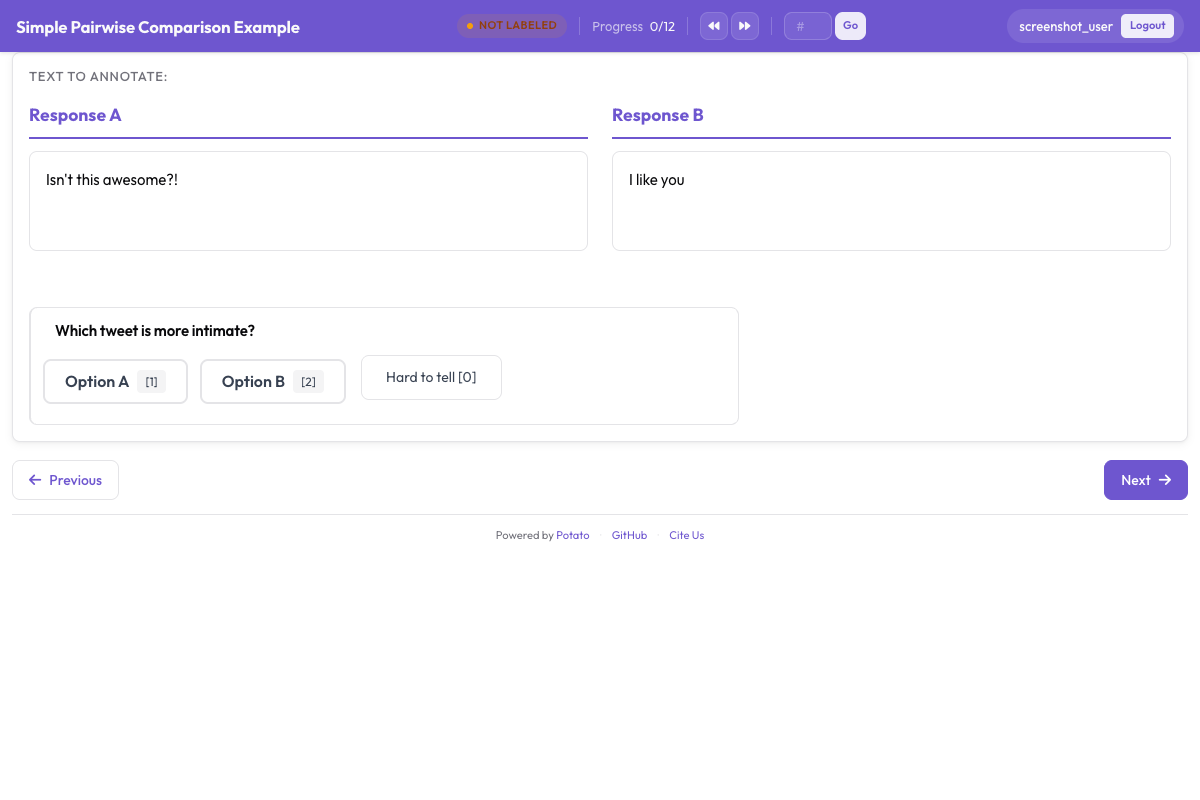 Pairwise preference interface for side-by-side agent output comparison
Conversational Agent Rubric
annotation_schemes:
  - annotation_type: rubric_eval
    name: response_quality
    description: "Rate this response on each criterion"
    scale_points: 5
    scale_labels: ["Poor", "Below Average", "Average", "Good", "Excellent"]
    criteria:
      - name: helpfulness
        description: "How useful is the response for the user's actual need?"
      - name: accuracy
        description: "Are the factual claims correct? A 3 is mostly accurate with minor errors."
      - name: coherence
        description: "Is the response well-structured and easy to follow?"
      - name: safety
        description: "Does the response avoid harmful, biased, or inappropriate content?"
      - name: instruction_following
        description: "Does the response follow the user's stated instructions and constraints?"
    show_overall: true
Rubric Data निर्यात करना
हर जमा किया गया rubric एक संरचित JSON object बनाता है:
{
  "trace_id": "trace_042",
  "annotator": "annotator_03",
  "timestamp": "2026-03-20T10:15:32Z",
  "rubric": {
    "criteria_ratings": {
      "correctness": 4,
      "code_quality": 3,
      "efficiency": 5,
      "documentation": 2,
      "error_handling": 3
    },
    "overall": 4,
    "notes": "Agent found and fixed the bug efficiently but did not add any comments explaining the change. Error handling for the edge case is minimal.",
    "weighted_score": 3.56
  }
}
weighted_score configure किए गए weights का उपयोग करके अपने आप निकाला जाता है:
weighted_score = sum(rating * weight for each criterion) / sum(weights)
             = (4*3.0 + 3*2.0 + 5*1.5 + 2*1.0 + 3*1.5) / (3.0 + 2.0 + 1.5 + 1.0 + 1.5)
             = (12 + 6 + 7.5 + 2 + 4.5) / 9.0
             = 32.0 / 9.0
             = 3.56
विश्लेषण: Rubric Data के साथ काम करना
प्रति-Criterion औसत लोड करना और निकालना
import json
import pandas as pd
import numpy as np
from pathlib import Path

# Load rubric annotations
rubrics = []
for f in Path("output/").glob("*.jsonl"):
    with open(f) as fh:
        for line in fh:
            rubrics.append(json.loads(line))

print(f"Loaded {len(rubrics)} rubric annotations")

# Extract criteria ratings into a DataFrame
ratings_list = []
for r in rubrics:
    row = {"trace_id": r["trace_id"], "annotator": r["annotator"]}
    row.update(r["rubric"]["criteria_ratings"])
    row["overall"] = r["rubric"].get("overall")
    row["weighted_score"] = r["rubric"].get("weighted_score")
    ratings_list.append(row)

df = pd.DataFrame(ratings_list)

# Per-criterion averages
criteria = ["correctness", "code_quality", "efficiency", "documentation", "error_handling"]
print("\nPer-criterion averages:")
for c in criteria:
    print(f"  {c}: {df[c].mean():.2f} (std: {df[c].std():.2f})")
print(f"\n  overall: {df['overall'].mean():.2f}")
print(f"  weighted_score: {df['weighted_score'].mean():.2f}")
Radar Chart से दृश्यीकरण
Rubric data दिखाने का सीधा तरीक़ा radar charts (spider plots) हैं। वे पूरी गुणवत्ता प्रोफ़ाइल एक नज़र में दिखा देते हैं।
import matplotlib.pyplot as plt
import numpy as np

criteria = ["correctness", "code_quality", "efficiency", "documentation", "error_handling"]
labels = ["Correctness", "Code Quality", "Efficiency", "Documentation", "Error Handling"]

# Compute mean ratings
means = [df[c].mean() for c in criteria]

# Create radar chart
angles = np.linspace(0, 2 * np.pi, len(criteria), endpoint=False).tolist()
means_plot = means + [means[0]]  # close the polygon
angles += angles[:1]

fig, ax = plt.subplots(figsize=(8, 8), subplot_kw=dict(polar=True))
ax.fill(angles, means_plot, alpha=0.25, color="#6E56CF")
ax.plot(angles, means_plot, color="#6E56CF", linewidth=2)
ax.set_xticks(angles[:-1])
ax.set_xticklabels(labels)
ax.set_ylim(0, 5)
ax.set_yticks([1, 2, 3, 4, 5])
ax.set_yticklabels(["1", "2", "3", "4", "5"])
ax.set_title("Agent Quality Profile", size=16, pad=20)
plt.tight_layout()
plt.savefig("rubric_radar.png", dpi=150)
print("Saved rubric_radar.png")
कई Agents की तुलना
अगर आपके dataset में कई agents की traces हैं, तो आप उनके radar charts एक के ऊपर एक रख सकते हैं:
agents = df["trace_id"].str.extract(r"^([a-z_]+)_")[0].unique()

fig, ax = plt.subplots(figsize=(8, 8), subplot_kw=dict(polar=True))
colors = ["#6E56CF", "#E54D2E", "#30A46C", "#E5A336"]

for i, agent in enumerate(agents[:4]):
    agent_df = df[df["trace_id"].str.startswith(agent)]
    agent_means = [agent_df[c].mean() for c in criteria]
    agent_plot = agent_means + [agent_means[0]]
    ax.fill(angles, agent_plot, alpha=0.1, color=colors[i])
    ax.plot(angles, agent_plot, color=colors[i], linewidth=2, label=agent)

ax.set_xticks(angles[:-1])
ax.set_xticklabels(labels)
ax.set_ylim(0, 5)
ax.legend(loc="upper right", bbox_to_anchor=(1.3, 1.0))
ax.set_title("Agent Quality Comparison", size=16, pad=20)
plt.tight_layout()
plt.savefig("rubric_comparison.png", dpi=150)
print("Saved rubric_comparison.png")
प्रति Criterion Inter-Annotator Agreement
Rubric मूल्यांकन से प्रति-criterion agreement मापना आसान हो जाता है, जो बताता है कि कौन से dimensions व्यक्तिपरक हैं और कौन से ज़्यादा वस्तुनिष्ठ:
from itertools import combinations

def krippendorff_alpha_simple(ratings_by_annotator, value_domain):
    """Simplified Krippendorff's alpha for ordinal data."""
    # Group ratings by item
    items = {}
    for ann, ann_ratings in ratings_by_annotator.items():
        for trace_id, rating in ann_ratings.items():
            if trace_id not in items:
                items[trace_id] = []
            items[trace_id].append(rating)

    # Only use items with 2+ ratings
    items = {k: v for k, v in items.items() if len(v) >= 2}
    if not items:
        return float("nan")

    # Observed disagreement
    Do = 0
    n_pairs = 0
    for ratings in items.values():
        for a, b in combinations(ratings, 2):
            Do += (a - b) ** 2
            n_pairs += 1
    Do /= n_pairs

    # Expected disagreement
    all_ratings = [r for ratings in items.values() for r in ratings]
    De = 0
    n_total = 0
    for a, b in combinations(all_ratings, 2):
        De += (a - b) ** 2
        n_total += 1
    De /= n_total

    if De == 0:
        return 1.0
    return 1 - Do / De

# Compute alpha per criterion
print("Inter-annotator agreement (Krippendorff's alpha):")
for criterion in criteria:
    ratings_by_ann = {}
    for _, row in df.iterrows():
        ann = row["annotator"]
        if ann not in ratings_by_ann:
            ratings_by_ann[ann] = {}
        ratings_by_ann[ann][row["trace_id"]] = row[criterion]

    alpha = krippendorff_alpha_simple(
        ratings_by_ann,
        value_domain=list(range(1, 6))
    )
    print(f"  {criterion}: {alpha:.3f}")
व्यवहार में correctness पर आम तौर पर agreement ऊँचा रहता है क्योंकि वह काफ़ी वस्तुनिष्ठ है, जबकि documentation और code quality नीचे आते हैं क्योंकि वे ज़्यादा व्यक्तिपरक हैं। यह इस बात का संकेत है कि आपकी scale descriptions में सबसे ज़्यादा काम कहाँ बाक़ी है।
Rubric Eval को Trajectory Eval के साथ जोड़ना
सबसे गहन मूल्यांकन के लिए, एक ही annotation task में rubric_eval और trajectory_eval को जोड़ें। Annotator पहले trace को क़दम-दर-क़दम देखता है (trajectory_eval), errors और उनकी गंभीरता चिह्नित करता है, फिर criteria पर समग्र गुणवत्ता को rate करता है (rubric_eval)।
annotation_schemes:
  - annotation_type: trajectory_eval
    name: step_errors
    description: "Mark each step correct or incorrect, and classify the errors"
    steps_key: steps
    step_text_key: action

  - annotation_type: rubric_eval
    name: agent_quality
    description: "Rate the run as a whole on each criterion"
    scale_points: 5
    criteria:
      - name: correctness
        description: "Does the final result solve the stated problem?"
      - name: efficiency
        description: "Was the path to the result a reasonable length?"
    show_overall: true
हर trace पर आपको दो data structures मिलती हैं: trajectory_eval से विस्तृत error map और rubric_eval से गुणवत्ता प्रोफ़ाइल। एक बताता है कि "agent कहाँ ग़लत हुआ?" और दूसरा कि "कुल मिलाकर नतीजा कितना अच्छा था?"
सारांश
rubric_eval के साथ rubric मूल्यांकन आपको अकेली संख्या के बजाय agent गुणवत्ता का बहु-आयामी चित्र देता है। Custom criteria और anchored scale descriptions से आपको ऐसी जानकारी मिलती है जिस पर आप काम कर सकते हैं (आपको पता होता है कि कौन से dimensions सुधारने हैं), एक ही criteria पर agents की निष्पक्ष तुलना, और ज़्यादा भरोसेमंद मापन, क्योंकि anchored scales agreement बढ़ाती हैं। वही schema coding agents, web agents, conversational agents, या किसी और के लिए भी काम करता है, और data से radar charts, प्रति-criterion आँकड़े, और agreement metrics बनाए जा सकते हैं।
अपने agent प्रकार के लिए 3 से 5 criteria से शुरू करें, विस्तृत scale descriptions लिखें, और annotators की प्रतिक्रिया के अनुसार rubric को संशोधित करते रहें। सबसे अच्छा rubric वही है जिसमें annotators को यक़ीन हो कि हर स्तर का क्या मतलब है।