कॉन्फ़िगरेशन मूल बातें
Potato कॉन्फ़िगरेशन फ़ाइलों की मूल बातें सीखें।
Potato एनोटेशन कार्यों को परिभाषित करने के लिए YAML कॉन्फ़िगरेशन फ़ाइलों का उपयोग करता है। यह गाइड आवश्यक कॉन्फ़िगरेशन विकल्पों को कवर करती है।
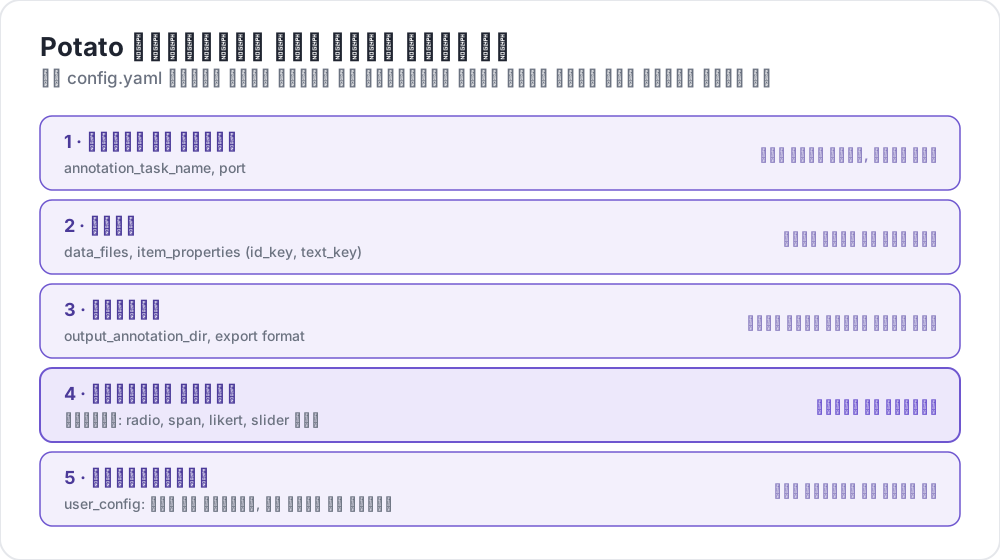 Potato कॉन्फ़िग में क्या होता है
कॉन्फ़िगरेशन फ़ाइल संरचना
एक बुनियादी Potato कॉन्फ़िगरेशन में ये मुख्य खंड होते हैं:
yaml
# Task settings
annotation_task_name: "My Annotation Task"
port: 8000

# Data configuration
data_files:
  - data.json

item_properties:
  id_key: id
  text_key: text

# Output settings
output_annotation_dir: "annotation_output/"
export_annotation_format: "jsonl"

# Annotation schemes
annotation_schemes:
  - annotation_type: radio
    name: my_annotation
    description: "Pick the label that fits this item"
    labels:
      - Label 1
      - Label 2

# User settings
user_config:
  allow_all_users: true
आवश्यक सेटिंग्स
कार्य और सर्वर कॉन्फ़िगरेशन
yaml
annotation_task_name: "My Task"  # Display name for your task
port: 8000                       # Port to run the server on
डेटा कॉन्फ़िगरेशन
yaml
data_files:
  - data.json           # Path to your data file(s)
  - more_data.json      # You can specify multiple files

item_properties:
  id_key: id            # Field containing unique ID
  text_key: text        # Field containing text to annotate
समर्थित डेटा प्रारूप:
- JSON (
.json) - JSON Lines (
.jsonl) - CSV (
.csv) - TSV (
.tsv)
आउटपुट कॉन्फ़िगरेशन
yaml
output_annotation_dir: "annotation_output/"   # Directory for annotation files
export_annotation_format: "jsonl"             # Formats: jsonl, csv, tsv, parquet, and the other registered exporters
एनोटेशन स्कीम
एक या अधिक एनोटेशन स्कीम परिभाषित करें:
yaml
annotation_schemes:
  - annotation_type: radio      # Type of annotation
    name: sentiment             # Internal name
    description: "Select the sentiment"  # Instructions
    labels:                     # Options for annotators
      - Positive
      - Negative
      - Neutral
उपलब्ध एनोटेशन प्रकार
| प्रकार | विवरण |
|---|---|
radio | एकल विकल्प चयन |
multiselect | बहु विकल्प चयन |
likert | एक स्केल पर रेटिंग |
text | मुक्त पाठ इनपुट |
number | संख्यात्मक इनपुट |
span | पाठ स्पैन हाइलाइटिंग |
slider | निरंतर रेंज चयन |
multirate | एकाधिक आइटम रेट करें |
उपयोगकर्ता कॉन्फ़िगरेशन
सभी उपयोगकर्ताओं को अनुमति दें
yaml
user_config:
  allow_all_users: true
विशिष्ट उपयोगकर्ताओं तक सीमित करें
yaml
user_config:
  allow_all_users: false
  users:
    - user1@example.com
    - user2@example.com
कार्य डायरेक्टरी
task_dir सेटिंग सापेक्ष पथों के लिए रूट डायरेक्टरी को परिभाषित करती है:
yaml
task_dir: ./my-task/
data_files:
  - data/input.json    # Resolves to ./my-task/data/input.json
पूर्ण उदाहरण
यहाँ एक सेंटिमेंट एनालिसिस कार्य के लिए पूर्ण कॉन्फ़िगरेशन है:
yaml
# config.yaml
annotation_task_name: "Sentiment Analysis"
port: 8000
task_dir: ./

# Data
data_files:
  - data/tweets.json

item_properties:
  id_key: id
  text_key: text

# Output
output_annotation_dir: "annotation_output/"
export_annotation_format: "jsonl"

# Annotation
annotation_schemes:
  - annotation_type: radio
    name: sentiment
    description: "What is the sentiment expressed in this tweet?"
    labels:
      - name: Positive
        key_value: "1"
      - name: Negative
        key_value: "2"
      - name: Neutral
        key_value: "3"
    sequential_key_binding: true

# Users
user_config:
  allow_all_users: true

# Assignment
per_annotator_quota:
  default: 100
num_annotators_per_item: 2
अगले कदम
- डेटा प्रारूपों को विस्तार से जानें
- एनोटेशन स्कीम के बारे में जानें
- UI कॉन्फ़िगरेशन के साथ इंटरफेस कस्टमाइज़ करें
- अपनी कॉन्फ़िगरेशन मान्य करने के लिए Preview CLI उपयोग करें