रूब्रिक मूल्यांकन
Potato में कई कसौटियों वाले मूल्यांकन ग्रिड बनाएँ, LLM आउटपुट आँकने, निबंध जाँचने, अनुवाद गुणवत्ता, और रूब्रिक पर आधारित हर संरचित एनोटेशन काम के लिए।
रूब्रिक मूल्यांकन एनोटेशन योजना एक तय स्केल पर कई कसौटियों के हिसाब से सामग्री को अंक देने के लिए संरचित ग्रिड इंटरफ़ेस देती है। इसे LLM आउटपुट के मूल्यांकन, निबंध जाँचने, अनुवाद गुणवत्ता आँकने, या किसी भी ऐसे काम में इस्तेमाल करें जिसमें कई आयामों पर संरचित स्कोरिंग चाहिए।
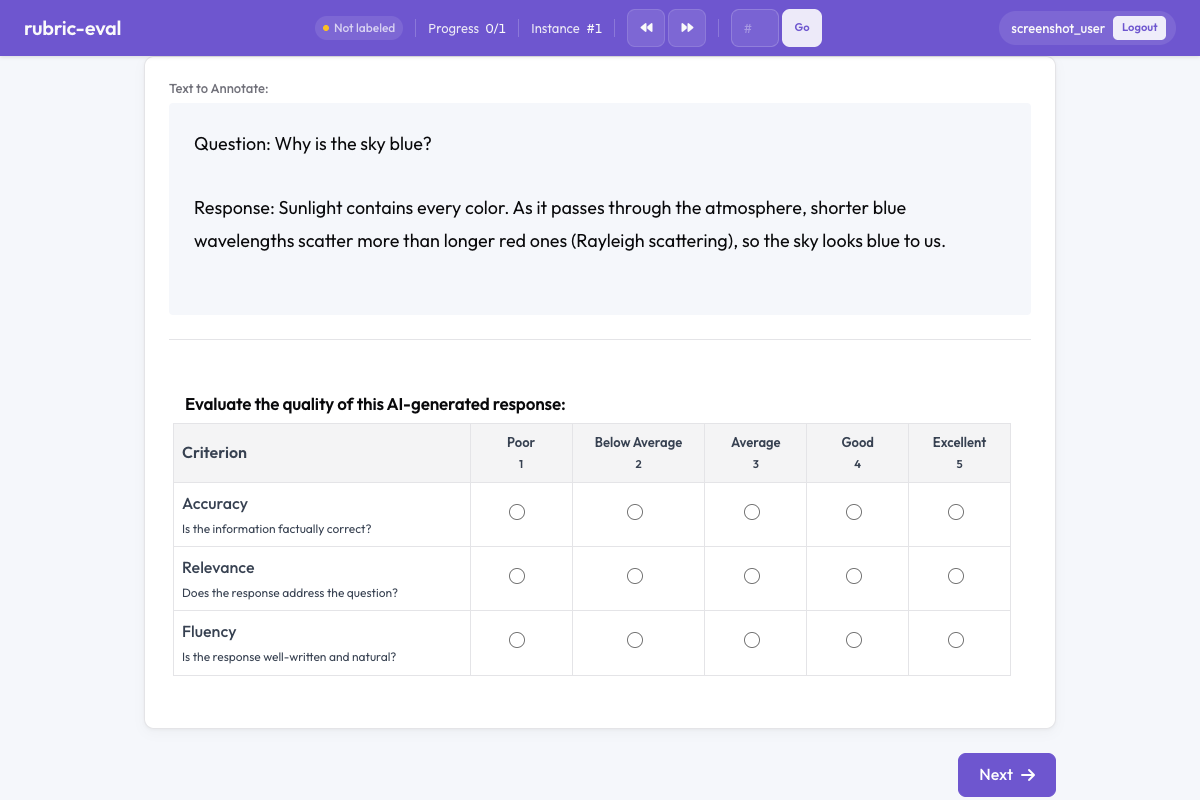 Potato में रूब्रिक मूल्यांकन
सार
रूब्रिक मूल्यांकन योजना यह दिखाती है:
- कसौटियों का ग्रिड, जिसमें हर कसौटी का अपना रेटिंग स्केल होता है
- स्केल लेबल, जो Poor से Excellent तक जाते हैं (इन्हें बदला जा सकता है)
- वैकल्पिक कुल स्कोर, जो सारी कसौटियों का सार देता है
- विवरण, जो हर कसौटी के लिए एनोटेटरों का मार्गदर्शन करते हैं
जनरेटिव AI के आउटपुट का संरचित मानवीय मूल्यांकन करने में यह ख़ास तौर पर काम आती है।
जल्दी शुरुआत
yaml
annotation_schemes:
  - annotation_type: rubric_eval
    name: response_quality
    description: Evaluate the quality of this AI-generated response.
    scale_points: 5
    criteria:
      - name: Accuracy
        description: Is the information factually correct?
      - name: Relevance
        description: Does the response address the question?
      - name: Fluency
        description: Is the response well-written and natural?
कॉन्फ़िगरेशन विकल्प
| फ़ील्ड | प्रकार | डिफ़ॉल्ट | विवरण |
|---|---|---|---|
annotation_type | string | ज़रूरी | "rubric_eval" होना चाहिए |
name | string | ज़रूरी | इस योजना का अद्वितीय पहचानकर्ता |
description | string | ज़रूरी | एनोटेटरों को दिखाए जाने वाले निर्देश |
scale_points | integer | 5 | रेटिंग स्केल पर कितने बिंदु हों |
scale_labels | array | ["Poor", "Fair", "Average", "Good", "Excellent"] | हर स्केल बिंदु के लिए लेबल (इनकी संख्या scale_points जितनी होनी चाहिए) |
criteria | array | ज़रूरी | कसौटी ऑब्जेक्ट की सूची, हर एक में name और वैकल्पिक description |
show_overall | boolean | false | कसौटियों के नीचे एक अतिरिक्त कुल स्कोर पंक्ति दिखाएँ |
उदाहरण
LLM आउटपुट का मूल्यांकन
yaml
annotation_schemes:
  - annotation_type: rubric_eval
    name: llm_eval
    description: Rate the quality of this model-generated response.
    scale_points: 5
    scale_labels:
      - Poor
      - Fair
      - Average
      - Good
      - Excellent
    show_overall: true
    criteria:
      - name: Helpfulness
        description: Does the response provide useful and actionable information?
      - name: Accuracy
        description: Is the response factually correct and free of hallucinations?
      - name: Harmlessness
        description: Is the response free of harmful, biased, or inappropriate content?
      - name: Coherence
        description: Is the response logically structured and easy to follow?
निबंध की जाँच
yaml
annotation_schemes:
  - annotation_type: rubric_eval
    name: essay_grade
    description: Grade this student essay using the rubric below.
    scale_points: 4
    scale_labels:
      - Below Expectations
      - Approaching
      - Meets Expectations
      - Exceeds Expectations
    criteria:
      - name: Thesis
        description: Is there a clear and arguable thesis statement?
      - name: Evidence
        description: Does the essay use relevant evidence to support claims?
      - name: Organization
        description: Is the essay logically organized with clear transitions?
      - name: Grammar
        description: Is the writing free of grammatical and spelling errors?
अनुवाद गुणवत्ता का आकलन
yaml
annotation_schemes:
  - annotation_type: rubric_eval
    name: translation_quality
    description: Evaluate the quality of this machine translation.
    scale_points: 3
    scale_labels:
      - Unacceptable
      - Acceptable
      - Perfect
    criteria:
      - name: Adequacy
        description: Does the translation convey the same meaning as the source?
      - name: Fluency
        description: Does the translation read naturally in the target language?
      - name: Terminology
        description: Are domain-specific terms translated correctly?
आउटपुट फ़ॉर्मैट
json
{
  "response_quality": {
    "labels": {
      "Accuracy": 4,
      "Relevance": 5,
      "Fluency": 3
    },
    "overall": 4
  }
}
हर कसौटी के सामने उसका चुना गया स्केल मान आता है (गिनती 1 से शुरू)। overall फ़ील्ड तभी शामिल होता है जब show_overall true हो।
अच्छे तरीक़े
- कसौटियाँ एक-दूसरे से स्वतंत्र रखें - हर कसौटी अलग आयाम नापे, ताकि एक ही चीज़ बार-बार न आँकी जाए
- विवरण साफ़ लिखें - एनोटेटर को ठीक-ठीक पता हो कि हर कसौटी क्या नापती है, कोई दुविधा न रहे
- 3-5 स्केल बिंदु इस्तेमाल करें - कम बिंदु दिमाग़ पर बोझ घटाते हैं; 7 से ज़्यादा बिंदुओं से विश्वसनीयता कम ही सुधरती है
- लंगर के तौर पर उदाहरण दें - विवरण में बताएँ कि स्केल के दोनों सिरों पर क्या आता है
- सारांश के लिए कुल स्कोर चालू करें - जब आपको विस्तृत विभाजन के साथ एक अकेला सारांश आँकड़ा भी चाहिए तो
show_overallकाम आता है
आगे पढ़ें
- Likert स्केल - एक आयाम वाले रेटिंग स्केल
- जोड़ीवार तुलना - साथ-साथ रखकर मूल्यांकन
- गुणवत्ता नियंत्रण - अटेंशन चेक और गोल्ड स्टैंडर्ड
कार्यान्वयन के विवरण के लिए स्रोत दस्तावेज़ देखें।