एनोटेशन स्कीम
YAML में radio, multiselect, span, likert, slider, text और 55 अन्य प्रकारों के साथ एनोटेशन स्कीम परिभाषित करें। लेबल, प्रश्न और आवश्यक फ़ील्ड कॉन्फ़िगर करें।
एनोटेशन स्कीम आपके एनोटेटरों के लिए लेबलिंग कार्य परिभाषित करती हैं। Potato 76 एनोटेशन प्रकारों का समर्थन करता है, जिन्हें जोड़कर जटिल एनोटेशन कार्य बनाए जा सकते हैं।
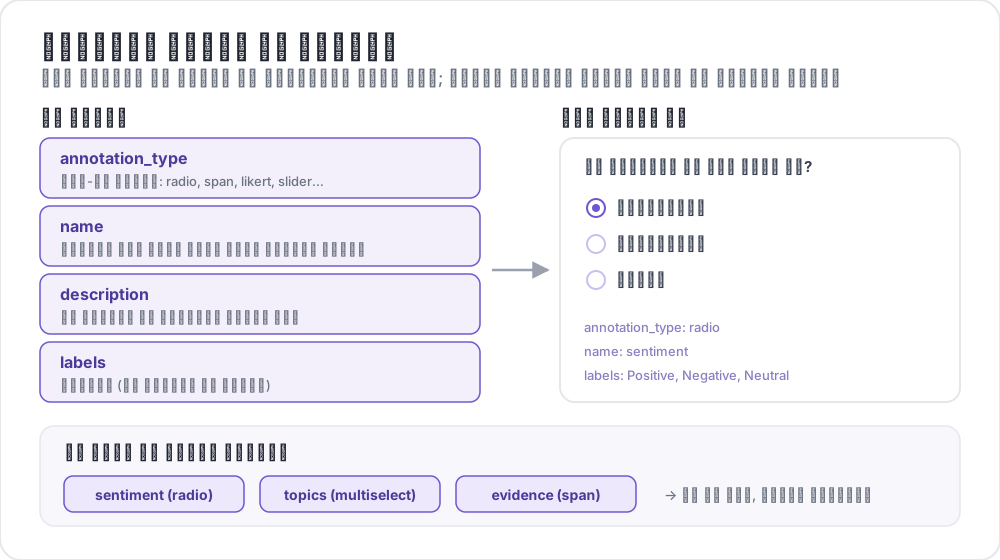 एनोटेशन स्कीम की संरचना
बुनियादी संरचना
प्रत्येक स्कीम annotation_schemes सरणी में परिभाषित की जाती है:
annotation_schemes:
  - annotation_type: radio
    name: sentiment
    description: "What is the sentiment?"
    labels:
      - Positive
      - Negative
      - Neutral
आवश्यक फ़ील्ड
हर स्कीम में ये तीन फ़ील्ड होते हैं। अलग-अलग प्रकार इनके ऊपर अपने आवश्यक फ़ील्ड जोड़ते हैं, जो नीचे हर प्रकार के साथ दिए गए हैं।
| फ़ील्ड | विवरण |
|---|---|
annotation_type | एनोटेशन का प्रकार (radio, multiselect, likert, span, text, number, slider, multirate, select, pairwise, bws, soft_label, confidence, constant_sum, range_slider, semantic_differential, hierarchical_multiselect, card_sort, rubric_eval, extractive_qa, error_span, triage, coreference, span_link, और अन्य) |
name | आंतरिक पहचानकर्ता (कोई स्पेस नहीं, आउटपुट में उपयोग होता है) |
description | एनोटेटरों को दिखाए जाने वाले निर्देश |
समर्थित एनोटेशन प्रकार
1. Radio (एकल विकल्प)
सूची से ठीक एक विकल्प चुनें:
- annotation_type: radio
  name: sentiment
  description: "What is the sentiment of this text?"
  labels:
    - Positive
    - Negative
    - Neutral

  # Assigns keys 1, 2, 3... in the order the labels are listed
  sequential_key_binding: true

  # Horizontal layout instead of vertical
  horizontal: true
क्रमिक बाइंडिंग अंक 1-9 को पहले नौ लेबलों से जोड़ती है, इसलिए लेबल सूची का क्रम बदलने पर कुंजियाँ भी बदल जाती हैं। ऐसी बाइंडिंग के लिए जो क्रम बदलने पर भी बनी रहे, हर लेबल को उसकी अपनी कुंजी दें (कीबोर्ड शॉर्टकट देखें)।
2. Likert स्केल
लेबल किए गए छोरों वाले रेटिंग स्केल:
- annotation_type: likert
  name: agreement
  description: "How much do you agree with this statement?"
  size: 5  # Number of scale points
  min_label: "Strongly Disagree"
  max_label: "Strongly Agree"

  # Show the numeric value of the selected point
  displaying_score: true
size और दोनों छोरों के लेबल आवश्यक हैं। पाँच बिंदु एनोटेटरों को एक तटस्थ मध्य बिंदु देते हैं, जबकि सम संख्या वाला आकार उन्हें किसी एक दिशा में जाने के लिए बाध्य करता है।
3. Multiselect (बहु विकल्प)
सूची से एकाधिक विकल्प चुनें:
- annotation_type: multiselect
  name: topics
  description: "Select all relevant topics"
  labels:
    - Politics
    - Technology
    - Sports
    - Entertainment
    - Science

  # Require at least one box before the annotator can move on
  label_requirement:
    required: true

  # Allow free text response
  has_free_response: true
has_free_response एक "other" टेक्स्ट बॉक्स जोड़ता है। जब तक लेबल सेट में संशोधन चल रहा हो, इसे चालू रखना उपयोगी है, क्योंकि इसमें आने वाली प्रविष्टियाँ उन श्रेणियों के नाम बताती हैं जो आपके सेट में नहीं हैं।
4. स्पैन एनोटेशन
पाठ खंडों को हाइलाइट और लेबल करें:
- annotation_type: span
  name: entities
  description: "Highlight named entities in the text"
  labels:
    - PERSON
    - ORGANIZATION
    - LOCATION
    - DATE

  # Show the label name on each highlighted span
  show_span_labels: true

  # Ctrl/Cmd+click to add non-contiguous ranges to one annotation
  allow_discontinuous: false

  # Keyboard shortcuts for labels
  sequential_key_binding: true
allow_discontinuous उन स्पैन के लिए है जो अलग-अलग हिस्सों से बने होते हैं, जैसे विभाजित पूर्ववर्ती (split antecedents)। यह एक-दूसरे पर चढ़ने वाले स्पैन के लिए नहीं है। इसे तब तक बंद रखें जब तक आप जिस घटना को लेबल कर रहे हैं वह सचमुच बीच में अंतराल के साथ टूटती न हो, क्योंकि Ctrl/Cmd-क्लिक का इशारा गलती से आसानी से हो जाता है।
5. Slider
निरंतर संख्यात्मक रेंज:
- annotation_type: slider
  name: confidence
  description: "How confident are you in your answer? (0 = not at all, 100 = completely)"
  min_value: 0
  max_value: 100
  starting_value: 50
  step: 1

  # Shows min_value and max_value at the ends of the track
show_labels: truemin_value, max_value और starting_value तीनों आवश्यक हैं। slider कोई labels सूची नहीं लेता। सूची जोड़ने पर प्रश्न radio लेआउट में बदल जाता है और slider गायब हो जाता है, इसलिए स्केल के छोरों के लिए कोई भी शब्द description में लिखें। प्रारंभिक मान वह जगह है जहाँ हर एनोटेटर का हैंडल उसके छूने से पहले रहता है, इसलिए मध्य बिंदु उन्हें किसी भी छोर की ओर झुकने (anchoring) से बचाता है।
6. पाठ इनपुट
मुक्त-रूप पाठ उत्तर:
- annotation_type: text
  name: explanation
  description: "Explain your reasoning"

  # Multi-line input
  rows: 4

  # Require a minimum length and show a running count
  min_chars: 20
  show_char_count: true

  # Placeholder text
  placeholder: "Enter your explanation here..."

  # Disable paste (for transcription tasks)
  allow_paste: false
allow_paste: false प्रतिलेखन और मुक्त-स्मरण कार्यों में मायने रखता है, जहाँ चिपकाया गया उत्तर एनोटेटर का अपना बनाया हुआ नहीं होता, बल्कि स्रोत से कॉपी किया गया होता है।
7. संख्या इनपुट
सीमाओं के साथ संख्यात्मक इनपुट:
- annotation_type: number
  name: count
  description: "How many entities are mentioned?"
  min: 0
  max: 100
  step: 1
8. Multirate (मैट्रिक्स रेटिंग)
एक ही स्केल पर एकाधिक आइटम रेट करें:
- annotation_type: multirate
  name: quality_aspects
  description: "Rate each aspect of the response"

  # Rows: the items being rated
  options:
    - Accuracy
    - Fluency
    - Relevance

  # Columns: the shared rating scale
  labels:
    - Poor
    - Fair
    - Good
    - Very Good
    - Excellent

  # Randomize row order per annotator
  option_randomization: true

  # Layout options
  arrangement: "vertical"
  display_config:
    num_columns: 2
options और labels दोनों आवश्यक हैं, क्योंकि मैट्रिक्स को पंक्तियाँ और स्तंभ दोनों चाहिए। पंक्तियों का क्रम यादृच्छिक करने से क्रम का प्रभाव सभी आइटमों में बँट जाता है, न कि उस पहलू पर केंद्रित होता है जो संयोग से सूची में सबसे पहले है।
सामान्य विकल्प
कीबोर्ड शॉर्टकट
कीबोर्ड बाइंडिंग के साथ एनोटेशन तेज़ करें:
# Automatic sequential binding: digits 1, 2, 3... in label order
sequential_key_binding: true
ऐसी बाइंडिंग के लिए जो लेबल सूची बदलने पर न खिसके, लेबल ऑब्जेक्ट दें और हर एक को एक key_value दें:
labels:
  - name: Positive
    key_value: "1"
  - name: Negative
    key_value: "2"
  - name: Neutral
    key_value: "3"
टूलटिप
अलग-अलग लेबलों पर होवर संकेत दें। टूलटिप स्कीम से नहीं, लेबल से जुड़ते हैं, इसलिए उन्हें labels के अंदर कॉन्फ़िगर किया जाता है:
labels:
  - name: Positive
    tooltip: "Expresses happiness, approval, or satisfaction"
  - name: Negative
    tooltip: "Expresses sadness, anger, or disappointment"
  - name: Neutral
    tooltip: "No clear emotional content"
फ़ॉर्मेट किए गए मार्गदर्शन के लिए, इसके बजाय tooltip_file को किसी HTML फ़ाइल की ओर इंगित करें:
labels:
  - name: Economic
    tooltip_file: "config/tooltips/economic.html"
लेबल रंग
दृश्य अंतर के लिए कस्टम रंग, जो पूरे प्रोजेक्ट के लिए एक बार ui के अंतर्गत परिभाषित किए जाते हैं:
ui:
  label_colors:
    entities:
      PERSON: "#3b82f6"
      LOCATION: "#10b981"
      ORGANIZATION: "#f59e0b"
रंग पहले स्कीम के नाम से, फिर लेबल से कुंजीबद्ध होते हैं। किसी एक लेबल पर उसके टूलटिप के साथ भी रंग सेट किया जा सकता है:
labels:
  - name: positive
    color: "#22C55E"
    tooltip: "Positive sentiment"
आवश्यक फ़ील्ड
सबमिशन से पहले किसी स्कीम को आवश्यक बनाएँ:
- annotation_type: radio
  name: sentiment
  description: "What is the sentiment?"
  label_requirement:
    required: true
  labels:
    - Positive
    - Negative
कोई भी उत्तर नहीं, बल्कि एक विशेष विकल्प आवश्यक करने के लिए, उसे required_label से नामित करें, जो एक लेबल या लेबलों की सूची स्वीकार करता है।
एकाधिक स्कीम
प्रति इंस्टेंस एकाधिक एनोटेशन प्रकार जोड़ें:
annotation_schemes:
  # Primary classification
  - annotation_type: radio
    name: sentiment
    description: "Overall sentiment"
    labels:
      - Positive
      - Negative
      - Neutral
    label_requirement:
      required: true
    sequential_key_binding: true

  # Confidence rating
  - annotation_type: likert
    name: confidence
    description: "How confident are you?"
    size: 5
    min_label: "Guessing"
    max_label: "Certain"

  # Topic tags
  - annotation_type: multiselect
    name: topics
    description: "Select all relevant topics"
    labels:
      - Politics
      - Technology
      - Sports
      - Entertainment
    has_free_response: true

  # Notes
  - annotation_type: text
    name: notes
    description: "Any additional observations"
    rows: 4
    label_requirement:
      required: false
यहाँ केवल sentiment लेबल आवश्यक है। confidence रेटिंग और notes को वैकल्पिक रखने से आवश्यक सेट उसी एक फ़ील्ड तक सीमित रहता है जिस पर अध्ययन निर्भर है, ताकि एनोटेटर किसी ऐसे बॉक्स के कारण न अटकें जिसका विश्लेषण में कोई महत्व नहीं है।
उन्नत सुविधाएँ
Pairwise Comparison
दो आइटमों की तुलना करें। आइटम स्वयं इंस्टेंस से आते हैं, जिन्हें items_key नामित करता है:
- annotation_type: pairwise
  name: preference
  description: "Which response is better?"
  mode: binary
  items_key: "responses"   # Field holding a list of 2+ items

  # Labels for the two sides
  show_labels: true
  labels:
    - "Response A"
    - "Response B"

  # Tie option (opt-in)
  allow_tie: true
  tie_label: "No preference"
डेटा फ़ाइल जोड़ी प्रदान करती है, इसलिए हर पंक्ति में कम से कम दो आइटमों की सूची होती है:
{"id": "1", "responses": ["First response text", "Second response text"]}जब सचमुच बराबर जोड़ियाँ आम हों, तो बराबरी (tie) का बटन जोड़ना उपयोगी है, क्योंकि उसके बिना एनोटेटर बराबरी को मनमाने ढंग से तोड़ते हैं और यह शोर असहमति के रूप में दिखता है।
Best-Worst Scaling
किसी टपल में से सर्वोत्तम और सबसे खराब चुनकर आइटमों को रैंक करें। टपल स्कीम से नहीं, बल्कि शीर्ष-स्तरीय bws_config ब्लॉक से बनते हैं, और इसके बिना bws स्कीम एक खाली आइटम सूची पर प्रश्न दिखाती है:
bws_config:
  tuple_size: 4              # Items per tuple
  min_item_appearances: 8    # Minimum appearances per item across tuples
  seed: 42
  scoring:
    method: counting         # counting | bradley_terry | plackett_luce

annotation_schemes:
  - annotation_type: bws
    name: ranking
    description: "Sentiment Intensity"
    best_description: "Which sentence expresses the MOST positive sentiment?"
    worst_description: "Which sentence expresses the LEAST positive sentiment?"
    tuple_size: 4
    sequential_key_binding: true
डेटा फ़ाइल की हर पंक्ति एक आइटम है, और Potato इस पूल से टपल का नमूना लेता है। min_item_appearances बढ़ाने से हर आइटम का स्कोर अधिक सटीक होता है, पर इसके लिए अधिक तुलनाएँ करनी पड़ती हैं।
Dropdown Select
कम जगह लेने वाला एकल चयन:
- annotation_type: select
  name: category
  description: "Select a category"
  labels:
    - Category A
    - Category B
    - Category C
    - Category D
    - Category E

  # Vary the option order between annotators
  randomize_order: true
dropdown खोले जाने तक विकल्प छिपाए रखता है, इसलिए यह लंबे लेबल सेटों के लिए उपयुक्त है, जहाँ radio बटन पाठ को स्क्रीन से बाहर धकेल देंगे। छोटे सेटों के लिए radio बटन तेज़ हैं, क्योंकि उनमें दो के बजाय एक क्लिक लगता है।
डेटा प्रारूप संदर्भ
इनपुट
एनोटेशन स्कीम आपके डेटा प्रारूप के साथ काम करती हैं:
{
  "id": "doc_1",
  "text": "This is the text to annotate."
}
आउटपुट
एनोटेशन स्कीम नामों को कुंजी के रूप में रखकर सहेजे जाते हैं:
{
  "id": "doc_1",
  "annotations": {
    "sentiment": "Positive",
    "confidence": 4,
    "topics": ["Technology", "Science"],
    "entities": [
      {"start": 0, "end": 4, "label": "ORGANIZATION", "text": "This"}
    ],
    "notes": "Clear positive sentiment about technology."
  }
}
सर्वोत्तम अभ्यास
1. स्पष्ट लेबल
स्पष्ट और एक-दूसरे से अलग लेबल उपयोग करें:
ये लेबल एक ही आयाम पर अलग-अलग बिंदुओं को नाम देते हैं:
labels:
  - Strongly Positive
  - Somewhat Positive
  - Neutral
  - Somewhat Negative
  - Strongly Negative
ये लेबल ऐसा नहीं करते। दो एनोटेटर "OK", "Fine" और "Acceptable" के बीच एक ही रेखा नहीं खींचेंगे, और उसके बाद होने वाली असहमति डेटा के बारे में नहीं, लेबल सेट के बारे में होती है:
labels:
  - Good
  - OK
  - Fine
  - Acceptable
2. सहायक टूलटिप
सूक्ष्म लेबलों के लिए टूलटिप जोड़ें:
labels:
  - name: Sarcasm
    tooltip: "The text says the opposite of what it means"
  - name: Irony
    tooltip: "A mismatch between expectation and reality"
3. कीबोर्ड शॉर्टकट
अधिक मात्रा वाले कार्यों के लिए शॉर्टकट सक्षम करें:
sequential_key_binding: true4. तार्किक क्रम
लेबलों को एक सुसंगत क्रम में रखें:
- सबसे सामान्य पहले
- वर्णानुक्रम में
- तीव्रता के अनुसार (कम से अधिक)
5. विकल्प सीमित करें
बहुत अधिक विकल्प एनोटेशन को धीमा करते हैं:
- Radio: 2-7 विकल्प
- Multiselect: 5-15 विकल्प
- Likert: 5-7 बिंदु
6. पहले परीक्षण करें
तैनाती से पहले स्वयं कई उदाहरण एनोटेट करें, ताकि ये समस्याएँ पकड़ी जा सकें:
- अस्पष्ट लेबल
- छूटी हुई श्रेणियाँ
- अस्पष्ट निर्देश